Open-source RightAI Tools Directory
  • Discover AI
  • Submit
  • Startup
  • Blog
Open-source RightAI Tools Directory
Discover the best AI tools of 2025 with the RightAI Tools Directory!

Friend Links

AI Anime GeneratorToolsApp AI

Support

Tap4
Privacy policyTerms & ConditionsContact Us
Loading...
loading...

Homie.AI on the App Store

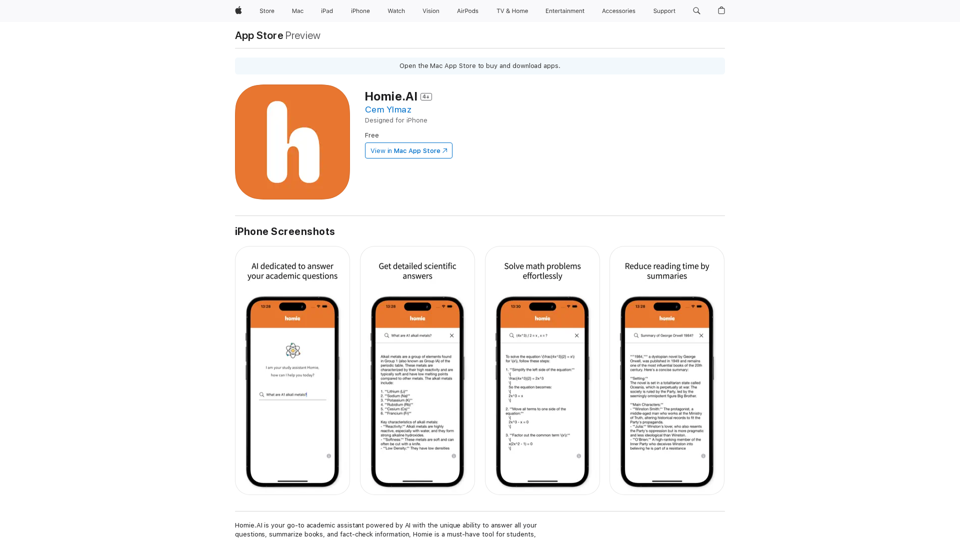
Homie.AI is your go-to academic assistant powered by AI with the unique ability to answer all your questions, summarize books, and fact-check information, Homie is always here to help you with your academic needs.
Visit Website
Homie.AI on the App Store
Visit Website

Introduction

Homie.AI is an AI-powered academic assistant designed for students, scholars, and intellectuals. It offers instant answers to questions, book summaries, and fact-checking capabilities. With its user-friendly interface and comprehensive features, Homie.AI aims to streamline academic research and learning processes.

Feature

Instant Answers with Scientific Explanations

Homie.AI provides detailed scientific explanations for a wide range of academic questions, ensuring users receive accurate and comprehensive information.

Book Summarization

The app offers book summaries, helping users reduce reading time while still grasping key concepts and information from various texts.

Fact-Checking Capability

Homie.AI includes a fact-checking feature to verify information, promoting accuracy in research and learning.

Math Problem Solver

Users can easily solve math problems using Homie.AI, making it a versatile tool for various academic disciplines.

User-Friendly Interface

The app boasts a simple and intuitive interface, allowing users to access its features effortlessly and enhance their learning experience.

iPhone Compatibility

Homie.AI is designed specifically for iPhone users and can be downloaded from the App Store.

Free Access

The app is available for free download, making it accessible to a wide range of users.

FAQ

What is Homie.AI?

Homie.AI is an AI-powered academic assistant that provides instant answers to questions, summarizes books, and fact-checks information. It's designed to support students, scholars, and intellectuals in their academic pursuits.

What are the main features of Homie.AI?

The main features of Homie.AI include:

  1. Providing comprehensive answers to academic questions
  2. Summarizing books to reduce reading time
  3. Fact-checking information for accuracy
  4. Solving math problems
  5. User-friendly interface for easy navigation

How does Homie.AI benefit users?

Homie.AI offers several benefits:

  • Instant access to accurate information
  • Time-saving book summaries
  • Reliable fact-checking capabilities
  • Simplified math problem-solving
  • Enhanced efficiency in academic research and learning

How can I access Homie.AI?

Homie.AI is designed for iPhone users and can be downloaded for free from the App Store. Its simple and intuitive interface allows users to easily access its features and start using it immediately.

Related Websites
super memory
View Detail

super memory

super memory

An extension for https://supermemory.ai - an AI hub for all your bookmarks.

193.90 M
Chrome Web Store
View Detail

Chrome Web Store

Chrome Web Store

Enhance your browser with new features and tailor your browsing experience to your preferences.

193.90 M
Get ChatGPT for Free with Google

You can now access ChatGPT, a powerful language model, for free with Google. Here's how:

Method 1: Google Colab

* Open Google Colab ([colab.research.google.com](http://colab.research.google.com))
* Create a new notebook
* Install the `transformers` library by running `!pip install transformers`
* Import the `transformers` library and load the ChatGPT model using `from transformers import AutoModelForCausalLM, AutoTokenizer; model = AutoModelForCausalLM.from_pretrained('chatgpt'); tokenizer = AutoTokenizer.from_pretrained('chatgpt')`
* Use the model to generate text using `input_text = "Your input here"; inputs = tokenizer.encode_plus(input_text, return_tensors='pt', max_length=1024, padding='max_length', truncation=True); output = model(inputs['input_ids'], attention_mask=inputs['attention_mask']); print(tokenizer.decode(output.logits[0], skip_special_tokens=True))`

Method 2: Google Apps Script

* Open Google Apps Script ([script.google.com](http://script.google.com))
* Create a new project
* Install the `transformers` library by running `npm install transformers`
* Import the `transformers` library and load the ChatGPT model using `const { AutoModelForCausalLM, AutoTokenizer } = require('transformers'); const model = new AutoModelForCausalLM('chatgpt'); const tokenizer = new AutoTokenizer('chatgpt');`
* Use the model to generate text using `const inputText = "Your input here"; const inputs = tokenizer.encodePlus(inputText, { return_tensors: 'pt', max_length: 1024, padding: 'max_length', truncation: true }); const output = model(inputs.inputIds, inputs.attentionMask); console.log(tokenizer.decode(output.logits[0], { skipSpecialTokens: true }));`

Note: These methods require some technical knowledge and may have limitations compared to the original ChatGPT model.
View Detail

Get ChatGPT for Free with Google You can now access ChatGPT, a powerful language model, for free with Google. Here's how: Method 1: Google Colab * Open Google Colab ([colab.research.google.com](http://colab.research.google.com)) * Create a new notebook * Install the `transformers` library by running `!pip install transformers` * Import the `transformers` library and load the ChatGPT model using `from transformers import AutoModelForCausalLM, AutoTokenizer; model = AutoModelForCausalLM.from_pretrained('chatgpt'); tokenizer = AutoTokenizer.from_pretrained('chatgpt')` * Use the model to generate text using `input_text = "Your input here"; inputs = tokenizer.encode_plus(input_text, return_tensors='pt', max_length=1024, padding='max_length', truncation=True); output = model(inputs['input_ids'], attention_mask=inputs['attention_mask']); print(tokenizer.decode(output.logits[0], skip_special_tokens=True))` Method 2: Google Apps Script * Open Google Apps Script ([script.google.com](http://script.google.com)) * Create a new project * Install the `transformers` library by running `npm install transformers` * Import the `transformers` library and load the ChatGPT model using `const { AutoModelForCausalLM, AutoTokenizer } = require('transformers'); const model = new AutoModelForCausalLM('chatgpt'); const tokenizer = new AutoTokenizer('chatgpt');` * Use the model to generate text using `const inputText = "Your input here"; const inputs = tokenizer.encodePlus(inputText, { return_tensors: 'pt', max_length: 1024, padding: 'max_length', truncation: true }); const output = model(inputs.inputIds, inputs.attentionMask); console.log(tokenizer.decode(output.logits[0], { skipSpecialTokens: true }));` Note: These methods require some technical knowledge and may have limitations compared to the original ChatGPT model.

Get ChatGPT for Free with Google You can now access ChatGPT, a powerful language model, for free with Google. Here's how: Method 1: Google Colab * Open Google Colab ([colab.research.google.com](http://colab.research.google.com)) * Create a new notebook * Install the `transformers` library by running `!pip install transformers` * Import the `transformers` library and load the ChatGPT model using `from transformers import AutoModelForCausalLM, AutoTokenizer; model = AutoModelForCausalLM.from_pretrained('chatgpt'); tokenizer = AutoTokenizer.from_pretrained('chatgpt')` * Use the model to generate text using `input_text = "Your input here"; inputs = tokenizer.encode_plus(input_text, return_tensors='pt', max_length=1024, padding='max_length', truncation=True); output = model(inputs['input_ids'], attention_mask=inputs['attention_mask']); print(tokenizer.decode(output.logits[0], skip_special_tokens=True))` Method 2: Google Apps Script * Open Google Apps Script ([script.google.com](http://script.google.com)) * Create a new project * Install the `transformers` library by running `npm install transformers` * Import the `transformers` library and load the ChatGPT model using `const { AutoModelForCausalLM, AutoTokenizer } = require('transformers'); const model = new AutoModelForCausalLM('chatgpt'); const tokenizer = new AutoTokenizer('chatgpt');` * Use the model to generate text using `const inputText = "Your input here"; const inputs = tokenizer.encodePlus(inputText, { return_tensors: 'pt', max_length: 1024, padding: 'max_length', truncation: true }); const output = model(inputs.inputIds, inputs.attentionMask); console.log(tokenizer.decode(output.logits[0], { skipSpecialTokens: true }));` Note: These methods require some technical knowledge and may have limitations compared to the original ChatGPT model.

How to Add ChatGPT to All Google Searches ===================================================== Step 1: Create a Custom Search Engine -------------------------------------- * Go to the [Google Custom Search Engine](https://cse.google.com/) website and sign in with your Google account. * Click on the "New Search Engine" button. * Fill in the required information, such as the name and description of your search engine. * Click on the "Create" button. Step 2: Add ChatGPT to the Search Engine ----------------------------------------- * In the "Setup" tab, click on the "Add" button next to "Sites to search". * Enter the following URL: `https://chat.openai.com/` * Click on the "Add" button. Step 3: Configure the Search Engine -------------------------------------- * In the "Setup" tab, click on the "Edit" button next to "Search engine keywords". * Add the following keywords: `ChatGPT` * Click on the "Save" button. Step 4: Get the Search Engine Code ------------------------------------- * In the "Setup" tab, click on the "Get code" button. * Copy the HTML code provided. Step 5: Add the Search Engine to Your Browser ------------------------------------------------ * Open your browser and go to the "Settings" or "Options" page. * Look for the "Search engine" or "Default search engine" option. * Click on the "Add" or "Manage search engines" button. * Paste the HTML code you copied earlier. * Click on the "Add" or "Save" button. You're Done! =============== Now, whenever you search on Google, ChatGPT will be included in the search results. You can also use the custom search engine URL provided by Google to search directly.

193.90 M
Twillot - X/Twitter Copilot
View Detail

Twillot - X/Twitter Copilot

Twillot - X/Twitter Copilot

Organize your Twitter bookmarks and make your Twitter experience smoother.

193.90 M
SinteseAI
View Detail

SinteseAI

SinteseAI

Turn educational videos into concise and easy-to-digest summaries with SinteseAI. This extension uses Artificial Intelligence...

193.90 M
Tendi | Your Personal AI Financial Advisor
View Detail

Tendi | Your Personal AI Financial Advisor

Tendi | Your Personal AI Financial Advisor

Tendi is a personal AI financial advisor that helps you set financial goals, plan, budget, and achieve them.

22.20 K
Explore GPT-4 for Free Online: OpenAI's Cutting-Edge Multimodal AI Platform
View Detail

Explore GPT-4 for Free Online: OpenAI's Cutting-Edge Multimodal AI Platform

Explore GPT-4 for Free Online: OpenAI's Cutting-Edge Multimodal AI Platform

Explore the future of AI with GPT-4o, OpenAI's groundbreaking multimodal platform that interprets and generates text, visuals, and audio. Experience unparalleled speed, cost efficiency, and accessibility in AI technology. Dive into GPT-4o's capabilities and learn how it can revolutionize your interaction with AI. Perfect for tech enthusiasts, developers, and businesses aiming to enhance operational efficiency and engagement.

1.33 K
Freebeat AI Workout App, AI Coach & Planner | Fitness AI
View Detail

Freebeat AI Workout App, AI Coach & Planner | Fitness AI

Freebeat AI Workout App, AI Coach & Planner | Fitness AI

Enhance your workout and sports routine with the best artificial intelligence workout app that syncs your workouts to music, offers real-time AI coaching. Receive advanced AI coaching and tracking from an AI workout planner. Explore fitness AI with the freebeat AI workout app!

273.37 K