Open-source RightAI Tools Directory
  • Discover AI
  • Submit
  • Startup
  • Blog
Open-source RightAI Tools Directory
Discover the best AI tools of 2025 with the RightAI Tools Directory!

Friend Links

AI Anime GeneratorToolsApp AI

Support

Tap4
Privacy policyTerms & ConditionsContact Us
Loading...
loading...

Linkster.ai

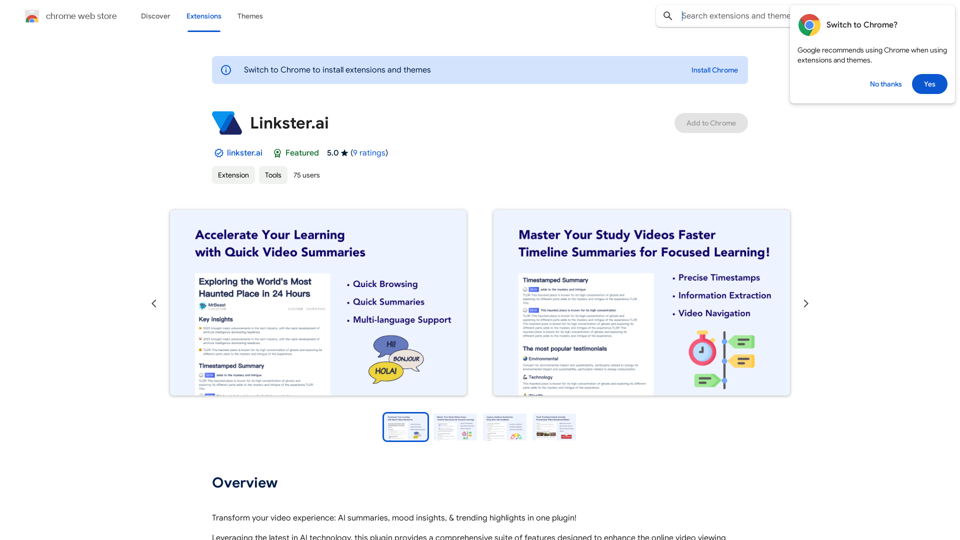
Transform your video experience: AI summaries, mood insights, & trending highlights in one plugin!
Visit Website
Linkster.ai
Visit Website

Introduction

Linkster.ai is a Chrome extension that enhances the video viewing experience by providing AI-generated summaries, sentiment analysis, and trending highlights. It uses advanced AI technology to offer users quick insights into video content and audience reactions, making it easier to navigate and engage with online videos.

Feature

AI-Generated Video Summaries

Linkster.ai creates concise and accurate summaries of video content, allowing users to grasp the main points without watching the entire video. This feature supports multiple languages, catering to a global audience.

Sentiment Analysis of Comments

The extension analyzes viewer comments, categorizing them into positive or negative sentiments. This provides users with a deeper understanding of the video's reception and overall audience reaction.

Channel's Trending Videos

Linkster.ai curates a list of a channel's most popular videos, making it easy for users to discover engaging content. This feature ensures users can quickly access the best content from each channel.

Seamless Integration

As a Chrome extension, Linkster.ai integrates smoothly into the user's browsing experience, providing quick and easy access to its features without disrupting the viewing process.

Privacy-Focused

The extension prioritizes user privacy, ensuring all data and interactions are handled with utmost confidentiality. This commitment to privacy enhances user trust and security.

Free and Premium Options

Linkster.ai offers a free version with basic features, as well as premium subscription plans that unlock additional enhanced functionalities for an improved user experience.

FAQ

What is Linkster.ai?

Linkster.ai is a Chrome extension that uses AI technology to provide video summaries, sentiment analysis of comments, and trending video highlights, enhancing the online video viewing experience.

Is Linkster.ai available for free?

Yes, Linkster.ai is available for free, with additional premium features accessible through subscription plans.

Does Linkster.ai collect or use user data?

No, Linkster.ai does not collect or use user data. The extension is committed to protecting user privacy and confidentiality.

Can I use Linkster.ai on multiple devices?

Yes, Linkster.ai is compatible with multiple devices and can be used on various browsers.

How can Linkster.ai enhance my video viewing experience?

Linkster.ai can help you quickly summarize long videos, understand audience sentiment through comment analysis, and discover trending videos on your favorite channels, making your video viewing more efficient and informative.

Latest Traffic Insights

  • Monthly Visits

    193.90 M

  • Bounce Rate

    56.27%

  • Pages Per Visit

    2.71

  • Time on Site(s)

    115.91

  • Global Rank

    -

  • Country Rank

    -

Recent Visits

Traffic Sources

  • Social Media:
    0.48%
  • Paid Referrals:
    0.55%
  • Email:
    0.15%
  • Referrals:
    12.81%
  • Search Engines:
    16.21%
  • Direct:
    69.81%
More Data

Related Websites

YouTube Video Summarizer
View Detail

YouTube Video Summarizer

YouTube Video Summarizer

Effortlessly summarize YouTube videos with 'YouTube Video Summarizer', your AI video-to-text converter and Chat GPT tool

193.90 M
Youtube VideoSynth: Summarize Youtube Videos

This tool uses artificial intelligence to create short summaries of YouTube videos. 

Simply paste the YouTube video URL into the input field, and VideoSynth will generate a concise summary of the video's content.
View Detail

Youtube VideoSynth: Summarize Youtube Videos This tool uses artificial intelligence to create short summaries of YouTube videos. Simply paste the YouTube video URL into the input field, and VideoSynth will generate a concise summary of the video's content.

Youtube VideoSynth: Summarize Youtube Videos This tool uses artificial intelligence to create short summaries of YouTube videos. Simply paste the YouTube video URL into the input field, and VideoSynth will generate a concise summary of the video's content.

Summarize YouTube Video Transcripts Using AI This is a powerful tool for quickly understanding the main points of long videos. Here's how it works: 1. Get the Transcript: You'll need a text transcript of the YouTube video. Many videos have automatic captions, or you can use a transcription service. 2. Choose an AI Summarizer: There are many free and paid AI summarization tools available online. Some popular options include: * OpenAI's GPT-3: A powerful language model that can generate high-quality summaries. * Google Cloud AI Platform: Offers a variety of AI services, including text summarization. * Hugging Face Transformers: An open-source library with pre-trained summarization models. 3. Input the Transcript: Paste the transcript into the AI summarizer. 4. Generate the Summary: The AI will analyze the text and generate a concise summary of the video's main points. 5. Review and Edit: Read through the AI-generated summary and make any necessary edits to ensure accuracy and clarity. Let me know if you'd like more details on any of these steps!

193.90 M
ChatGPT Snippet Saver

This is a simple tool to save snippets from your ChatGPT conversations. 

How to Use:

1.  Copy the text snippet you want to save from your ChatGPT conversation.
2.  Paste the text into the input box below.
3.  Click the "Save Snippet" button.

Your snippet will be saved to your local storage. You can access your saved snippets later by clicking the "View Saved Snippets" button.
View Detail

ChatGPT Snippet Saver This is a simple tool to save snippets from your ChatGPT conversations. How to Use: 1. Copy the text snippet you want to save from your ChatGPT conversation. 2. Paste the text into the input box below. 3. Click the "Save Snippet" button. Your snippet will be saved to your local storage. You can access your saved snippets later by clicking the "View Saved Snippets" button.

ChatGPT Snippet Saver This is a simple tool to save snippets from your ChatGPT conversations. How to Use: 1. Copy the text snippet you want to save from your ChatGPT conversation. 2. Paste the text into the input box below. 3. Click the "Save Snippet" button. Your snippet will be saved to your local storage. You can access your saved snippets later by clicking the "View Saved Snippets" button.

GPT Snippet Saver - Save Your Favorite ChatGPT Conversations Revolutionize how you gather and organize information from ChatGPT! - Effortlessly capture and store your most valuable ChatGPT interactions. - Organize your saved conversations by topic, date, or any custom tag. - Easily search and retrieve specific snippets from your saved history. - Share your favorite ChatGPT insights with others. - Never lose track of a brilliant idea or helpful response again.

193.90 M
Breadchaser - Custom networking messages & job applications with AI
View Detail

Breadchaser - Custom networking messages & job applications with AI

Breadchaser - Custom networking messages & job applications with AI

Breadchaser transforms your networking by automating personal messages, sales InMails, and job applications with AI, all while sounding natural and human.

193.90 M
ChatGPT Voice Master
View Detail

ChatGPT Voice Master

ChatGPT Voice Master

Supports English voice engine for chatgpt.com, making conversations more natural and interactions smoother.

193.90 M
Genius PT
View Detail

Genius PT

Genius PT

Genius PT Extension.

193.90 M
AI Voice Over for YouTube 

This is a guide to using AI voice over for your YouTube videos. 

Why Use AI Voice Over?

* Cost-Effective: AI voice over is much cheaper than hiring a professional voice actor.
* Time-Saving: You can generate voice over quickly and easily, without needing to schedule recording sessions.
* Variety of Voices: Choose from a wide range of AI voices, including male, female, and even robotic voices.
* Accessibility: Make your videos accessible to viewers who are deaf or hard of hearing by adding captions generated by AI.

How to Use AI Voice Over

1. Choose a Platform: There are many different platforms that offer AI voice over services, such as:
    * Google Cloud Text-to-Speech
    * Amazon Polly
    * Microsoft Azure Text to Speech
    * Murf.ai
    * NaturalReader
2. Write Your Script:  Write a clear and concise script for your video.
3. Upload Your Script:  Upload your script to the chosen platform.
4. Select a Voice: Choose the voice that best suits your video.
5. Adjust Settings:  Adjust settings such as speed, pitch, and volume.
6. Generate Voice Over:  Click the "Generate" button to create your voice over.
7. Download and Edit: Download the generated voice over file and edit it as needed.
8. Add to Your Video:  Add the voice over to your YouTube video.

Tips for Using AI Voice Over

* Use Natural Language:  Write your script as if you were speaking naturally.
* Vary Your Tone:  Use different tones of voice to keep your viewers engaged.
* Add Pauses:  Include pauses in your script to allow viewers to process information.
* Proofread Carefully:  Always proofread your script before generating the voice over.
* Experiment:  Try different voices, settings, and styles to find what works best for you.
View Detail

AI Voice Over for YouTube This is a guide to using AI voice over for your YouTube videos. Why Use AI Voice Over? * Cost-Effective: AI voice over is much cheaper than hiring a professional voice actor. * Time-Saving: You can generate voice over quickly and easily, without needing to schedule recording sessions. * Variety of Voices: Choose from a wide range of AI voices, including male, female, and even robotic voices. * Accessibility: Make your videos accessible to viewers who are deaf or hard of hearing by adding captions generated by AI. How to Use AI Voice Over 1. Choose a Platform: There are many different platforms that offer AI voice over services, such as: * Google Cloud Text-to-Speech * Amazon Polly * Microsoft Azure Text to Speech * Murf.ai * NaturalReader 2. Write Your Script: Write a clear and concise script for your video. 3. Upload Your Script: Upload your script to the chosen platform. 4. Select a Voice: Choose the voice that best suits your video. 5. Adjust Settings: Adjust settings such as speed, pitch, and volume. 6. Generate Voice Over: Click the "Generate" button to create your voice over. 7. Download and Edit: Download the generated voice over file and edit it as needed. 8. Add to Your Video: Add the voice over to your YouTube video. Tips for Using AI Voice Over * Use Natural Language: Write your script as if you were speaking naturally. * Vary Your Tone: Use different tones of voice to keep your viewers engaged. * Add Pauses: Include pauses in your script to allow viewers to process information. * Proofread Carefully: Always proofread your script before generating the voice over. * Experiment: Try different voices, settings, and styles to find what works best for you.

AI Voice Over for YouTube This is a guide to using AI voice over for your YouTube videos. Why Use AI Voice Over? * Cost-Effective: AI voice over is much cheaper than hiring a professional voice actor. * Time-Saving: You can generate voice over quickly and easily, without needing to schedule recording sessions. * Variety of Voices: Choose from a wide range of AI voices, including male, female, and even robotic voices. * Accessibility: Make your videos accessible to viewers who are deaf or hard of hearing by adding captions generated by AI. How to Use AI Voice Over 1. Choose a Platform: There are many different platforms that offer AI voice over services, such as: * Google Cloud Text-to-Speech * Amazon Polly * Microsoft Azure Text to Speech * Murf.ai * NaturalReader 2. Write Your Script: Write a clear and concise script for your video. 3. Upload Your Script: Upload your script to the chosen platform. 4. Select a Voice: Choose the voice that best suits your video. 5. Adjust Settings: Adjust settings such as speed, pitch, and volume. 6. Generate Voice Over: Click the "Generate" button to create your voice over. 7. Download and Edit: Download the generated voice over file and edit it as needed. 8. Add to Your Video: Add the voice over to your YouTube video. Tips for Using AI Voice Over * Use Natural Language: Write your script as if you were speaking naturally. * Vary Your Tone: Use different tones of voice to keep your viewers engaged. * Add Pauses: Include pauses in your script to allow viewers to process information. * Proofread Carefully: Always proofread your script before generating the voice over. * Experiment: Try different voices, settings, and styles to find what works best for you.

Watch foreign language YouTube videos in your own language.

193.90 M
Genji - AI Browser Assistant
View Detail

Genji - AI Browser Assistant

Genji - AI Browser Assistant

Automate the Browser Using a Visual AI Assistant

193.90 M