Open-source RightAI Tools Directory
  • Discover AI
  • Submit
  • Startup
  • Blog
Open-source RightAI Tools Directory
Discover the best AI tools of 2025 with the RightAI Tools Directory!

Friend Links

AI Anime GeneratorToolsApp AI

Support

Tap4
Privacy policyTerms & ConditionsContact Us
Loading...
loading...

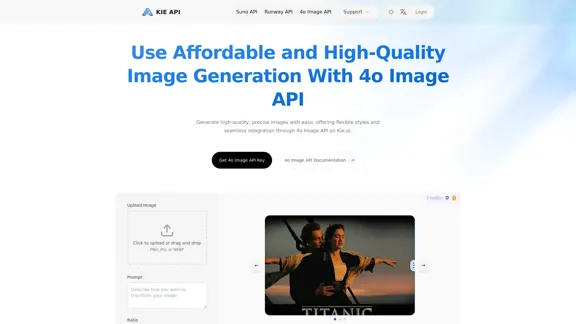
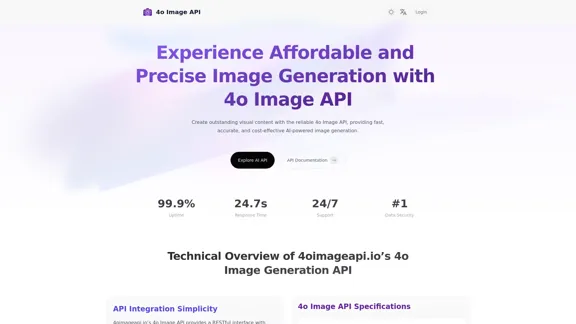
4o Image API: Affordable, Stable, and Versatile AI Image Generation

4oimageapi.io’s 4o Image API provides affordable, stable, and accurate AI image generation, allowing creators to easily produce high-quality visuals. With features such as text-to-image and image-to-image transformations, along with a variety of artistic styles, it offers dependable and effective tools for creative projects.
Visit Website
4o Image API: Affordable, Stable, and Versatile AI Image Generation
Visit Website

Introduction

4oimageapi.io’s 4o Image API offers an affordable and reliable solution for AI-powered image generation. It enables users to create high-quality visual content quickly and accurately, making it suitable for various applications, from marketing to product visualization. The API is designed for ease of integration, providing comprehensive documentation and support to ensure a smooth user experience.

Feature

  1. Image-to-Image Generation

    Users can upload images and modify them based on detailed prompts, allowing for style transfer and content enhancement.

  2. Text-to-Image Conversion

    The API accurately transforms text prompts into high-quality images, capturing specific scenes or abstract concepts with remarkable detail.

  3. Text Rendering

    It excels at integrating clear text into images, making it ideal for infographics, signs, and advertisements.

  4. Versatile Style Transformation

    Supports a wide range of artistic styles, enabling users to tailor images to fit their creative vision.

  5. Fast Response Time

    The API is optimized for speed, delivering high-quality visuals within seconds to a minute.

  6. High-Concurrency Support

    Capable of handling multiple image generation requests simultaneously, ensuring reliable performance under heavy usage.

  7. 24/7 Customer Support

    Offers dedicated support to assist users with integration issues and advanced features.

How to Use?

  1. Register for an account on 4oimageapi.io to access the API features.
  2. Generate your unique API key after logging in.
  3. Follow the detailed instructions in the developer documentation to integrate the API into your application.

FAQ

What makes 4oimageapi.io’s 4o Image Generation API unique?

The API stands out due to its seamless integration, fast processing times, and high-quality outputs, offering flexible image generation capabilities.

What is the pricing for 4oimageapi.io’s ChatGPT image generation API?

4oimageapi.io provides flexible and transparent pricing designed for businesses of all sizes, allowing for scalable usage without high costs.

How can 4oimageapi.io’s GPT-4o Image API improve your creative workflow?

It enables rapid generation of high-quality visuals from text prompts or modifications of existing images, streamlining the design process.

Does 4oimageapi.io offer a free trial for the OpenAI Image Generation API?

Yes, a free trial is available, allowing users to test the API's capabilities before committing to a paid plan.

Price

Plan TypePrice
Free Plan$0/month
Basic Plan$9.99/month
Standard Plan$19.99/month
Professional Plan$49.99/month
The price is for reference only, please refer to the latest official data for actual information.

Evaluation

  1. The 4o Image API demonstrates strong capabilities in generating high-quality images quickly, making it suitable for various applications.
  2. The integration process is straightforward, supported by comprehensive documentation.
  3. However, the API's performance may vary based on the complexity of the prompts, which could affect user experience.
  4. While the API excels in many areas, expanding the range of artistic styles and improving the accuracy of text rendering could enhance its appeal further.
  5. Overall, it is a valuable tool for businesses and creatives looking to streamline their visual content creation process.

Latest Traffic Insights

  • Monthly Visits

    0

  • Bounce Rate

    0.00%

  • Pages Per Visit

    0.00

  • Time on Site(s)

    0.00

  • Global Rank

    -

  • Country Rank

    -

Recent Visits

Traffic Sources

  • Social Media:
    0.00%
  • Paid Referrals:
    0.00%
  • Email:
    0.00%
  • Referrals:
    0.00%
  • Search Engines:
    0.00%
  • Direct:
    0.00%
More Data

Related Websites

Editing and Design Tools | Picsart
View Detail

Editing and Design Tools | Picsart

Editing and Design Tools | Picsart

Picsart is the biggest comprehensive creative platform offering photo and video editing tools along with design capabilities. It provides an ecosystem of freely available content and inspiration drawn from other creators.

13.31 M
AI PhishNet
View Detail

AI PhishNet

AI PhishNet

AI PhishNet is using Prosfinity's unique AI technology to detect phishing URLs.

193.90 M
Iconopedia
View Detail

Iconopedia

Iconopedia

Generate Stunning Images with AI Let's explore the world of AI-powered image generation and unleash your creativity! What is AI Image Generation? AI image generation uses artificial intelligence algorithms to create images from text descriptions, known as "prompts." How Does it Work? These powerful models, trained on massive datasets of images and text, learn the relationships between words and visual concepts. When you provide a prompt, the AI interprets it and generates a corresponding image. Benefits of AI Image Generation: * Effortless Creativity: Bring your ideas to life without needing artistic skills. * Endless Possibilities: Explore unique concepts and styles with ease. * Rapid Prototyping: Quickly visualize designs and concepts. * Personalized Content: Create custom images tailored to your needs. Popular AI Image Generators: * DALL-E 2: Known for its photorealistic and imaginative results. * Midjourney: Creates artistic and dreamlike images. * Stable Diffusion: Open-source and highly customizable. * Craiyon (formerly DALL-E mini): A free and accessible option. Tips for Generating Stunning Images: * Be Specific: Provide clear and detailed prompts. * Use Descriptive Language: Include adjectives, nouns, and verbs to guide the AI. * Experiment with Styles: Explore different artistic styles and aesthetics. * Iterate and Refine: Adjust your prompts and settings to achieve your desired outcome. Let your imagination run wild and discover the incredible potential of AI image generation!

0
Image translation
View Detail

Image translation

Image translation

Right-click on an image on a webpage and select "Image Translation" to translate the image directly into Chinese content.

193.90 M
Translate Frame
View Detail

Translate Frame

Translate Frame

This Chrome extension lets you translate text by taking pictures of it on web pages.

193.90 M
AI Headshot Generator Free
View Detail

AI Headshot Generator Free

AI Headshot Generator Free

Create stunning, professional headshots for free with our AI Headshot Generator. Perfect for LinkedIn and resumes. Try it now!

0
Text to Voice Generator
==========================

A text-to-voice generator, also known as a text-to-speech (TTS) system, is a software that converts written text into a spoken voice output. This technology has been widely used in various applications, including virtual assistants, audiobooks, and language learning platforms.

How it Works
---------------

The process of generating voice from text involves several steps:

1. Text Analysis: The input text is analyzed to identify the language, syntax, and semantics.
2. Phonetic Transcription: The text is converted into a phonetic transcription, which represents the sounds of the spoken language.
3. Prosody Generation: The phonetic transcription is then used to generate the prosody, or rhythm and intonation, of the spoken voice.
4. Waveform Generation: The prosody and phonetic transcription are combined to generate the audio waveform, which is the final spoken voice output.

Types of Text-to-Voice Generators
-----------------------------------

There are two main types of text-to-voice generators:

Rule-Based Systems

These systems use a set of predefined rules to generate the spoken voice output. They are often limited in their ability to produce natural-sounding voices and may sound robotic.

Machine Learning-Based Systems

These systems use machine learning algorithms to learn from large datasets of spoken voices and generate more natural-sounding voices. They are often more advanced and can produce high-quality voice outputs.

Applications of Text-to-Voice Generators
-----------------------------------------

Text-to-voice generators have a wide range of applications, including:

Virtual Assistants

Virtual assistants, such as Siri and Alexa, use text-to-voice generators to respond to user queries.

Audiobooks

Text-to-voice generators can be used to create audiobooks from written texts, making it easier for people to access written content.

Language Learning

Language learning platforms use text-to-voice generators to provide pronunciation guidance and practice exercises for learners.

Accessibility

Text-to-voice generators can be used to assist people with disabilities, such as visual impairments, by providing an auditory interface to written content.
View Detail

Text to Voice Generator ========================== A text-to-voice generator, also known as a text-to-speech (TTS) system, is a software that converts written text into a spoken voice output. This technology has been widely used in various applications, including virtual assistants, audiobooks, and language learning platforms. How it Works --------------- The process of generating voice from text involves several steps: 1. Text Analysis: The input text is analyzed to identify the language, syntax, and semantics. 2. Phonetic Transcription: The text is converted into a phonetic transcription, which represents the sounds of the spoken language. 3. Prosody Generation: The phonetic transcription is then used to generate the prosody, or rhythm and intonation, of the spoken voice. 4. Waveform Generation: The prosody and phonetic transcription are combined to generate the audio waveform, which is the final spoken voice output. Types of Text-to-Voice Generators ----------------------------------- There are two main types of text-to-voice generators: Rule-Based Systems These systems use a set of predefined rules to generate the spoken voice output. They are often limited in their ability to produce natural-sounding voices and may sound robotic. Machine Learning-Based Systems These systems use machine learning algorithms to learn from large datasets of spoken voices and generate more natural-sounding voices. They are often more advanced and can produce high-quality voice outputs. Applications of Text-to-Voice Generators ----------------------------------------- Text-to-voice generators have a wide range of applications, including: Virtual Assistants Virtual assistants, such as Siri and Alexa, use text-to-voice generators to respond to user queries. Audiobooks Text-to-voice generators can be used to create audiobooks from written texts, making it easier for people to access written content. Language Learning Language learning platforms use text-to-voice generators to provide pronunciation guidance and practice exercises for learners. Accessibility Text-to-voice generators can be used to assist people with disabilities, such as visual impairments, by providing an auditory interface to written content.

Text to Voice Generator ========================== A text-to-voice generator, also known as a text-to-speech (TTS) system, is a software that converts written text into a spoken voice output. This technology has been widely used in various applications, including virtual assistants, audiobooks, and language learning platforms. How it Works --------------- The process of generating voice from text involves several steps: 1. Text Analysis: The input text is analyzed to identify the language, syntax, and semantics. 2. Phonetic Transcription: The text is converted into a phonetic transcription, which represents the sounds of the spoken language. 3. Prosody Generation: The phonetic transcription is then used to generate the prosody, or rhythm and intonation, of the spoken voice. 4. Waveform Generation: The prosody and phonetic transcription are combined to generate the audio waveform, which is the final spoken voice output. Types of Text-to-Voice Generators ----------------------------------- There are two main types of text-to-voice generators: Rule-Based Systems These systems use a set of predefined rules to generate the spoken voice output. They are often limited in their ability to produce natural-sounding voices and may sound robotic. Machine Learning-Based Systems These systems use machine learning algorithms to learn from large datasets of spoken voices and generate more natural-sounding voices. They are often more advanced and can produce high-quality voice outputs. Applications of Text-to-Voice Generators ----------------------------------------- Text-to-voice generators have a wide range of applications, including: Virtual Assistants Virtual assistants, such as Siri and Alexa, use text-to-voice generators to respond to user queries. Audiobooks Text-to-voice generators can be used to create audiobooks from written texts, making it easier for people to access written content. Language Learning Language learning platforms use text-to-voice generators to provide pronunciation guidance and practice exercises for learners. Accessibility Text-to-voice generators can be used to assist people with disabilities, such as visual impairments, by providing an auditory interface to written content.

Generate Voice from Text on Any Web Page With the advancement of technology, it is now possible to generate voice from text on any web page. This feature is particularly useful for people who prefer listening to content rather than reading it. Here's how you can do it: #Method 1: Using Browser Extension You can use a browser extension like Read Aloud or SpeakIt! to generate voice from text on any web page. These extensions are available for both Google Chrome and Mozilla Firefox browsers. #Method 2: Using Online Tools There are several online tools available that can convert text to speech. Some popular tools include NaturalReader, Voice Dream Reader, and Google Text-to-Speech. You can copy and paste the text from any web page into these tools to generate voice. #Method 3: Using Screen Reader If you are using a Windows operating system, you can use the built-in Narrator screen reader to generate voice from text on any web page. For Mac users, you can use VoiceOver. By using any of these methods, you can easily generate voice from text on any web page and enjoy a more convenient and accessible reading experience.

193.90 M
Physna Nexus+
View Detail

Physna Nexus+

Physna Nexus+

Physna Nexus+ is a tool that improves Unity Asset Manager by adding search features powered by Physna.

193.90 M