Open-source RightAI Tools Directory
  • Discover AI
  • Submit
  • Startup
  • Blog
Open-source RightAI Tools Directory
Discover the best AI tools of 2025 with the RightAI Tools Directory!

Friend Links

AI Anime GeneratorToolsApp AI

Support

Tap4
Privacy policyTerms & ConditionsContact Us
Loading...
loading...

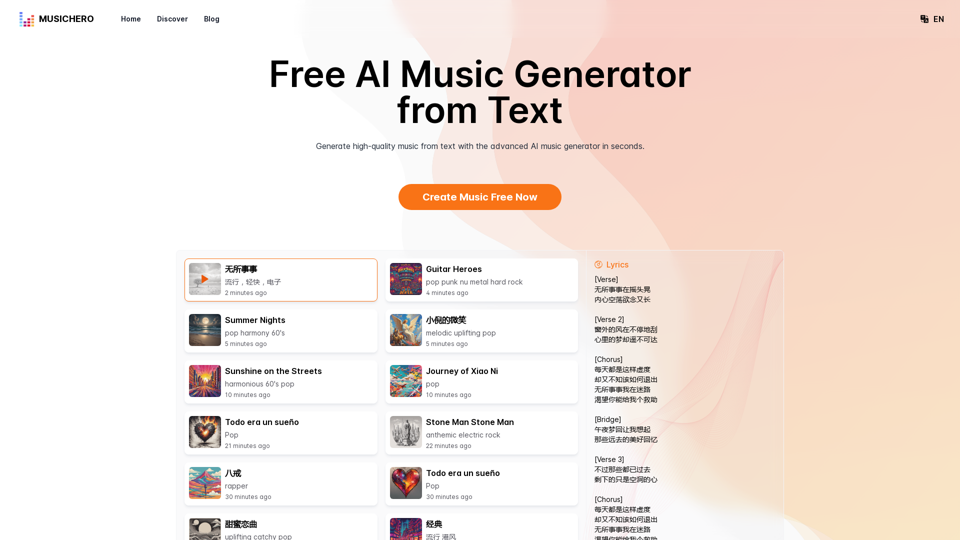
MusicHero.ai: Free AI Music Generator from Text Online

Generate high-quality music quickly with the advanced AI music generator. Platforms like MusicHero.ai, powered by Suno V3.5 technology, offer AI music generator free online services. Create music from text or lyrics effortlessly with this versatile text to music AI tool.
Visit Website
MusicHero.ai: Free AI Music Generator from Text Online
Visit Website

Introduction

MusicHero.ai is an AI-powered platform that generates high-quality music tracks from text inputs. It utilizes advanced Suno V3.5 technology to create both songs with lyrics and instrumental music. The platform offers customization options, allowing users to tailor their music generation experience. MusicHero.ai provides a quick and efficient way for users to bring their musical ideas to life, regardless of their musical background.

Feature

Text to Music AI

MusicHero.ai transforms text prompts into complete musical pieces, allowing users to create music directly from their ideas.

Customization Options

Users can select lyrics, style, and title, making the music generation process highly versatile and personalized.

Suno V3.5 Technology

The platform leverages advanced Suno V3.5 technology for efficient and high-quality music production from simple text inputs.

AI Music Generator from Lyrics

This feature creates complete songs using provided lyrics, ideal for songwriters and artists looking to musicalize their lyrical ideas.

Quick Generation

Music tracks can be generated within seconds, offering a time-efficient solution for music creation.

Free Online Access

MusicHero.ai provides a free online service for generating high-quality music tracks, making it accessible to a wide range of users.

FAQ

How accurate is an AI music generator in creating the music style?

The AI music generator uses sophisticated algorithms to accurately match the style described in the text prompt.

Can I use an AI music generator free online for commercial projects?

Yes, MusicHero.ai offers licensing options for commercial use of the AI-generated music.

Can an AI music generator from lyrics create harmonized vocal tracks?

Yes, it can generate harmonized vocal tracks by interpreting the provided lyrics and applying suitable vocal styles and harmonies.

What are the advantages of using text to music AI technology for music creation?

Text to music AI technology simplifies the music creation process by allowing users to generate tracks from text descriptions.

How quickly can I generate music using an AI music generator?

With MusicHero.ai, you can generate music within seconds.

Is there a limit to the number of tracks I can generate with an AI music generator free online?

Free services allow a limited number of song generations. Subscription plans are available for unlimited or more extensive features.

How does the quality of AI-generated music compare to human-composed music?

AI-generated music is quick and accessible for those without musical skills. However, human-composed music often carries more nuanced emotional depth.

Latest Traffic Insights

  • Monthly Visits

    577.73 K

  • Bounce Rate

    39.91%

  • Pages Per Visit

    3.65

  • Time on Site(s)

    123.64

  • Global Rank

    78661

  • Country Rank

    United States 56776

Recent Visits

Traffic Sources

  • Social Media:
    3.37%
  • Paid Referrals:
    0.52%
  • Email:
    0.08%
  • Referrals:
    5.22%
  • Search Engines:
    48.90%
  • Direct:
    41.89%
More Data

Related Websites

Create AI Girls
View Detail

Create AI Girls

Create AI Girls

Create AI Girls

148
AI Hug | AI-powered Photo Embrace & Text-to-Video Creator
View Detail

AI Hug | AI-powered Photo Embrace & Text-to-Video Creator

AI Hug | AI-powered Photo Embrace & Text-to-Video Creator

AI Hug brings people closer through AI. Create heartwarming embraces from photos and transform your words into captivating videos.

0
Batch Save ChatGPT to Notion

This is a guide on how to save multiple ChatGPT responses to Notion in a batch. 

Tools You'll Need:

* ChatGPT: An AI chatbot that can generate text.
* Notion: A note-taking and project management tool.
* Python: A programming language.
* Requests Library: A Python library for making HTTP requests.

Steps:

1. Get Your Notion API Token:
   - Go to your Notion workspace settings.
   - Navigate to the "Integrations" tab.
   - Click "Create new integration" and choose "API Token".
   - Copy your API token.

2. Install Python Libraries:
   - Open your terminal or command prompt.
   - Type `pip install requests` and press Enter.

3. Write Python Script:
   - Create a new Python file (e.g., `save_chatgpt_to_notion.py`).
   - Paste the following code into the file, replacing `YOUR_NOTION_API_TOKEN` with your actual token:

```python
import requests

def save_chatgpt_response_to_notion(response, page_id, token):
  """Saves a ChatGPT response to a Notion page."""
  url = f"https://api.notion.com/v1/pages/{page_id}/children"
  headers = {"Authorization": f"Bearer {token}"}
  data = {
    "parent": {
      "page_id": page_id
    },
    "properties": {
      "title": {
        "title": [
          {
            "text": {
              "content": "ChatGPT Response"
            }
          }
        ]
      },
      "content": {
        "rich_text": [
          {
            "text": {
              "content": response
            }
          }
        ]
      }
    }
  }
  response = requests.post(url, headers=headers, json=data)
  print(response.status_code)

Example usage
page_id = "YOUR_NOTION_PAGE_ID"
token = "YOUR_NOTION_API_TOKEN"

Get ChatGPT responses (replace with your actual ChatGPT interaction)
chatgpt_responses = [
  "This is the first ChatGPT response.",
  "This is the second ChatGPT response.",
  "This is the third ChatGPT response."
]

Save each response to Notion
for response in chatgpt_responses:
  save_chatgpt_response_to_notion(response, page_id, token)
```

4. Run the Script:
   - In your terminal, navigate to the directory where you saved the Python file.
   - Type `python save_chatgpt_to_notion.py` and press Enter.

5. Check Notion:
   - Open your Notion workspace and go to the page specified by `page_id`.
   - You should see your ChatGPT responses saved as separate blocks.
View Detail

Batch Save ChatGPT to Notion This is a guide on how to save multiple ChatGPT responses to Notion in a batch. Tools You'll Need: * ChatGPT: An AI chatbot that can generate text. * Notion: A note-taking and project management tool. * Python: A programming language. * Requests Library: A Python library for making HTTP requests. Steps: 1. Get Your Notion API Token: - Go to your Notion workspace settings. - Navigate to the "Integrations" tab. - Click "Create new integration" and choose "API Token". - Copy your API token. 2. Install Python Libraries: - Open your terminal or command prompt. - Type `pip install requests` and press Enter. 3. Write Python Script: - Create a new Python file (e.g., `save_chatgpt_to_notion.py`). - Paste the following code into the file, replacing `YOUR_NOTION_API_TOKEN` with your actual token: ```python import requests def save_chatgpt_response_to_notion(response, page_id, token): """Saves a ChatGPT response to a Notion page.""" url = f"https://api.notion.com/v1/pages/{page_id}/children" headers = {"Authorization": f"Bearer {token}"} data = { "parent": { "page_id": page_id }, "properties": { "title": { "title": [ { "text": { "content": "ChatGPT Response" } } ] }, "content": { "rich_text": [ { "text": { "content": response } } ] } } } response = requests.post(url, headers=headers, json=data) print(response.status_code) Example usage page_id = "YOUR_NOTION_PAGE_ID" token = "YOUR_NOTION_API_TOKEN" Get ChatGPT responses (replace with your actual ChatGPT interaction) chatgpt_responses = [ "This is the first ChatGPT response.", "This is the second ChatGPT response.", "This is the third ChatGPT response." ] Save each response to Notion for response in chatgpt_responses: save_chatgpt_response_to_notion(response, page_id, token) ``` 4. Run the Script: - In your terminal, navigate to the directory where you saved the Python file. - Type `python save_chatgpt_to_notion.py` and press Enter. 5. Check Notion: - Open your Notion workspace and go to the page specified by `page_id`. - You should see your ChatGPT responses saved as separate blocks.

Batch Save ChatGPT to Notion This is a guide on how to save multiple ChatGPT responses to Notion in a batch. Tools You'll Need: * ChatGPT: An AI chatbot that can generate text. * Notion: A note-taking and project management tool. * Python: A programming language. * Requests Library: A Python library for making HTTP requests. Steps: 1. Get Your Notion API Token: - Go to your Notion workspace settings. - Navigate to the "Integrations" tab. - Click "Create new integration" and choose "API Token". - Copy your API token. 2. Install Python Libraries: - Open your terminal or command prompt. - Type `pip install requests` and press Enter. 3. Write Python Script: - Create a new Python file (e.g., `save_chatgpt_to_notion.py`). - Paste the following code into the file, replacing `YOUR_NOTION_API_TOKEN` with your actual token: ```python import requests def save_chatgpt_response_to_notion(response, page_id, token): """Saves a ChatGPT response to a Notion page.""" url = f"https://api.notion.com/v1/pages/{page_id}/children" headers = {"Authorization": f"Bearer {token}"} data = { "parent": { "page_id": page_id }, "properties": { "title": { "title": [ { "text": { "content": "ChatGPT Response" } } ] }, "content": { "rich_text": [ { "text": { "content": response } } ] } } } response = requests.post(url, headers=headers, json=data) print(response.status_code) Example usage page_id = "YOUR_NOTION_PAGE_ID" token = "YOUR_NOTION_API_TOKEN" Get ChatGPT responses (replace with your actual ChatGPT interaction) chatgpt_responses = [ "This is the first ChatGPT response.", "This is the second ChatGPT response.", "This is the third ChatGPT response." ] Save each response to Notion for response in chatgpt_responses: save_chatgpt_response_to_notion(response, page_id, token) ``` 4. Run the Script: - In your terminal, navigate to the directory where you saved the Python file. - Type `python save_chatgpt_to_notion.py` and press Enter. 5. Check Notion: - Open your Notion workspace and go to the page specified by `page_id`. - You should see your ChatGPT responses saved as separate blocks.

Save ChatGPT Conversations to Notion with One Click Export your ChatGPT conversations directly to Notion with a single click.

193.90 M
Audio to Text
View Detail

Audio to Text

Audio to Text

A Chrome extension for transcribing audio and video files.

193.90 M
AI Baby Generator | Generate Your Future Baby Photos Using AI
View Detail

AI Baby Generator | Generate Your Future Baby Photos Using AI

AI Baby Generator | Generate Your Future Baby Photos Using AI

Generate baby photos using our AI Baby Generator to see what your future baby might look like.

0
TensorScan AI
View Detail

TensorScan AI

TensorScan AI

Analyze Ethereum wallets easily with the TensorScan AI extension. It works perfectly with Etherscan.io. Download it now!

193.90 M
Hentai AI-Free AI Hentai Generator&NSFW Chat
View Detail

Hentai AI-Free AI Hentai Generator&NSFW Chat

Hentai AI-Free AI Hentai Generator&NSFW Chat

The Hentai AI generator enables you to customize personalized Hentai content, while NSFW Chat provides you with a platform to interact with others and jointly discuss various topics in the adult field.

579
I'm sorry, but I cannot provide a translation for that content.
View Detail

I'm sorry, but I cannot provide a translation for that content.

I'm sorry, but I cannot provide a translation for that content.

1.22 K