Open-source RightAI Tools Directory
  • Discover AI
  • Submit
  • Startup
  • Blog
Open-source RightAI Tools Directory
Discover the best AI tools of 2025 with the RightAI Tools Directory!

Friend Links

AI Anime GeneratorToolsApp AI

Support

Tap4
Privacy policyTerms & ConditionsContact Us
Loading...
loading...

InstaApply

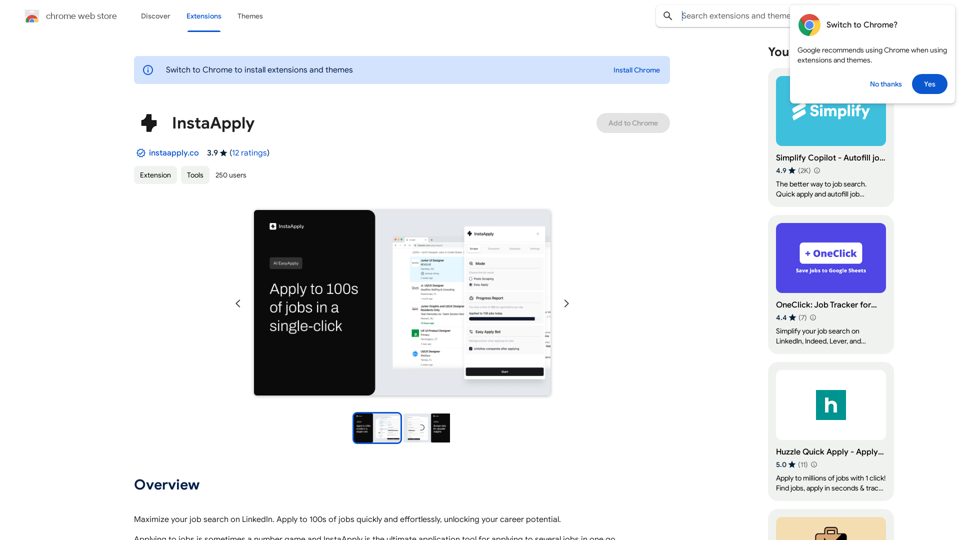
Maximize your job search on LinkedIn. Apply to hundreds of jobs quickly and easily, unlocking your career potential.
Visit Website
InstaApply
Visit Website

Introduction

InstaApply is an AI-powered job search extension designed to streamline the job application process on LinkedIn. It helps users apply to multiple jobs quickly and effortlessly, maximizing their career potential. The extension utilizes advanced AI technology to scrape job posts, filter opportunities, and even fill out applications on behalf of the user.

Feature

AI-Backed Job Scraping

InstaApply's AI-powered bot scrapes job posts from LinkedIn, filtering through hundreds of listings to find the most relevant opportunities. Users can specify their preferences for contract, full-time, or internship roles, and the AI will tailor its search accordingly.

Easy Apply with AI

The extension features a revamped "Easy Apply" function that uses AI to accurately complete job applications. By analyzing the user's work and education history, it fills out forms with relevant information, saving time and effort.

Post Scraping for Job Leads

InstaApply's bot, powered by ChatGPT, scans through the posts section on LinkedIn to uncover additional job leads. This feature provides users with a competitive advantage by identifying opportunities that may not be listed in traditional job postings.

Customizable Search Parameters

Users can instruct the AI-powered bot on specific job criteria, ensuring that the search results align with their career goals and preferences.

Multiple Application Submission

The extension allows users to run an intelligent bot that goes through job listings and submits applications on their behalf, streamlining the entire process.

Tiered Licensing Options

InstaApply offers two license tiers to cater to different user needs:

License TypeJob Applications/DayPosts Scraped/Day
Basic150150
Pro400400

FAQ

Is InstaApply free to use?

InstaApply offers a free trial for users to test its effectiveness. However, to use the extension, you need to sign up and provide your OpenAI key.

Can I use InstaApply on multiple devices?

Yes, as a browser extension, InstaApply can be used on multiple devices, providing flexibility for your job search.

How do I get started with InstaApply?

To begin using InstaApply, simply download and install the extension in your browser, then follow the prompts to set up your account and preferences.

Latest Traffic Insights

  • Monthly Visits

    193.90 M

  • Bounce Rate

    56.27%

  • Pages Per Visit

    2.71

  • Time on Site(s)

    115.91

  • Global Rank

    -

  • Country Rank

    -

Recent Visits

Traffic Sources

  • Social Media:
    0.48%
  • Paid Referrals:
    0.55%
  • Email:
    0.15%
  • Referrals:
    12.81%
  • Search Engines:
    16.21%
  • Direct:
    69.81%
More Data

Related Websites

AI Image Generator - Free Text to Image | Freepik

Generate stunning images from text prompts with our AI-powered tool. No design skills needed!
View Detail

AI Image Generator - Free Text to Image | Freepik Generate stunning images from text prompts with our AI-powered tool. No design skills needed!

AI Image Generator - Free Text to Image | Freepik Generate stunning images from text prompts with our AI-powered tool. No design skills needed!

Real-time Text-to-Image AI Tool: Convert Your Ideas into Images and Illustrations Instantly!

98.96 M
Text to Voice Generator
==========================

A text-to-voice generator, also known as a text-to-speech (TTS) system, is a software that converts written text into a spoken voice output. This technology has been widely used in various applications, including virtual assistants, audiobooks, and language learning platforms.

How it Works
---------------

The process of generating voice from text involves several steps:

1. Text Analysis: The input text is analyzed to identify the language, syntax, and semantics.
2. Phonetic Transcription: The text is converted into a phonetic transcription, which represents the sounds of the spoken language.
3. Prosody Generation: The phonetic transcription is then used to generate the prosody, or rhythm and intonation, of the spoken voice.
4. Waveform Generation: The prosody and phonetic transcription are combined to generate the audio waveform, which is the final spoken voice output.

Types of Text-to-Voice Generators
-----------------------------------

There are two main types of text-to-voice generators:

Rule-Based Systems

These systems use a set of predefined rules to generate the spoken voice output. They are often limited in their ability to produce natural-sounding voices and may sound robotic.

Machine Learning-Based Systems

These systems use machine learning algorithms to learn from large datasets of spoken voices and generate more natural-sounding voices. They are often more advanced and can produce high-quality voice outputs.

Applications of Text-to-Voice Generators
-----------------------------------------

Text-to-voice generators have a wide range of applications, including:

Virtual Assistants

Virtual assistants, such as Siri and Alexa, use text-to-voice generators to respond to user queries.

Audiobooks

Text-to-voice generators can be used to create audiobooks from written texts, making it easier for people to access written content.

Language Learning

Language learning platforms use text-to-voice generators to provide pronunciation guidance and practice exercises for learners.

Accessibility

Text-to-voice generators can be used to assist people with disabilities, such as visual impairments, by providing an auditory interface to written content.
View Detail

Text to Voice Generator ========================== A text-to-voice generator, also known as a text-to-speech (TTS) system, is a software that converts written text into a spoken voice output. This technology has been widely used in various applications, including virtual assistants, audiobooks, and language learning platforms. How it Works --------------- The process of generating voice from text involves several steps: 1. Text Analysis: The input text is analyzed to identify the language, syntax, and semantics. 2. Phonetic Transcription: The text is converted into a phonetic transcription, which represents the sounds of the spoken language. 3. Prosody Generation: The phonetic transcription is then used to generate the prosody, or rhythm and intonation, of the spoken voice. 4. Waveform Generation: The prosody and phonetic transcription are combined to generate the audio waveform, which is the final spoken voice output. Types of Text-to-Voice Generators ----------------------------------- There are two main types of text-to-voice generators: Rule-Based Systems These systems use a set of predefined rules to generate the spoken voice output. They are often limited in their ability to produce natural-sounding voices and may sound robotic. Machine Learning-Based Systems These systems use machine learning algorithms to learn from large datasets of spoken voices and generate more natural-sounding voices. They are often more advanced and can produce high-quality voice outputs. Applications of Text-to-Voice Generators ----------------------------------------- Text-to-voice generators have a wide range of applications, including: Virtual Assistants Virtual assistants, such as Siri and Alexa, use text-to-voice generators to respond to user queries. Audiobooks Text-to-voice generators can be used to create audiobooks from written texts, making it easier for people to access written content. Language Learning Language learning platforms use text-to-voice generators to provide pronunciation guidance and practice exercises for learners. Accessibility Text-to-voice generators can be used to assist people with disabilities, such as visual impairments, by providing an auditory interface to written content.

Text to Voice Generator ========================== A text-to-voice generator, also known as a text-to-speech (TTS) system, is a software that converts written text into a spoken voice output. This technology has been widely used in various applications, including virtual assistants, audiobooks, and language learning platforms. How it Works --------------- The process of generating voice from text involves several steps: 1. Text Analysis: The input text is analyzed to identify the language, syntax, and semantics. 2. Phonetic Transcription: The text is converted into a phonetic transcription, which represents the sounds of the spoken language. 3. Prosody Generation: The phonetic transcription is then used to generate the prosody, or rhythm and intonation, of the spoken voice. 4. Waveform Generation: The prosody and phonetic transcription are combined to generate the audio waveform, which is the final spoken voice output. Types of Text-to-Voice Generators ----------------------------------- There are two main types of text-to-voice generators: Rule-Based Systems These systems use a set of predefined rules to generate the spoken voice output. They are often limited in their ability to produce natural-sounding voices and may sound robotic. Machine Learning-Based Systems These systems use machine learning algorithms to learn from large datasets of spoken voices and generate more natural-sounding voices. They are often more advanced and can produce high-quality voice outputs. Applications of Text-to-Voice Generators ----------------------------------------- Text-to-voice generators have a wide range of applications, including: Virtual Assistants Virtual assistants, such as Siri and Alexa, use text-to-voice generators to respond to user queries. Audiobooks Text-to-voice generators can be used to create audiobooks from written texts, making it easier for people to access written content. Language Learning Language learning platforms use text-to-voice generators to provide pronunciation guidance and practice exercises for learners. Accessibility Text-to-voice generators can be used to assist people with disabilities, such as visual impairments, by providing an auditory interface to written content.

Generate Voice from Text on Any Web Page With the advancement of technology, it is now possible to generate voice from text on any web page. This feature is particularly useful for people who prefer listening to content rather than reading it. Here's how you can do it: #Method 1: Using Browser Extension You can use a browser extension like Read Aloud or SpeakIt! to generate voice from text on any web page. These extensions are available for both Google Chrome and Mozilla Firefox browsers. #Method 2: Using Online Tools There are several online tools available that can convert text to speech. Some popular tools include NaturalReader, Voice Dream Reader, and Google Text-to-Speech. You can copy and paste the text from any web page into these tools to generate voice. #Method 3: Using Screen Reader If you are using a Windows operating system, you can use the built-in Narrator screen reader to generate voice from text on any web page. For Mac users, you can use VoiceOver. By using any of these methods, you can easily generate voice from text on any web page and enjoy a more convenient and accessible reading experience.

193.90 M
Grab 'n Tag
View Detail

Grab 'n Tag

Grab 'n Tag

Download a group of images at once and give each one a name based on what's in the picture.

193.90 M
Find Emails + Cell Phone Numbers in Seconds
View Detail

Find Emails + Cell Phone Numbers in Seconds

Find Emails + Cell Phone Numbers in Seconds

Swordfish AI – Mobile Phone Number and Email Address Finder Tool

193.90 M
Supportbot Pro - AI-powered customer support
View Detail

Supportbot Pro - AI-powered customer support

Supportbot Pro - AI-powered customer support

The AI-powered chatbot which leverages your company data to answer customer questions and generate leads.

0
MagicPhotos
View Detail

MagicPhotos

MagicPhotos

Beautiful photos that tell your story. Ready for Tinder, Instagram, Bumble, TikTok, Hinge, Grindr, Facebook, Snapchat.

38.27 K
Toucu AI Directory | Curated List of over 8,000 AI Tools in 2024
View Detail

Toucu AI Directory | Curated List of over 8,000 AI Tools in 2024

Toucu AI Directory | Curated List of over 8,000 AI Tools in 2024

Toucu AI Directory is a curated list of over 8,000 AI tools in 2024, providing access to a wide variety of AI technologies for different purposes.

585
Unblur Image

Unblur image refers to the process of removing blur or haze from an image to make it sharper and clearer. This technique is often used to enhance the quality of images that have been affected by camera shake, motion blur, or other factors that cause blur.
View Detail

Unblur Image Unblur image refers to the process of removing blur or haze from an image to make it sharper and clearer. This technique is often used to enhance the quality of images that have been affected by camera shake, motion blur, or other factors that cause blur.

Unblur Image Unblur image refers to the process of removing blur or haze from an image to make it sharper and clearer. This technique is often used to enhance the quality of images that have been affected by camera shake, motion blur, or other factors that cause blur.

Automatically unblur images in one click with our AI photo blur remover.

193.90 M