Open-source RightAI Tools Directory
  • Discover AI
  • Submit
  • Startup
  • Blog
Open-source RightAI Tools Directory
Discover the best AI tools of 2025 with the RightAI Tools Directory!

Friend Links

AI Anime GeneratorToolsApp AI

Support

Tap4
Privacy policyTerms & ConditionsContact Us
Loading...
loading...

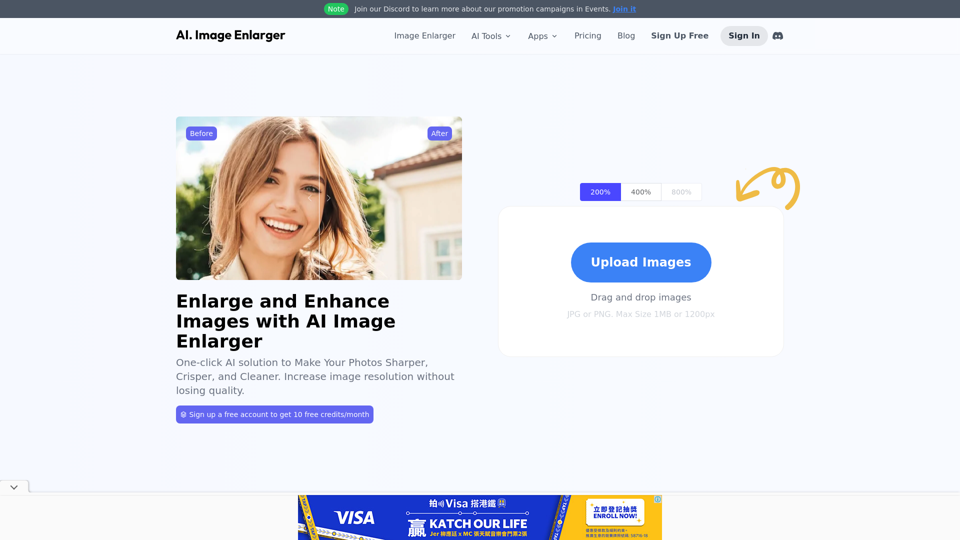
AI Image Enlarger | Enlarge Images Without Losing Quality!

AI Image Enlarger is a FREE online tool for automatically upscaling and enhancing small images. It can make jpg/png pictures larger without compromising quality.
Visit Website
AI Image Enlarger | Enlarge Images Without Losing Quality!
Visit Website

Introduction

AI Image Enlarger is a comprehensive AI-powered platform offering various image enhancement technologies. It provides tools for enlarging, upscaling, and improving image quality, catering to both casual users and professionals. The platform offers a range of features, from basic image enlargement to advanced AI-powered tools like background removal and photo colorization.

Feature

Free Access with Monthly Credits

Users can access AI Image Enlarger for free, with 10 credits available each month. This allows everyone to experience the platform's capabilities without any initial cost.

Image Enlargement Capabilities

Enlarge Images Up to 8K Resolution

The platform enables users to enlarge images to 2K, 4K, and even 8K resolutions without compromising quality, utilizing advanced AI technology.

Multiple AI-Powered Tools

AI Image Enlarger offers nearly 10 different AI-powered tools for image enhancement:

ToolFunction
AI Image UpscalerImproves image resolution
AI Anime UpscalerEnhances anime and cartoon images
AI Image EnhancerGeneral image quality improvement
AI Image SharpenerIncreases image sharpness
AI Face RetouchEnhances facial features
AI Background RemoverRemoves image backgrounds
AI CartoonizerConverts photos to cartoon style
AI Photo ColorizerAdds color to black and white images
Object RemoverRemoves unwanted objects from images

Privacy Protection

AI Image Enlarger prioritizes user privacy. User data is not used for training purposes, and users have the option to delete their accounts and all associated data at any time.

Subscription Options

For users who require more than the free monthly credits, AI Image Enlarger offers cost-effective subscription plans for extended access and additional benefits.

FAQ

What is AI Image Enlarger?

AI Image Enlarger is an AI-powered platform that offers a wide range of technologies for enhancing images, including enlarging, upscaling, and improving image quality.

How can I use AI Image Enlarger?

Every user can access AI Image Enlarger for free up to 10 credits per month. Subscribing to the platform provides additional benefits and extended access beyond the free usage limits.

Can I enlarge images using AI Image Enlarger?

Yes, users can enlarge images up to 2k, 4k, and 8k without losing quality using AI Image Enlarger's image enlargement feature.

How many features are available on AI Image Enlarger?

AI Image Enlarger offers nearly 10 AI-powered tools for image enhancement, including AI Image Upscaler, AI Anime Upscaler, AI Image Enhancer, AI Image Sharpener, AI Face Retouch, AI Background Remover, AI Cartoonizer, AI Photo Colorizer, and Object Remover.

How can I maximize my use of AI Image Enlarger services?

By utilizing the daily free tools provided by AI Image Enlarger, users can explore a wide range of AI-powered features to assist with various tasks.

Will my information be used for training data?

No, user privacy is highly respected, and your data will not be utilized for training purposes. You have the option to delete your account at any time, which will also remove all your data.

When would I need a subscription to AI Image Enlarger?

If the 10 free credits per month are insufficient for your needs and you heavily rely on AI Image Enlarger services, subscribing to their cost-effective products is recommended.

Latest Traffic Insights

  • Monthly Visits

    614.68 K

  • Bounce Rate

    58.34%

  • Pages Per Visit

    3.17

  • Time on Site(s)

    277.13

  • Global Rank

    -

  • Country Rank

    -

Recent Visits

Traffic Sources

  • Social Media:
    3.74%
  • Paid Referrals:
    2.24%
  • Email:
    0.14%
  • Referrals:
    17.90%
  • Search Engines:
    12.91%
  • Direct:
    63.06%
More Data

Related Websites

AI Baby Generator: FutureBaby on the App Store
View Detail

AI Baby Generator: FutureBaby on the App Store

AI Baby Generator: FutureBaby on the App Store

Introducing the FutureBaby: AI Baby Generator app, an innovative tool that predicts the potential appearance of your future child by analyzing the facial features of you and your partner.

124.77 M
AI Face Studio - AI Face Transformation & Editing Tools
View Detail

AI Face Studio - AI Face Transformation & Editing Tools

AI Face Studio - AI Face Transformation & Editing Tools

AI Face Studio provides face swapping, outfit alterations, video transformations, style conversions, and facial editing with premium security and high-quality outcomes.

27.66 K
Journey ArtPrompt with Midjourney

This guide will walk you through creating stunning artwork using Midjourney, a powerful AI art generator. 

1. Accessing Midjourney

* You'll need a Discord account to use Midjourney. 
* Join the official Midjourney server: [https://discord.gg/midjourney](https://discord.gg/midjourney)

2. Understanding the Basics

* `/imagine` Command: This is the core command for generating images.
* Prompt:  A text description of the artwork you want to create. Be specific and descriptive!
* Parameters: Options that control aspects like image size, aspect ratio, and style.

3. Crafting Your Journey Prompt

Think about the story you want to tell with your artwork.  

* Setting: Where does your journey take place? (e.g., a mystical forest, a futuristic city, a desolate wasteland)
* Characters: Who is on this journey? (e.g., a lone traveler, a group of adventurers, mythical creatures)
* Mood: What feeling do you want to evoke? (e.g., adventurous, mysterious, hopeful, melancholic)
* Style: What artistic style appeals to you? (e.g., photorealistic, painterly, abstract)

4. Putting it Together

Combine these elements into a clear and concise prompt. 

Example:

`/imagine A lone traveler journeys through a mystical forest at sunset, bathed in golden light. The path ahead is shrouded in mist, hinting at unknown wonders. Style: painterly, ethereal`

5. Experiment and Refine

* Midjourney is all about experimentation! Try different prompts, parameters, and styles.
* Use the "upscale" command to enlarge your favorite images and reveal more detail.
* Don't be afraid to iterate and refine your prompts based on the results.
View Detail

Journey ArtPrompt with Midjourney This guide will walk you through creating stunning artwork using Midjourney, a powerful AI art generator. 1. Accessing Midjourney * You'll need a Discord account to use Midjourney. * Join the official Midjourney server: [https://discord.gg/midjourney](https://discord.gg/midjourney) 2. Understanding the Basics * `/imagine` Command: This is the core command for generating images. * Prompt: A text description of the artwork you want to create. Be specific and descriptive! * Parameters: Options that control aspects like image size, aspect ratio, and style. 3. Crafting Your Journey Prompt Think about the story you want to tell with your artwork. * Setting: Where does your journey take place? (e.g., a mystical forest, a futuristic city, a desolate wasteland) * Characters: Who is on this journey? (e.g., a lone traveler, a group of adventurers, mythical creatures) * Mood: What feeling do you want to evoke? (e.g., adventurous, mysterious, hopeful, melancholic) * Style: What artistic style appeals to you? (e.g., photorealistic, painterly, abstract) 4. Putting it Together Combine these elements into a clear and concise prompt. Example: `/imagine A lone traveler journeys through a mystical forest at sunset, bathed in golden light. The path ahead is shrouded in mist, hinting at unknown wonders. Style: painterly, ethereal` 5. Experiment and Refine * Midjourney is all about experimentation! Try different prompts, parameters, and styles. * Use the "upscale" command to enlarge your favorite images and reveal more detail. * Don't be afraid to iterate and refine your prompts based on the results.

Journey ArtPrompt with Midjourney This guide will walk you through creating stunning artwork using Midjourney, a powerful AI art generator. 1. Accessing Midjourney * You'll need a Discord account to use Midjourney. * Join the official Midjourney server: [https://discord.gg/midjourney](https://discord.gg/midjourney) 2. Understanding the Basics * `/imagine` Command: This is the core command for generating images. * Prompt: A text description of the artwork you want to create. Be specific and descriptive! * Parameters: Options that control aspects like image size, aspect ratio, and style. 3. Crafting Your Journey Prompt Think about the story you want to tell with your artwork. * Setting: Where does your journey take place? (e.g., a mystical forest, a futuristic city, a desolate wasteland) * Characters: Who is on this journey? (e.g., a lone traveler, a group of adventurers, mythical creatures) * Mood: What feeling do you want to evoke? (e.g., adventurous, mysterious, hopeful, melancholic) * Style: What artistic style appeals to you? (e.g., photorealistic, painterly, abstract) 4. Putting it Together Combine these elements into a clear and concise prompt. Example: `/imagine A lone traveler journeys through a mystical forest at sunset, bathed in golden light. The path ahead is shrouded in mist, hinting at unknown wonders. Style: painterly, ethereal` 5. Experiment and Refine * Midjourney is all about experimentation! Try different prompts, parameters, and styles. * Use the "upscale" command to enlarge your favorite images and reveal more detail. * Don't be afraid to iterate and refine your prompts based on the results.

New backgrounds with Midjourney on new tabs

193.90 M
Audio to Text
View Detail

Audio to Text

Audio to Text

A Chrome extension for transcribing audio and video files.

193.90 M
Midjourney API - Automate Midjourney AI Image Generation 

This document outlines how to use the Midjourney API to automate the generation of AI images. 

What is the Midjourney API?

The Midjourney API allows developers to programmatically interact with the powerful Midjourney AI model. This means you can generate images, control various parameters, and integrate Midjourney into your own applications and workflows.

Why Use the Midjourney API?

* Automation: Automate the creation of images for various purposes, such as marketing materials, website content, or research projects.
* Customization: Fine-tune image generation by controlling parameters like aspect ratio, style, and seed values.
* Integration: Seamlessly integrate Midjourney's capabilities into your existing tools and platforms.

Getting Started

1. Sign Up for a Midjourney Account: You'll need a Midjourney account to access the API.

2. Obtain an API Key: Once you have an account, you can generate an API key from your account settings.

3. Choose a Programming Language: The Midjourney API supports various programming languages, including Python, JavaScript, and Go.

4. Install the API Client: Install the appropriate API client library for your chosen language.

5. Start Generating Images: Use the API client to send image generation requests to the Midjourney server.

Example (Python):

```python
import midjourney

Replace with your actual API key
api_key = "YOUR_API_KEY"

Create a Midjourney client
client = midjourney.Client(api_key=api_key)

Generate an image
response = client.create_image(prompt="A cat wearing a hat", num_images=1)

Print the image URL
print(response.images[0].url)
```

Documentation and Resources

For detailed information about the Midjourney API, including available endpoints, parameters, and examples, please refer to the official documentation: [https://docs.midjourney.com/](https://docs.midjourney.com/)
View Detail

Midjourney API - Automate Midjourney AI Image Generation This document outlines how to use the Midjourney API to automate the generation of AI images. What is the Midjourney API? The Midjourney API allows developers to programmatically interact with the powerful Midjourney AI model. This means you can generate images, control various parameters, and integrate Midjourney into your own applications and workflows. Why Use the Midjourney API? * Automation: Automate the creation of images for various purposes, such as marketing materials, website content, or research projects. * Customization: Fine-tune image generation by controlling parameters like aspect ratio, style, and seed values. * Integration: Seamlessly integrate Midjourney's capabilities into your existing tools and platforms. Getting Started 1. Sign Up for a Midjourney Account: You'll need a Midjourney account to access the API. 2. Obtain an API Key: Once you have an account, you can generate an API key from your account settings. 3. Choose a Programming Language: The Midjourney API supports various programming languages, including Python, JavaScript, and Go. 4. Install the API Client: Install the appropriate API client library for your chosen language. 5. Start Generating Images: Use the API client to send image generation requests to the Midjourney server. Example (Python): ```python import midjourney Replace with your actual API key api_key = "YOUR_API_KEY" Create a Midjourney client client = midjourney.Client(api_key=api_key) Generate an image response = client.create_image(prompt="A cat wearing a hat", num_images=1) Print the image URL print(response.images[0].url) ``` Documentation and Resources For detailed information about the Midjourney API, including available endpoints, parameters, and examples, please refer to the official documentation: [https://docs.midjourney.com/](https://docs.midjourney.com/)

Midjourney API - Automate Midjourney AI Image Generation This document outlines how to use the Midjourney API to automate the generation of AI images. What is the Midjourney API? The Midjourney API allows developers to programmatically interact with the powerful Midjourney AI model. This means you can generate images, control various parameters, and integrate Midjourney into your own applications and workflows. Why Use the Midjourney API? * Automation: Automate the creation of images for various purposes, such as marketing materials, website content, or research projects. * Customization: Fine-tune image generation by controlling parameters like aspect ratio, style, and seed values. * Integration: Seamlessly integrate Midjourney's capabilities into your existing tools and platforms. Getting Started 1. Sign Up for a Midjourney Account: You'll need a Midjourney account to access the API. 2. Obtain an API Key: Once you have an account, you can generate an API key from your account settings. 3. Choose a Programming Language: The Midjourney API supports various programming languages, including Python, JavaScript, and Go. 4. Install the API Client: Install the appropriate API client library for your chosen language. 5. Start Generating Images: Use the API client to send image generation requests to the Midjourney server. Example (Python): ```python import midjourney Replace with your actual API key api_key = "YOUR_API_KEY" Create a Midjourney client client = midjourney.Client(api_key=api_key) Generate an image response = client.create_image(prompt="A cat wearing a hat", num_images=1) Print the image URL print(response.images[0].url) ``` Documentation and Resources For detailed information about the Midjourney API, including available endpoints, parameters, and examples, please refer to the official documentation: [https://docs.midjourney.com/](https://docs.midjourney.com/)

Easily integrate Midjourney AI into your apps using the Midjourney API. Start creating AI images automatically today!

0
LogoAI.ai: Free Online AI Logo Creator
View Detail

LogoAI.ai: Free Online AI Logo Creator

LogoAI.ai: Free Online AI Logo Creator

Create unique and professional logos effortlessly with LogoAI.ai's AI logo maker. Enjoy free online access, advanced customization, watermark-free logos, and secure design.

129.09 K
Home - Marketing Automation
View Detail

Home - Marketing Automation

Home - Marketing Automation

AI-Based Revenue Optimization Embark on a Revenue Journey: AI Leading the Way! Revmore helps you to grow the in-app purchase (IAP) and in-app advertising (IAA) revenue of your apps and games with AI-based optimizations and improvements. Book A Demo! Elevate your revenue with our AI magic. Explore our diverse optimization solutions, meticulously crafted to meet unique demands. In-app Purchase (IAP)

0
SaberTrade Browser Extension
View Detail

SaberTrade Browser Extension

SaberTrade Browser Extension

Your AI-Enabled Trading Companion Let's explore how AI can revolutionize your trading experience. Harness the Power of AI * Automated Trading: Execute trades with precision and speed, powered by AI algorithms that analyze market data in real-time. * Smart Order Routing: Optimize your order execution by intelligently routing trades to the best available market for maximum efficiency. * Risk Management: Minimize potential losses with AI-driven risk assessment and management tools that adapt to changing market conditions. * Personalized Insights: Receive tailored market analysis and trading recommendations based on your individual investment goals and risk tolerance. Stay Ahead of the Curve * Predictive Analytics: Gain an edge with AI-powered predictions on market trends and price movements. * Sentiment Analysis: Understand market sentiment and investor psychology through AI-driven analysis of news, social media, and other data sources. * Backtesting and Optimization: Test and refine your trading strategies using historical data and AI algorithms for improved performance. Empower Your Trading Journey * User-Friendly Interface: Navigate the world of AI trading with ease through our intuitive and accessible platform. * 24/7 Support: Get assistance whenever you need it with our dedicated team of experts available around the clock. * Continuous Learning: Benefit from ongoing AI advancements and algorithm improvements that enhance your trading capabilities. Let AI be your trusted partner in navigating the dynamic world of trading.

193.90 M