Open-source RightAI Tools Directory
  • Discover AI
  • Submit
  • Startup
  • Blog
Open-source RightAI Tools Directory
Discover the best AI tools of 2025 with the RightAI Tools Directory!

Friend Links

AI Anime GeneratorToolsApp AI

Support

Tap4
Privacy policyTerms & ConditionsContact Us
Loading...
loading...

What's his face

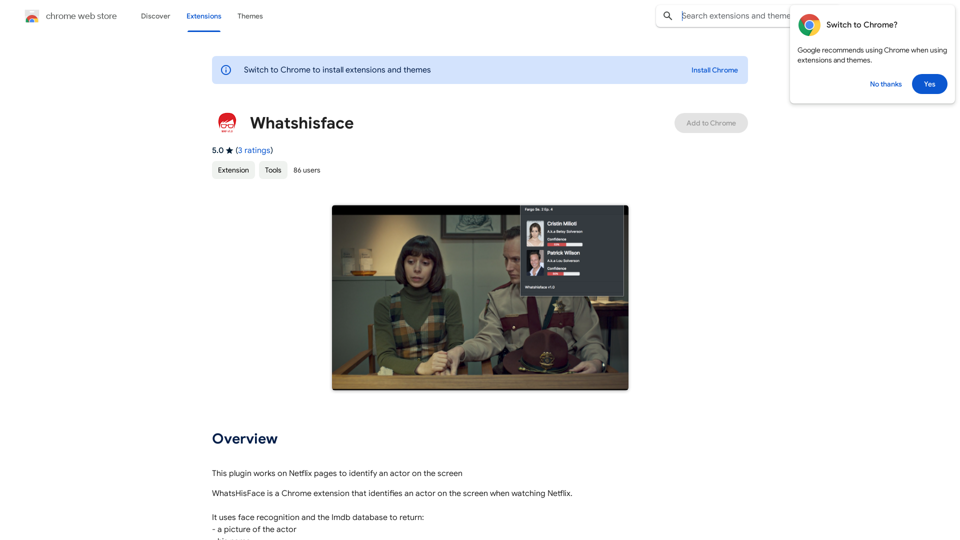
This plugin works on Netflix pages to identify an actor on the screen.
Visit Website
What's his face
Visit Website

Introduction

WhatsHisFace is a Chrome extension designed to enhance the Netflix viewing experience. It utilizes face recognition technology and the IMDb database to identify actors on screen in real-time. The extension provides users with the actor's picture, name, and character name, offering a seamless way to access information about the cast while watching movies or TV shows on Netflix.

Feature

Face Recognition Technology

WhatsHisFace employs advanced face recognition algorithms to accurately identify actors on screen during Netflix playback. This feature ensures precise and reliable actor identification.

IMDb Database Integration

The extension leverages the extensive IMDb database to provide comprehensive information about identified actors. Users can access details such as the actor's name and their character's name in the current production.

User-Friendly Interface

WhatsHisFace boasts a simple and intuitive interface, making it easy for users to access actor information without disrupting their viewing experience. The extension seamlessly integrates with the Netflix platform.

Automatic Actor Identification

Once installed, WhatsHisFace works automatically in the background. Users can simply watch their favorite Netflix content, and the extension will identify actors on screen without any manual input required.

Free to Use

WhatsHisFace is available as a free Chrome extension, allowing users to enjoy its features without any subscription or payment requirements.

FAQ

Is WhatsHisFace compatible with other browsers or streaming platforms?

WhatsHisFace is currently only available as a Chrome extension and is specifically designed for use with Netflix. It is not compatible with other browsers or streaming platforms at this time.

How can I optimize my experience with WhatsHisFace?

To get the most out of WhatsHisFace:

  • Ensure your Netflix browser is updated to the latest version
  • Restart your browser or check for extension updates if you encounter any issues
  • Note that WhatsHisFace can also identify actors in movies and TV shows outside of Netflix

Does WhatsHisFace collect or store user data?

No, WhatsHisFace does not collect or store any user data, ensuring user privacy and data security.

Latest Traffic Insights

  • Monthly Visits

    193.90 M

  • Bounce Rate

    56.27%

  • Pages Per Visit

    2.71

  • Time on Site(s)

    115.91

  • Global Rank

    -

  • Country Rank

    -

Recent Visits

Traffic Sources

  • Social Media:
    0.48%
  • Paid Referrals:
    0.55%
  • Email:
    0.15%
  • Referrals:
    12.81%
  • Search Engines:
    16.21%
  • Direct:
    69.81%
More Data

Related Websites

SinteseAI
View Detail

SinteseAI

SinteseAI

Turn educational videos into concise and easy-to-digest summaries with SinteseAI. This extension uses Artificial Intelligence...

193.90 M
Midjourney SREF Codes Library for Style Reference

What are SREF Codes?

SREF codes are special text strings used in Midjourney to quickly and easily apply specific artistic styles to your image generations. 

How to Use SREF Codes:

Simply add an SREF code to your Midjourney prompt. For example:

`/imagine a majestic dragon, SREF:cyberpunk`

SREF Code Library:

This library contains a collection of SREF codes categorized by style. 

* Art Styles:
    * `photorealistic`: Creates images with high levels of realism.
    * `impressionistic`:  Captures the essence of a scene with loose brushstrokes and vibrant colors.
    * `cubist`:  Breaks down objects into geometric shapes.
    * `surrealist`:  Creates dreamlike and fantastical images.
    * `abstract`:  Focuses on form, color, and composition rather than representational imagery.

* Visual Effects:
    * `cinematic`:  Gives images a cinematic look and feel.
    * `HDR`:  Creates images with high dynamic range, resulting in greater detail and contrast.
    * `neon`:  Adds vibrant neon lights to the image.
    * `pixel art`:  Generates images in a retro pixel art style.

* Other Styles:
    * `anime`:  Creates images in the style of Japanese animation.
    * `manga`:  Similar to anime, but with a more comic book aesthetic.
    * `sketch`:  Generates images that resemble pencil sketches.
    * `watercolor`:  Creates images with the look and feel of watercolor paintings.

Note: This is just a small sample of the many SREF codes available. 

Explore and Experiment:

The best way to learn about SREF codes is to experiment with them! Try combining different codes to create unique and interesting styles.
View Detail

Midjourney SREF Codes Library for Style Reference What are SREF Codes? SREF codes are special text strings used in Midjourney to quickly and easily apply specific artistic styles to your image generations. How to Use SREF Codes: Simply add an SREF code to your Midjourney prompt. For example: `/imagine a majestic dragon, SREF:cyberpunk` SREF Code Library: This library contains a collection of SREF codes categorized by style. * Art Styles: * `photorealistic`: Creates images with high levels of realism. * `impressionistic`: Captures the essence of a scene with loose brushstrokes and vibrant colors. * `cubist`: Breaks down objects into geometric shapes. * `surrealist`: Creates dreamlike and fantastical images. * `abstract`: Focuses on form, color, and composition rather than representational imagery. * Visual Effects: * `cinematic`: Gives images a cinematic look and feel. * `HDR`: Creates images with high dynamic range, resulting in greater detail and contrast. * `neon`: Adds vibrant neon lights to the image. * `pixel art`: Generates images in a retro pixel art style. * Other Styles: * `anime`: Creates images in the style of Japanese animation. * `manga`: Similar to anime, but with a more comic book aesthetic. * `sketch`: Generates images that resemble pencil sketches. * `watercolor`: Creates images with the look and feel of watercolor paintings. Note: This is just a small sample of the many SREF codes available. Explore and Experiment: The best way to learn about SREF codes is to experiment with them! Try combining different codes to create unique and interesting styles.

Midjourney SREF Codes Library for Style Reference What are SREF Codes? SREF codes are special text strings used in Midjourney to quickly and easily apply specific artistic styles to your image generations. How to Use SREF Codes: Simply add an SREF code to your Midjourney prompt. For example: `/imagine a majestic dragon, SREF:cyberpunk` SREF Code Library: This library contains a collection of SREF codes categorized by style. * Art Styles: * `photorealistic`: Creates images with high levels of realism. * `impressionistic`: Captures the essence of a scene with loose brushstrokes and vibrant colors. * `cubist`: Breaks down objects into geometric shapes. * `surrealist`: Creates dreamlike and fantastical images. * `abstract`: Focuses on form, color, and composition rather than representational imagery. * Visual Effects: * `cinematic`: Gives images a cinematic look and feel. * `HDR`: Creates images with high dynamic range, resulting in greater detail and contrast. * `neon`: Adds vibrant neon lights to the image. * `pixel art`: Generates images in a retro pixel art style. * Other Styles: * `anime`: Creates images in the style of Japanese animation. * `manga`: Similar to anime, but with a more comic book aesthetic. * `sketch`: Generates images that resemble pencil sketches. * `watercolor`: Creates images with the look and feel of watercolor paintings. Note: This is just a small sample of the many SREF codes available. Explore and Experiment: The best way to learn about SREF codes is to experiment with them! Try combining different codes to create unique and interesting styles.

Explore a list of 177 unique Midjourney sref codes and style references to find your perfect Midjourney sref code effect.

149.96 K
YouTube Video Summarizer
View Detail

YouTube Video Summarizer

YouTube Video Summarizer

Effortlessly summarize YouTube videos with 'YouTube Video Summarizer', your AI video-to-text converter and Chat GPT tool

193.90 M
Knowyoursnack - Discover What’s Inside Your Snacks
View Detail

Knowyoursnack - Discover What’s Inside Your Snacks

Knowyoursnack - Discover What’s Inside Your Snacks

KnowYourSnack is your personal guide to understanding snack ingredients. Simply snap a photo of the ingredients list on any snack package, and our AI-powered app will identify harmful substances, provide detailed information, and help you make healthier choices.

0
Universal Listening Comprehension - Speech-to-Text, Bilingual Subtitle Translation
View Detail

Universal Listening Comprehension - Speech-to-Text, Bilingual Subtitle Translation

Universal Listening Comprehension - Speech-to-Text, Bilingual Subtitle Translation

Alibaba's free large model application, real-time speech recognition, AI subtitle translation, and intelligent summarization. Essential for online courses, chasing dramas, and online meetings. Record, transcribe, translate, and summarize online courses and meetings from any web page.

193.90 M
Chrome Web Store
View Detail

Chrome Web Store

Chrome Web Store

Enhance your browser with new features and customize your web browsing.

193.90 M
Influencer Tools for Amazon Influencers

This guide explores essential tools to help Amazon influencers succeed.

1. Content Creation Tools:

* Canva: Design eye-catching graphics, videos, and social media posts.
* Lumen5: Create engaging videos from blog posts or scripts.
* InShot: Edit and enhance videos for mobile devices.

2. Product Research Tools:

* Jungle Scout: Analyze product trends, competition, and sales data.
* Helium 10:  Discover profitable products, track keywords, and optimize listings.
* Viral Launch:  Identify trending products and conduct market research.

3. Social Media Management Tools:

* Buffer: Schedule and manage social media posts across multiple platforms.
* Hootsuite: Monitor brand mentions, engage with followers, and track social media performance.
* Later: Plan and visualize Instagram content.

4. Analytics and Tracking Tools:

* Amazon Influencer Program Dashboard: Track your performance, earnings, and audience engagement.
* Google Analytics: Monitor website traffic and user behavior.
* UTM Parameters: Track the effectiveness of your marketing campaigns.

5. Email Marketing Tools:

* Mailchimp: Create and send email newsletters to your subscribers.
* ConvertKit: Build an email list and automate your marketing workflows.
* Klaviyo:  Segment your audience and personalize email campaigns.
View Detail

Influencer Tools for Amazon Influencers This guide explores essential tools to help Amazon influencers succeed. 1. Content Creation Tools: * Canva: Design eye-catching graphics, videos, and social media posts. * Lumen5: Create engaging videos from blog posts or scripts. * InShot: Edit and enhance videos for mobile devices. 2. Product Research Tools: * Jungle Scout: Analyze product trends, competition, and sales data. * Helium 10: Discover profitable products, track keywords, and optimize listings. * Viral Launch: Identify trending products and conduct market research. 3. Social Media Management Tools: * Buffer: Schedule and manage social media posts across multiple platforms. * Hootsuite: Monitor brand mentions, engage with followers, and track social media performance. * Later: Plan and visualize Instagram content. 4. Analytics and Tracking Tools: * Amazon Influencer Program Dashboard: Track your performance, earnings, and audience engagement. * Google Analytics: Monitor website traffic and user behavior. * UTM Parameters: Track the effectiveness of your marketing campaigns. 5. Email Marketing Tools: * Mailchimp: Create and send email newsletters to your subscribers. * ConvertKit: Build an email list and automate your marketing workflows. * Klaviyo: Segment your audience and personalize email campaigns.

Influencer Tools for Amazon Influencers This guide explores essential tools to help Amazon influencers succeed. 1. Content Creation Tools: * Canva: Design eye-catching graphics, videos, and social media posts. * Lumen5: Create engaging videos from blog posts or scripts. * InShot: Edit and enhance videos for mobile devices. 2. Product Research Tools: * Jungle Scout: Analyze product trends, competition, and sales data. * Helium 10: Discover profitable products, track keywords, and optimize listings. * Viral Launch: Identify trending products and conduct market research. 3. Social Media Management Tools: * Buffer: Schedule and manage social media posts across multiple platforms. * Hootsuite: Monitor brand mentions, engage with followers, and track social media performance. * Later: Plan and visualize Instagram content. 4. Analytics and Tracking Tools: * Amazon Influencer Program Dashboard: Track your performance, earnings, and audience engagement. * Google Analytics: Monitor website traffic and user behavior. * UTM Parameters: Track the effectiveness of your marketing campaigns. 5. Email Marketing Tools: * Mailchimp: Create and send email newsletters to your subscribers. * ConvertKit: Build an email list and automate your marketing workflows. * Klaviyo: Segment your audience and personalize email campaigns.

Tools to help influencers grow their audience and influence.

193.90 M
Suinfy: AI YouTube Summarizer
View Detail

Suinfy: AI YouTube Summarizer

Suinfy: AI YouTube Summarizer

Save time by watching long videos. Generate key insights and subtitles.

193.90 M