Open-source RightAI Tools Directory
  • Discover AI
  • Submit
  • Startup
  • Blog
Open-source RightAI Tools Directory
Discover the best AI tools of 2025 with the RightAI Tools Directory!

Friend Links

AI Anime GeneratorToolsApp AI

Support

Tap4
Privacy policyTerms & ConditionsContact Us
Loading...
loading...

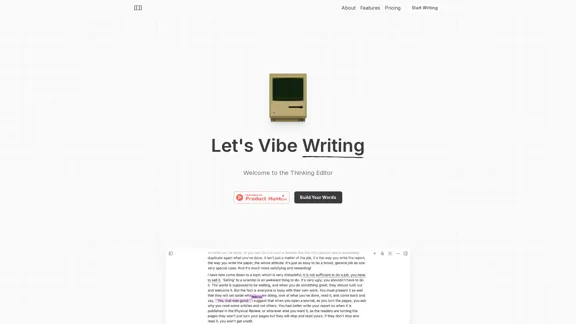
Grimo - Cursor for Writing

The most powerful AI text editor. Coherent editing. Customized styling. Collaborate seamlessly.
Visit Website
Grimo - Cursor for Writing
Visit Website

Introduction

Grimo is an advanced AI-powered text editor designed to enhance the writing process. It collaborates with users rather than writing for them, providing a unique experience that combines AI capabilities with human creativity. With features like voice input, real-time collaboration, and access to credible sources, Grimo aims to streamline the writing process and improve productivity.

Feature

  1. AI Collaboration

    Grimo works alongside users, allowing them to edit and refine their writing with the assistance of powerful AI models such as DeepSeek R1, Claude 3.7 Sonnet, and OpenAI GPT-4.

  2. Voice Input

    Users can utilize voice input that functions similarly to keyboard input, making the writing process more dynamic and engaging.

  3. Real-time Collaboration

    Grimo supports both real-time and asynchronous collaboration, enabling users to work together seamlessly without the hassle of sending files back and forth.

  4. Web Search Integration

    The tool allows users to access credible sources directly within the editor, enhancing the writing process with reliable information.

  5. Prompt Management

    Grimo can generate and improve writing prompts, as well as provide access to production-level templates from the community, making it easier for users to start their writing projects.

  6. Simple Pricing Structure

    Grimo offers straightforward pricing plans with no hidden fees, allowing users to choose a plan that fits their needs without worrying about add-ons.

How to Use?

  1. Explore the features of Grimo by signing up for the free Starter plan to get a feel for the tool.
  2. Utilize the voice input feature to enhance your writing experience and increase productivity.
  3. Take advantage of the real-time collaboration feature to work with others on your writing projects.
  4. Use the web search integration to gather credible sources and improve the quality of your writing.
  5. Experiment with the prompt management feature to discover new ideas and templates for your writing.

FAQ

What is Grimo?

Grimo is an AI-powered text editor that collaborates with users to enhance their writing experience. It provides various features to assist in the writing process, making it suitable for both casual writers and professionals.

How does Grimo work?

Grimo utilizes advanced AI models to assist users in writing. It allows for voice input, real-time collaboration, and access to credible sources, making the writing process more efficient and enjoyable.

Can I collaborate with others using Grimo?

Yes, Grimo supports both real-time and asynchronous collaboration, allowing multiple users to work on documents together without the need to send files back and forth.

What pricing plans does Grimo offer?

Grimo offers a free Starter plan, a Pro plan for $20/month, and a Team plan for $40/month, each with varying features to cater to different user needs.

How is Grimo different from other text editors?

Grimo stands out by integrating AI collaboration, voice input, and web search capabilities directly into the writing process, providing a unique and efficient writing experience.

Price

PlanPriceFeatures
StarterFreeBasic writing and editing with AI
Pro$20/monthUnlimited documents, community templates
Team$40/monthAdvanced security, organization workspace
The price is for reference only, please refer to the latest official data for actual information.

Evaluation

  1. Grimo effectively combines AI technology with user input, enhancing the writing process and making it more interactive.
  2. The voice input feature is a valuable addition, allowing for a more dynamic writing experience.
  3. Real-time collaboration is a strong point, facilitating teamwork and communication among users.
  4. However, the pricing structure may be a barrier for some users, especially those looking for free alternatives.
  5. The tool could benefit from additional features such as more extensive formatting options or integrations with other writing tools.
  6. Overall, Grimo presents a compelling option for writers seeking to leverage AI in their creative process, though it may require further enhancements to fully meet the needs of all users.

Latest Traffic Insights

  • Monthly Visits

    1.36 K

  • Bounce Rate

    38.83%

  • Pages Per Visit

    1.09

  • Time on Site(s)

    0.00

  • Global Rank

    12279296

  • Country Rank

    United States 3622818

Recent Visits

Traffic Sources

  • Social Media:
    9.80%
  • Paid Referrals:
    1.51%
  • Email:
    0.20%
  • Referrals:
    12.75%
  • Search Engines:
    33.18%
  • Direct:
    41.71%
More Data

Related Websites

Arvin: 1-Click to Use AI Copilot Anywhere
View Detail

Arvin: 1-Click to Use AI Copilot Anywhere

Arvin: 1-Click to Use AI Copilot Anywhere

The Arvin ChatGPT extension is a versatile tool that can be used on any website, offering a range of features to enhance your online experience. These features include an AI writer for crafting emails, Twitter posts, and LinkedIn updates, as well as a summarizer for blogs and YouTube videos.

193.90 M
JustRecap
View Detail

JustRecap

JustRecap

JustRecap extracts summaries and key moments from videos so you can learn more in less time.

193.90 M
Imagifi: 1-Click AI Art Anywhere
View Detail

Imagifi: 1-Click AI Art Anywhere

Imagifi: 1-Click AI Art Anywhere

Create original AI images from any page on the web Introducing Imagifi from Easyfi.ai, your personal AI image generator! With…

193.90 M
AI Anime Generator – High Quality Anime Images
View Detail

AI Anime Generator – High Quality Anime Images

AI Anime Generator – High Quality Anime Images

AI Anime Generator – High Quality Anime Images

424
Chart GPT
View Detail

Chart GPT

Chart GPT

AI-Powered Trading Companion

193.90 M
ChatGPT Snippet Saver

This is a simple tool to save snippets from your ChatGPT conversations. 

How to Use:

1.  Copy the text snippet you want to save from your ChatGPT conversation.
2.  Paste the text into the input box below.
3.  Click the "Save Snippet" button.

Your snippet will be saved to your local storage. You can access your saved snippets later by clicking the "View Saved Snippets" button.
View Detail

ChatGPT Snippet Saver This is a simple tool to save snippets from your ChatGPT conversations. How to Use: 1. Copy the text snippet you want to save from your ChatGPT conversation. 2. Paste the text into the input box below. 3. Click the "Save Snippet" button. Your snippet will be saved to your local storage. You can access your saved snippets later by clicking the "View Saved Snippets" button.

ChatGPT Snippet Saver This is a simple tool to save snippets from your ChatGPT conversations. How to Use: 1. Copy the text snippet you want to save from your ChatGPT conversation. 2. Paste the text into the input box below. 3. Click the "Save Snippet" button. Your snippet will be saved to your local storage. You can access your saved snippets later by clicking the "View Saved Snippets" button.

GPT Snippet Saver - Save Your Favorite ChatGPT Conversations Revolutionize how you gather and organize information from ChatGPT! - Effortlessly capture and store your most valuable ChatGPT interactions. - Organize your saved conversations by topic, date, or any custom tag. - Easily search and retrieve specific snippets from your saved history. - Share your favorite ChatGPT insights with others. - Never lose track of a brilliant idea or helpful response again.

193.90 M
AI Emoji Maker 

This is a fun tool that lets you create your own custom emojis using artificial intelligence! 

Just type in a description of the emoji you want, and our AI will generate some unique options for you to choose from. 

You can then customize your emoji further by adjusting its colors, size, and other features. 

Share your creations with friends and family, or use them to add a personal touch to your online conversations. 


Let your creativity flow and make some awesome emojis!
View Detail

AI Emoji Maker This is a fun tool that lets you create your own custom emojis using artificial intelligence! Just type in a description of the emoji you want, and our AI will generate some unique options for you to choose from. You can then customize your emoji further by adjusting its colors, size, and other features. Share your creations with friends and family, or use them to add a personal touch to your online conversations. Let your creativity flow and make some awesome emojis!

AI Emoji Maker This is a fun tool that lets you create your own custom emojis using artificial intelligence! Just type in a description of the emoji you want, and our AI will generate some unique options for you to choose from. You can then customize your emoji further by adjusting its colors, size, and other features. Share your creations with friends and family, or use them to add a personal touch to your online conversations. Let your creativity flow and make some awesome emojis!

Make your own unique emojis with our emoji creator that shows off your personality!

193.90 M
Chat-GPT PDF

What is Chat-GPT PDF?

Chat-GPT PDF is a tool that allows users to generate PDF files from Chat-GPT conversations. This innovative tool enables users to save and share their conversations in a more organized and visually appealing format.

How does Chat-GPT PDF work?

The process is simple and straightforward. Here's a step-by-step guide:

1. Copy the conversation: Copy the entire conversation from the Chat-GPT platform.
2. Paste the conversation: Paste the copied conversation into the Chat-GPT PDF tool.
3. Customize the layout: Customize the layout, font, and design of the PDF file according to your preferences.
4. Generate the PDF: Click the "Generate PDF" button to create a downloadable PDF file.

Features of Chat-GPT PDF

Chat-GPT PDF offers several features that make it an essential tool for users:

* Customizable layout: Customize the layout, font, and design of the PDF file to suit your needs.
* Easy sharing: Share the PDF file with others via email, social media, or messaging apps.
* Offline access: Access your conversations offline, even without an internet connection.
* Organization: Organize your conversations in a neat and tidy format, making it easier to review and reference.

Benefits of Chat-GPT PDF

The benefits of using Chat-GPT PDF are numerous:

* Improved productivity: Save time and increase productivity by having all your conversations in one place.
* Enhanced collaboration: Collaborate with others more effectively by sharing conversations in a clear and concise format.
* Better organization: Keep your conversations organized, making it easier to review and reference them later.

Conclusion

Chat-GPT PDF is a game-changer for anyone who uses Chat-GPT regularly. With its ease of use, customization options, and benefits, it's an essential tool for anyone looking to get the most out of their conversations.
View Detail

Chat-GPT PDF What is Chat-GPT PDF? Chat-GPT PDF is a tool that allows users to generate PDF files from Chat-GPT conversations. This innovative tool enables users to save and share their conversations in a more organized and visually appealing format. How does Chat-GPT PDF work? The process is simple and straightforward. Here's a step-by-step guide: 1. Copy the conversation: Copy the entire conversation from the Chat-GPT platform. 2. Paste the conversation: Paste the copied conversation into the Chat-GPT PDF tool. 3. Customize the layout: Customize the layout, font, and design of the PDF file according to your preferences. 4. Generate the PDF: Click the "Generate PDF" button to create a downloadable PDF file. Features of Chat-GPT PDF Chat-GPT PDF offers several features that make it an essential tool for users: * Customizable layout: Customize the layout, font, and design of the PDF file to suit your needs. * Easy sharing: Share the PDF file with others via email, social media, or messaging apps. * Offline access: Access your conversations offline, even without an internet connection. * Organization: Organize your conversations in a neat and tidy format, making it easier to review and reference. Benefits of Chat-GPT PDF The benefits of using Chat-GPT PDF are numerous: * Improved productivity: Save time and increase productivity by having all your conversations in one place. * Enhanced collaboration: Collaborate with others more effectively by sharing conversations in a clear and concise format. * Better organization: Keep your conversations organized, making it easier to review and reference them later. Conclusion Chat-GPT PDF is a game-changer for anyone who uses Chat-GPT regularly. With its ease of use, customization options, and benefits, it's an essential tool for anyone looking to get the most out of their conversations.

Chat-GPT PDF What is Chat-GPT PDF? Chat-GPT PDF is a tool that allows users to generate PDF files from Chat-GPT conversations. This innovative tool enables users to save and share their conversations in a more organized and visually appealing format. How does Chat-GPT PDF work? The process is simple and straightforward. Here's a step-by-step guide: 1. Copy the conversation: Copy the entire conversation from the Chat-GPT platform. 2. Paste the conversation: Paste the copied conversation into the Chat-GPT PDF tool. 3. Customize the layout: Customize the layout, font, and design of the PDF file according to your preferences. 4. Generate the PDF: Click the "Generate PDF" button to create a downloadable PDF file. Features of Chat-GPT PDF Chat-GPT PDF offers several features that make it an essential tool for users: * Customizable layout: Customize the layout, font, and design of the PDF file to suit your needs. * Easy sharing: Share the PDF file with others via email, social media, or messaging apps. * Offline access: Access your conversations offline, even without an internet connection. * Organization: Organize your conversations in a neat and tidy format, making it easier to review and reference. Benefits of Chat-GPT PDF The benefits of using Chat-GPT PDF are numerous: * Improved productivity: Save time and increase productivity by having all your conversations in one place. * Enhanced collaboration: Collaborate with others more effectively by sharing conversations in a clear and concise format. * Better organization: Keep your conversations organized, making it easier to review and reference them later. Conclusion Chat-GPT PDF is a game-changer for anyone who uses Chat-GPT regularly. With its ease of use, customization options, and benefits, it's an essential tool for anyone looking to get the most out of their conversations.

Exporting Chat History to PDF You can export your chat history with Chat-GPT to a PDF file using the following methods: #Method 1: Browser Print Function 1. Open your chat conversation with Chat-GPT in a web browser. 2. Press `Ctrl + P` (Windows) or `Cmd + P` (Mac) to open the print dialog box. 3. Select "Save as PDF" as the printer destination. 4. Choose a location to save the PDF file and set the file name. 5. Click "Save" to export the chat history to a PDF file. #Method 2: Online PDF Conversion Tools 1. Copy the entire chat conversation by pressing `Ctrl + A` (Windows) or `Cmd + A` (Mac) and then `Ctrl + C` (Windows) or `Cmd + C` (Mac). 2. Go to an online PDF conversion tool, such as SmallPDF or Convertio. 3. Paste the chat conversation into the conversion tool's text box. 4. Select the PDF format and click "Convert" to generate the PDF file. 5. Download the PDF file to your computer. #Method 3: Browser Extensions 1. Install a browser extension, such as Print Friendly & PDF or FireShot, that allows you to save web pages as PDF files. 2. Open your chat conversation with Chat-GPT in a web browser. 3. Click the browser extension's icon in the toolbar. 4. Select the "Save as PDF" option and choose a location to save the file. 5. Click "Save" to export the chat history to a PDF file. By following these methods, you can easily export your chat history with Chat-GPT to a PDF file for future reference or sharing.

193.90 M