Open-source RightAI Tools Directory
  • Discover AI
  • Submit
  • Startup
  • Blog
Open-source RightAI Tools Directory
Discover the best AI tools of 2025 with the RightAI Tools Directory!

Friend Links

AI Anime GeneratorToolsApp AI

Support

Tap4
Privacy policyTerms & ConditionsContact Us
Loading...
loading...

Keble | Online Business Co-Pilot

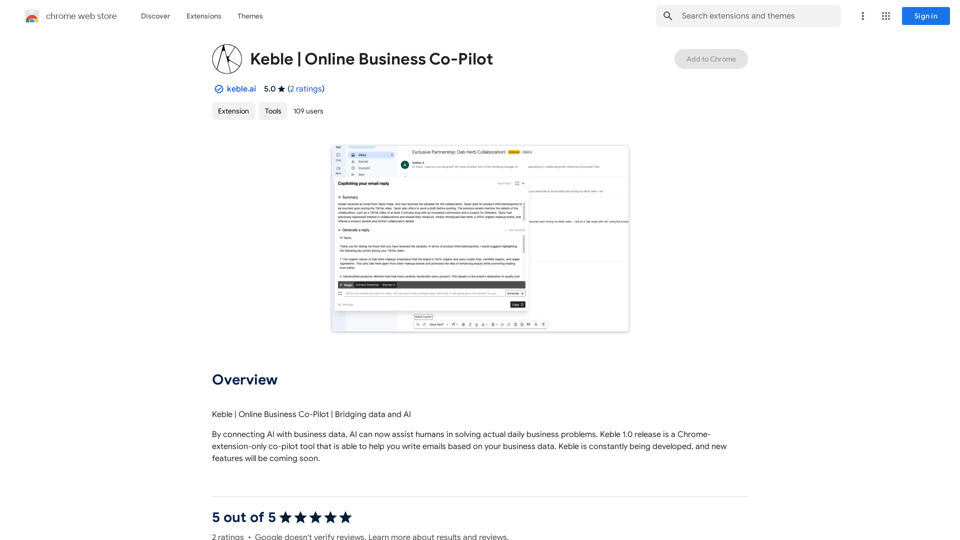
Keble | Online Business Co-Pilot | Bridging data and AI
Visit Website
Keble | Online Business Co-Pilot
Visit Website

Introduction

Keble is a Chrome extension that integrates AI with business data to assist users in solving daily business problems. The current version, Keble 1.0, functions as a co-pilot tool specifically designed to help users write emails based on their business data. This innovative extension bridges the gap between AI technology and practical business applications, making it easier for professionals to streamline their email communication processes.

Feature

AI-Powered Email Writing

Keble utilizes advanced AI technology to assist users in composing emails based on their business data. This feature helps to create more relevant and data-driven email content.

Chrome Extension Integration

As a Chrome extension, Keble seamlessly integrates with your browser, providing easy access to its features without the need for additional software installations.

Business Data Connection

Users can connect their business data to the Keble extension, allowing the AI to generate more accurate and personalized email content.

User-Friendly Interface

Keble is designed to be easy to use, requiring no technical expertise. This makes it accessible to a wide range of users, regardless of their technical background.

Continuous Development

The Keble team is committed to constantly updating the extension with new features and improvements, ensuring that users always have access to the latest AI-powered tools.

Time-Saving Automation

By automating the email writing process, Keble helps users save valuable time that can be redirected to other important tasks.

Improved Accuracy and Precision

The AI-powered email writing tool ensures a high level of accuracy and precision in email composition, reducing the risk of errors or miscommunication.

Productivity Enhancement

Keble streamlines the email writing process, contributing to increased overall productivity for its users.

Customization Options

Users can customize Keble to fit their specific business needs, making it a versatile tool for various industries and use cases.

FAQ

How do I get started with Keble?

To start using Keble, follow these steps:

  1. Install the Keble extension from the Chrome Web Store
  2. Connect your business data to the Keble extension
  3. Use the AI-powered email writing tool to compose emails based on your business data

Is Keble free to use?

Yes, Keble is free to use. However, there are optional paid upgrades available for users who require additional features or capabilities.

Which browsers are compatible with Keble?

Currently, Keble is compatible with Google Chrome. It is designed as a Chrome extension to integrate seamlessly with this popular browser.

Can I use Keble with my own business data?

Yes, Keble is designed to work with your business data. You can connect your data to the extension, allowing the AI to generate emails tailored to your specific business needs and information.

How can I maximize the benefits of using Keble?

To get the most out of Keble:

  1. Use it to automate repetitive email writing tasks
  2. Customize the extension to fit your specific business requirements
  3. Take advantage of Keble's AI-powered features to improve your email writing skills and efficiency

Related Websites
Sketch2Code GPT4-128K GPT4-Vision - Sidebar 

This is a simple sidebar for a Sketch2Code application powered by GPT4-128K and GPT4-Vision. 

It likely contains:

* Upload Sketch: A button or area to upload an image sketch.
* Code Generation Options:  Settings to choose the programming language, desired code complexity, or other generation parameters.
* Output Code: A display area to show the generated code.
* Clear Output: A button to clear the generated code.


Let me know if you'd like me to elaborate on any specific aspect of the sidebar!
View Detail

Sketch2Code GPT4-128K GPT4-Vision - Sidebar This is a simple sidebar for a Sketch2Code application powered by GPT4-128K and GPT4-Vision. It likely contains: * Upload Sketch: A button or area to upload an image sketch. * Code Generation Options: Settings to choose the programming language, desired code complexity, or other generation parameters. * Output Code: A display area to show the generated code. * Clear Output: A button to clear the generated code. Let me know if you'd like me to elaborate on any specific aspect of the sidebar!

Sketch2Code GPT4-128K GPT4-Vision - Sidebar This is a simple sidebar for a Sketch2Code application powered by GPT4-128K and GPT4-Vision. It likely contains: * Upload Sketch: A button or area to upload an image sketch. * Code Generation Options: Settings to choose the programming language, desired code complexity, or other generation parameters. * Output Code: A display area to show the generated code. * Clear Output: A button to clear the generated code. Let me know if you'd like me to elaborate on any specific aspect of the sidebar!

Sketch2Code GPT4-128K GPT4-Vision - FREE

193.90 M
Influencer Tools for Amazon Influencers

This guide explores essential tools to help Amazon influencers succeed.

1. Content Creation Tools:

* Canva: Design eye-catching graphics, videos, and social media posts.
* Lumen5: Create engaging videos from blog posts or scripts.
* InShot: Edit and enhance videos for mobile devices.

2. Product Research Tools:

* Jungle Scout: Analyze product trends, competition, and sales data.
* Helium 10:  Discover profitable products, track keywords, and optimize listings.
* Viral Launch:  Identify trending products and conduct market research.

3. Social Media Management Tools:

* Buffer: Schedule and manage social media posts across multiple platforms.
* Hootsuite: Monitor brand mentions, engage with followers, and track social media performance.
* Later: Plan and visualize Instagram content.

4. Analytics and Tracking Tools:

* Amazon Influencer Program Dashboard: Track your performance, earnings, and audience engagement.
* Google Analytics: Monitor website traffic and user behavior.
* UTM Parameters: Track the effectiveness of your marketing campaigns.

5. Email Marketing Tools:

* Mailchimp: Create and send email newsletters to your subscribers.
* ConvertKit: Build an email list and automate your marketing workflows.
* Klaviyo:  Segment your audience and personalize email campaigns.
View Detail

Influencer Tools for Amazon Influencers This guide explores essential tools to help Amazon influencers succeed. 1. Content Creation Tools: * Canva: Design eye-catching graphics, videos, and social media posts. * Lumen5: Create engaging videos from blog posts or scripts. * InShot: Edit and enhance videos for mobile devices. 2. Product Research Tools: * Jungle Scout: Analyze product trends, competition, and sales data. * Helium 10: Discover profitable products, track keywords, and optimize listings. * Viral Launch: Identify trending products and conduct market research. 3. Social Media Management Tools: * Buffer: Schedule and manage social media posts across multiple platforms. * Hootsuite: Monitor brand mentions, engage with followers, and track social media performance. * Later: Plan and visualize Instagram content. 4. Analytics and Tracking Tools: * Amazon Influencer Program Dashboard: Track your performance, earnings, and audience engagement. * Google Analytics: Monitor website traffic and user behavior. * UTM Parameters: Track the effectiveness of your marketing campaigns. 5. Email Marketing Tools: * Mailchimp: Create and send email newsletters to your subscribers. * ConvertKit: Build an email list and automate your marketing workflows. * Klaviyo: Segment your audience and personalize email campaigns.

Influencer Tools for Amazon Influencers This guide explores essential tools to help Amazon influencers succeed. 1. Content Creation Tools: * Canva: Design eye-catching graphics, videos, and social media posts. * Lumen5: Create engaging videos from blog posts or scripts. * InShot: Edit and enhance videos for mobile devices. 2. Product Research Tools: * Jungle Scout: Analyze product trends, competition, and sales data. * Helium 10: Discover profitable products, track keywords, and optimize listings. * Viral Launch: Identify trending products and conduct market research. 3. Social Media Management Tools: * Buffer: Schedule and manage social media posts across multiple platforms. * Hootsuite: Monitor brand mentions, engage with followers, and track social media performance. * Later: Plan and visualize Instagram content. 4. Analytics and Tracking Tools: * Amazon Influencer Program Dashboard: Track your performance, earnings, and audience engagement. * Google Analytics: Monitor website traffic and user behavior. * UTM Parameters: Track the effectiveness of your marketing campaigns. 5. Email Marketing Tools: * Mailchimp: Create and send email newsletters to your subscribers. * ConvertKit: Build an email list and automate your marketing workflows. * Klaviyo: Segment your audience and personalize email campaigns.

Tools to help influencers grow their audience and influence.

193.90 M
Upword: AI Notes & Summarization Tool
View Detail

Upword: AI Notes & Summarization Tool

Upword: AI Notes & Summarization Tool

Get the key information from every webpage. Generate AI-powered notes and save time with Upword.

193.90 M
Rent GPUs | Vast.ai
View Detail

Rent GPUs | Vast.ai

Rent GPUs | Vast.ai

Reduce your cloud compute costs by 3-5 times with the best cloud GPU rentals. Vast.ai's simple search interface allows for fair comparison of GPU rentals from all providers.

869.48 K
MIA - Writing Assistant
View Detail

MIA - Writing Assistant

MIA - Writing Assistant

Write Faster, Better, and More Engaging Content On LinkedIn and Medium Tired of staring at a blank page? We've all been there. But what if you could write compelling content for LinkedIn and Medium with ease? Here's how: * Find Your Niche: What are you passionate about? What do you know a lot about? Focus your writing on topics that genuinely interest you. * Craft a Killer Headline: Your headline is your first impression. Make it catchy, clear, and benefit-driven. * Structure for Success: Use headings, subheadings, and bullet points to break up your text and make it easy to read. * Tell a Story: People connect with stories. Weave narratives into your content to make it more engaging. * Keep it Concise: Get to the point quickly. People have short attention spans, so respect their time. * Use Visuals: Images, videos, and infographics can break up text and make your content more visually appealing. * Proofread Carefully: Typos and grammatical errors can damage your credibility. Always proofread your work before publishing. * Promote Your Content: Share your articles on social media and engage with your audience in the comments. By following these tips, you can write faster, better, and more engaging content for LinkedIn and Medium.

193.90 M
Genius PT
View Detail

Genius PT

Genius PT

Genius PT Extension.

193.90 M
ChatGPT/Wenxin Yiyan to Yuque
View Detail

ChatGPT/Wenxin Yiyan to Yuque

ChatGPT/Wenxin Yiyan to Yuque

One-click sync ChatGPT/Wenxin Yiyan conversation history to Yuque document

193.90 M
STAIRAZ 

Job Application Tracker, Resume Builder, Job Analysis
View Detail

STAIRAZ Job Application Tracker, Resume Builder, Job Analysis

STAIRAZ Job Application Tracker, Resume Builder, Job Analysis

STAIRAZ Job Application Tracker: A professional tool that simplifies your job search and increases your chances of getting hired.

193.90 M