Open-source RightAI Tools Directory
  • Discover AI
  • Submit
  • Startup
  • Blog
Open-source RightAI Tools Directory
Discover the best AI tools of 2025 with the RightAI Tools Directory!

Friend Links

AI Anime GeneratorToolsApp AI

Support

Tap4
Privacy policyTerms & ConditionsContact Us
Loading...
loading...

Please provide me with the YouTube video link so I can transcribe it for you.

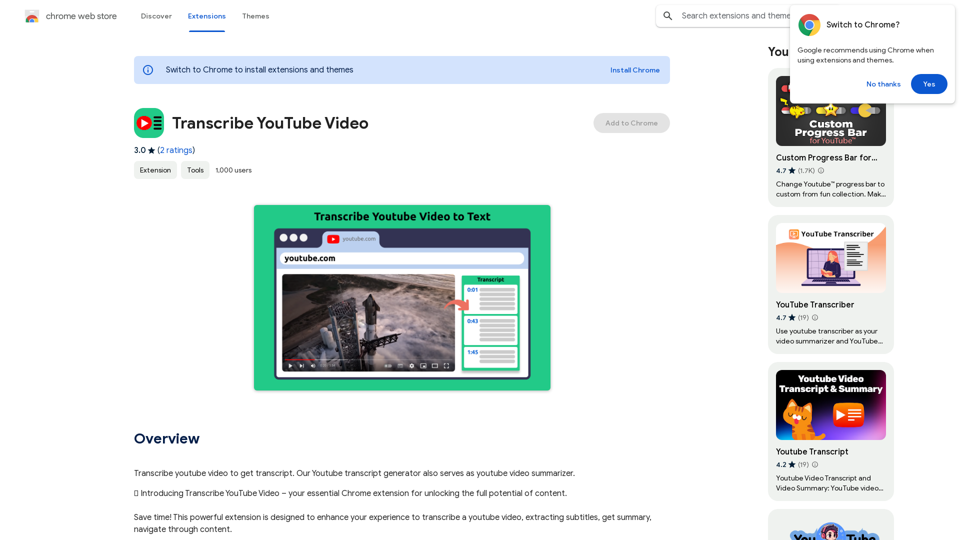
Transcribe a YouTube video to get a transcript. Our YouTube transcript generator also acts as a YouTube video summarizer.
Visit Website
Please provide me with the YouTube video link so I can transcribe it for you.
Visit Website

Introduction

Transcribe YouTube Video is a Chrome extension that uses AI technology to transcribe and summarize YouTube videos. It offers features like multi-language support, time navigation, and transcript downloading. This tool is designed for various users, including non-native speakers, students, teachers, professionals, researchers, and content creators, aiming to enhance accessibility, save time, and improve content understanding.

Feature

AI YouTube Summarizer

  • Transcribe and summarize YouTube videos using AI technology
  • Provide quick insights without watching the entire content

Multi-Language Support

  • Transcribe and summarize videos in various languages
  • Cater to a global audience

Time Navigation

  • Jump directly to specific parts of the video
  • Intuitive interface for easy navigation

Transcript Management

  • Download transcripts for offline use
  • Copy video transcript or AI summary to clipboard
  • Flexible options for integrating YouTube content into projects

User-Friendly Interface

  • Simple installation process via Chrome Web Store
  • Easy-to-use interface on YouTube video pages

Free to Use

  • Accessible to all users without cost
  • Requires funding for server and AI resources

Privacy Protection

  • Ensures user data security

FAQ

How to use Transcribe YouTube Video?

  1. Install the extension from Chrome Web Store
  2. Open a YouTube video
  3. Access the green panel for full transcript, AI summary, and timeline navigation
  4. Download or copy the text as needed

Is the app free?

The extension is free to use but requires funding for server and AI resources.

Can it transcribe videos in any language?

Yes, users can choose their preferred language for transcription and summarization. A default language option is also available.

How does it work?

The extension activates by clicking its button on any YouTube video page.

Who can benefit from this tool?

  • Non-native speakers: Improve language skills
  • Students: Enhance learning and note-taking
  • Teachers: Improve teaching methodologies
  • Professionals: Save time on research and analysis
  • Researchers: Quickly gather information from YouTube
  • Content creators: Improve accessibility and engagement

Latest Traffic Insights

  • Monthly Visits

    193.90 M

  • Bounce Rate

    56.27%

  • Pages Per Visit

    2.71

  • Time on Site(s)

    115.91

  • Global Rank

    -

  • Country Rank

    -

Recent Visits

Traffic Sources

  • Social Media:
    0.48%
  • Paid Referrals:
    0.55%
  • Email:
    0.15%
  • Referrals:
    12.81%
  • Search Engines:
    16.21%
  • Direct:
    69.81%
More Data

Related Websites

Seenopsi
View Detail

Seenopsi

Seenopsi

Send custom prompts, generate content, summarize links, entire web pages, YouTube videos, and code, and much more! All powered by GPT-4 ⚡️

193.90 M
Lexicore - AI for Legal Practices
View Detail

Lexicore - AI for Legal Practices

Lexicore - AI for Legal Practices

Lexicore is an AI-powered chatbot designed to be a virtual legal assistant. It can give you quick answers and accurate information to help you with your legal questions.

0
Chrome Web Store
View Detail

Chrome Web Store

Chrome Web Store

Enhance your browser with new features and tailor your browsing experience to your preferences.

193.90 M
Readel: AI Text-to-Speech
View Detail

Readel: AI Text-to-Speech

Readel: AI Text-to-Speech

A small program that can read aloud any Reddit posts, audiobooks, or webpages using the highest quality text-to-speech technology.

193.90 M
Stability Matrix CivitAI Integration 

This document outlines the integration of Stability Matrix into Civitai. 

What is Stability Matrix?

Stability Matrix is a powerful tool for evaluating and comparing different AI models. It provides a comprehensive set of metrics to assess model performance across various tasks, including text generation, image generation, and code generation.

Benefits of Integrating Stability Matrix into Civitai:

* Enhanced Model Discovery: Users can easily identify high-performing models based on their desired tasks and preferences.
* Improved Model Selection: The detailed metrics provided by Stability Matrix allow for informed decision-making when choosing a model for a specific project.
* Community-Driven Evaluation: By leveraging the collective wisdom of the Civitai community, Stability Matrix fosters a transparent and collaborative approach to model evaluation.
* Accelerated Model Development: Developers can use Stability Matrix to track the progress of their models and identify areas for improvement.

Implementation Details:

* Stability Matrix scores will be displayed alongside model descriptions on Civitai.
* Users will be able to filter models based on their Stability Matrix scores.
* The integration will initially focus on text generation and image generation models.

Future Enhancements:

* Expand support for additional model types, such as code generation models.
* Implement interactive visualizations of Stability Matrix data.
* Allow users to contribute their own model evaluations to the platform.
View Detail

Stability Matrix CivitAI Integration This document outlines the integration of Stability Matrix into Civitai. What is Stability Matrix? Stability Matrix is a powerful tool for evaluating and comparing different AI models. It provides a comprehensive set of metrics to assess model performance across various tasks, including text generation, image generation, and code generation. Benefits of Integrating Stability Matrix into Civitai: * Enhanced Model Discovery: Users can easily identify high-performing models based on their desired tasks and preferences. * Improved Model Selection: The detailed metrics provided by Stability Matrix allow for informed decision-making when choosing a model for a specific project. * Community-Driven Evaluation: By leveraging the collective wisdom of the Civitai community, Stability Matrix fosters a transparent and collaborative approach to model evaluation. * Accelerated Model Development: Developers can use Stability Matrix to track the progress of their models and identify areas for improvement. Implementation Details: * Stability Matrix scores will be displayed alongside model descriptions on Civitai. * Users will be able to filter models based on their Stability Matrix scores. * The integration will initially focus on text generation and image generation models. Future Enhancements: * Expand support for additional model types, such as code generation models. * Implement interactive visualizations of Stability Matrix data. * Allow users to contribute their own model evaluations to the platform.

Stability Matrix CivitAI Integration This document outlines the integration of Stability Matrix into Civitai. What is Stability Matrix? Stability Matrix is a powerful tool for evaluating and comparing different AI models. It provides a comprehensive set of metrics to assess model performance across various tasks, including text generation, image generation, and code generation. Benefits of Integrating Stability Matrix into Civitai: * Enhanced Model Discovery: Users can easily identify high-performing models based on their desired tasks and preferences. * Improved Model Selection: The detailed metrics provided by Stability Matrix allow for informed decision-making when choosing a model for a specific project. * Community-Driven Evaluation: By leveraging the collective wisdom of the Civitai community, Stability Matrix fosters a transparent and collaborative approach to model evaluation. * Accelerated Model Development: Developers can use Stability Matrix to track the progress of their models and identify areas for improvement. Implementation Details: * Stability Matrix scores will be displayed alongside model descriptions on Civitai. * Users will be able to filter models based on their Stability Matrix scores. * The integration will initially focus on text generation and image generation models. Future Enhancements: * Expand support for additional model types, such as code generation models. * Implement interactive visualizations of Stability Matrix data. * Allow users to contribute their own model evaluations to the platform.

This extension adds a button to the CivitAI interface that allows you to download a given model with Stability Matrix.

193.90 M
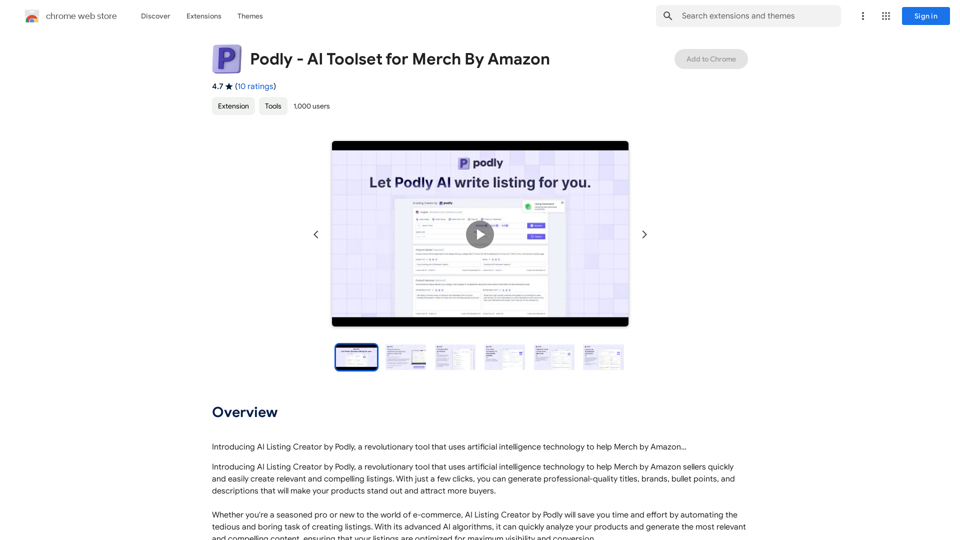
Podly - AI Toolset for Merch By Amazon
View Detail

Podly - AI Toolset for Merch By Amazon

Podly - AI Toolset for Merch By Amazon

Introducing AI Listing Creator by Podly, a revolutionary tool that uses artificial intelligence technology to help Merch by Amazon sellers create high-quality product listings quickly and efficiently.

193.90 M
Article Summary with ChatGPT and Take Notes

This is a guide on how to use ChatGPT to summarize articles and take notes effectively. 

Step 1:  Provide ChatGPT with the Article

Copy and paste the full text of the article into the ChatGPT interface. 

Step 2:  Craft Your Prompt

Tell ChatGPT what you want it to do. Here are some examples:

* Summarize: "Please summarize this article in 200 words."
* Key Points: "What are the main points of this article?"
* Bullet Points: "Summarize the key findings of this article in bullet points."
* Notes: "Take notes on this article, focusing on the author's arguments and supporting evidence."

Step 3:  Review and Refine

ChatGPT will generate a summary, key points, bullet points, or notes based on your prompt. 

* Read carefully: Make sure the output accurately reflects the article's content.
* Edit as needed:  You can ask ChatGPT to rephrase sections or provide more detail.
* Add your own insights:  Don't just copy ChatGPT's output. Use it as a starting point and add your own thoughts, questions, and connections.

Tips for Effective Use:

* Be specific: The more specific your prompt, the better the output will be.
* Experiment with different prompts: Try various phrasing to see what works best.
* Use ChatGPT as a tool:  It's a powerful aid, but it's not a replacement for critical reading and thinking.
View Detail

Article Summary with ChatGPT and Take Notes This is a guide on how to use ChatGPT to summarize articles and take notes effectively. Step 1: Provide ChatGPT with the Article Copy and paste the full text of the article into the ChatGPT interface. Step 2: Craft Your Prompt Tell ChatGPT what you want it to do. Here are some examples: * Summarize: "Please summarize this article in 200 words." * Key Points: "What are the main points of this article?" * Bullet Points: "Summarize the key findings of this article in bullet points." * Notes: "Take notes on this article, focusing on the author's arguments and supporting evidence." Step 3: Review and Refine ChatGPT will generate a summary, key points, bullet points, or notes based on your prompt. * Read carefully: Make sure the output accurately reflects the article's content. * Edit as needed: You can ask ChatGPT to rephrase sections or provide more detail. * Add your own insights: Don't just copy ChatGPT's output. Use it as a starting point and add your own thoughts, questions, and connections. Tips for Effective Use: * Be specific: The more specific your prompt, the better the output will be. * Experiment with different prompts: Try various phrasing to see what works best. * Use ChatGPT as a tool: It's a powerful aid, but it's not a replacement for critical reading and thinking.

Article Summary with ChatGPT and Take Notes This is a guide on how to use ChatGPT to summarize articles and take notes effectively. Step 1: Provide ChatGPT with the Article Copy and paste the full text of the article into the ChatGPT interface. Step 2: Craft Your Prompt Tell ChatGPT what you want it to do. Here are some examples: * Summarize: "Please summarize this article in 200 words." * Key Points: "What are the main points of this article?" * Bullet Points: "Summarize the key findings of this article in bullet points." * Notes: "Take notes on this article, focusing on the author's arguments and supporting evidence." Step 3: Review and Refine ChatGPT will generate a summary, key points, bullet points, or notes based on your prompt. * Read carefully: Make sure the output accurately reflects the article's content. * Edit as needed: You can ask ChatGPT to rephrase sections or provide more detail. * Add your own insights: Don't just copy ChatGPT's output. Use it as a starting point and add your own thoughts, questions, and connections. Tips for Effective Use: * Be specific: The more specific your prompt, the better the output will be. * Experiment with different prompts: Try various phrasing to see what works best. * Use ChatGPT as a tool: It's a powerful aid, but it's not a replacement for critical reading and thinking.

I can do that! Please provide me with the URL of the webpage or article you'd like me to summarize. I'll do my best to create a concise and easy-to-understand summary for you.

193.90 M
Kerplunk - AI Powered Video Interviewer
View Detail

Kerplunk - AI Powered Video Interviewer

Kerplunk - AI Powered Video Interviewer

Optimize your hiring with our AI-powered video interviewer. Kerplunk delivers insightful interviews. Get an AI Interview Assistant for your recruitment.

7.59 K