Open-source RightAI Tools Directory
  • Discover AI
  • Submit
  • Startup
  • Blog
Open-source RightAI Tools Directory
Discover the best AI tools of 2025 with the RightAI Tools Directory!

Friend Links

AI Anime GeneratorToolsApp AI

Support

Tap4
Privacy policyTerms & ConditionsContact Us
Loading...
loading...

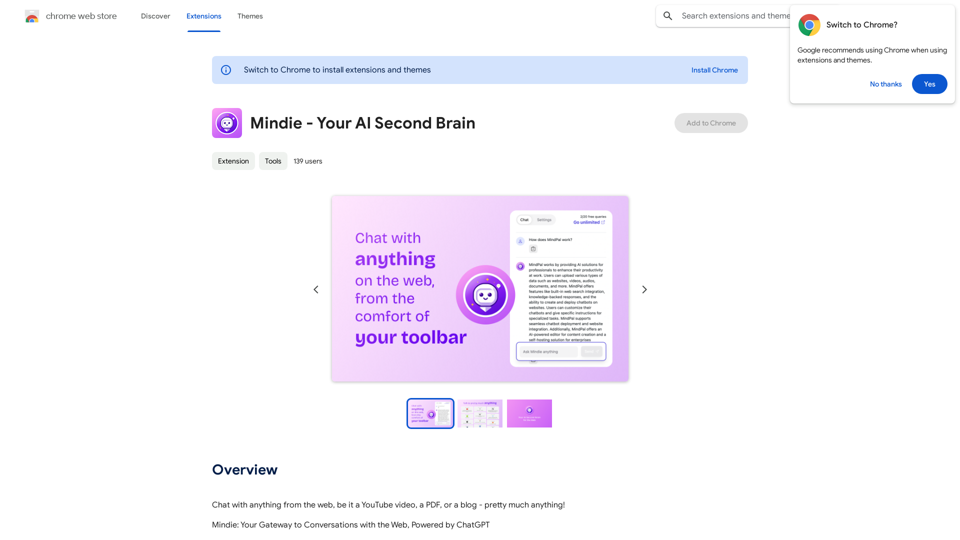
Mindie - Your AI Second Brain

Talk to anything on the web, like YouTube videos, PDFs, or blogs - almost anything!
Visit Website
Mindie - Your AI Second Brain
Visit Website

Introduction

Mindie is an AI-powered browser extension that enables users to interact with web content using ChatGPT technology. It allows seamless conversations with various online materials, including YouTube videos, PDF documents, and blog posts. Mindie offers features like instant page summaries and quick queries, making it a versatile tool for enhancing web browsing experiences.

Feature

🔍 Instant Page Summaries

Mindie provides quick and comprehensive summaries of articles and webpages, allowing users to grasp the main points at a glance.

🎙 Quick Queries

Users can ask questions about web pages directly from the browser's toolbar, eliminating the need to switch between multiple tabs.

Custom Email Replies

Mindie can generate personalized email responses using ChatGPT and predefined contexts, streamlining communication tasks.

Versatile Content Interaction

The extension supports interactions with various types of web content, including YouTube videos, PDF documents, and blog posts.

Easy Installation and Use

Mindie is simple to install and use, with features accessible directly from the browser's toolbar.

Free Basic Version

The extension offers a free version with core functionalities, making it accessible to all users.

Premium Features

Mindie provides in-app purchases for additional features and benefits, catering to users who require advanced capabilities.

FAQ

Is Mindie free to use?

Yes, Mindie offers a free version with core functionalities. However, it also provides in-app purchases for additional features and benefits.

What types of web content can Mindie interact with?

Mindie can interact with various types of web content, including YouTube videos, PDF documents, and blog posts.

How do I access Mindie's features?

After installing the Mindie extension, you can access its features directly from your browser's toolbar.

Latest Traffic Insights

  • Monthly Visits

    193.90 M

  • Bounce Rate

    56.27%

  • Pages Per Visit

    2.71

  • Time on Site(s)

    115.91

  • Global Rank

    -

  • Country Rank

    -

Recent Visits

Traffic Sources

  • Social Media:
    0.48%
  • Paid Referrals:
    0.55%
  • Email:
    0.15%
  • Referrals:
    12.81%
  • Search Engines:
    16.21%
  • Direct:
    69.81%
More Data

Related Websites

Magic Cal
View Detail

Magic Cal

Magic Cal

Make events with AI -- ChatGPT in Google Calendar This is a guide on how to use ChatGPT to create events in your Google Calendar. 1. Open ChatGPT and Google Calendar: * Start a new conversation in ChatGPT. * Open your Google Calendar in a separate tab or window. 2. Tell ChatGPT what you want to schedule: * Be specific about the event details, including: * Event name: (e.g., "Team Meeting") * Date and time: (e.g., "Next Tuesday at 2:00 PM") * Duration: (e.g., "1 hour") * Location: (e.g., "Conference Room") * Description: (optional, add any relevant details) 3. ChatGPT will generate a calendar event string: * ChatGPT will provide you with a text string that includes all the event details in a format suitable for Google Calendar. 4. Copy and paste the event string into Google Calendar: * Click on the "Create" button in Google Calendar. * Paste the event string generated by ChatGPT into the event details field. * Adjust any details if needed. 5. Save the event: * Click "Save" to add the event to your Google Calendar. Let me know if you have any other questions.

193.90 M
Discord Translator
View Detail

Discord Translator

Discord Translator

Translate Messages in Discord ============================= What is the "Translate" feature in Discord? The "Translate" feature in Discord allows users to translate messages in real-time, making it easier for people who speak different languages to communicate with each other. How to use the "Translate" feature in Discord? #1. Enable the "Translate" feature To enable the "Translate" feature, you need to go to the "User Settings" and click on the "Language" tab. Then, toggle the switch next to "Translator" to the "On" position. #2. Set your preferred language After enabling the "Translate" feature, you need to set your preferred language. You can do this by clicking on the "Language" dropdown menu and selecting your preferred language from the list. #3. Translate messages Once you've set your preferred language, you can start translating messages. To translate a message, simply hover over the message and click on the "Translate" button that appears. #4. View translated messages After clicking the "Translate" button, the message will be translated into your preferred language. You can view the translated message below the original message. Benefits of the "Translate" feature in Discord The "Translate" feature in Discord has several benefits, including: * Improved communication: The "Translate" feature helps to break down language barriers, making it easier for people who speak different languages to communicate with each other. * Increased accessibility: The "Translate" feature makes Discord more accessible to people who may not speak the dominant language of a server or community. * Enhanced collaboration: The "Translate" feature enables people to collaborate more effectively, even if they speak different languages.

193.90 M
New York Laws on the App Store
View Detail

New York Laws on the App Store

New York Laws on the App Store

Access the full text of New York State laws with ease. Bookmark important sections, highlight text, and get AI-generated summaries. Features include: - Comprehensive search functionality to quickly find specific laws and regulations - Customizable bookmarks to mark important sections for future reference - Highlighting tool to emphasize key points and phrases - AI-powered summaries to provide a concise overview of complex laws

124.77 M
AI Essay Writer & Free AI Writing Tools | Essay Generator
View Detail

AI Essay Writer & Free AI Writing Tools | Essay Generator

AI Essay Writer & Free AI Writing Tools | Essay Generator

Enhance your essay writing skills with our AI Essay Writer. Begin creating essays today using our AI Essay Writing Tools | No Registration Needed

121.36 K
AHelp: Ultimate Hub of Educational and AI Writing Tools
View Detail

AHelp: Ultimate Hub of Educational and AI Writing Tools

AHelp: Ultimate Hub of Educational and AI Writing Tools

AHelp: Your essential toolkit for study, homework and research. Our platform offers various tools to make homework, assignments and essay writing easier.

99.04 K
Cykel: AI Task Automation Assistant
View Detail

Cykel: AI Task Automation Assistant

Cykel: AI Task Automation Assistant

Cykel AI Browser Extension

193.90 M
Knowz AI Search Engine: A New Era of Online Searching Experience
View Detail

Knowz AI Search Engine: A New Era of Online Searching Experience

Knowz AI Search Engine: A New Era of Online Searching Experience

Discover the power of Knowz, a free AI search designed to deliver fast, accurate, and clutter-free answers, revolutionizing your online searches.

270
Met Genius Extension
View Detail

Met Genius Extension

Met Genius Extension

The Power of React and TypeScript for Building Interactive Chrome Extensions React and TypeScript are a powerful combination for developing engaging and robust Chrome extensions. Here's why: * React's Component-Based Architecture: React's component-based approach makes building complex UIs for your extensions manageable and reusable. * TypeScript's Static Typing: TypeScript's type system catches errors early in development, leading to more reliable and maintainable code. * Improved Developer Experience: Both React and TypeScript offer excellent tooling and a strong community, making development smoother and more enjoyable. By leveraging these technologies, you can create Chrome extensions that are: * Interactive and User-Friendly: React's declarative style and virtual DOM enable smooth and responsive user interfaces. * Scalable and Maintainable: TypeScript's type safety and React's component structure promote code organization and extensibility. * Bug-Free and Reliable: TypeScript's static typing helps prevent runtime errors, resulting in more robust extensions. Let's explore how to harness the power of React and TypeScript to build your next amazing Chrome extension!

193.90 M