Open-source RightAI Tools Directory
  • Discover AI
  • Submit
  • Startup
  • Blog
Open-source RightAI Tools Directory
Discover the best AI tools of 2025 with the RightAI Tools Directory!

Friend Links

AI Anime GeneratorToolsApp AI

Support

Tap4
Privacy policyTerms & ConditionsContact Us
Loading...
loading...

DreamStudio

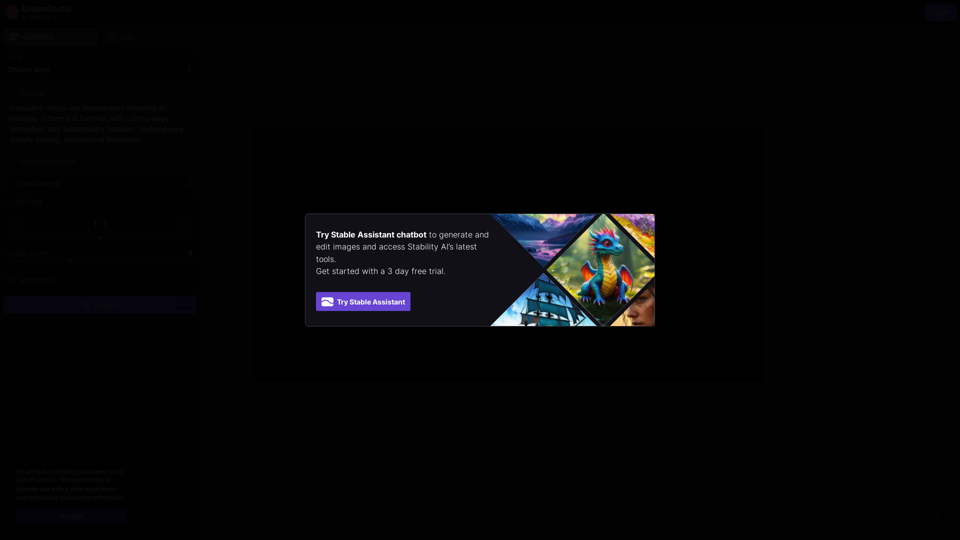
DreamStudio is an AI-powered image generation platform developed by Stability AI
Visit Website
DreamStudio
Visit Website

Introduction

DreamStudio is an AI-powered image generation platform developed by Stability AI. It offers users the ability to create, edit, and style images using advanced artificial intelligence technology. The platform caters to both creative professionals and enthusiasts, providing a user-friendly interface for exploring AI-generated art and imagery. With features like image generation from text prompts, image editing, style application, and customizable settings, DreamStudio empowers users to create unique, high-quality visuals quickly and efficiently.

Feature

Image Generation and Editing

  • Generate unique images from text prompts
  • Modify existing images using AI tools
  • Apply various artistic styles to images
  • Adjust parameters for fine-tuned results

Stable Assistant

  • AI chatbot for image generation and editing guidance
  • Helps users access Stability AI's latest tools and features

User-Friendly Interface

  • Designed for both beginners and professionals
  • Options to Generate, Edit, or Style images
  • Customizable settings for image dimensions and count

Versatile Applications

  • Suitable for art, design, and content creation
  • Applicable in fields such as graphic design, digital art, content marketing, product visualization, architectural rendering, fashion design, game asset creation, and storyboarding

Advanced AI Technology

  • Powered by Stability AI's proprietary machine learning models
  • Trained on vast datasets of images and text
  • Capable of understanding and generating complex visual concepts

Free Trial and Pricing

  • 3-day free trial available for new users
  • Detailed pricing information available on the official website

FAQ

What is Stable Assistant?

Stable Assistant is an AI chatbot integrated into DreamStudio that helps users generate and edit images, as well as access Stability AI's latest tools.

Can I use DreamStudio for commercial projects?

For information on commercial usage, please refer to Stability AI's terms of service or contact their support team.

How does DreamStudio compare to other AI image generators?

DreamStudio leverages Stability AI's advanced technology, offering unique features and capabilities. It's best to try the free trial and compare it with other platforms to determine which suits your needs best.

Is my data safe when using DreamStudio?

Stability AI uses cookies to enhance user experience and website functionality. For detailed information on data handling and privacy, refer to their privacy policy.

Can I upload my own images to edit in DreamStudio?

Yes, DreamStudio allows users to upload their own images for editing and style application.

Related Websites
Journey ArtPrompt with Midjourney

This guide will walk you through creating stunning artwork using Midjourney, a powerful AI art generator. 

1. Accessing Midjourney

* You'll need a Discord account to use Midjourney. 
* Join the official Midjourney server: [https://discord.gg/midjourney](https://discord.gg/midjourney)

2. Understanding the Basics

* `/imagine` Command: This is the core command for generating images.
* Prompt:  A text description of the artwork you want to create. Be specific and descriptive!
* Parameters: Options that control aspects like image size, aspect ratio, and style.

3. Crafting Your Journey Prompt

Think about the story you want to tell with your artwork.  

* Setting: Where does your journey take place? (e.g., a mystical forest, a futuristic city, a desolate wasteland)
* Characters: Who is on this journey? (e.g., a lone traveler, a group of adventurers, mythical creatures)
* Mood: What feeling do you want to evoke? (e.g., adventurous, mysterious, hopeful, melancholic)
* Style: What artistic style appeals to you? (e.g., photorealistic, painterly, abstract)

4. Putting it Together

Combine these elements into a clear and concise prompt. 

Example:

`/imagine A lone traveler journeys through a mystical forest at sunset, bathed in golden light. The path ahead is shrouded in mist, hinting at unknown wonders. Style: painterly, ethereal`

5. Experiment and Refine

* Midjourney is all about experimentation! Try different prompts, parameters, and styles.
* Use the "upscale" command to enlarge your favorite images and reveal more detail.
* Don't be afraid to iterate and refine your prompts based on the results.
View Detail

Journey ArtPrompt with Midjourney This guide will walk you through creating stunning artwork using Midjourney, a powerful AI art generator. 1. Accessing Midjourney * You'll need a Discord account to use Midjourney. * Join the official Midjourney server: [https://discord.gg/midjourney](https://discord.gg/midjourney) 2. Understanding the Basics * `/imagine` Command: This is the core command for generating images. * Prompt: A text description of the artwork you want to create. Be specific and descriptive! * Parameters: Options that control aspects like image size, aspect ratio, and style. 3. Crafting Your Journey Prompt Think about the story you want to tell with your artwork. * Setting: Where does your journey take place? (e.g., a mystical forest, a futuristic city, a desolate wasteland) * Characters: Who is on this journey? (e.g., a lone traveler, a group of adventurers, mythical creatures) * Mood: What feeling do you want to evoke? (e.g., adventurous, mysterious, hopeful, melancholic) * Style: What artistic style appeals to you? (e.g., photorealistic, painterly, abstract) 4. Putting it Together Combine these elements into a clear and concise prompt. Example: `/imagine A lone traveler journeys through a mystical forest at sunset, bathed in golden light. The path ahead is shrouded in mist, hinting at unknown wonders. Style: painterly, ethereal` 5. Experiment and Refine * Midjourney is all about experimentation! Try different prompts, parameters, and styles. * Use the "upscale" command to enlarge your favorite images and reveal more detail. * Don't be afraid to iterate and refine your prompts based on the results.

Journey ArtPrompt with Midjourney This guide will walk you through creating stunning artwork using Midjourney, a powerful AI art generator. 1. Accessing Midjourney * You'll need a Discord account to use Midjourney. * Join the official Midjourney server: [https://discord.gg/midjourney](https://discord.gg/midjourney) 2. Understanding the Basics * `/imagine` Command: This is the core command for generating images. * Prompt: A text description of the artwork you want to create. Be specific and descriptive! * Parameters: Options that control aspects like image size, aspect ratio, and style. 3. Crafting Your Journey Prompt Think about the story you want to tell with your artwork. * Setting: Where does your journey take place? (e.g., a mystical forest, a futuristic city, a desolate wasteland) * Characters: Who is on this journey? (e.g., a lone traveler, a group of adventurers, mythical creatures) * Mood: What feeling do you want to evoke? (e.g., adventurous, mysterious, hopeful, melancholic) * Style: What artistic style appeals to you? (e.g., photorealistic, painterly, abstract) 4. Putting it Together Combine these elements into a clear and concise prompt. Example: `/imagine A lone traveler journeys through a mystical forest at sunset, bathed in golden light. The path ahead is shrouded in mist, hinting at unknown wonders. Style: painterly, ethereal` 5. Experiment and Refine * Midjourney is all about experimentation! Try different prompts, parameters, and styles. * Use the "upscale" command to enlarge your favorite images and reveal more detail. * Don't be afraid to iterate and refine your prompts based on the results.

New backgrounds with Midjourney on new tabs

193.90 M
#1 AI Dating Assistant for Rizz Pick Up Lines - WingmanX
View Detail

#1 AI Dating Assistant for Rizz Pick Up Lines - WingmanX

#1 AI Dating Assistant for Rizz Pick Up Lines - WingmanX

Be visible on Tinder, Hinge, Bumble with WingmanX. Attract any woman, get instant replies, and say goodbye to wasted matches. Boost your dating success.

4.90 K
Youdao Smart Translation
View Detail

Youdao Smart Translation

Youdao Smart Translation

【Youdao Lingdong Translation】Using Youdao's large translation model, the top choice for immersive web translation tools! Real-time contrast translation: Turn any web page into a contrast. Image translation: Easily extract text from images. Instant translation input box: Enter Chinese and easily convert to English.

193.90 M
Free AI Image Generator | Prompt Generator and AI Image Creator
View Detail

Free AI Image Generator | Prompt Generator and AI Image Creator

Free AI Image Generator | Prompt Generator and AI Image Creator

Picture AI is an amazing AI image generator and image editor. It generates prompts for you and then creates images that meet your needs with AI.

100
Dressplay
View Detail

Dressplay

Dressplay

Dressplay

0
H1B Sponsor Checker by H1BGrader
View Detail

H1B Sponsor Checker by H1BGrader

H1B Sponsor Checker by H1BGrader

View H1B Sponsorship salaries, LCA/USCIS data, and insights for employers and their job postings while browsing Linkedin, and Indeed

193.90 M
Recally - The Best Screenshot Management App for macOS
View Detail

Recally - The Best Screenshot Management App for macOS

Recally - The Best Screenshot Management App for macOS

Recally is the best app to manage your screenshots on macOS. Organize, browse, and search your screenshots with ease. Available on macOS.

0
ImageTrans
View Detail

ImageTrans

ImageTrans

Translate text within images found on websites.

193.90 M