Open-source RightAI Tools Directory
  • Discover AI
  • Submit
  • Startup
  • Blog
Open-source RightAI Tools Directory
Discover the best AI tools of 2025 with the RightAI Tools Directory!

Friend Links

AI Anime GeneratorToolsApp AI

Support

Tap4
Privacy policyTerms & ConditionsContact Us
Loading...
loading...

Launch Your App in Days, Not Weeks | ShipAppFast

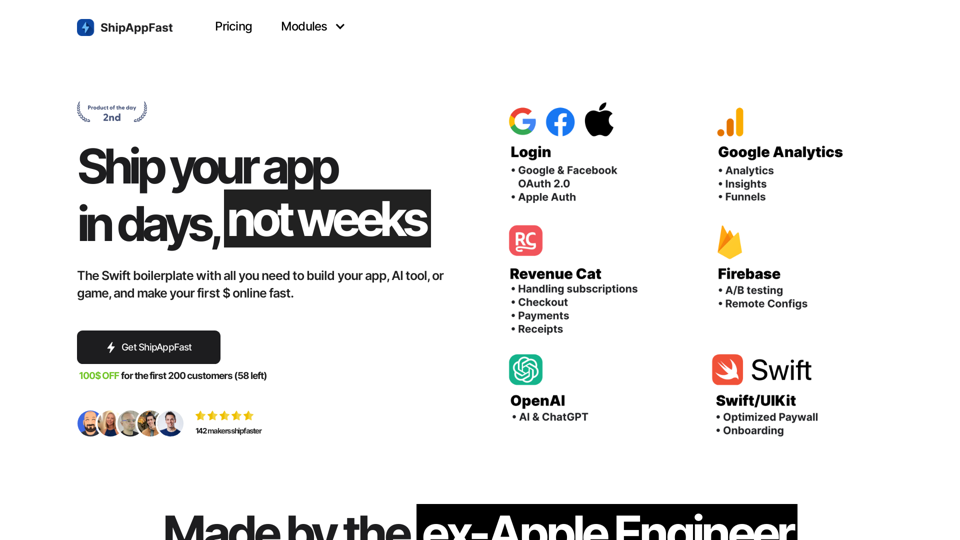
The Swift boilerplate with all the necessary elements to bring your product to customers. From concept to production in just 5 minutes.
Visit Website
Launch Your App in Days, Not Weeks | ShipAppFast
Visit Website

Introduction

ShipAppFast is an AI-powered platform designed to accelerate app development and deployment. It offers a comprehensive suite of AI technologies, including ChatGPT and GPT-4o for text generation and image understanding, as well as Dalle3 for image creation. The platform's primary goal is to help developers launch their apps quickly and start generating revenue in a matter of days rather than weeks.

Feature

AI-Driven Development

  • Utilizes advanced AI technologies like ChatGPT, GPT-4o, and Dalle3
  • Enables rapid app development and deployment
  • Supports various AI functionalities including text generation and image understanding

Analytics Module

  • Tracks user usage and behavior
  • Excludes logging from testing devices and simulators
  • Provides cohort behavior analysis (funnels, free form, path exploration)
  • Attaches common parameters (locale, app version)
  • Estimated time savings: 3 hours

Login Module

  • Offers a view controller for user authentication
  • Supports Apple Auth, Google & Facebook OAuth 2.0
  • Includes notification permission requests
  • Estimated time savings: 3 hours

Payments Module

  • Integrates Apple StoreKit 2 for handling payments
  • Manages subscriptions and in-app purchases
  • Provides receipt refresh functionality
  • Includes analytics integration
  • Estimated time savings: 4 hours

Onboarding Module

  • Introduces users to the app's features and benefits
  • Integrates with Analytics for user demographics
  • Optimized for UX, remaining steps, length, and animation
  • Estimated time savings: 4 hours

Paywall Module

  • Showcases app benefits and user reviews
  • Integrates with Analytics and Payments modules
  • Offers various purchase options (lifetime, monthly, yearly subscriptions)
  • Includes features for restoring previous purchases
  • Provides access to privacy and terms of use information
  • Estimated time savings: 5 hours

ChatGPT Integration

  • Enables quick implementation of chat completion
  • Supports primary (cheaper) and secondary (more expensive) models
  • 25% more reliable with preset retryer
  • Includes observability features for errors and latency
  • Implements model switchback for rate limits, timeouts, and token excess
  • Estimated time savings: 4 hours

FAQ

How can I use ShipAppFast?

ShipAppFast offers free usage of GPT-4o up to 20 times per day for every user. For extended access and additional benefits, users can subscribe to the platform.

What are the pricing options for ShipAppFast?

ShipAppFast offers two pricing tiers:

  1. Starter: $14
  2. All-in: $99 There's currently a $100 discount for the first 200 customers, with 58 spots remaining.

What exactly do I receive with ShipAppFast?

You get a Swift starter kit containing all the necessary boilerplate code to run an online business.

How frequently is ShipAppFast updated?

ShipAppFast is updated every 1-2 weeks to ensure users have access to the latest features and improvements.

What makes ShipAppFast superior to other boilerplates?

ShipAppFast boasts Apple-quality code, written by a former Apple Senior Software Engineer, ensuring high standards and reliability.

Is there a refund policy for ShipAppFast?

Once you gain access to the repository, ShipAppFast becomes yours permanently and cannot be refunded.

Are there any additional costs associated with using ShipAppFast?

The only external library with associated costs is RevenueCat, which charges a 1% fee only if your app surpasses $2500 in monthly recurring revenue.

Can I use PayPal for purchasing ShipAppFast?

Yes, PayPal is accepted. You can send the USD equivalent of your chosen plan ($69 or $99) to the PayPal account: paypal.me/lucalupo87.

Related Websites

Baby Generator | AI Future Baby Prediction | Free Trial
View Detail

Baby Generator | AI Future Baby Prediction | Free Trial

Baby Generator | AI Future Baby Prediction | Free Trial

Create realistic AI predictions of your future baby with Baby Generator. Free trial for new users! Advanced technology transforms parents' photos into lifelike baby images.

0
abcdefGPT Extension
View Detail

abcdefGPT Extension

abcdefGPT Extension

Support for Real Estate Selection

193.90 M
Leading Platform for Autonomous Automation & Artificial Intelligence Agents
View Detail

Leading Platform for Autonomous Automation & Artificial Intelligence Agents

Leading Platform for Autonomous Automation & Artificial Intelligence Agents

Autonomous AI Agents to automate processes. Used by Fortune 500 companies and startups, our AI agent platform helps organizations build and deploy agents in minutes.

164.60 K
Image Enhancer
View Detail

Image Enhancer

Image Enhancer

Enhance photos effortlessly with AI photo enhancer. Increase image resolution, improve colors, and make photo clear with just a click!

193.90 M
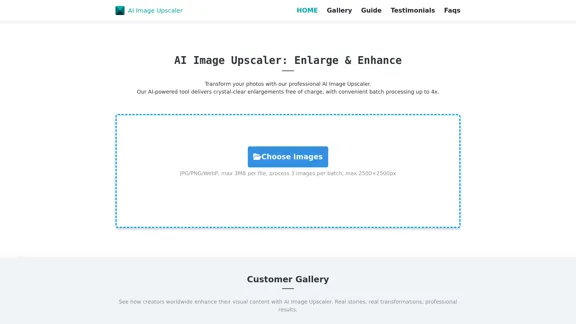
AI Image Enlarger
View Detail

AI Image Enlarger

AI Image Enlarger

AI Image Upscaler | Enhance your images in size and quality using AI

68
Colorize Image
View Detail

Colorize Image

Colorize Image

Image Colorizer | Colorize your old black and white photos automatically online.

193.90 M
Batch Save ChatGPT to Notion

This is a guide on how to save multiple ChatGPT responses to Notion in a batch. 

Tools You'll Need:

* ChatGPT: An AI chatbot that can generate text.
* Notion: A note-taking and project management tool.
* Python: A programming language.
* Requests Library: A Python library for making HTTP requests.

Steps:

1. Get Your Notion API Token:
   - Go to your Notion workspace settings.
   - Navigate to the "Integrations" tab.
   - Click "Create new integration" and choose "API Token".
   - Copy your API token.

2. Install Python Libraries:
   - Open your terminal or command prompt.
   - Type `pip install requests` and press Enter.

3. Write Python Script:
   - Create a new Python file (e.g., `save_chatgpt_to_notion.py`).
   - Paste the following code into the file, replacing `YOUR_NOTION_API_TOKEN` with your actual token:

```python
import requests

def save_chatgpt_response_to_notion(response, page_id, token):
  """Saves a ChatGPT response to a Notion page."""
  url = f"https://api.notion.com/v1/pages/{page_id}/children"
  headers = {"Authorization": f"Bearer {token}"}
  data = {
    "parent": {
      "page_id": page_id
    },
    "properties": {
      "title": {
        "title": [
          {
            "text": {
              "content": "ChatGPT Response"
            }
          }
        ]
      },
      "content": {
        "rich_text": [
          {
            "text": {
              "content": response
            }
          }
        ]
      }
    }
  }
  response = requests.post(url, headers=headers, json=data)
  print(response.status_code)

Example usage
page_id = "YOUR_NOTION_PAGE_ID"
token = "YOUR_NOTION_API_TOKEN"

Get ChatGPT responses (replace with your actual ChatGPT interaction)
chatgpt_responses = [
  "This is the first ChatGPT response.",
  "This is the second ChatGPT response.",
  "This is the third ChatGPT response."
]

Save each response to Notion
for response in chatgpt_responses:
  save_chatgpt_response_to_notion(response, page_id, token)
```

4. Run the Script:
   - In your terminal, navigate to the directory where you saved the Python file.
   - Type `python save_chatgpt_to_notion.py` and press Enter.

5. Check Notion:
   - Open your Notion workspace and go to the page specified by `page_id`.
   - You should see your ChatGPT responses saved as separate blocks.
View Detail

Batch Save ChatGPT to Notion This is a guide on how to save multiple ChatGPT responses to Notion in a batch. Tools You'll Need: * ChatGPT: An AI chatbot that can generate text. * Notion: A note-taking and project management tool. * Python: A programming language. * Requests Library: A Python library for making HTTP requests. Steps: 1. Get Your Notion API Token: - Go to your Notion workspace settings. - Navigate to the "Integrations" tab. - Click "Create new integration" and choose "API Token". - Copy your API token. 2. Install Python Libraries: - Open your terminal or command prompt. - Type `pip install requests` and press Enter. 3. Write Python Script: - Create a new Python file (e.g., `save_chatgpt_to_notion.py`). - Paste the following code into the file, replacing `YOUR_NOTION_API_TOKEN` with your actual token: ```python import requests def save_chatgpt_response_to_notion(response, page_id, token): """Saves a ChatGPT response to a Notion page.""" url = f"https://api.notion.com/v1/pages/{page_id}/children" headers = {"Authorization": f"Bearer {token}"} data = { "parent": { "page_id": page_id }, "properties": { "title": { "title": [ { "text": { "content": "ChatGPT Response" } } ] }, "content": { "rich_text": [ { "text": { "content": response } } ] } } } response = requests.post(url, headers=headers, json=data) print(response.status_code) Example usage page_id = "YOUR_NOTION_PAGE_ID" token = "YOUR_NOTION_API_TOKEN" Get ChatGPT responses (replace with your actual ChatGPT interaction) chatgpt_responses = [ "This is the first ChatGPT response.", "This is the second ChatGPT response.", "This is the third ChatGPT response." ] Save each response to Notion for response in chatgpt_responses: save_chatgpt_response_to_notion(response, page_id, token) ``` 4. Run the Script: - In your terminal, navigate to the directory where you saved the Python file. - Type `python save_chatgpt_to_notion.py` and press Enter. 5. Check Notion: - Open your Notion workspace and go to the page specified by `page_id`. - You should see your ChatGPT responses saved as separate blocks.

Batch Save ChatGPT to Notion This is a guide on how to save multiple ChatGPT responses to Notion in a batch. Tools You'll Need: * ChatGPT: An AI chatbot that can generate text. * Notion: A note-taking and project management tool. * Python: A programming language. * Requests Library: A Python library for making HTTP requests. Steps: 1. Get Your Notion API Token: - Go to your Notion workspace settings. - Navigate to the "Integrations" tab. - Click "Create new integration" and choose "API Token". - Copy your API token. 2. Install Python Libraries: - Open your terminal or command prompt. - Type `pip install requests` and press Enter. 3. Write Python Script: - Create a new Python file (e.g., `save_chatgpt_to_notion.py`). - Paste the following code into the file, replacing `YOUR_NOTION_API_TOKEN` with your actual token: ```python import requests def save_chatgpt_response_to_notion(response, page_id, token): """Saves a ChatGPT response to a Notion page.""" url = f"https://api.notion.com/v1/pages/{page_id}/children" headers = {"Authorization": f"Bearer {token}"} data = { "parent": { "page_id": page_id }, "properties": { "title": { "title": [ { "text": { "content": "ChatGPT Response" } } ] }, "content": { "rich_text": [ { "text": { "content": response } } ] } } } response = requests.post(url, headers=headers, json=data) print(response.status_code) Example usage page_id = "YOUR_NOTION_PAGE_ID" token = "YOUR_NOTION_API_TOKEN" Get ChatGPT responses (replace with your actual ChatGPT interaction) chatgpt_responses = [ "This is the first ChatGPT response.", "This is the second ChatGPT response.", "This is the third ChatGPT response." ] Save each response to Notion for response in chatgpt_responses: save_chatgpt_response_to_notion(response, page_id, token) ``` 4. Run the Script: - In your terminal, navigate to the directory where you saved the Python file. - Type `python save_chatgpt_to_notion.py` and press Enter. 5. Check Notion: - Open your Notion workspace and go to the page specified by `page_id`. - You should see your ChatGPT responses saved as separate blocks.

Save ChatGPT Conversations to Notion with One Click Export your ChatGPT conversations directly to Notion with a single click.

193.90 M
Buyers List Builder
View Detail

Buyers List Builder

Buyers List Builder

Build a Cash Buyer List Fast and Easy

193.90 M