Open-source RightAI Tools Directory
  • Discover AI
  • Submit
  • Startup
  • Blog
Open-source RightAI Tools Directory
Discover the best AI tools of 2025 with the RightAI Tools Directory!

Friend Links

AI Anime GeneratorToolsApp AI

Support

Tap4
Privacy policyTerms & ConditionsContact Us
Loading...
loading...

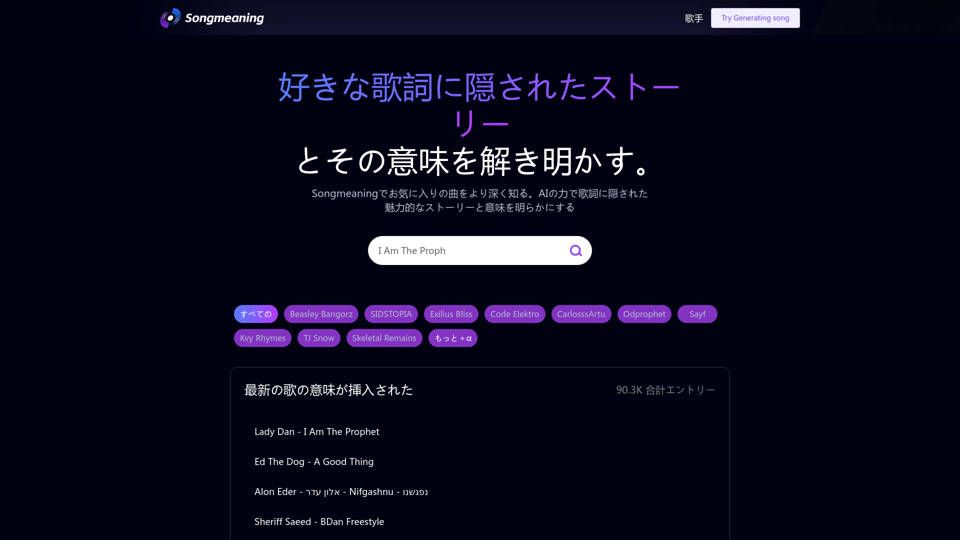
Songmeaning - Uncovering the Hidden Story Behind Your Favorite Song Lyrics

Let's unlock the hidden depths of your favorite song with the power of AI. With Songmeaning, let's uncover the true meaning behind your favorite lyrics.
Visit Website
Songmeaning - Uncovering the Hidden Story Behind Your Favorite Song Lyrics
Visit Website

Introduction

Songmeaning is an AI-powered platform designed to uncover hidden stories and meanings behind song lyrics. It offers users a deeper understanding of their favorite songs through AI-driven analysis. The platform features a vast library of song lyrics from various genres and artists, making it easy for users to explore and discover new meanings in music.

Feature

AI-Driven Lyric Analysis

Songmeaning utilizes advanced AI technology to analyze song lyrics, revealing hidden stories and meanings that might not be immediately apparent to listeners.

Extensive Song Library

The platform boasts a comprehensive collection of song lyrics across various genres and artists, providing users with a wide range of options to explore.

User-Friendly Navigation

Alphabetical Browsing

Users can easily browse through the song library alphabetically, making it simple to find specific songs or explore new ones.

Artist Search

The platform allows users to search for specific artists, enabling them to delve into the meanings behind their favorite musicians' works.

Song Meaning Generation

Songmeaning's AI can generate interpretations of song lyrics, offering users unique insights into the possible meanings and stories behind the music.

News and Trends Section

Users can stay updated with the latest news, trends, and stories related to music and song lyrics through the platform's "Read More" feature.

Free Trial Option

Songmeaning offers a free trial period, allowing users to experience the platform's features without any initial cost.

FAQ

Is Songmeaning free to use?

Songmeaning offers a free trial period, allowing users to generate song meanings and explore the platform without any initial costs. For extended access and additional features, a subscription model is available.

How do I navigate the Songmeaning platform?

Songmeaning is designed for easy navigation. Users can:

  1. Browse the song library alphabetically
  2. Search for specific artists
  3. Use the song meaning generation feature
  4. Explore the latest music news and trends in the "Read More" section

What are the main benefits of using Songmeaning?

Using Songmeaning allows users to:

  • Gain deeper understanding of their favorite songs
  • Discover new songs and their meanings
  • Initiate conversations about music and lyrics
  • Explore a vast library of song lyrics from various genres and artists

How does Songmeaning ensure user privacy?

Songmeaning prioritizes user privacy and ensures that all user data is kept safe and secure on the platform.

Latest Traffic Insights

  • Monthly Visits

    84.13 K

  • Bounce Rate

    45.50%

  • Pages Per Visit

    1.50

  • Time on Site(s)

    18.45

  • Global Rank

    463697

  • Country Rank

    Russia 80607

Recent Visits

Traffic Sources

  • Social Media:
    4.76%
  • Paid Referrals:
    0.56%
  • Email:
    0.12%
  • Referrals:
    7.95%
  • Search Engines:
    54.95%
  • Direct:
    31.59%
More Data

Related Websites

GPT Store: Find Your Perfect GPT
View Detail

GPT Store: Find Your Perfect GPT

GPT Store: Find Your Perfect GPT

A One-Stop Shop to Explore the Newest, Trending, and Most Effective OpenAI GPTs!

193.90 M
Chrome Web Store
View Detail

Chrome Web Store

Chrome Web Store

Enhance your browser with new features and tailor your browsing experience to your preferences.

193.90 M
Background Remover for Images
View Detail

Background Remover for Images

Background Remover for Images

Automatically and quickly remove image backgrounds, making image backgrounds transparent or changing the backgrounds.

193.90 M
UndetectableGPT.ai: Bypass GPTZero with Undetectable AI Humanizer Free Online
View Detail

UndetectableGPT.ai: Bypass GPTZero with Undetectable AI Humanizer Free Online

UndetectableGPT.ai: Bypass GPTZero with Undetectable AI Humanizer Free Online

Transform AI-generated content with our undetectable AI humanizer and rewriter. Make AI text undetectable and bypass AI checkers like GPTZero and ZeroGPT using undetectable AI free online tools. Perfect for creating undetecable GPT content.

1.66 K
Chat-GPT PDF

What is Chat-GPT PDF?

Chat-GPT PDF is a tool that allows users to generate PDF files from Chat-GPT conversations. This innovative tool enables users to save and share their conversations in a more organized and visually appealing format.

How does Chat-GPT PDF work?

The process is simple and straightforward. Here's a step-by-step guide:

1. Copy the conversation: Copy the entire conversation from the Chat-GPT platform.
2. Paste the conversation: Paste the copied conversation into the Chat-GPT PDF tool.
3. Customize the layout: Customize the layout, font, and design of the PDF file according to your preferences.
4. Generate the PDF: Click the "Generate PDF" button to create a downloadable PDF file.

Features of Chat-GPT PDF

Chat-GPT PDF offers several features that make it an essential tool for users:

* Customizable layout: Customize the layout, font, and design of the PDF file to suit your needs.
* Easy sharing: Share the PDF file with others via email, social media, or messaging apps.
* Offline access: Access your conversations offline, even without an internet connection.
* Organization: Organize your conversations in a neat and tidy format, making it easier to review and reference.

Benefits of Chat-GPT PDF

The benefits of using Chat-GPT PDF are numerous:

* Improved productivity: Save time and increase productivity by having all your conversations in one place.
* Enhanced collaboration: Collaborate with others more effectively by sharing conversations in a clear and concise format.
* Better organization: Keep your conversations organized, making it easier to review and reference them later.

Conclusion

Chat-GPT PDF is a game-changer for anyone who uses Chat-GPT regularly. With its ease of use, customization options, and benefits, it's an essential tool for anyone looking to get the most out of their conversations.
View Detail

Chat-GPT PDF What is Chat-GPT PDF? Chat-GPT PDF is a tool that allows users to generate PDF files from Chat-GPT conversations. This innovative tool enables users to save and share their conversations in a more organized and visually appealing format. How does Chat-GPT PDF work? The process is simple and straightforward. Here's a step-by-step guide: 1. Copy the conversation: Copy the entire conversation from the Chat-GPT platform. 2. Paste the conversation: Paste the copied conversation into the Chat-GPT PDF tool. 3. Customize the layout: Customize the layout, font, and design of the PDF file according to your preferences. 4. Generate the PDF: Click the "Generate PDF" button to create a downloadable PDF file. Features of Chat-GPT PDF Chat-GPT PDF offers several features that make it an essential tool for users: * Customizable layout: Customize the layout, font, and design of the PDF file to suit your needs. * Easy sharing: Share the PDF file with others via email, social media, or messaging apps. * Offline access: Access your conversations offline, even without an internet connection. * Organization: Organize your conversations in a neat and tidy format, making it easier to review and reference. Benefits of Chat-GPT PDF The benefits of using Chat-GPT PDF are numerous: * Improved productivity: Save time and increase productivity by having all your conversations in one place. * Enhanced collaboration: Collaborate with others more effectively by sharing conversations in a clear and concise format. * Better organization: Keep your conversations organized, making it easier to review and reference them later. Conclusion Chat-GPT PDF is a game-changer for anyone who uses Chat-GPT regularly. With its ease of use, customization options, and benefits, it's an essential tool for anyone looking to get the most out of their conversations.

Chat-GPT PDF What is Chat-GPT PDF? Chat-GPT PDF is a tool that allows users to generate PDF files from Chat-GPT conversations. This innovative tool enables users to save and share their conversations in a more organized and visually appealing format. How does Chat-GPT PDF work? The process is simple and straightforward. Here's a step-by-step guide: 1. Copy the conversation: Copy the entire conversation from the Chat-GPT platform. 2. Paste the conversation: Paste the copied conversation into the Chat-GPT PDF tool. 3. Customize the layout: Customize the layout, font, and design of the PDF file according to your preferences. 4. Generate the PDF: Click the "Generate PDF" button to create a downloadable PDF file. Features of Chat-GPT PDF Chat-GPT PDF offers several features that make it an essential tool for users: * Customizable layout: Customize the layout, font, and design of the PDF file to suit your needs. * Easy sharing: Share the PDF file with others via email, social media, or messaging apps. * Offline access: Access your conversations offline, even without an internet connection. * Organization: Organize your conversations in a neat and tidy format, making it easier to review and reference. Benefits of Chat-GPT PDF The benefits of using Chat-GPT PDF are numerous: * Improved productivity: Save time and increase productivity by having all your conversations in one place. * Enhanced collaboration: Collaborate with others more effectively by sharing conversations in a clear and concise format. * Better organization: Keep your conversations organized, making it easier to review and reference them later. Conclusion Chat-GPT PDF is a game-changer for anyone who uses Chat-GPT regularly. With its ease of use, customization options, and benefits, it's an essential tool for anyone looking to get the most out of their conversations.

Exporting Chat History to PDF You can export your chat history with Chat-GPT to a PDF file using the following methods: #Method 1: Browser Print Function 1. Open your chat conversation with Chat-GPT in a web browser. 2. Press `Ctrl + P` (Windows) or `Cmd + P` (Mac) to open the print dialog box. 3. Select "Save as PDF" as the printer destination. 4. Choose a location to save the PDF file and set the file name. 5. Click "Save" to export the chat history to a PDF file. #Method 2: Online PDF Conversion Tools 1. Copy the entire chat conversation by pressing `Ctrl + A` (Windows) or `Cmd + A` (Mac) and then `Ctrl + C` (Windows) or `Cmd + C` (Mac). 2. Go to an online PDF conversion tool, such as SmallPDF or Convertio. 3. Paste the chat conversation into the conversion tool's text box. 4. Select the PDF format and click "Convert" to generate the PDF file. 5. Download the PDF file to your computer. #Method 3: Browser Extensions 1. Install a browser extension, such as Print Friendly & PDF or FireShot, that allows you to save web pages as PDF files. 2. Open your chat conversation with Chat-GPT in a web browser. 3. Click the browser extension's icon in the toolbar. 4. Select the "Save as PDF" option and choose a location to save the file. 5. Click "Save" to export the chat history to a PDF file. By following these methods, you can easily export your chat history with Chat-GPT to a PDF file for future reference or sharing.

193.90 M
Orthoscribe
View Detail

Orthoscribe

Orthoscribe

Orthographic transcription

193.90 M
OpenGPTs
View Detail

OpenGPTs

OpenGPTs

OpenGPTs - Powerful GPTs Manager | Powerful GPT Manager

193.90 M
Youdao Speed Reading Plugin
View Detail

Youdao Speed Reading Plugin

Youdao Speed Reading Plugin

Recognize PDF files on the page, one-click jump to Youdao Speed Reading and upload to open.

193.90 M