Open-source RightAI Tools Directory
  • Discover AI
  • Submit
  • Startup
  • Blog
Open-source RightAI Tools Directory
Discover the best AI tools of 2025 with the RightAI Tools Directory!

Friend Links

AI Anime GeneratorToolsApp AI

Support

Tap4
Privacy policyTerms & ConditionsContact Us
Loading...
loading...

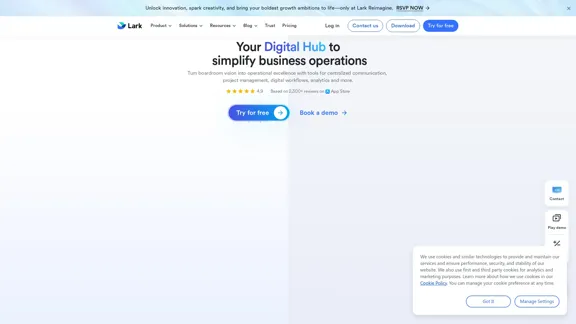
Lark | Productivity Superapp for Communication, Meetings, Documents, and Projects

Lark is a productivity superapp for teams. Get chat, documents, meetings, workflow automations, and AI for free all in one place.
Visit Website
Lark | Productivity Superapp for Communication, Meetings, Documents, and Projects
Visit Website

Introduction

Lark is a comprehensive productivity superapp designed to streamline collaboration across various business functions. It integrates chat, meetings, document editing, project management, and automation tools into one intuitive platform, enhancing team communication and simplifying workflows. With Lark, businesses can unlock innovation and achieve operational excellence.

Feature

  1. All-in-One Platform

    Lark combines multiple tools such as chat, video conferencing, document editing, and project management into a single application, reducing the need for multiple software solutions.

  2. Global Collaboration

    The platform supports translations for chats, documents, and meetings, enabling seamless communication among global teams.

  3. Project Management Tools

    Lark offers features to manage projects effectively, track progress, and automate workflows, ensuring that tasks are completed efficiently.

  4. Mobile Optimization

    Lark is designed for use on mobile devices, allowing users to collaborate and manage tasks from anywhere, at any time.

  5. Smart Workflows

    The approval process is streamlined with smart workflows that reduce turnaround time from days to hours, enhancing productivity.

  6. Robust Security Features

    Lark prioritizes data security and compliance, ensuring that customer information is protected.

How to Use?

  1. Explore Lark's features by signing up for a free trial to understand how it can benefit your team.
  2. Utilize the mobile app to manage tasks and communicate with team members on the go.
  3. Take advantage of the translation feature to facilitate communication in multilingual teams.
  4. Automate repetitive tasks using Lark's workflow automation tools to save time and increase efficiency.
  5. Regularly review project progress through Lark's project management tools to stay on track.

FAQ

What is Lark?

Lark is a productivity superapp that integrates various business tools, including chat, meetings, document editing, and project management, into one platform.

How does Lark enhance collaboration?

Lark enhances collaboration by providing real-time communication tools, automated workflows, and translation features, making it easier for teams to work together regardless of location.

Is Lark suitable for small businesses?

Yes, Lark is designed to cater to businesses of all sizes, including small teams, offering features that scale as the business grows.

What security measures does Lark implement?

Lark implements robust security measures, including data encryption and compliance with industry standards, to protect user information.

Can I use Lark for free?

Lark offers a free plan suitable for individuals and small teams, allowing users to explore its features without any cost.

Price

PlanPrice (per user/month)Features
StarterFreeUp to 20 users, 100GB storage, 18 months message history, unlimited AI translation
Pro$12.00Up to 500 users, 15TB storage, unlimited message history, video conferencing for 500 attendees
EnterpriseCustomUnlimited users, advanced security, and management features, additional storage options
The price is for reference only, please refer to the latest official data for actual information.

Evaluation

  1. Lark effectively consolidates multiple productivity tools into one platform, which can significantly enhance team collaboration and efficiency.
  2. The mobile optimization allows users to stay connected and manage tasks from anywhere, which is a major advantage for remote teams.
  3. However, the learning curve may be steep for new users unfamiliar with integrated platforms, requiring time to fully utilize all features.
  4. While Lark offers robust features, some users may find the pricing structure for larger teams to be a consideration.
  5. Overall, Lark is a powerful tool for businesses looking to streamline operations, but ongoing support and training may be necessary to maximize its potential.

Latest Traffic Insights

  • Monthly Visits

    8.82 M

  • Bounce Rate

    30.48%

  • Pages Per Visit

    7.12

  • Time on Site(s)

    588.38

  • Global Rank

    5455

  • Country Rank

    Vietnam 454

Recent Visits

Traffic Sources

  • Social Media:
    0.56%
  • Paid Referrals:
    0.26%
  • Email:
    0.04%
  • Referrals:
    4.57%
  • Search Engines:
    20.87%
  • Direct:
    73.70%
More Data

Related Websites

Dr. Muscle
View Detail

Dr. Muscle

Dr. Muscle

Imagine ChatGPT, but for fitness. Automated yet personal, with expert coaching and workouts tailored specifically to you—optimized to get you in shape faster, on autopilot.

385
Jestor - Build apps for operations without code
View Detail

Jestor - Build apps for operations without code

Jestor - Build apps for operations without code

Build scalable Apps, automations, and workflows for your entire company without any coding required. Do it yourself.

36.60 K
Free iPear PDF Tool
View Detail

Free iPear PDF Tool

Free iPear PDF Tool

Free iPear PDF Tool

0
Globe Explorer
View Detail

Globe Explorer

Globe Explorer

Explorer is an AI-powered discovery and learning engine that delivers intelligent and relevant search results. Give it a try now!

80.85 K
VibeTrack - Scheduling for Podcasters
View Detail

VibeTrack - Scheduling for Podcasters

VibeTrack - Scheduling for Podcasters

VibeTrack is a scheduling tool designed for location-flexible professionals and hobbyists who prefer in-person meetings.

0
qsourcer.com - Talent Acquisition with AI, Boolean and X-ray Search.
View Detail

qsourcer.com - Talent Acquisition with AI, Boolean and X-ray Search.

qsourcer.com - Talent Acquisition with AI, Boolean and X-ray Search.

Discover top-tier professionals on LinkedIn, GitHub, and StackOverflow using qSourcer's AI-powered Boolean search recruitment software.

1.38 K
Automate Your Content Strategy and Lead Generation with Captain
View Detail

Automate Your Content Strategy and Lead Generation with Captain

Automate Your Content Strategy and Lead Generation with Captain

Captain's AI-powered platform automatically creates and optimizes data-driven content that generates awareness, engagement, and leads.

23
Copilot for Microsoft 365 – Microsoft Adoption

Copilot for Microsoft 365 is a powerful AI assistant that helps you work smarter and faster across Microsoft 365 apps and services. It combines the power of large language models (LLMs) with your organization's data in the Microsoft Graph and Microsoft 365 apps to turn your words into the most powerful productivity tool on the planet.

Copilot is designed to help you:

• Unleash creativity
• Unlock productivity
• Uplevel skills

Copilot is built on Microsoft's comprehensive approach to security, compliance, and privacy. Copilot in Microsoft 365 apps and services:

• Does not use your data to train the underlying LLM
• Does not replace human ingenuity and judgment
• Is designed to keep humans in the loop

Copilot is currently available in Word, Excel, PowerPoint, Outlook, Teams, and more.

Getting Started with Copilot

To get started with Copilot, follow these steps:

1. Check availability: Ensure your organization has access to Copilot.
2. Learn the basics: Familiarize yourself with Copilot's capabilities and how to use it effectively.
3. Explore use cases: Discover how Copilot can help you in your specific role and tasks.
4. Practice and refine: Use Copilot regularly and refine your prompts for better results.
5. Share and collaborate: Collaborate with colleagues using Copilot and share best practices.

Best Practices for Using Copilot

1. Be specific in your prompts
2. Provide context for better results
3. Review and edit Copilot's output
4. Use Copilot as a starting point, not a final product
5. Experiment with different approaches
6. Stay informed about new features and updates

Copilot in Different Microsoft 365 Apps

• Word: Draft, edit, summarize, and rewrite content
• Excel: Analyze data, create formulas, and generate insights
• PowerPoint: Create presentations, design slides, and generate content
• Outlook: Compose emails, summarize threads, and manage your inbox
• Teams: Summarize meetings, generate action items, and create meeting notes

Responsible AI and Copilot

Microsoft is committed to developing AI systems responsibly. When using Copilot, keep in mind:

• AI-generated content may contain biases or inaccuracies
• Always review and verify Copilot's output
• Use your judgment and expertise alongside Copilot's suggestions
• Be aware of your organization's policies regarding AI use

Conclusion

Copilot for Microsoft 365 is a powerful tool that can significantly enhance your productivity and creativity. By understanding its capabilities, following best practices, and using it responsibly, you can make the most of this AI assistant in your daily work.
View Detail

Copilot for Microsoft 365 – Microsoft Adoption Copilot for Microsoft 365 is a powerful AI assistant that helps you work smarter and faster across Microsoft 365 apps and services. It combines the power of large language models (LLMs) with your organization's data in the Microsoft Graph and Microsoft 365 apps to turn your words into the most powerful productivity tool on the planet. Copilot is designed to help you: • Unleash creativity • Unlock productivity • Uplevel skills Copilot is built on Microsoft's comprehensive approach to security, compliance, and privacy. Copilot in Microsoft 365 apps and services: • Does not use your data to train the underlying LLM • Does not replace human ingenuity and judgment • Is designed to keep humans in the loop Copilot is currently available in Word, Excel, PowerPoint, Outlook, Teams, and more. Getting Started with Copilot To get started with Copilot, follow these steps: 1. Check availability: Ensure your organization has access to Copilot. 2. Learn the basics: Familiarize yourself with Copilot's capabilities and how to use it effectively. 3. Explore use cases: Discover how Copilot can help you in your specific role and tasks. 4. Practice and refine: Use Copilot regularly and refine your prompts for better results. 5. Share and collaborate: Collaborate with colleagues using Copilot and share best practices. Best Practices for Using Copilot 1. Be specific in your prompts 2. Provide context for better results 3. Review and edit Copilot's output 4. Use Copilot as a starting point, not a final product 5. Experiment with different approaches 6. Stay informed about new features and updates Copilot in Different Microsoft 365 Apps • Word: Draft, edit, summarize, and rewrite content • Excel: Analyze data, create formulas, and generate insights • PowerPoint: Create presentations, design slides, and generate content • Outlook: Compose emails, summarize threads, and manage your inbox • Teams: Summarize meetings, generate action items, and create meeting notes Responsible AI and Copilot Microsoft is committed to developing AI systems responsibly. When using Copilot, keep in mind: • AI-generated content may contain biases or inaccuracies • Always review and verify Copilot's output • Use your judgment and expertise alongside Copilot's suggestions • Be aware of your organization's policies regarding AI use Conclusion Copilot for Microsoft 365 is a powerful tool that can significantly enhance your productivity and creativity. By understanding its capabilities, following best practices, and using it responsibly, you can make the most of this AI assistant in your daily work.

Copilot for Microsoft 365 – Microsoft Adoption Copilot for Microsoft 365 is a powerful AI assistant that helps you work smarter and faster across Microsoft 365 apps and services. It combines the power of large language models (LLMs) with your organization's data in the Microsoft Graph and Microsoft 365 apps to turn your words into the most powerful productivity tool on the planet. Copilot is designed to help you: • Unleash creativity • Unlock productivity • Uplevel skills Copilot is built on Microsoft's comprehensive approach to security, compliance, and privacy. Copilot in Microsoft 365 apps and services: • Does not use your data to train the underlying LLM • Does not replace human ingenuity and judgment • Is designed to keep humans in the loop Copilot is currently available in Word, Excel, PowerPoint, Outlook, Teams, and more. Getting Started with Copilot To get started with Copilot, follow these steps: 1. Check availability: Ensure your organization has access to Copilot. 2. Learn the basics: Familiarize yourself with Copilot's capabilities and how to use it effectively. 3. Explore use cases: Discover how Copilot can help you in your specific role and tasks. 4. Practice and refine: Use Copilot regularly and refine your prompts for better results. 5. Share and collaborate: Collaborate with colleagues using Copilot and share best practices. Best Practices for Using Copilot 1. Be specific in your prompts 2. Provide context for better results 3. Review and edit Copilot's output 4. Use Copilot as a starting point, not a final product 5. Experiment with different approaches 6. Stay informed about new features and updates Copilot in Different Microsoft 365 Apps • Word: Draft, edit, summarize, and rewrite content • Excel: Analyze data, create formulas, and generate insights • PowerPoint: Create presentations, design slides, and generate content • Outlook: Compose emails, summarize threads, and manage your inbox • Teams: Summarize meetings, generate action items, and create meeting notes Responsible AI and Copilot Microsoft is committed to developing AI systems responsibly. When using Copilot, keep in mind: • AI-generated content may contain biases or inaccuracies • Always review and verify Copilot's output • Use your judgment and expertise alongside Copilot's suggestions • Be aware of your organization's policies regarding AI use Conclusion Copilot for Microsoft 365 is a powerful tool that can significantly enhance your productivity and creativity. By understanding its capabilities, following best practices, and using it responsibly, you can make the most of this AI assistant in your daily work.

Microsoft Copilot combines the power of large language models (LLMs) with your organization's data to turn your words into one of the most powerful productivity tools on the planet.

608.60 K