Open-source RightAI Tools Directory
  • Discover AI
  • Submit
  • Startup
  • Blog
Open-source RightAI Tools Directory
Discover the best AI tools of 2025 with the RightAI Tools Directory!

Friend Links

AI Anime GeneratorToolsApp AI

Support

Tap4
Privacy policyTerms & ConditionsContact Us
Loading...
loading...

Help me read | GPT Reading Assistant

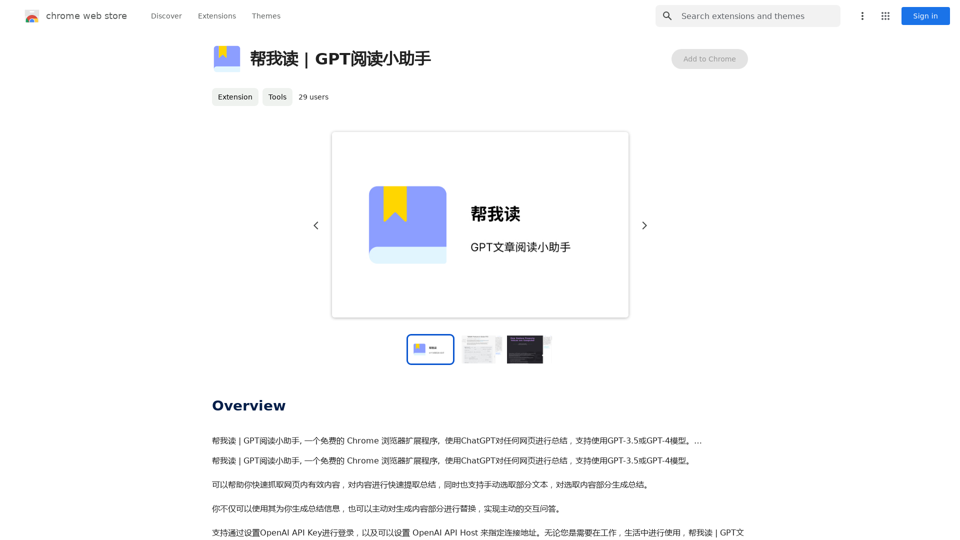
Help me read | GPT Reading Assistant, a free Chrome browser extension, summarizes any webpage using ChatGPT, supporting the use of GPT-3.5 or GPT-4 models. ...
Visit Website
Help me read | GPT Reading Assistant
Visit Website

Introduction

GPT Reading Assistant is a free Chrome browser extension that leverages ChatGPT technology to summarize web content. It supports both GPT-3.5 and GPT-4 models, offering users the ability to quickly extract valuable information from web pages, generate summaries, and even translate text. This tool is designed to enhance reading efficiency and comprehension for users across various online platforms.

Feature

One-Click Webpage Summarization

With GPT Reading Assistant, users can summarize any webpage instantly by simply clicking the extension icon. This feature streamlines the process of extracting key information from lengthy articles or documents.

Dual Model Support

The extension supports both GPT-3.5 and GPT-4 models, allowing users to choose the most suitable option for their summarization needs. This flexibility caters to different levels of complexity and accuracy requirements.

Content Extraction and Translation

GPT Reading Assistant excels at extracting valuable content from web pages and offers translation capabilities. This dual functionality makes it an invaluable tool for users dealing with multilingual content or seeking to understand foreign language websites.

Customizable Summary Settings

Users can tailor the summary output to their specific needs by adjusting various settings within the extension. This customization ensures that the generated summaries align with individual preferences and requirements.

Interactive AI Assistant

The extension provides an interactive AI assistant feature, allowing users to engage in a dialogue with the AI for further clarification or additional information about the summarized content.

Free of Charge

GPT Reading Assistant is completely free to use, with no hidden costs or subscription fees. This accessibility ensures that all users can benefit from its powerful summarization and translation capabilities without financial constraints.

FAQ

What is the difference between GPT-3.5 and GPT-4 models in GPT Reading Assistant?

GPT-3.5 is a more general-purpose model, while GPT-4 is specialized for text summarization and translation tasks. Users can experiment with both to determine which model best suits their specific needs.

How can I customize the summary settings in GPT Reading Assistant?

To customize summary settings, click on the extension icon and select the "Settings" option. This allows you to adjust various parameters to tailor the summary output according to your preferences.

Can GPT Reading Assistant be used for translating text?

Yes, GPT Reading Assistant offers translation capabilities, allowing users to translate text from one language to another. This feature enhances its utility for users working with multilingual content or browsing international websites.

Related Websites
Genspark

Genspark is a technology company that provides AI-powered education and talent development solutions.
View Detail

Genspark Genspark is a technology company that provides AI-powered education and talent development solutions.

Genspark Genspark is a technology company that provides AI-powered education and talent development solutions.

GenSpark GenSpark is a training program that focuses on providing skills and knowledge to individuals in the field of software development, data science, and other related technologies. The program aims to bridge the gap between the skills possessed by the students and the requirements of the industry.

8.76 M
Twillot - X/Twitter Copilot
View Detail

Twillot - X/Twitter Copilot

Twillot - X/Twitter Copilot

Organize your Twitter bookmarks and make your Twitter experience smoother.

193.90 M
Cadabra - Maximize Email Efficiency With AI
View Detail

Cadabra - Maximize Email Efficiency With AI

Cadabra - Maximize Email Efficiency With AI

Save countless hours reading, writing, replying to, and reviewing emails with the power of AI.

193.90 M
Awesome GPTs
View Detail

Awesome GPTs

Awesome GPTs

Power Your Workflow with Custom GPTs

193.90 M
AI Photo Caption - Text Generator on the App Store
View Detail

AI Photo Caption - Text Generator on the App Store

AI Photo Caption - Text Generator on the App Store

Welcome to PhotoCaption AI – where your photos speak a thousand words in multiple languages! Do you often find yourself struggling to come up with the perfect caption for your amazing photos?

654.73 K
Prompt Support
View Detail

Prompt Support

Prompt Support

Maximize the Effectiveness of Your GPT Engine Prompts 1. Be Clear and Specific: * Instead of: "Write about dogs." * Try: "Write a 500-word essay about the history and characteristics of Golden Retrievers." 2. Provide Context: * Instead of: "Summarize this article." * Try: "Summarize the main arguments presented in this article about the impact of social media on teenagers." 3. Set the Tone and Style: * Instead of: "Write a story." * Try: "Write a humorous short story about a cat who thinks it's a dog." 4. Define the Desired Format: * Instead of: "Create a poem." * Try: "Write a rhyming sonnet about the beauty of a sunset." 5. Use Examples: * Instead of: "Generate some creative writing ideas." * Try: "Generate some creative writing ideas similar to the style of Edgar Allan Poe." 6. Break Down Complex Tasks: * Instead of: "Write a business plan." * Try: * "Outline the key components of a business plan for a new coffee shop." * "Write a section of the business plan focusing on the target market." 7. Refine Your Prompts: * Experiment with different wording: See what yields the best results. * Iterate on your prompts: Build upon previous responses to get closer to your desired outcome. By following these tips, you can craft more effective prompts that will help you get the most out of your GPT engine.

193.90 M
ChatGPT Sidebar by cloudHQ 

This is a powerful tool that brings the capabilities of ChatGPT directly into your workflow. 

Key Features:

* Seamless Integration:  Effortlessly access ChatGPT within your favorite applications like Gmail, Slack, and Notion. 
* Contextual Understanding:  ChatGPT remembers past interactions, providing relevant and coherent responses within the context of your current task.
* Boost Productivity:  Automate repetitive tasks, generate creative content, and get instant answers to your questions, all without leaving your workspace.
* Enhanced Collaboration:  Share ChatGPT-powered insights and ideas with your team, fostering more productive and efficient collaboration.

Benefits:

* Save Time and Effort:  Streamline your workflow and focus on high-value tasks.
* Unlock Creativity:  Overcome writer's block and generate innovative ideas.
* Improve Communication:  Craft clear, concise, and engaging messages.
* Make Informed Decisions:  Access reliable information and insights to support your decision-making process.


Get Started Today:

Visit our website to learn more and start using ChatGPT Sidebar by cloudHQ.
View Detail

ChatGPT Sidebar by cloudHQ This is a powerful tool that brings the capabilities of ChatGPT directly into your workflow. Key Features: * Seamless Integration: Effortlessly access ChatGPT within your favorite applications like Gmail, Slack, and Notion. * Contextual Understanding: ChatGPT remembers past interactions, providing relevant and coherent responses within the context of your current task. * Boost Productivity: Automate repetitive tasks, generate creative content, and get instant answers to your questions, all without leaving your workspace. * Enhanced Collaboration: Share ChatGPT-powered insights and ideas with your team, fostering more productive and efficient collaboration. Benefits: * Save Time and Effort: Streamline your workflow and focus on high-value tasks. * Unlock Creativity: Overcome writer's block and generate innovative ideas. * Improve Communication: Craft clear, concise, and engaging messages. * Make Informed Decisions: Access reliable information and insights to support your decision-making process. Get Started Today: Visit our website to learn more and start using ChatGPT Sidebar by cloudHQ.

ChatGPT Sidebar by cloudHQ This is a powerful tool that brings the capabilities of ChatGPT directly into your workflow. Key Features: * Seamless Integration: Effortlessly access ChatGPT within your favorite applications like Gmail, Slack, and Notion. * Contextual Understanding: ChatGPT remembers past interactions, providing relevant and coherent responses within the context of your current task. * Boost Productivity: Automate repetitive tasks, generate creative content, and get instant answers to your questions, all without leaving your workspace. * Enhanced Collaboration: Share ChatGPT-powered insights and ideas with your team, fostering more productive and efficient collaboration. Benefits: * Save Time and Effort: Streamline your workflow and focus on high-value tasks. * Unlock Creativity: Overcome writer's block and generate innovative ideas. * Improve Communication: Craft clear, concise, and engaging messages. * Make Informed Decisions: Access reliable information and insights to support your decision-making process. Get Started Today: Visit our website to learn more and start using ChatGPT Sidebar by cloudHQ.

ChatGPT sidebar as your AI assistant on any page

193.90 M
Fast AI
View Detail

Fast AI

Fast AI

Easy to choose AI tools for your everyday use.

193.90 M