Open-source RightAI Tools Directory
  • Discover AI
  • Submit
  • Startup
  • Blog
Open-source RightAI Tools Directory
Discover the best AI tools of 2025 with the RightAI Tools Directory!

Friend Links

AI Anime GeneratorToolsApp AI

Support

Tap4
Privacy policyTerms & ConditionsContact Us
Loading...
loading...

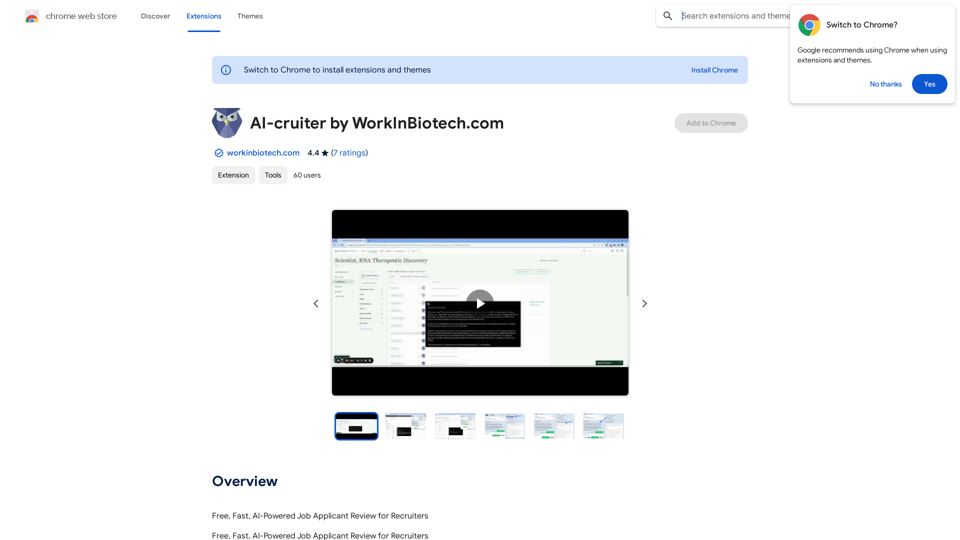
AI-cruiter by WorkInBiotech.com

Free, Fast, AI-Powered Job Applicant Review for Recruiters
Visit Website
AI-cruiter by WorkInBiotech.com
Visit Website

Introduction

AI-cruiter is a free, AI-powered job applicant review extension for recruiters. It streamlines the recruitment process by providing AI-generated summaries and fitness ratings for up to 2,000 job applicants per month. The extension integrates seamlessly with popular applicant tracking systems and leverages advanced language models to enhance efficiency in candidate evaluation.

Feature

AI-Powered Efficiency

AI-cruiter generates customizable summaries based on resumes and assigns fitness scores for each applicant based on the selected job description, significantly speeding up the review process.

Advanced Language Models

The extension utilizes cutting-edge large language models like ChatGPT 4 and Llama 3, enabling recruiters to review hundreds of applicants in minutes.

Seamless ATS Integration

AI-cruiter works out-of-the-box with popular applicant tracking systems including Lever, Greenhouse, JazzHR, Workable, and Breezy, ensuring a smooth workflow.

Customization and Bookmarking

Users can bookmark promising candidates and create or customize prompts for different jobs, allowing for a tailored recruitment experience.

Free Usage

AI-cruiter offers free access for reviewing up to 2,000 job applicants per month, with paid subscription options available for heavier usage.

FAQ

How does AI-cruiter work?

AI-cruiter utilizes advanced large language models like ChatGPT 4 and Llama 3 to generate AI-powered summaries and fitness ratings for job applicants, streamlining the review process.

How can I start using AI-cruiter?

To use AI-cruiter:

  1. Install the extension from the Chrome Web Store
  2. Configure it by selecting the job description and setting up the AI-powered review process
  3. Begin reviewing applicants, generating summaries and fitness ratings
  4. Bookmark promising candidates and customize prompts as needed

What are some helpful tips for using AI-cruiter effectively?

  1. Customize your job description for more accurate AI-powered summaries and ratings
  2. Use the bookmarking feature to track promising candidates
  3. Experiment with different prompts to optimize the AI-powered review process

Latest Traffic Insights

  • Monthly Visits

    193.90 M

  • Bounce Rate

    56.27%

  • Pages Per Visit

    2.71

  • Time on Site(s)

    115.91

  • Global Rank

    -

  • Country Rank

    -

Recent Visits

Traffic Sources

  • Social Media:
    0.48%
  • Paid Referrals:
    0.55%
  • Email:
    0.15%
  • Referrals:
    12.81%
  • Search Engines:
    16.21%
  • Direct:
    69.81%
More Data

Related Websites

Gening AI - Chat with AI Characters Online
View Detail

Gening AI - Chat with AI Characters Online

Gening AI - Chat with AI Characters Online

Gening AI - Chat with AI Characters Online

327.68 K
Chrome Web Store
View Detail

Chrome Web Store

Chrome Web Store

Add new features to your browser and personalize your browsing experience.

193.90 M
Fast ChatGPT
View Detail

Fast ChatGPT

Fast ChatGPT

Using ChatGPT in a browser popup window without having to switch tabs.

193.90 M
Midjourney SREF Codes Library for Style Reference

What are SREF Codes?

SREF codes are special text strings used in Midjourney to quickly and easily apply specific artistic styles to your image generations. 

How to Use SREF Codes:

Simply add an SREF code to your Midjourney prompt. For example:

`/imagine a majestic dragon, SREF:cyberpunk`

SREF Code Library:

This library contains a collection of SREF codes categorized by style. 

* Art Styles:
    * `photorealistic`: Creates images with high levels of realism.
    * `impressionistic`:  Captures the essence of a scene with loose brushstrokes and vibrant colors.
    * `cubist`:  Breaks down objects into geometric shapes.
    * `surrealist`:  Creates dreamlike and fantastical images.
    * `abstract`:  Focuses on form, color, and composition rather than representational imagery.

* Visual Effects:
    * `cinematic`:  Gives images a cinematic look and feel.
    * `HDR`:  Creates images with high dynamic range, resulting in greater detail and contrast.
    * `neon`:  Adds vibrant neon lights to the image.
    * `pixel art`:  Generates images in a retro pixel art style.

* Other Styles:
    * `anime`:  Creates images in the style of Japanese animation.
    * `manga`:  Similar to anime, but with a more comic book aesthetic.
    * `sketch`:  Generates images that resemble pencil sketches.
    * `watercolor`:  Creates images with the look and feel of watercolor paintings.

Note: This is just a small sample of the many SREF codes available. 

Explore and Experiment:

The best way to learn about SREF codes is to experiment with them! Try combining different codes to create unique and interesting styles.
View Detail

Midjourney SREF Codes Library for Style Reference What are SREF Codes? SREF codes are special text strings used in Midjourney to quickly and easily apply specific artistic styles to your image generations. How to Use SREF Codes: Simply add an SREF code to your Midjourney prompt. For example: `/imagine a majestic dragon, SREF:cyberpunk` SREF Code Library: This library contains a collection of SREF codes categorized by style. * Art Styles: * `photorealistic`: Creates images with high levels of realism. * `impressionistic`: Captures the essence of a scene with loose brushstrokes and vibrant colors. * `cubist`: Breaks down objects into geometric shapes. * `surrealist`: Creates dreamlike and fantastical images. * `abstract`: Focuses on form, color, and composition rather than representational imagery. * Visual Effects: * `cinematic`: Gives images a cinematic look and feel. * `HDR`: Creates images with high dynamic range, resulting in greater detail and contrast. * `neon`: Adds vibrant neon lights to the image. * `pixel art`: Generates images in a retro pixel art style. * Other Styles: * `anime`: Creates images in the style of Japanese animation. * `manga`: Similar to anime, but with a more comic book aesthetic. * `sketch`: Generates images that resemble pencil sketches. * `watercolor`: Creates images with the look and feel of watercolor paintings. Note: This is just a small sample of the many SREF codes available. Explore and Experiment: The best way to learn about SREF codes is to experiment with them! Try combining different codes to create unique and interesting styles.

Midjourney SREF Codes Library for Style Reference What are SREF Codes? SREF codes are special text strings used in Midjourney to quickly and easily apply specific artistic styles to your image generations. How to Use SREF Codes: Simply add an SREF code to your Midjourney prompt. For example: `/imagine a majestic dragon, SREF:cyberpunk` SREF Code Library: This library contains a collection of SREF codes categorized by style. * Art Styles: * `photorealistic`: Creates images with high levels of realism. * `impressionistic`: Captures the essence of a scene with loose brushstrokes and vibrant colors. * `cubist`: Breaks down objects into geometric shapes. * `surrealist`: Creates dreamlike and fantastical images. * `abstract`: Focuses on form, color, and composition rather than representational imagery. * Visual Effects: * `cinematic`: Gives images a cinematic look and feel. * `HDR`: Creates images with high dynamic range, resulting in greater detail and contrast. * `neon`: Adds vibrant neon lights to the image. * `pixel art`: Generates images in a retro pixel art style. * Other Styles: * `anime`: Creates images in the style of Japanese animation. * `manga`: Similar to anime, but with a more comic book aesthetic. * `sketch`: Generates images that resemble pencil sketches. * `watercolor`: Creates images with the look and feel of watercolor paintings. Note: This is just a small sample of the many SREF codes available. Explore and Experiment: The best way to learn about SREF codes is to experiment with them! Try combining different codes to create unique and interesting styles.

Explore a list of 177 unique Midjourney sref codes and style references to find your perfect Midjourney sref code effect.

149.96 K
Julius AI - Analyze Google Sheets with ChatGPT

This is a powerful tool that combines the analytical capabilities of ChatGPT with the data organization of Google Sheets. 

Imagine being able to ask natural language questions about your spreadsheet data and get insightful answers instantly. 

Julius AI makes this a reality. 


Here's how it works:

* Connect your Google Sheet:  Easily link your spreadsheet to Julius AI.
* Ask ChatGPT to analyze:  Use natural language to ask questions about your data. For example, "What is the average sales for product X?" or "Show me the top 5 customers by revenue."
* Get clear, concise answers:  Julius AI will leverage ChatGPT's understanding of language and your spreadsheet data to provide you with accurate and easy-to-understand answers.

Julius AI empowers you to:

* Uncover hidden insights:  Discover patterns and trends in your data that you might have missed.
* Make data-driven decisions:  Use the insights gained from Julius AI to make informed business decisions.
* Save time and effort:  Stop spending hours manually analyzing data. Let Julius AI do the heavy lifting for you.


Julius AI is the perfect tool for anyone who wants to unlock the power of their Google Sheets data.
View Detail

Julius AI - Analyze Google Sheets with ChatGPT This is a powerful tool that combines the analytical capabilities of ChatGPT with the data organization of Google Sheets. Imagine being able to ask natural language questions about your spreadsheet data and get insightful answers instantly. Julius AI makes this a reality. Here's how it works: * Connect your Google Sheet: Easily link your spreadsheet to Julius AI. * Ask ChatGPT to analyze: Use natural language to ask questions about your data. For example, "What is the average sales for product X?" or "Show me the top 5 customers by revenue." * Get clear, concise answers: Julius AI will leverage ChatGPT's understanding of language and your spreadsheet data to provide you with accurate and easy-to-understand answers. Julius AI empowers you to: * Uncover hidden insights: Discover patterns and trends in your data that you might have missed. * Make data-driven decisions: Use the insights gained from Julius AI to make informed business decisions. * Save time and effort: Stop spending hours manually analyzing data. Let Julius AI do the heavy lifting for you. Julius AI is the perfect tool for anyone who wants to unlock the power of their Google Sheets data.

Julius AI - Analyze Google Sheets with ChatGPT This is a powerful tool that combines the analytical capabilities of ChatGPT with the data organization of Google Sheets. Imagine being able to ask natural language questions about your spreadsheet data and get insightful answers instantly. Julius AI makes this a reality. Here's how it works: * Connect your Google Sheet: Easily link your spreadsheet to Julius AI. * Ask ChatGPT to analyze: Use natural language to ask questions about your data. For example, "What is the average sales for product X?" or "Show me the top 5 customers by revenue." * Get clear, concise answers: Julius AI will leverage ChatGPT's understanding of language and your spreadsheet data to provide you with accurate and easy-to-understand answers. Julius AI empowers you to: * Uncover hidden insights: Discover patterns and trends in your data that you might have missed. * Make data-driven decisions: Use the insights gained from Julius AI to make informed business decisions. * Save time and effort: Stop spending hours manually analyzing data. Let Julius AI do the heavy lifting for you. Julius AI is the perfect tool for anyone who wants to unlock the power of their Google Sheets data.

Use Julius AI, which is powered by ChatGPT and Anthropic, to analyze your Google Sheets data. You can create charts, write reports, and do other tasks.

193.90 M
Fabric - Your assistant for all your files and cloud storage.
View Detail

Fabric - Your assistant for all your files and cloud storage.

Fabric - Your assistant for all your files and cloud storage.

🍱 All your things in one place. 👋 Work together on anything.

193.90 M
What are we eating today?
View Detail

What are we eating today?

What are we eating today?

An extension that suggests recipes using the ingredients you have in your pantry.

193.90 M
Rolemantic - NSFW Character AI Chat - NSFW Character AI Chat
View Detail

Rolemantic - NSFW Character AI Chat - NSFW Character AI Chat

Rolemantic - NSFW Character AI Chat - NSFW Character AI Chat

Explore the fantasy realm of Rolemantic. Our unrestricted adult AI chatbot enables you to experience AI-powered flirtatious messaging, explicit conversations, and imaginative roleplaying at no cost.

1.03 K