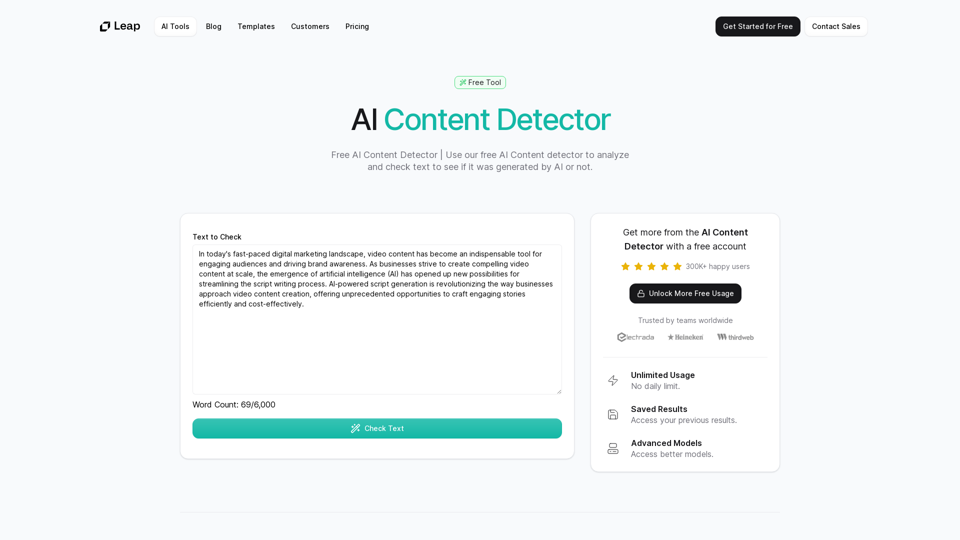
AI Content Detector is a free tool powered by advanced AI technology that analyzes text to determine if it was generated by artificial intelligence. Using state-of-the-art LLM models, this tool offers precise and accurate identification of AI-generated content, making it an invaluable resource for educators, content creators, and professionals who need reliable AI content detection.
AI Content Detector | GPT-4o, Anthropic, & ChatGPT This AI content detector is designed to identify text generated by popular AI models, including GPT-4o, Anthropic, and ChatGPT.
Free AI Content Detector | 使用我们的免费AI内容检测器来分析和检查文本,以查看它是否由AI生成。
Introduction
Feature
Advanced LLM Models
The AI Content Detector employs cutting-edge Large Language Models (LLM) to accurately analyze and identify AI-generated content, ensuring high precision in detection.
Unlimited Free Usage
Users can access the AI Content Detector without any daily limits or restrictions, making it freely available to everyone who needs to verify content authenticity.
Result History
The tool allows users to access and track their previous analysis results, enabling them to maintain a history of their content checks.
Simple 3-Step Process
- Input text into the provided box
- Click 'Check Text' to initiate analysis
- View comprehensive results of the AI content detection
Multi-Language Support
While specific language support is not mentioned, the tool likely accommodates various languages to cater to a global user base.
FAQ
How does an AI Content Detector work?
AI Content Detectors use advanced language models to analyze text patterns, structure, and characteristics that are typical of AI-generated content. These tools compare the input text against known patterns of human and AI writing to determine the likelihood of AI generation.
How accurate are AI Content Detectors?
The accuracy of AI Content Detectors can vary, but advanced tools like this one use the latest LLM models to ensure high precision. However, as AI technology evolves, these tools continually adapt to maintain accuracy.
Why do I need to use AI Content Detectors?
AI Content Detectors help maintain content integrity and authenticity. They are particularly useful for educators checking student work, content creators ensuring originality, and professionals verifying the source of information.
Can AI Content Detectors distinguish between different AI writing styles?
Advanced AI Content Detectors can often identify various AI writing styles, as they are trained on diverse datasets. However, the specific capabilities may vary between different tools.
Is the AI Content Detector free?
Yes, this AI Content Detector is completely free to use, with no usage limits or restrictions.
Related Websites

Sentimetric Sentimetric is a method used to measure the sentiment of text data, such as customer reviews, comments, or social media posts. It involves analyzing the emotional tone or attitude conveyed by the text, whether it's positive, negative, or neutral.
Sentimetric Sentimetric is a method used to measure the sentiment of text data, such as customer reviews, comments, or social media posts. It involves analyzing the emotional tone or attitude conveyed by the text, whether it's positive, negative, or neutral.Unlock your career potential with our AI-powered job application presentation builder designed to help you stand out in the competitive job market. Our app goes beyond traditional cover letters and resumes by creating personalized presentations that show recruiters how your skills and experience align with company goals and values. Plus, we provide project ideas with SWOT analyses that will impress every recruiter.
0
)
* Create a new notebook
* Install the `transformers` library by running `!pip install transformers`
* Import the `transformers` library and load the ChatGPT model using `from transformers import AutoModelForCausalLM, AutoTokenizer; model = AutoModelForCausalLM.from_pretrained('chatgpt'); tokenizer = AutoTokenizer.from_pretrained('chatgpt')`
* Use the model to generate text using `input_text = "Your input here"; inputs = tokenizer.encode_plus(input_text, return_tensors='pt', max_length=1024, padding='max_length', truncation=True); output = model(inputs['input_ids'], attention_mask=inputs['attention_mask']); print(tokenizer.decode(output.logits[0], skip_special_tokens=True))`
Method 2: Google Apps Script
* Open Google Apps Script ([script.google.com](http://script.google.com))
* Create a new project
* Install the `transformers` library by running `npm install transformers`
* Import the `transformers` library and load the ChatGPT model using `const { AutoModelForCausalLM, AutoTokenizer } = require('transformers'); const model = new AutoModelForCausalLM('chatgpt'); const tokenizer = new AutoTokenizer('chatgpt');`
* Use the model to generate text using `const inputText = "Your input here"; const inputs = tokenizer.encodePlus(inputText, { return_tensors: 'pt', max_length: 1024, padding: 'max_length', truncation: true }); const output = model(inputs.inputIds, inputs.attentionMask); console.log(tokenizer.decode(output.logits[0], { skipSpecialTokens: true }));`
Note: These methods require some technical knowledge and may have limitations compared to the original ChatGPT model.](https://static.right-ai.com/tools/2024/7/3/chromewebstore-google-com-detail-chatgpt-for-google-for-fr-pabeminldebomngnkgffiejipjjaaogi-thumbnail-1720037311.png "Get ChatGPT for Free with Google
You can now access ChatGPT, a powerful language model, for free with Google. Here's how:
Method 1: Google Colab
* Open Google Colab ([colab.research.google.com](http://colab.research.google.com))
* Create a new notebook
* Install the `transformers` library by running `!pip install transformers`
* Import the `transformers` library and load the ChatGPT model using `from transformers import AutoModelForCausalLM, AutoTokenizer; model = AutoModelForCausalLM.from_pretrained('chatgpt'); tokenizer = AutoTokenizer.from_pretrained('chatgpt')`
* Use the model to generate text using `input_text = \"Your input here\"; inputs = tokenizer.encode_plus(input_text, return_tensors='pt', max_length=1024, padding='max_length', truncation=True); output = model(inputs['input_ids'], attention_mask=inputs['attention_mask']); print(tokenizer.decode(output.logits[0], skip_special_tokens=True))`
Method 2: Google Apps Script
* Open Google Apps Script ([script.google.com](http://script.google.com))
* Create a new project
* Install the `transformers` library by running `npm install transformers`
* Import the `transformers` library and load the ChatGPT model using `const { AutoModelForCausalLM, AutoTokenizer } = require('transformers'); const model = new AutoModelForCausalLM('chatgpt'); const tokenizer = new AutoTokenizer('chatgpt');`
* Use the model to generate text using `const inputText = \"Your input here\"; const inputs = tokenizer.encodePlus(inputText, { return_tensors: 'pt', max_length: 1024, padding: 'max_length', truncation: true }); const output = model(inputs.inputIds, inputs.attentionMask); console.log(tokenizer.decode(output.logits[0], { skipSpecialTokens: true }));`
Note: These methods require some technical knowledge and may have limitations compared to the original ChatGPT model.")
Get ChatGPT for Free with Google You can now access ChatGPT, a powerful language model, for free with Google. Here's how: Method 1: Google Colab * Open Google Colab ([colab.research.google.com](http://colab.research.google.com)) * Create a new notebook * Install the `transformers` library by running `!pip install transformers` * Import the `transformers` library and load the ChatGPT model using `from transformers import AutoModelForCausalLM, AutoTokenizer; model = AutoModelForCausalLM.from_pretrained('chatgpt'); tokenizer = AutoTokenizer.from_pretrained('chatgpt')` * Use the model to generate text using `input_text = "Your input here"; inputs = tokenizer.encode_plus(input_text, return_tensors='pt', max_length=1024, padding='max_length', truncation=True); output = model(inputs['input_ids'], attention_mask=inputs['attention_mask']); print(tokenizer.decode(output.logits[0], skip_special_tokens=True))` Method 2: Google Apps Script * Open Google Apps Script ([script.google.com](http://script.google.com)) * Create a new project * Install the `transformers` library by running `npm install transformers` * Import the `transformers` library and load the ChatGPT model using `const { AutoModelForCausalLM, AutoTokenizer } = require('transformers'); const model = new AutoModelForCausalLM('chatgpt'); const tokenizer = new AutoTokenizer('chatgpt');` * Use the model to generate text using `const inputText = "Your input here"; const inputs = tokenizer.encodePlus(inputText, { return_tensors: 'pt', max_length: 1024, padding: 'max_length', truncation: true }); const output = model(inputs.inputIds, inputs.attentionMask); console.log(tokenizer.decode(output.logits[0], { skipSpecialTokens: true }));` Note: These methods require some technical knowledge and may have limitations compared to the original ChatGPT model.
Get ChatGPT for Free with Google You can now access ChatGPT, a powerful language model, for free with Google. Here's how: Method 1: Google Colab * Open Google Colab ([colab.research.google.com](http://colab.research.google.com)) * Create a new notebook * Install the `transformers` library by running `!pip install transformers` * Import the `transformers` library and load the ChatGPT model using `from transformers import AutoModelForCausalLM, AutoTokenizer; model = AutoModelForCausalLM.from_pretrained('chatgpt'); tokenizer = AutoTokenizer.from_pretrained('chatgpt')` * Use the model to generate text using `input_text = "Your input here"; inputs = tokenizer.encode_plus(input_text, return_tensors='pt', max_length=1024, padding='max_length', truncation=True); output = model(inputs['input_ids'], attention_mask=inputs['attention_mask']); print(tokenizer.decode(output.logits[0], skip_special_tokens=True))` Method 2: Google Apps Script * Open Google Apps Script ([script.google.com](http://script.google.com)) * Create a new project * Install the `transformers` library by running `npm install transformers` * Import the `transformers` library and load the ChatGPT model using `const { AutoModelForCausalLM, AutoTokenizer } = require('transformers'); const model = new AutoModelForCausalLM('chatgpt'); const tokenizer = new AutoTokenizer('chatgpt');` * Use the model to generate text using `const inputText = "Your input here"; const inputs = tokenizer.encodePlus(inputText, { return_tensors: 'pt', max_length: 1024, padding: 'max_length', truncation: true }); const output = model(inputs.inputIds, inputs.attentionMask); console.log(tokenizer.decode(output.logits[0], { skipSpecialTokens: true }));` Note: These methods require some technical knowledge and may have limitations compared to the original ChatGPT model.How to Add ChatGPT to All Google Searches ===================================================== Step 1: Create a Custom Search Engine -------------------------------------- * Go to the [Google Custom Search Engine](https://cse.google.com/) website and sign in with your Google account. * Click on the "New Search Engine" button. * Fill in the required information, such as the name and description of your search engine. * Click on the "Create" button. Step 2: Add ChatGPT to the Search Engine ----------------------------------------- * In the "Setup" tab, click on the "Add" button next to "Sites to search". * Enter the following URL: `https://chat.openai.com/` * Click on the "Add" button. Step 3: Configure the Search Engine -------------------------------------- * In the "Setup" tab, click on the "Edit" button next to "Search engine keywords". * Add the following keywords: `ChatGPT` * Click on the "Save" button. Step 4: Get the Search Engine Code ------------------------------------- * In the "Setup" tab, click on the "Get code" button. * Copy the HTML code provided. Step 5: Add the Search Engine to Your Browser ------------------------------------------------ * Open your browser and go to the "Settings" or "Options" page. * Look for the "Search engine" or "Default search engine" option. * Click on the "Add" or "Manage search engines" button. * Paste the HTML code you copied earlier. * Click on the "Add" or "Save" button. You're Done! =============== Now, whenever you search on Google, ChatGPT will be included in the search results. You can also use the custom search engine URL provided by Google to search directly.
193.90 M
Free AI Face Swapper supports single photo face swaps, multiple photo face swaps, and video face swaps!
193.90 M
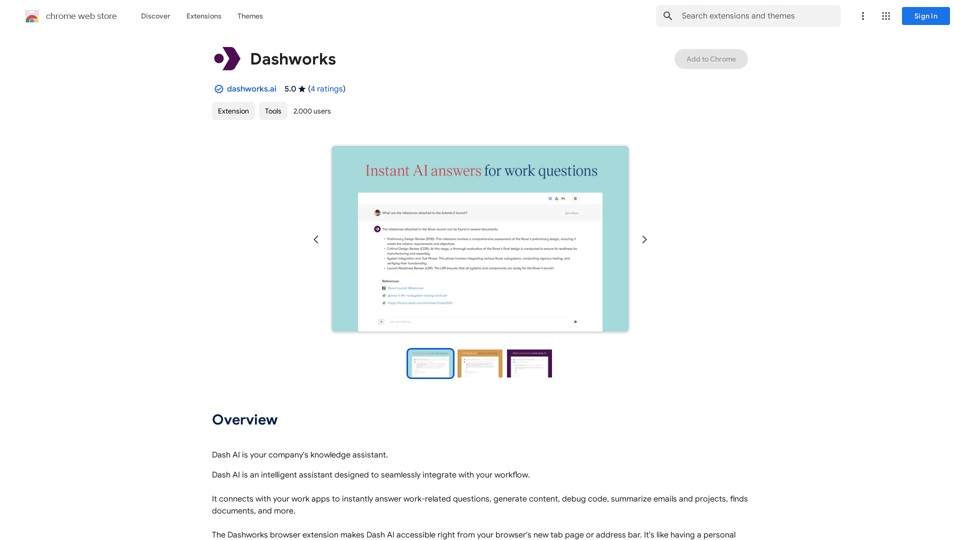
Dashworks Dashworks is a powerful and flexible IT transformation and cloud migration planning tool that helps organizations to assess, plan, and execute their IT transformation projects.
Dashworks Dashworks is a powerful and flexible IT transformation and cloud migration planning tool that helps organizations to assess, plan, and execute their IT transformation projects.Dash AI is your company's knowledge assistant.
193.90 M