Open-source RightAI Tools Directory
  • Discover AI
  • Submit
  • Startup
  • Blog
Open-source RightAI Tools Directory
Discover the best AI tools of 2025 with the RightAI Tools Directory!

Friend Links

AI Anime GeneratorToolsApp AI

Support

Tap4
Privacy policyTerms & ConditionsContact Us
Loading...
loading...

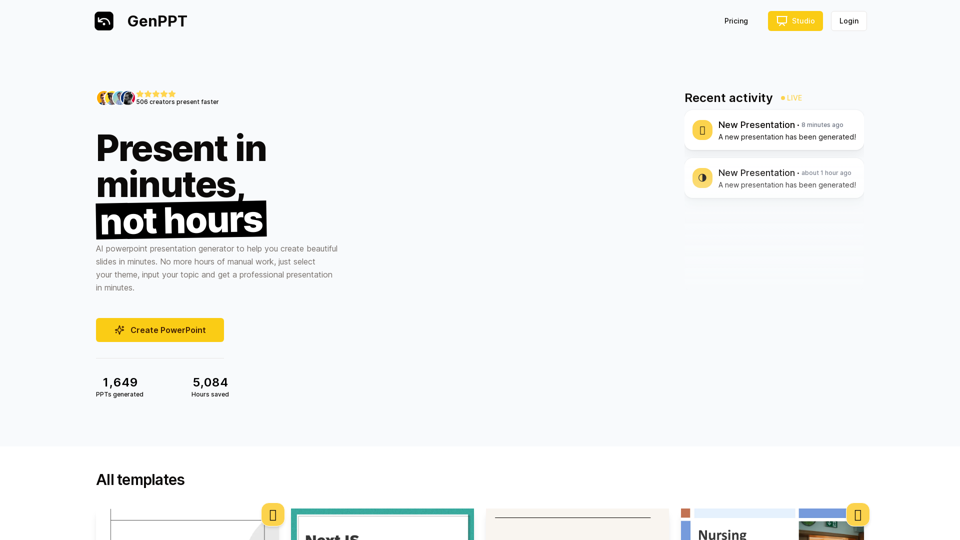
AI Presentation Generator | GenPPT.com

Generate beautiful presentations in minutes with GenPPT. Choose from a variety of themes and let GenPPT's PowerPoint presentation AI do the rest.
Visit Website
AI Presentation Generator | GenPPT.com
Visit Website

Introduction

GenPPT is an AI-powered presentation generator that revolutionizes the way you create slides. With its intuitive interface, users can effortlessly produce professional presentations in minutes. By selecting a theme and inputting a topic, GenPPT's AI technology swiftly generates stunning slides, eliminating hours of manual work. This tool caters to various presentation needs, offering a range of templates and customization options to ensure your slides are both visually appealing and content-rich.

Feature

AI-Powered Presentation Generation

GenPPT utilizes advanced AI technology to create PowerPoint presentations quickly and efficiently. Its extensive library of templates and design elements enables users to produce high-quality presentations in a fraction of the time compared to traditional methods.

Diverse Template Selection

Users can choose from a wide variety of templates to match different presentation styles and needs. Whether you prefer elegant and sophisticated or minimalist and playful designs, GenPPT has options to suit every preference.

User-Friendly Interface

The platform is designed with simplicity in mind, making it accessible to users of all skill levels. The straightforward process involves selecting a theme, inputting a topic, and letting the AI handle the rest.

Customization Options

While GenPPT automates the initial creation process, users have the flexibility to customize their presentations. Add personal content, images, and design elements to tailor the slides to your specific requirements.

Flexible Pricing Plans

GenPPT offers various pricing options to accommodate different needs and budgets:

PlanPrice
Monthly$9/month
Yearly$90/year
Lifetime$47 (limited offer)

Security and Privacy

GenPPT prioritizes the security and privacy of its users, ensuring that all data is kept safe and secure.

FAQ

How do I get started with GenPPT?

To begin using GenPPT, simply sign up for an account on the platform. Once registered, you can immediately start generating presentations.

Can I customize the AI-generated presentations?

Yes, GenPPT allows for extensive customization. After the AI generates your initial presentation, you can add your own content, images, and design elements to personalize it further.

What types of presentations can I create with GenPPT?

GenPPT is versatile and can be used for various presentation types, including business proposals, educational lectures, marketing pitches, and more. The diverse template selection caters to different styles and purposes.

Latest Traffic Insights

  • Monthly Visits

    41.71 K

  • Bounce Rate

    40.77%

  • Pages Per Visit

    2.71

  • Time on Site(s)

    50.44

  • Global Rank

    641952

  • Country Rank

    United States 393103

Recent Visits

Traffic Sources

  • Social Media:
    19.55%
  • Paid Referrals:
    1.04%
  • Email:
    0.11%
  • Referrals:
    9.31%
  • Search Engines:
    32.69%
  • Direct:
    37.11%
More Data

Related Websites

Calorielens: Calorie Counter in the App Store
View Detail

Calorielens: Calorie Counter in the App Store

Calorielens: Calorie Counter in the App Store

CalorieLens is your ultimate companion for calorie tracking. With just a simple snapshot, this AI-powered app accurately analyzes the calories in…

124.77 M
AI Voice Over for YouTube 

This is a guide to using AI voice over for your YouTube videos. 

Why Use AI Voice Over?

* Cost-Effective: AI voice over is much cheaper than hiring a professional voice actor.
* Time-Saving: You can generate voice over quickly and easily, without needing to schedule recording sessions.
* Variety of Voices: Choose from a wide range of AI voices, including male, female, and even robotic voices.
* Accessibility: Make your videos accessible to viewers who are deaf or hard of hearing by adding captions generated by AI.

How to Use AI Voice Over

1. Choose a Platform: There are many different platforms that offer AI voice over services, such as:
    * Google Cloud Text-to-Speech
    * Amazon Polly
    * Microsoft Azure Text to Speech
    * Murf.ai
    * NaturalReader
2. Write Your Script:  Write a clear and concise script for your video.
3. Upload Your Script:  Upload your script to the chosen platform.
4. Select a Voice: Choose the voice that best suits your video.
5. Adjust Settings:  Adjust settings such as speed, pitch, and volume.
6. Generate Voice Over:  Click the "Generate" button to create your voice over.
7. Download and Edit: Download the generated voice over file and edit it as needed.
8. Add to Your Video:  Add the voice over to your YouTube video.

Tips for Using AI Voice Over

* Use Natural Language:  Write your script as if you were speaking naturally.
* Vary Your Tone:  Use different tones of voice to keep your viewers engaged.
* Add Pauses:  Include pauses in your script to allow viewers to process information.
* Proofread Carefully:  Always proofread your script before generating the voice over.
* Experiment:  Try different voices, settings, and styles to find what works best for you.
View Detail

AI Voice Over for YouTube This is a guide to using AI voice over for your YouTube videos. Why Use AI Voice Over? * Cost-Effective: AI voice over is much cheaper than hiring a professional voice actor. * Time-Saving: You can generate voice over quickly and easily, without needing to schedule recording sessions. * Variety of Voices: Choose from a wide range of AI voices, including male, female, and even robotic voices. * Accessibility: Make your videos accessible to viewers who are deaf or hard of hearing by adding captions generated by AI. How to Use AI Voice Over 1. Choose a Platform: There are many different platforms that offer AI voice over services, such as: * Google Cloud Text-to-Speech * Amazon Polly * Microsoft Azure Text to Speech * Murf.ai * NaturalReader 2. Write Your Script: Write a clear and concise script for your video. 3. Upload Your Script: Upload your script to the chosen platform. 4. Select a Voice: Choose the voice that best suits your video. 5. Adjust Settings: Adjust settings such as speed, pitch, and volume. 6. Generate Voice Over: Click the "Generate" button to create your voice over. 7. Download and Edit: Download the generated voice over file and edit it as needed. 8. Add to Your Video: Add the voice over to your YouTube video. Tips for Using AI Voice Over * Use Natural Language: Write your script as if you were speaking naturally. * Vary Your Tone: Use different tones of voice to keep your viewers engaged. * Add Pauses: Include pauses in your script to allow viewers to process information. * Proofread Carefully: Always proofread your script before generating the voice over. * Experiment: Try different voices, settings, and styles to find what works best for you.

AI Voice Over for YouTube This is a guide to using AI voice over for your YouTube videos. Why Use AI Voice Over? * Cost-Effective: AI voice over is much cheaper than hiring a professional voice actor. * Time-Saving: You can generate voice over quickly and easily, without needing to schedule recording sessions. * Variety of Voices: Choose from a wide range of AI voices, including male, female, and even robotic voices. * Accessibility: Make your videos accessible to viewers who are deaf or hard of hearing by adding captions generated by AI. How to Use AI Voice Over 1. Choose a Platform: There are many different platforms that offer AI voice over services, such as: * Google Cloud Text-to-Speech * Amazon Polly * Microsoft Azure Text to Speech * Murf.ai * NaturalReader 2. Write Your Script: Write a clear and concise script for your video. 3. Upload Your Script: Upload your script to the chosen platform. 4. Select a Voice: Choose the voice that best suits your video. 5. Adjust Settings: Adjust settings such as speed, pitch, and volume. 6. Generate Voice Over: Click the "Generate" button to create your voice over. 7. Download and Edit: Download the generated voice over file and edit it as needed. 8. Add to Your Video: Add the voice over to your YouTube video. Tips for Using AI Voice Over * Use Natural Language: Write your script as if you were speaking naturally. * Vary Your Tone: Use different tones of voice to keep your viewers engaged. * Add Pauses: Include pauses in your script to allow viewers to process information. * Proofread Carefully: Always proofread your script before generating the voice over. * Experiment: Try different voices, settings, and styles to find what works best for you.

Watch foreign language YouTube videos in your own language.

193.90 M
PPT Summary Genius - ChatGPT for PPT

Turn your boring presentations into engaging masterpieces!

* Summarize lengthy PPTs:  ChatGPT can condense your slides into concise summaries, perfect for quick reviews or sharing key points.
* Generate compelling narratives:  Transform your data and bullet points into captivating stories that resonate with your audience.
* Craft impactful introductions and conclusions:  Start strong and leave a lasting impression with ChatGPT's help.
* Overcome writer's block:  Struggling with slide content? ChatGPT can provide creative ideas and help you overcome creative hurdles.
* Tailor your message:  Adjust the tone and style of your presentation to match your audience and purpose.

Boost your productivity and create presentations that truly shine!
View Detail

PPT Summary Genius - ChatGPT for PPT Turn your boring presentations into engaging masterpieces! * Summarize lengthy PPTs: ChatGPT can condense your slides into concise summaries, perfect for quick reviews or sharing key points. * Generate compelling narratives: Transform your data and bullet points into captivating stories that resonate with your audience. * Craft impactful introductions and conclusions: Start strong and leave a lasting impression with ChatGPT's help. * Overcome writer's block: Struggling with slide content? ChatGPT can provide creative ideas and help you overcome creative hurdles. * Tailor your message: Adjust the tone and style of your presentation to match your audience and purpose. Boost your productivity and create presentations that truly shine!

PPT Summary Genius - ChatGPT for PPT Turn your boring presentations into engaging masterpieces! * Summarize lengthy PPTs: ChatGPT can condense your slides into concise summaries, perfect for quick reviews or sharing key points. * Generate compelling narratives: Transform your data and bullet points into captivating stories that resonate with your audience. * Craft impactful introductions and conclusions: Start strong and leave a lasting impression with ChatGPT's help. * Overcome writer's block: Struggling with slide content? ChatGPT can provide creative ideas and help you overcome creative hurdles. * Tailor your message: Adjust the tone and style of your presentation to match your audience and purpose. Boost your productivity and create presentations that truly shine!

Using ChatGPT, you can chat, ask questions, get instant summaries and answers, and generate outlines for presentations in PPT and PowerPoint format.

193.90 M
mymap.ai: Mapping Ideas That Change the World
View Detail

mymap.ai: Mapping Ideas That Change the World

mymap.ai: Mapping Ideas That Change the World

MyMap transforms your textual concepts into visual representations such as mind maps and presentations through a straightforward chat interface. It's perfect for students, educators, and professionals, requiring no design expertise. This tool saves you time by enabling effortless, collaborative visual creation.

1.04 M
QuraAi
View Detail

QuraAi

QuraAi

Qura.ai is designed to improve your Twitter experience with artificial intelligence.

193.90 M
Outmeet: Cohost
View Detail

Outmeet: Cohost

Outmeet: Cohost

Interview assistant. Manage interviews efficiently, providing real-time feedback and suggestions to improve the conversation flow.

193.90 M
AMISSU
View Detail

AMISSU

AMISSU

AMIS Schedule Unitizer: Automatic Schedule Planner for University Class Enrollment

193.90 M
DeckBird
View Detail

DeckBird

DeckBird

DeckBird.ai is the number one presentation sharing tool, turning presentations into an AI sales and marketing assistant.

193.90 M