Open-source RightAI Tools Directory
  • Discover AI
  • Submit
  • Startup
  • Blog
Open-source RightAI Tools Directory
Discover the best AI tools of 2025 with the RightAI Tools Directory!

Friend Links

AI Anime GeneratorToolsApp AI

Support

Tap4
Privacy policyTerms & ConditionsContact Us
Loading...
loading...

Website Optimizer AI

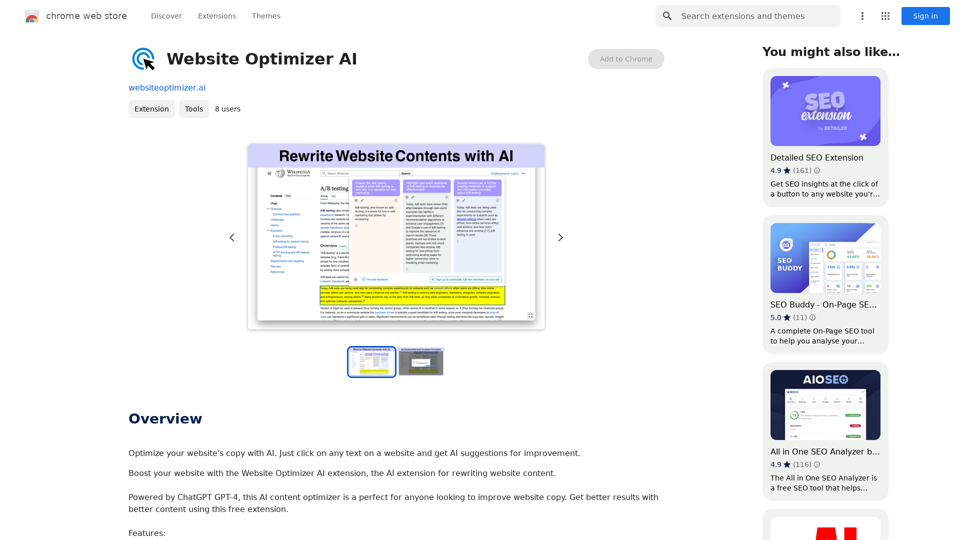
Improve your website's text with AI. Simply click on any text on a website and receive AI-powered suggestions for making it better.
Visit Website
Website Optimizer AI
Visit Website

Introduction

Website Optimizer AI is a Chrome extension that leverages ChatGPT GPT-4 to rewrite and improve website content. This AI-driven tool is designed to enhance website copy, making it more engaging and SEO-friendly. It's an ideal solution for marketers, content creators, and website owners looking to optimize their online presence and achieve better results through improved content.

Feature

Easy Integration

Website Optimizer AI seamlessly integrates with Chrome, allowing users to instantly transform website text without complex setup processes.

Smart Rewriting

Utilizing GPT-4 technology, the extension revamps text to make it more engaging and SEO-friendly, improving overall content quality.

Customizable Prompts

Users can input custom prompts to ensure AI-generated copy aligns with their brand's unique voice and tone.

Multiple Content Variants

The tool generates various content options at the click of a button, ideal for A/B testing and experimentation to maximize results.

User-Friendly Interface

With a simple click, users can rewrite any part of a website, making content optimization accessible to all skill levels.

Free to Use

Website Optimizer AI is available at no cost, with no subscription fees required.

FAQ

How do I use Website Optimizer AI?

To use Website Optimizer AI, simply click on any text on a website after installing the Chrome extension. The AI will then provide suggestions for improvement.

Can I customize the AI-generated content?

Yes, you can feed custom prompts to the AI to ensure the generated copy matches your brand's tone and style.

Is Website Optimizer AI suitable for SEO improvement?

Absolutely. The tool is designed to make content more SEO-friendly, helping to improve website visibility and ranking.

How can I maximize results with Website Optimizer AI?

Combine the extension with A/B testing and experimentation to find the most effective content variations for your website.

Is there a limit to how much content I can optimize?

There are no mentioned limitations. Users can optimize as much content as they need on their websites.

Related Websites
Coursera Summary with ChatGPT and Take Notes
=====================================================

What is Coursera?

Coursera is an online learning platform that partners with top universities and organizations to offer courses and degree programs in a wide range of fields.

What is ChatGPT?

ChatGPT is a conversational AI tool that can understand and respond to human input in a human-like way. It can be used to generate text, answer questions, and even create content.

How to Use ChatGPT for Coursera Summary?

You can use ChatGPT to summarize Coursera courses by:

* Providing the course material or lecture notes to ChatGPT
* Asking ChatGPT to summarize the key points or main ideas
* Reviewing and editing the summary generated by ChatGPT

Benefits of Using ChatGPT for Coursera Summary

Using ChatGPT for Coursera summary can help you:

* Save time by automating the summarization process
* Improve understanding and retention of course material
* Focus on key concepts and ideas
* Enhance learning experience

How to Take Notes with ChatGPT?

You can use ChatGPT to take notes by:

* Providing the course material or lecture notes to ChatGPT
* Asking ChatGPT to generate notes or key points
* Reviewing and editing the notes generated by ChatGPT
* Organizing and structuring the notes for easy reference

Benefits of Using ChatGPT for Taking Notes

Using ChatGPT for taking notes can help you:

* Save time by automating the note-taking process
* Improve organization and structure of notes
* Enhance understanding and retention of course material
* Focus on key concepts and ideas
View Detail

Coursera Summary with ChatGPT and Take Notes ===================================================== What is Coursera? Coursera is an online learning platform that partners with top universities and organizations to offer courses and degree programs in a wide range of fields. What is ChatGPT? ChatGPT is a conversational AI tool that can understand and respond to human input in a human-like way. It can be used to generate text, answer questions, and even create content. How to Use ChatGPT for Coursera Summary? You can use ChatGPT to summarize Coursera courses by: * Providing the course material or lecture notes to ChatGPT * Asking ChatGPT to summarize the key points or main ideas * Reviewing and editing the summary generated by ChatGPT Benefits of Using ChatGPT for Coursera Summary Using ChatGPT for Coursera summary can help you: * Save time by automating the summarization process * Improve understanding and retention of course material * Focus on key concepts and ideas * Enhance learning experience How to Take Notes with ChatGPT? You can use ChatGPT to take notes by: * Providing the course material or lecture notes to ChatGPT * Asking ChatGPT to generate notes or key points * Reviewing and editing the notes generated by ChatGPT * Organizing and structuring the notes for easy reference Benefits of Using ChatGPT for Taking Notes Using ChatGPT for taking notes can help you: * Save time by automating the note-taking process * Improve organization and structure of notes * Enhance understanding and retention of course material * Focus on key concepts and ideas

Coursera Summary with ChatGPT and Take Notes ===================================================== What is Coursera? Coursera is an online learning platform that partners with top universities and organizations to offer courses and degree programs in a wide range of fields. What is ChatGPT? ChatGPT is a conversational AI tool that can understand and respond to human input in a human-like way. It can be used to generate text, answer questions, and even create content. How to Use ChatGPT for Coursera Summary? You can use ChatGPT to summarize Coursera courses by: * Providing the course material or lecture notes to ChatGPT * Asking ChatGPT to summarize the key points or main ideas * Reviewing and editing the summary generated by ChatGPT Benefits of Using ChatGPT for Coursera Summary Using ChatGPT for Coursera summary can help you: * Save time by automating the summarization process * Improve understanding and retention of course material * Focus on key concepts and ideas * Enhance learning experience How to Take Notes with ChatGPT? You can use ChatGPT to take notes by: * Providing the course material or lecture notes to ChatGPT * Asking ChatGPT to generate notes or key points * Reviewing and editing the notes generated by ChatGPT * Organizing and structuring the notes for easy reference Benefits of Using ChatGPT for Taking Notes Using ChatGPT for taking notes can help you: * Save time by automating the note-taking process * Improve organization and structure of notes * Enhance understanding and retention of course material * Focus on key concepts and ideas

Automate Your Learning: Coursera Videos Transcript and Summary with ChatGPT ============================================================ Are you tired of manually taking notes while watching Coursera videos? Do you wish you had a summary of the video to review later? Look no further! With the power of ChatGPT, you can now generate transcripts and summaries of Coursera videos with ease. How it Works --------------- 1. Transcribe the Video: Use a transcription tool to convert the audio from the Coursera video into text. 2. Feed it to ChatGPT: Input the transcript into ChatGPT, and it will generate a concise summary of the video. 3. Review and Refine: Review the summary, refine it as needed, and you're good to go! Benefits ------------ * Save Time: No more manual note-taking or re-watching videos to understand the content. * Improve Retention: A summary of the video helps you retain information better and review it quickly. * Enhance Learning: Focus on understanding the concepts rather than taking notes. Get Started -------------- Try it out today and take your learning to the next level!

193.90 M
Kling AI | KuaiShou Text-to-Video Generation Model
View Detail

Kling AI | KuaiShou Text-to-Video Generation Model

Kling AI | KuaiShou Text-to-Video Generation Model

Discover Kling AI, a revolutionary Sora-like text-to-video model. Create stunning videos with advanced 3D mechanisms and cinema-grade quality.

21.14 K
New York Laws on the App Store
View Detail

New York Laws on the App Store

New York Laws on the App Store

Access the full text of New York State laws with ease. Bookmark important sections, highlight text, and get AI-generated summaries. Features include: - Comprehensive search functionality to quickly find specific laws and regulations - Customizable bookmarks to mark important sections for future reference - Highlighting tool to emphasize key points and phrases - AI-powered summaries to provide a concise overview of complex laws

124.77 M
AI-cruiter by WorkInBiotech.com
View Detail

AI-cruiter by WorkInBiotech.com

AI-cruiter by WorkInBiotech.com

Free, Fast, AI-Powered Job Applicant Review for Recruiters

193.90 M
GoldDust
View Detail

GoldDust

GoldDust

What is the founding date of Google?

193.90 M
All-in-One AI Chat Social Media Search Engine
View Detail

All-in-One AI Chat Social Media Search Engine

All-in-One AI Chat Social Media Search Engine

Search Google SGE AI, best free AI generative search engines, Gemini AI chatbots, video, image, and social media search engine all in one.

193.90 M
Stable Diffusion 3 Free Online Access - Powered By SD3 API
View Detail

Stable Diffusion 3 Free Online Access - Powered By SD3 API

Stable Diffusion 3 Free Online Access - Powered By SD3 API

Discover Stable Diffusion 3, the advanced text-to-image model by Stability AI. Learn about the stable diffusion 3 release date, how to download stable diffusion 3, stable diffusion 3 API, and how to access stable diffusion 3 for free online.

105.22 K
GrammaticGenius™
View Detail

GrammaticGenius™

GrammaticGenius™

Your English Co-Pilot, Right in Your Browser

193.90 M