Open-source RightAI Tools Directory
  • Discover AI
  • Submit
  • Startup
  • Blog
Open-source RightAI Tools Directory
Discover the best AI tools of 2025 with the RightAI Tools Directory!

Friend Links

AI Anime GeneratorToolsApp AI

Support

Tap4
Privacy policyTerms & ConditionsContact Us
Loading...
loading...

Homie.AI on the App Store

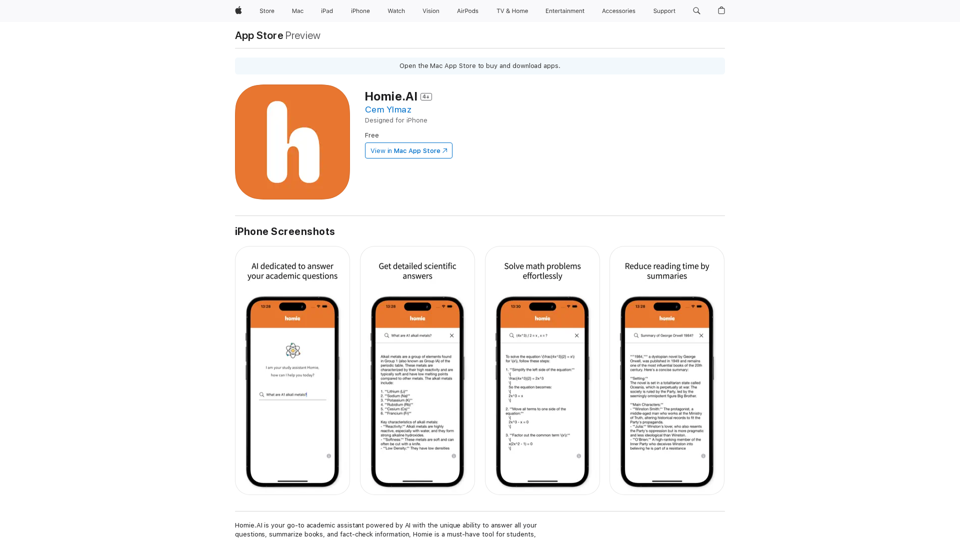
Homie.AI is your go-to academic assistant powered by AI with the unique ability to answer all your questions, summarize books, and fact-check information, Homie is always here to help you with your academic needs.
Visit Website
Homie.AI on the App Store
Visit Website

Introduction

Homie.AI is an AI-powered academic assistant designed for students, scholars, and intellectuals. It offers instant answers to questions, book summaries, and fact-checking capabilities. With its user-friendly interface and comprehensive features, Homie.AI aims to streamline academic research and learning processes.

Feature

Instant Answers with Scientific Explanations

Homie.AI provides detailed scientific explanations for a wide range of academic questions, ensuring users receive accurate and comprehensive information.

Book Summarization

The app offers book summaries, helping users reduce reading time while still grasping key concepts and information from various texts.

Fact-Checking Capability

Homie.AI includes a fact-checking feature to verify information, promoting accuracy in research and learning.

Math Problem Solver

Users can easily solve math problems using Homie.AI, making it a versatile tool for various academic disciplines.

User-Friendly Interface

The app boasts a simple and intuitive interface, allowing users to access its features effortlessly and enhance their learning experience.

iPhone Compatibility

Homie.AI is designed specifically for iPhone users and can be downloaded from the App Store.

Free Access

The app is available for free download, making it accessible to a wide range of users.

FAQ

What is Homie.AI?

Homie.AI is an AI-powered academic assistant that provides instant answers to questions, summarizes books, and fact-checks information. It's designed to support students, scholars, and intellectuals in their academic pursuits.

What are the main features of Homie.AI?

The main features of Homie.AI include:

  1. Providing comprehensive answers to academic questions
  2. Summarizing books to reduce reading time
  3. Fact-checking information for accuracy
  4. Solving math problems
  5. User-friendly interface for easy navigation

How does Homie.AI benefit users?

Homie.AI offers several benefits:

  • Instant access to accurate information
  • Time-saving book summaries
  • Reliable fact-checking capabilities
  • Simplified math problem-solving
  • Enhanced efficiency in academic research and learning

How can I access Homie.AI?

Homie.AI is designed for iPhone users and can be downloaded for free from the App Store. Its simple and intuitive interface allows users to easily access its features and start using it immediately.

Related Websites
Rizz Baby - AI Dating Tools on the App Store
View Detail

Rizz Baby - AI Dating Tools on the App Store

Rizz Baby - AI Dating Tools on the App Store

Want to take your social interactions to the next level? Rizz Baby is your perfect partner! Powered by cutting-edge AI, our app creates customized responses and icebreakers that will help you shine in any social situation.

124.77 M
HindustanGPT: GPT in Indian Languages on Google™
View Detail

HindustanGPT: GPT in Indian Languages on Google™

HindustanGPT: GPT in Indian Languages on Google™

ChatGPT™ for all Google™ searches in Indian languages.

193.90 M
Print Perfect AI Text Editor
View Detail

Print Perfect AI Text Editor

Print Perfect AI Text Editor

Print Perfect helps you correct and edit your text to make it sound like it was written by a native English speaker.

193.90 M
SliceX AI Tweet Analyzer
View Detail

SliceX AI Tweet Analyzer

SliceX AI Tweet Analyzer

Search for tweets and get real-time statistics: general sentiment, toxicity levels, and emotions expressed.

193.90 M
AI Voice Over for YouTube 

This is a guide to using AI voice over for your YouTube videos. 

Why Use AI Voice Over?

* Cost-Effective: AI voice over is much cheaper than hiring a professional voice actor.
* Time-Saving: You can generate voice over quickly and easily, without needing to schedule recording sessions.
* Variety of Voices: Choose from a wide range of AI voices, including male, female, and even robotic voices.
* Accessibility: Make your videos accessible to viewers who are deaf or hard of hearing by adding captions generated by AI.

How to Use AI Voice Over

1. Choose a Platform: There are many different platforms that offer AI voice over services, such as:
    * Google Cloud Text-to-Speech
    * Amazon Polly
    * Microsoft Azure Text to Speech
    * Murf.ai
    * NaturalReader
2. Write Your Script:  Write a clear and concise script for your video.
3. Upload Your Script:  Upload your script to the chosen platform.
4. Select a Voice: Choose the voice that best suits your video.
5. Adjust Settings:  Adjust settings such as speed, pitch, and volume.
6. Generate Voice Over:  Click the "Generate" button to create your voice over.
7. Download and Edit: Download the generated voice over file and edit it as needed.
8. Add to Your Video:  Add the voice over to your YouTube video.

Tips for Using AI Voice Over

* Use Natural Language:  Write your script as if you were speaking naturally.
* Vary Your Tone:  Use different tones of voice to keep your viewers engaged.
* Add Pauses:  Include pauses in your script to allow viewers to process information.
* Proofread Carefully:  Always proofread your script before generating the voice over.
* Experiment:  Try different voices, settings, and styles to find what works best for you.
View Detail

AI Voice Over for YouTube This is a guide to using AI voice over for your YouTube videos. Why Use AI Voice Over? * Cost-Effective: AI voice over is much cheaper than hiring a professional voice actor. * Time-Saving: You can generate voice over quickly and easily, without needing to schedule recording sessions. * Variety of Voices: Choose from a wide range of AI voices, including male, female, and even robotic voices. * Accessibility: Make your videos accessible to viewers who are deaf or hard of hearing by adding captions generated by AI. How to Use AI Voice Over 1. Choose a Platform: There are many different platforms that offer AI voice over services, such as: * Google Cloud Text-to-Speech * Amazon Polly * Microsoft Azure Text to Speech * Murf.ai * NaturalReader 2. Write Your Script: Write a clear and concise script for your video. 3. Upload Your Script: Upload your script to the chosen platform. 4. Select a Voice: Choose the voice that best suits your video. 5. Adjust Settings: Adjust settings such as speed, pitch, and volume. 6. Generate Voice Over: Click the "Generate" button to create your voice over. 7. Download and Edit: Download the generated voice over file and edit it as needed. 8. Add to Your Video: Add the voice over to your YouTube video. Tips for Using AI Voice Over * Use Natural Language: Write your script as if you were speaking naturally. * Vary Your Tone: Use different tones of voice to keep your viewers engaged. * Add Pauses: Include pauses in your script to allow viewers to process information. * Proofread Carefully: Always proofread your script before generating the voice over. * Experiment: Try different voices, settings, and styles to find what works best for you.

AI Voice Over for YouTube This is a guide to using AI voice over for your YouTube videos. Why Use AI Voice Over? * Cost-Effective: AI voice over is much cheaper than hiring a professional voice actor. * Time-Saving: You can generate voice over quickly and easily, without needing to schedule recording sessions. * Variety of Voices: Choose from a wide range of AI voices, including male, female, and even robotic voices. * Accessibility: Make your videos accessible to viewers who are deaf or hard of hearing by adding captions generated by AI. How to Use AI Voice Over 1. Choose a Platform: There are many different platforms that offer AI voice over services, such as: * Google Cloud Text-to-Speech * Amazon Polly * Microsoft Azure Text to Speech * Murf.ai * NaturalReader 2. Write Your Script: Write a clear and concise script for your video. 3. Upload Your Script: Upload your script to the chosen platform. 4. Select a Voice: Choose the voice that best suits your video. 5. Adjust Settings: Adjust settings such as speed, pitch, and volume. 6. Generate Voice Over: Click the "Generate" button to create your voice over. 7. Download and Edit: Download the generated voice over file and edit it as needed. 8. Add to Your Video: Add the voice over to your YouTube video. Tips for Using AI Voice Over * Use Natural Language: Write your script as if you were speaking naturally. * Vary Your Tone: Use different tones of voice to keep your viewers engaged. * Add Pauses: Include pauses in your script to allow viewers to process information. * Proofread Carefully: Always proofread your script before generating the voice over. * Experiment: Try different voices, settings, and styles to find what works best for you.

Watch foreign language YouTube videos in your own language.

193.90 M
Lai画 - Link-Generated AI Video Tool
View Detail

Lai画 - Link-Generated AI Video Tool

Lai画 - Link-Generated AI Video Tool

With just one URL link, you can quickly generate videos in multiple styles using AI. It supports secondary editing and ensures controllable results.

193.90 M
Hadana: Your AI Travel Planner
View Detail

Hadana: Your AI Travel Planner

Hadana: Your AI Travel Planner

An AI-powered travel companion that crafts personalized travel plans based on your preferences.

593.63 K
Browser Copilot
View Detail

Browser Copilot

Browser Copilot

Use existing or create your own AI helpers to make your web application tasks easier.

193.90 M