Open-source RightAI Tools Directory
  • Discover AI
  • Submit
  • Startup
  • Blog
Open-source RightAI Tools Directory
Discover the best AI tools of 2025 with the RightAI Tools Directory!

Friend Links

AI Anime GeneratorToolsApp AI

Support

Tap4
Privacy policyTerms & ConditionsContact Us
Loading...
loading...

UniOne AI

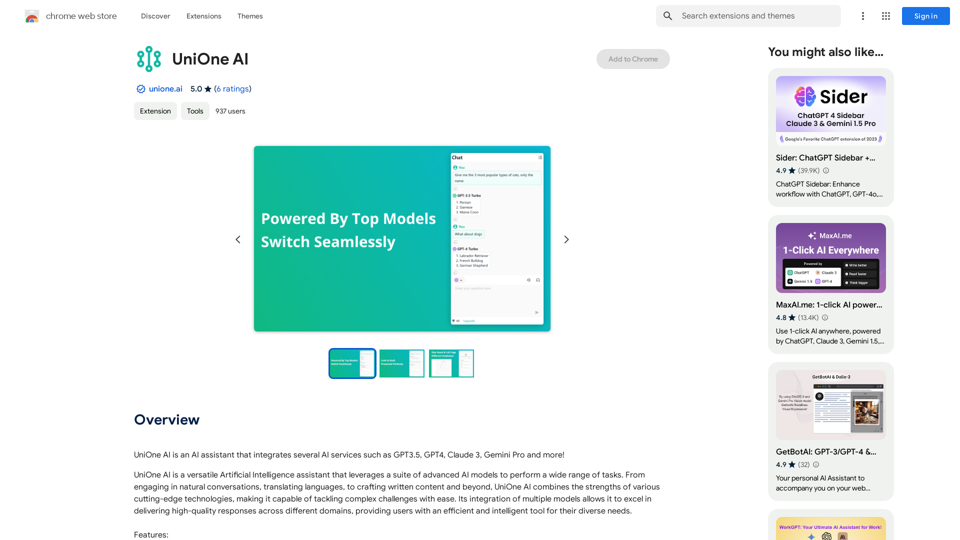
UniOne AI is an AI assistant that integrates several AI services such as GPT3.5, GPT4, Claude 3, Gemini Pro and more!
Visit Website
UniOne AI
Visit Website

Introduction

UniOne AI is a versatile AI assistant that integrates multiple advanced AI models, including GPT3.5, GPT4, Claude 3, and Gemini Pro. It offers a wide range of features and capabilities, making it a powerful tool for various tasks such as natural conversations, content creation, and more. UniOne AI is designed to be user-friendly, efficient, and accessible to everyone.

Feature

Free Access with Daily Quota

  • 30 fast query quota per day
  • Quick sign-up using cell phone or email

Optimized Performance

  • Fast and stable responses
  • Available from any location

Flexible Model Switching

  • Seamless switching between AI models
  • Automatic context retention during switches

Conversation Management

  • Start new conversations anytime
  • Resume from historical conversations

User Interface Options

  • Sidebar for multitasking
  • Full-page mode for focused work

Web Content Access

  • Real-time answers from web content

Text-to-Image Generation

  • Create images from text descriptions

Translation Interface

  • Independent two-column interface
  • Efficient translation workflow

Code and Math Support

  • Code highlighting for better readability
  • LaTeX formula support for academic content

Usability Features

  • One-click copy for code blocks and messages
  • Markdown format copying available

Multilingual Support

  • Currently supports English and Simplified Chinese
  • Plans for more language additions

Customizable Display

  • Dark mode option
  • Automatic theme switching based on system settings

Quick Access Tools

  • Hoverball for sidebar access and settings
  • Cross-word dialog and translation on any webpage

FAQ

How can I start using UniOne AI?

Sign up for free using your cell phone or email address to enjoy 30 fast query quota per day. Subscription options are available for extended access and benefits.

What upcoming features are planned for UniOne AI?

Prompt Management

  • Built-in rich prompts
  • Support for user-defined prompts

Chat with Documents

  • Upload and interact with various document types (PDF, Word, PPT, etc.)

Is UniOne AI free to use permanently?

Yes, free credits are provided permanently. Paid packages are available for users with greater needs.

Are there plans for other platforms besides browser plugins?

Yes, development is underway for mobile, desktop, and web applications, covering all platforms at no extra charge.

How does UniOne AI ensure privacy and security?

  • User information is used only for necessary functions like login
  • Conversation history is stored locally by default
  • Server-stored private information is encrypted and professionally maintained

How can I contact UniOne AI for support or suggestions?

You can reach out to [email protected] for any questions or feedback.

Related Websites
Alt Text Generator for Webflow 

This tool helps you generate descriptive alt text for your Webflow images. 

Why is Alt Text Important?

* Accessibility: Alt text allows screen readers to describe images to visually impaired users.
* SEO: Search engines use alt text to understand the content of your images, improving your website's ranking.

How to Use:

1. Paste your image URL: Enter the URL of the image you want to generate alt text for.
2. Click "Generate Alt Text": The tool will analyze the image and suggest relevant alt text.
3. Review and Edit:  Read the generated alt text and make any necessary changes to ensure it accurately describes the image.

Example:

Image URL: https://www.example.com/image.jpg

Generated Alt Text: A photo of a smiling woman holding a cup of coffee.

Remember:

* Keep alt text concise and descriptive.
* Use keywords that accurately reflect the image content.
* Avoid using generic phrases like "image" or "picture."
View Detail

Alt Text Generator for Webflow This tool helps you generate descriptive alt text for your Webflow images. Why is Alt Text Important? * Accessibility: Alt text allows screen readers to describe images to visually impaired users. * SEO: Search engines use alt text to understand the content of your images, improving your website's ranking. How to Use: 1. Paste your image URL: Enter the URL of the image you want to generate alt text for. 2. Click "Generate Alt Text": The tool will analyze the image and suggest relevant alt text. 3. Review and Edit: Read the generated alt text and make any necessary changes to ensure it accurately describes the image. Example: Image URL: https://www.example.com/image.jpg Generated Alt Text: A photo of a smiling woman holding a cup of coffee. Remember: * Keep alt text concise and descriptive. * Use keywords that accurately reflect the image content. * Avoid using generic phrases like "image" or "picture."

Alt Text Generator for Webflow This tool helps you generate descriptive alt text for your Webflow images. Why is Alt Text Important? * Accessibility: Alt text allows screen readers to describe images to visually impaired users. * SEO: Search engines use alt text to understand the content of your images, improving your website's ranking. How to Use: 1. Paste your image URL: Enter the URL of the image you want to generate alt text for. 2. Click "Generate Alt Text": The tool will analyze the image and suggest relevant alt text. 3. Review and Edit: Read the generated alt text and make any necessary changes to ensure it accurately describes the image. Example: Image URL: https://www.example.com/image.jpg Generated Alt Text: A photo of a smiling woman holding a cup of coffee. Remember: * Keep alt text concise and descriptive. * Use keywords that accurately reflect the image content. * Avoid using generic phrases like "image" or "picture."

Big update! Reconfigured the API to get rid of cold starts. What does this mean? Faster alt text generation! Completely redesigned...

193.90 M
Text to Voice Generator
==========================

A text-to-voice generator, also known as a text-to-speech (TTS) system, is a software that converts written text into a spoken voice output. This technology has been widely used in various applications, including virtual assistants, audiobooks, and language learning platforms.

How it Works
---------------

The process of generating voice from text involves several steps:

1. Text Analysis: The input text is analyzed to identify the language, syntax, and semantics.
2. Phonetic Transcription: The text is converted into a phonetic transcription, which represents the sounds of the spoken language.
3. Prosody Generation: The phonetic transcription is then used to generate the prosody, or rhythm and intonation, of the spoken voice.
4. Waveform Generation: The prosody and phonetic transcription are combined to generate the audio waveform, which is the final spoken voice output.

Types of Text-to-Voice Generators
-----------------------------------

There are two main types of text-to-voice generators:

Rule-Based Systems

These systems use a set of predefined rules to generate the spoken voice output. They are often limited in their ability to produce natural-sounding voices and may sound robotic.

Machine Learning-Based Systems

These systems use machine learning algorithms to learn from large datasets of spoken voices and generate more natural-sounding voices. They are often more advanced and can produce high-quality voice outputs.

Applications of Text-to-Voice Generators
-----------------------------------------

Text-to-voice generators have a wide range of applications, including:

Virtual Assistants

Virtual assistants, such as Siri and Alexa, use text-to-voice generators to respond to user queries.

Audiobooks

Text-to-voice generators can be used to create audiobooks from written texts, making it easier for people to access written content.

Language Learning

Language learning platforms use text-to-voice generators to provide pronunciation guidance and practice exercises for learners.

Accessibility

Text-to-voice generators can be used to assist people with disabilities, such as visual impairments, by providing an auditory interface to written content.
View Detail

Text to Voice Generator ========================== A text-to-voice generator, also known as a text-to-speech (TTS) system, is a software that converts written text into a spoken voice output. This technology has been widely used in various applications, including virtual assistants, audiobooks, and language learning platforms. How it Works --------------- The process of generating voice from text involves several steps: 1. Text Analysis: The input text is analyzed to identify the language, syntax, and semantics. 2. Phonetic Transcription: The text is converted into a phonetic transcription, which represents the sounds of the spoken language. 3. Prosody Generation: The phonetic transcription is then used to generate the prosody, or rhythm and intonation, of the spoken voice. 4. Waveform Generation: The prosody and phonetic transcription are combined to generate the audio waveform, which is the final spoken voice output. Types of Text-to-Voice Generators ----------------------------------- There are two main types of text-to-voice generators: Rule-Based Systems These systems use a set of predefined rules to generate the spoken voice output. They are often limited in their ability to produce natural-sounding voices and may sound robotic. Machine Learning-Based Systems These systems use machine learning algorithms to learn from large datasets of spoken voices and generate more natural-sounding voices. They are often more advanced and can produce high-quality voice outputs. Applications of Text-to-Voice Generators ----------------------------------------- Text-to-voice generators have a wide range of applications, including: Virtual Assistants Virtual assistants, such as Siri and Alexa, use text-to-voice generators to respond to user queries. Audiobooks Text-to-voice generators can be used to create audiobooks from written texts, making it easier for people to access written content. Language Learning Language learning platforms use text-to-voice generators to provide pronunciation guidance and practice exercises for learners. Accessibility Text-to-voice generators can be used to assist people with disabilities, such as visual impairments, by providing an auditory interface to written content.

Text to Voice Generator ========================== A text-to-voice generator, also known as a text-to-speech (TTS) system, is a software that converts written text into a spoken voice output. This technology has been widely used in various applications, including virtual assistants, audiobooks, and language learning platforms. How it Works --------------- The process of generating voice from text involves several steps: 1. Text Analysis: The input text is analyzed to identify the language, syntax, and semantics. 2. Phonetic Transcription: The text is converted into a phonetic transcription, which represents the sounds of the spoken language. 3. Prosody Generation: The phonetic transcription is then used to generate the prosody, or rhythm and intonation, of the spoken voice. 4. Waveform Generation: The prosody and phonetic transcription are combined to generate the audio waveform, which is the final spoken voice output. Types of Text-to-Voice Generators ----------------------------------- There are two main types of text-to-voice generators: Rule-Based Systems These systems use a set of predefined rules to generate the spoken voice output. They are often limited in their ability to produce natural-sounding voices and may sound robotic. Machine Learning-Based Systems These systems use machine learning algorithms to learn from large datasets of spoken voices and generate more natural-sounding voices. They are often more advanced and can produce high-quality voice outputs. Applications of Text-to-Voice Generators ----------------------------------------- Text-to-voice generators have a wide range of applications, including: Virtual Assistants Virtual assistants, such as Siri and Alexa, use text-to-voice generators to respond to user queries. Audiobooks Text-to-voice generators can be used to create audiobooks from written texts, making it easier for people to access written content. Language Learning Language learning platforms use text-to-voice generators to provide pronunciation guidance and practice exercises for learners. Accessibility Text-to-voice generators can be used to assist people with disabilities, such as visual impairments, by providing an auditory interface to written content.

Generate Voice from Text on Any Web Page With the advancement of technology, it is now possible to generate voice from text on any web page. This feature is particularly useful for people who prefer listening to content rather than reading it. Here's how you can do it: #Method 1: Using Browser Extension You can use a browser extension like Read Aloud or SpeakIt! to generate voice from text on any web page. These extensions are available for both Google Chrome and Mozilla Firefox browsers. #Method 2: Using Online Tools There are several online tools available that can convert text to speech. Some popular tools include NaturalReader, Voice Dream Reader, and Google Text-to-Speech. You can copy and paste the text from any web page into these tools to generate voice. #Method 3: Using Screen Reader If you are using a Windows operating system, you can use the built-in Narrator screen reader to generate voice from text on any web page. For Mac users, you can use VoiceOver. By using any of these methods, you can easily generate voice from text on any web page and enjoy a more convenient and accessible reading experience.

193.90 M
FluxImage | Free Flux AI Image Generator with Flux.1 Models
View Detail

FluxImage | Free Flux AI Image Generator with Flux.1 Models

FluxImage | Free Flux AI Image Generator with Flux.1 Models

Flux AI is a state-of-the-art text-to-image Flux.1 AI model created by Black Forest Labs. It includes Flux.1 Pro, Flux.1 Dev, and Flux.1 Schnell versions.

0
Stability AI
View Detail

Stability AI

Stability AI

Activating humanity's potential through generative AI. Open models in every modality, for everyone, everywhere.

734.70 K
PS2 Filter AI - PS2 Video Game Style Generator
View Detail

PS2 Filter AI - PS2 Video Game Style Generator

PS2 Filter AI - PS2 Video Game Style Generator

Discover the magic of AI with our PS2 filter and instantly transform your photos into classic PS2 video game characters. Experience this retro style with a modern twist—just upload your photo and see the transformation in one click! Try it for free at ps2filterai.net.

0
PaintShop Pro: Photo Editing Software by Corel
View Detail

PaintShop Pro: Photo Editing Software by Corel

PaintShop Pro: Photo Editing Software by Corel

The official website for the PaintShop Pro family of products. Get product information, updates and free trials. Access special offers, tutorials and videos.

155.73 K
Iconopedia
View Detail

Iconopedia

Iconopedia

Generate Stunning Images with AI Let's explore the world of AI-powered image generation and unleash your creativity! What is AI Image Generation? AI image generation uses artificial intelligence algorithms to create images from text descriptions, known as "prompts." How Does it Work? These powerful models, trained on massive datasets of images and text, learn the relationships between words and visual concepts. When you provide a prompt, the AI interprets it and generates a corresponding image. Benefits of AI Image Generation: * Effortless Creativity: Bring your ideas to life without needing artistic skills. * Endless Possibilities: Explore unique concepts and styles with ease. * Rapid Prototyping: Quickly visualize designs and concepts. * Personalized Content: Create custom images tailored to your needs. Popular AI Image Generators: * DALL-E 2: Known for its photorealistic and imaginative results. * Midjourney: Creates artistic and dreamlike images. * Stable Diffusion: Open-source and highly customizable. * Craiyon (formerly DALL-E mini): A free and accessible option. Tips for Generating Stunning Images: * Be Specific: Provide clear and detailed prompts. * Use Descriptive Language: Include adjectives, nouns, and verbs to guide the AI. * Experiment with Styles: Explore different artistic styles and aesthetics. * Iterate and Refine: Adjust your prompts and settings to achieve your desired outcome. Let your imagination run wild and discover the incredible potential of AI image generation!

0
Study
View Detail

Study

Study

A Learning Game for Individuals with ADHD This innovative game is specifically designed for individuals with Attention Deficit Hyperactivity Disorder (ADHD) to make learning an engaging and enjoyable experience.

0