Open-source RightAI Tools Directory
  • Discover AI
  • Submit
  • Startup
  • Blog
Open-source RightAI Tools Directory
Discover the best AI tools of 2025 with the RightAI Tools Directory!

Friend Links

AI Anime GeneratorToolsApp AI

Support

Tap4
Privacy policyTerms & ConditionsContact Us
Loading...
loading...

SinteseAI

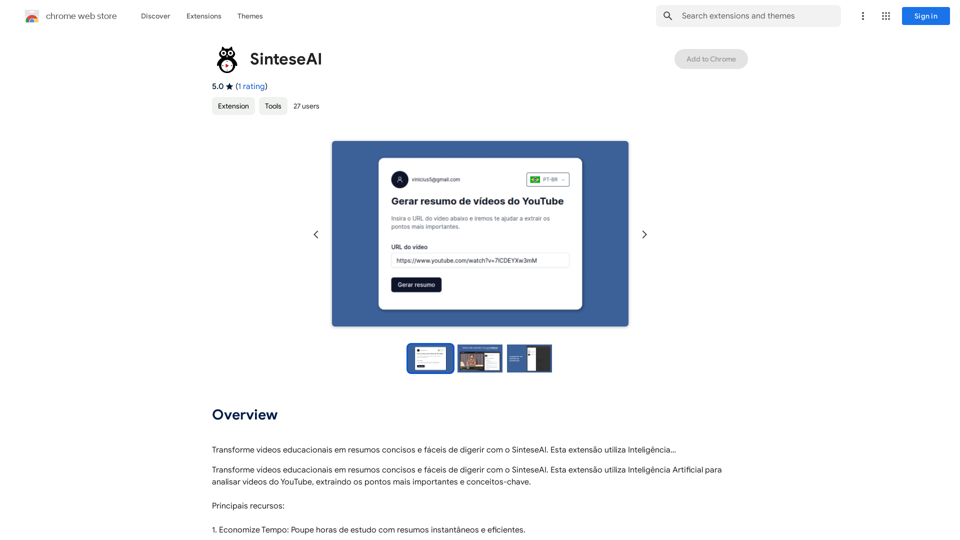
Turn educational videos into concise and easy-to-digest summaries with SinteseAI. This extension uses Artificial Intelligence...
Visit Website
SinteseAI
Visit Website

Introduction

SinteseAI is a Chrome extension that uses artificial intelligence to transform educational YouTube videos into concise summaries. This tool helps users save study time, simplify memorization, and seamlessly integrate with their online learning workflow. With an average rating of 5 stars from 27 users, SinteseAI offers both free and subscription-based options to cater to various user needs.

Feature

Save Time

Save hours of study time with instant and efficient summaries generated by AI technology.

Simplified Memorization

Simplify the memorization process by extracting key concepts and important information from educational videos.

Seamless Integration

Seamlessly integrate with your online study workflow using this Chrome extension, enhancing your learning experience.

AI-Powered Video Analysis

Utilize advanced artificial intelligence to analyze YouTube videos and extract the most crucial points and concepts.

Customizable Summaries

Tailor your summaries to focus on specific topics or concepts, allowing for a personalized learning experience.

Privacy Protection

SinteseAI values user privacy and does not use your data for training purposes. Users can delete their accounts at any time, removing all associated data.

Free and Premium Options

Enjoy daily free uses of SinteseAI, with the option to subscribe to affordable products for increased usage.

FAQ

How does SinteseAI work?

SinteseAI uses artificial intelligence to analyze YouTube videos, extracting the most important points and key concepts to create concise summaries.

Is SinteseAI free to use?

Yes, SinteseAI offers free daily uses with limits on the number of summaries you can generate. For users who require more extensive use, subscription options are available.

Can I customize my summaries?

Yes, SinteseAI allows users to customize their summaries to fit specific needs, focusing on particular topics or concepts of interest.

How many free uses does SinteseAI offer daily?

SinteseAI provides 20 free uses daily, allowing users to explore its AI-powered tools for various tasks.

What should I do if I need more than the free daily uses?

If you find that the 20 free daily uses are insufficient for your needs, SinteseAI offers affordable subscription options for more extensive usage.

Latest Traffic Insights

  • Monthly Visits

    193.90 M

  • Bounce Rate

    56.27%

  • Pages Per Visit

    2.71

  • Time on Site(s)

    115.91

  • Global Rank

    -

  • Country Rank

    -

Recent Visits

Traffic Sources

  • Social Media:
    0.48%
  • Paid Referrals:
    0.55%
  • Email:
    0.15%
  • Referrals:
    12.81%
  • Search Engines:
    16.21%
  • Direct:
    69.81%
More Data

Related Websites

Coachpilot
View Detail

Coachpilot

Coachpilot

Coachpilot: Use AI to Write User Stories in Jira Coachpilot helps you write better user stories in Jira using the power of artificial intelligence.

193.90 M
MOJi Dictionary Plugin
View Detail

MOJi Dictionary Plugin

MOJi Dictionary Plugin

MOJi Dictionary is an official Japanese learning dictionary browser extension that makes it easy and fast to look up and save Japanese words.

193.90 M
Coursera Summary with ChatGPT and Take Notes
=====================================================

What is Coursera?

Coursera is an online learning platform that partners with top universities and organizations to offer courses and degree programs in a wide range of fields.

What is ChatGPT?

ChatGPT is a conversational AI tool that can understand and respond to human input in a human-like way. It can be used to generate text, answer questions, and even create content.

How to Use ChatGPT for Coursera Summary?

You can use ChatGPT to summarize Coursera courses by:

* Providing the course material or lecture notes to ChatGPT
* Asking ChatGPT to summarize the key points or main ideas
* Reviewing and editing the summary generated by ChatGPT

Benefits of Using ChatGPT for Coursera Summary

Using ChatGPT for Coursera summary can help you:

* Save time by automating the summarization process
* Improve understanding and retention of course material
* Focus on key concepts and ideas
* Enhance learning experience

How to Take Notes with ChatGPT?

You can use ChatGPT to take notes by:

* Providing the course material or lecture notes to ChatGPT
* Asking ChatGPT to generate notes or key points
* Reviewing and editing the notes generated by ChatGPT
* Organizing and structuring the notes for easy reference

Benefits of Using ChatGPT for Taking Notes

Using ChatGPT for taking notes can help you:

* Save time by automating the note-taking process
* Improve organization and structure of notes
* Enhance understanding and retention of course material
* Focus on key concepts and ideas
View Detail

Coursera Summary with ChatGPT and Take Notes ===================================================== What is Coursera? Coursera is an online learning platform that partners with top universities and organizations to offer courses and degree programs in a wide range of fields. What is ChatGPT? ChatGPT is a conversational AI tool that can understand and respond to human input in a human-like way. It can be used to generate text, answer questions, and even create content. How to Use ChatGPT for Coursera Summary? You can use ChatGPT to summarize Coursera courses by: * Providing the course material or lecture notes to ChatGPT * Asking ChatGPT to summarize the key points or main ideas * Reviewing and editing the summary generated by ChatGPT Benefits of Using ChatGPT for Coursera Summary Using ChatGPT for Coursera summary can help you: * Save time by automating the summarization process * Improve understanding and retention of course material * Focus on key concepts and ideas * Enhance learning experience How to Take Notes with ChatGPT? You can use ChatGPT to take notes by: * Providing the course material or lecture notes to ChatGPT * Asking ChatGPT to generate notes or key points * Reviewing and editing the notes generated by ChatGPT * Organizing and structuring the notes for easy reference Benefits of Using ChatGPT for Taking Notes Using ChatGPT for taking notes can help you: * Save time by automating the note-taking process * Improve organization and structure of notes * Enhance understanding and retention of course material * Focus on key concepts and ideas

Coursera Summary with ChatGPT and Take Notes ===================================================== What is Coursera? Coursera is an online learning platform that partners with top universities and organizations to offer courses and degree programs in a wide range of fields. What is ChatGPT? ChatGPT is a conversational AI tool that can understand and respond to human input in a human-like way. It can be used to generate text, answer questions, and even create content. How to Use ChatGPT for Coursera Summary? You can use ChatGPT to summarize Coursera courses by: * Providing the course material or lecture notes to ChatGPT * Asking ChatGPT to summarize the key points or main ideas * Reviewing and editing the summary generated by ChatGPT Benefits of Using ChatGPT for Coursera Summary Using ChatGPT for Coursera summary can help you: * Save time by automating the summarization process * Improve understanding and retention of course material * Focus on key concepts and ideas * Enhance learning experience How to Take Notes with ChatGPT? You can use ChatGPT to take notes by: * Providing the course material or lecture notes to ChatGPT * Asking ChatGPT to generate notes or key points * Reviewing and editing the notes generated by ChatGPT * Organizing and structuring the notes for easy reference Benefits of Using ChatGPT for Taking Notes Using ChatGPT for taking notes can help you: * Save time by automating the note-taking process * Improve organization and structure of notes * Enhance understanding and retention of course material * Focus on key concepts and ideas

Automate Your Learning: Coursera Videos Transcript and Summary with ChatGPT ============================================================ Are you tired of manually taking notes while watching Coursera videos? Do you wish you had a summary of the video to review later? Look no further! With the power of ChatGPT, you can now generate transcripts and summaries of Coursera videos with ease. How it Works --------------- 1. Transcribe the Video: Use a transcription tool to convert the audio from the Coursera video into text. 2. Feed it to ChatGPT: Input the transcript into ChatGPT, and it will generate a concise summary of the video. 3. Review and Refine: Review the summary, refine it as needed, and you're good to go! Benefits ------------ * Save Time: No more manual note-taking or re-watching videos to understand the content. * Improve Retention: A summary of the video helps you retain information better and review it quickly. * Enhance Learning: Focus on understanding the concepts rather than taking notes. Get Started -------------- Try it out today and take your learning to the next level!

193.90 M
Text to Calendar

Convert text into a calendar format, making it easy to organize and schedule events.
View Detail

Text to Calendar Convert text into a calendar format, making it easy to organize and schedule events.

Text to Calendar Convert text into a calendar format, making it easy to organize and schedule events.

Easily create calendar events from any piece of highlighted text

4.65 K
Sketch2Code GPT4-128K GPT4-Vision - Sidebar 

This is a simple sidebar for a Sketch2Code application powered by GPT4-128K and GPT4-Vision. 

It likely contains:

* Upload Sketch: A button or area to upload an image sketch.
* Code Generation Options:  Settings to choose the programming language, desired code complexity, or other generation parameters.
* Output Code: A display area to show the generated code.
* Clear Output: A button to clear the generated code.


Let me know if you'd like me to elaborate on any specific aspect of the sidebar!
View Detail

Sketch2Code GPT4-128K GPT4-Vision - Sidebar This is a simple sidebar for a Sketch2Code application powered by GPT4-128K and GPT4-Vision. It likely contains: * Upload Sketch: A button or area to upload an image sketch. * Code Generation Options: Settings to choose the programming language, desired code complexity, or other generation parameters. * Output Code: A display area to show the generated code. * Clear Output: A button to clear the generated code. Let me know if you'd like me to elaborate on any specific aspect of the sidebar!

Sketch2Code GPT4-128K GPT4-Vision - Sidebar This is a simple sidebar for a Sketch2Code application powered by GPT4-128K and GPT4-Vision. It likely contains: * Upload Sketch: A button or area to upload an image sketch. * Code Generation Options: Settings to choose the programming language, desired code complexity, or other generation parameters. * Output Code: A display area to show the generated code. * Clear Output: A button to clear the generated code. Let me know if you'd like me to elaborate on any specific aspect of the sidebar!

Sketch2Code GPT4-128K GPT4-Vision - FREE

193.90 M
Introducing Bard
View Detail

Introducing Bard

Introducing Bard

See the ChatGPT responses right next to your search engine results.

193.90 M
Shift-Ctrl-F: Semantic Search for the Browser
View Detail

Shift-Ctrl-F: Semantic Search for the Browser

Shift-Ctrl-F: Semantic Search for the Browser

Find information on a webpage using everyday words.

193.90 M
Bing Chatbot
View Detail

Bing Chatbot

Bing Chatbot

Powered by GPT-4, Bing Chatbot changes the way you explore and search the internet!

193.90 M