BrainyAI is a powerful browser AI sidekick that enhances your browsing experience with seamless AI chat, search, summarization, and browsing capabilities. Utilizing the latest ChatGPT technology, this versatile browser extension integrates into your workflow through a convenient sidebar, offering unrestricted queries and delivering relevant, insightful results.
BrainyAI - Browser AI Sidekick for Chat, Search, Read, and Summarize
Enjoy seamless AI chat, search, summarization, and browsing with the best AI models. All from your browser sidebar! No more page-hopping!

Introduction
Feature
Multi-Engine Smart Search
BrainyAI leverages multiple AI-powered search engines to provide tailored results based on your specific search requirements. Users can choose from various search options to find the most relevant and insightful information.
Customizable Shortcuts
Enhance your work efficiency with one-click processing of selected text on web pages. BrainyAI offers explanations, translations, and rephrasing options, streamlining your browsing experience.
Interactive AI Conversations
Engage in real-time discussions with BrainyAI to receive instant, accurate responses to your questions. This feature also serves as a source of inspiration, stimulating creative thinking and problem-solving.
Continuous Updates and Enhancements
BrainyAI evolves with regular updates, introducing new features and improvements based on user feedback. This ensures an ever-improving user experience and keeps the extension at the forefront of AI technology.
Privacy Protection
BrainyAI prioritizes user privacy with a transparent policy and secure data handling. The opt-in anonymous data collection feature gives users full control over their personal information.
FAQ
Is BrainyAI free to use?
Yes, BrainyAI is a completely free browser extension. There are no subscription fees or hidden costs associated with using its features.
How do I start using BrainyAI?
To begin using BrainyAI, simply install the browser extension and follow the setup prompts. Once installed, you can access AI chat, search, summarization, and browsing capabilities directly from your browser sidebar.
Is my data secure when using BrainyAI?
BrainyAI follows a transparent privacy policy to ensure the security of your data. The extension offers opt-in anonymous data collection, giving you full control over your personal information.
Related Websites
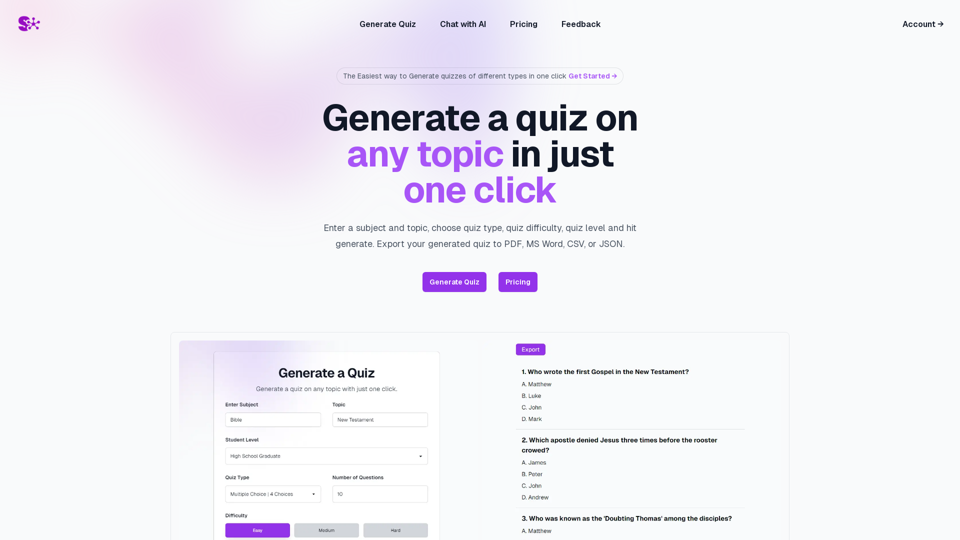
Quiz Generation Made Easy! ============================= With just one click, you can generate a quiz on any topic you want! Whether you're a teacher, student, or just a curious learner, this feature is perfect for you. How it Works --------------- 1. Choose Your Topic: Select the topic you want to generate a quiz on. It can be anything from history to science, literature to music, or even pop culture! 2. Click the Button: Simply click the "Generate Quiz" button, and our AI-powered algorithm will do the rest. 3. Get Your Quiz: In an instant, you'll receive a comprehensive quiz with multiple-choice questions, true/false questions, and short-answer questions. Features ------------ * Customizable: You can adjust the difficulty level, question type, and even add your own questions to make the quiz more personalized. * Instant Feedback: Get instant feedback on your answers, so you can track your progress and identify areas for improvement. * Shareable: Share your quiz with friends, classmates, or even on social media to spark a fun competition! Try it Out! -------------- Click the "Generate Quiz" button below to get started! [Generate Quiz Button] Happy quizzing!
0

Stable Diffusion 3 Free Online Access - Powered By SD3 API
Stable Diffusion 3 Free Online Access - Powered By SD3 APIDiscover Stable Diffusion 3, the advanced text-to-image model by Stability AI. Learn about the stable diffusion 3 release date, how to download stable diffusion 3, stable diffusion 3 API, and how to access stable diffusion 3 for free online.
105.22 K
![Searching for ChatGPT Plugins
Searching for ChatGPT plugins can be an exciting experience, as it allows you to explore and discover new features and functionalities to enhance your conversational AI model. Here are some ways to search for ChatGPT plugins:
Official Plugin Directory
The official ChatGPT plugin directory is a great place to start your search. This directory provides a curated list of plugins that are compatible with ChatGPT, along with their descriptions, features, and installation instructions.
GitHub and Open-Source Repositories
GitHub and other open-source repositories are treasure troves for ChatGPT plugins. You can search for plugins using keywords like "ChatGPT plugin" or "conversational AI plugin" to find relevant repositories. You can also explore popular open-source repositories like the ChatGPT community repository.
Plugin Marketplaces
Some plugin marketplaces, like the ChatGPT Marketplace, offer a wide range of plugins for ChatGPT. These marketplaces often provide user reviews, ratings, and descriptions to help you make informed decisions.
Forums and Communities
ChatGPT forums and communities are great places to ask for plugin recommendations or search for plugins. You can ask other users about their favorite plugins or search for threads related to specific plugin categories.
Search Engines
Finally, you can use search engines like Google to search for ChatGPT plugins. Use specific keywords like "ChatGPT plugin for [specific feature]" or "best ChatGPT plugins" to get relevant results.
Remember to always evaluate the plugins you find based on their compatibility, features, and user reviews before installing them. Happy searching!](https://static.right-ai.com/tools/2024/7/3/chromewebstore-google-com-detail-chatgpt-plugin-search-hjdhbhggcljjjfenfbdbbhhngmkglpkl-thumbnail-1720045154.png "Searching for ChatGPT Plugins
Searching for ChatGPT plugins can be an exciting experience, as it allows you to explore and discover new features and functionalities to enhance your conversational AI model. Here are some ways to search for ChatGPT plugins:
Official Plugin Directory
The official ChatGPT plugin directory is a great place to start your search. This directory provides a curated list of plugins that are compatible with ChatGPT, along with their descriptions, features, and installation instructions.
GitHub and Open-Source Repositories
GitHub and other open-source repositories are treasure troves for ChatGPT plugins. You can search for plugins using keywords like \"ChatGPT plugin\" or \"conversational AI plugin\" to find relevant repositories. You can also explore popular open-source repositories like the ChatGPT community repository.
Plugin Marketplaces
Some plugin marketplaces, like the ChatGPT Marketplace, offer a wide range of plugins for ChatGPT. These marketplaces often provide user reviews, ratings, and descriptions to help you make informed decisions.
Forums and Communities
ChatGPT forums and communities are great places to ask for plugin recommendations or search for plugins. You can ask other users about their favorite plugins or search for threads related to specific plugin categories.
Search Engines
Finally, you can use search engines like Google to search for ChatGPT plugins. Use specific keywords like \"ChatGPT plugin for [specific feature]\" or \"best ChatGPT plugins\" to get relevant results.
Remember to always evaluate the plugins you find based on their compatibility, features, and user reviews before installing them. Happy searching!")
Searching for ChatGPT Plugins Searching for ChatGPT plugins can be an exciting experience, as it allows you to explore and discover new features and functionalities to enhance your conversational AI model. Here are some ways to search for ChatGPT plugins: Official Plugin Directory The official ChatGPT plugin directory is a great place to start your search. This directory provides a curated list of plugins that are compatible with ChatGPT, along with their descriptions, features, and installation instructions. GitHub and Open-Source Repositories GitHub and other open-source repositories are treasure troves for ChatGPT plugins. You can search for plugins using keywords like "ChatGPT plugin" or "conversational AI plugin" to find relevant repositories. You can also explore popular open-source repositories like the ChatGPT community repository. Plugin Marketplaces Some plugin marketplaces, like the ChatGPT Marketplace, offer a wide range of plugins for ChatGPT. These marketplaces often provide user reviews, ratings, and descriptions to help you make informed decisions. Forums and Communities ChatGPT forums and communities are great places to ask for plugin recommendations or search for plugins. You can ask other users about their favorite plugins or search for threads related to specific plugin categories. Search Engines Finally, you can use search engines like Google to search for ChatGPT plugins. Use specific keywords like "ChatGPT plugin for [specific feature]" or "best ChatGPT plugins" to get relevant results. Remember to always evaluate the plugins you find based on their compatibility, features, and user reviews before installing them. Happy searching!
Searching for ChatGPT Plugins Searching for ChatGPT plugins can be an exciting experience, as it allows you to explore and discover new features and functionalities to enhance your conversational AI model. Here are some ways to search for ChatGPT plugins: Official Plugin Directory The official ChatGPT plugin directory is a great place to start your search. This directory provides a curated list of plugins that are compatible with ChatGPT, along with their descriptions, features, and installation instructions. GitHub and Open-Source Repositories GitHub and other open-source repositories are treasure troves for ChatGPT plugins. You can search for plugins using keywords like "ChatGPT plugin" or "conversational AI plugin" to find relevant repositories. You can also explore popular open-source repositories like the ChatGPT community repository. Plugin Marketplaces Some plugin marketplaces, like the ChatGPT Marketplace, offer a wide range of plugins for ChatGPT. These marketplaces often provide user reviews, ratings, and descriptions to help you make informed decisions. Forums and Communities ChatGPT forums and communities are great places to ask for plugin recommendations or search for plugins. You can ask other users about their favorite plugins or search for threads related to specific plugin categories. Search Engines Finally, you can use search engines like Google to search for ChatGPT plugins. Use specific keywords like "ChatGPT plugin for [specific feature]" or "best ChatGPT plugins" to get relevant results. Remember to always evaluate the plugins you find based on their compatibility, features, and user reviews before installing them. Happy searching!Here are some of the best, top, and popular ChatGPT plugins: 1. WebChat: A plugin that allows users to interact with ChatGPT through a web interface. 2. ChatGPT Writer: A plugin that helps users generate high-quality content, such as articles, stories, and emails, using ChatGPT's language generation capabilities. 3. ChatGPT Code Interpreter: A plugin that enables users to write code in various programming languages and have ChatGPT interpret and execute it. 4. ChatGPT Conversational AI: A plugin that allows users to create conversational AI models using ChatGPT's language understanding capabilities. 5. ChatGPT Language Translator: A plugin that enables users to translate text from one language to another using ChatGPT's language translation capabilities. 6. ChatGPT Summarizer: A plugin that helps users summarize long pieces of text, such as articles or documents, into concise summaries using ChatGPT's text summarization capabilities. 7. ChatGPT Q&A: A plugin that enables users to ask questions and receive answers from ChatGPT on a wide range of topics. 8. ChatGPT Creative Writing: A plugin that helps users generate creative writing, such as poetry, stories, and dialogues, using ChatGPT's language generation capabilities. 9. ChatGPT Dialogue System: A plugin that enables users to create conversational dialogue systems using ChatGPT's language understanding capabilities. 10. ChatGPT Sentiment Analyzer: A plugin that helps users analyze the sentiment of text, such as determining whether a piece of text is positive, negative, or neutral, using ChatGPT's sentiment analysis capabilities.
193.90 M

Personal Vocabulary (Highlight/Read Aloud/Translate/Grammar)
Personal Vocabulary (Highlight/Read Aloud/Translate/Grammar)Highlight new words, read aloud | Translate, lexical dependency | Syntax analysis
193.90 M