Open-source RightAI Tools Directory
  • Discover AI
  • Submit
  • Startup
  • Blog
Open-source RightAI Tools Directory
Discover the best AI tools of 2025 with the RightAI Tools Directory!

Friend Links

AI Anime GeneratorToolsApp AI

Support

Tap4
Privacy policyTerms & ConditionsContact Us
Loading...
loading...

Semaj AI

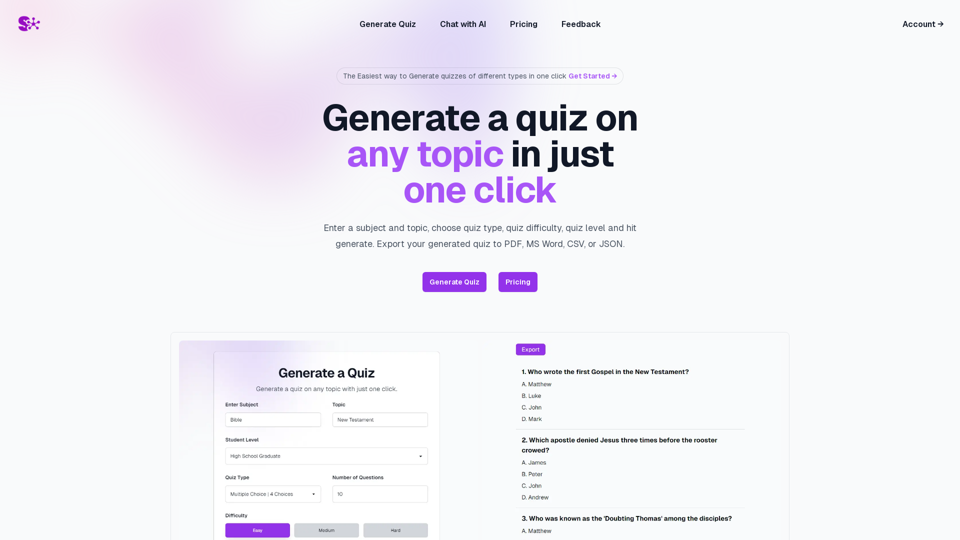
Quiz Generation Made Easy! ============================= With just one click, you can generate a quiz on any topic you want! Whether you're a teacher, student, or just a curious learner, this feature is perfect for you. How it Works --------------- 1. Choose Your Topic: Select the topic you want to generate a quiz on. It can be anything from history to science, literature to music, or even pop culture! 2. Click the Button: Simply click the "Generate Quiz" button, and our AI-powered algorithm will do the rest. 3. Get Your Quiz: In an instant, you'll receive a comprehensive quiz with multiple-choice questions, true/false questions, and short-answer questions. Features ------------ * Customizable: You can adjust the difficulty level, question type, and even add your own questions to make the quiz more personalized. * Instant Feedback: Get instant feedback on your answers, so you can track your progress and identify areas for improvement. * Shareable: Share your quiz with friends, classmates, or even on social media to spark a fun competition! Try it Out! -------------- Click the "Generate Quiz" button below to get started! [Generate Quiz Button] Happy quizzing!
Visit Website
Semaj AI
Visit Website

Introduction

Semaj AI is a cutting-edge platform designed to simplify quiz creation. It offers users the ability to generate diverse quizzes instantly with a single click. The platform boasts a user-friendly interface, allowing for the creation of quizzes on any topic, with customizable types and difficulty levels. Semaj AI also provides the flexibility to export quizzes in various formats, including PDF, MS Word, CSV, and JSON, catering to different user needs.

Feature

One-Click Quiz Generation

Generate quizzes on any topic instantly by simply entering the subject, selecting the quiz type, and setting the difficulty level.

Multi-Model Access

Access a range of advanced language models:

  • OpenAI: GPT 3.5 Turbo, GPT 4o
  • Google: Gemini 1.0 Pro, Gemini 1.5 Pro
  • Anthropic: Haiku, Sonnet, Opus

This feature allows users to compare and obtain optimal results across different AI models.

Master Prompt

Utilize the Master Prompt feature to access all available models with a single prompt, streamlining the quiz creation process.

Customizable Quiz Parameters

Tailor quizzes to specific needs by choosing:

  • Quiz type
  • Difficulty level
  • Export format (PDF, MS Word, CSV, JSON)

User-Friendly Interface

Navigate the platform with ease, making quiz generation and model access straightforward for all users.

FAQ

What types of quizzes can I create with Semaj AI?

Semaj AI allows you to create quizzes on any topic of your choice. The platform is versatile and can accommodate a wide range of subjects and quiz types.

How does the Multi-Model Access feature work?

The Multi-Model Access feature provides users with the ability to utilize various language models from different providers (OpenAI, Google, Anthropic). This allows for comparison and selection of the best responses across multiple AI models.

Can I export my quizzes in different formats?

Yes, Semaj AI offers the flexibility to export your generated quizzes in multiple formats, including PDF, MS Word, CSV, and JSON, catering to various use cases and preferences.

What is the Master Prompt feature?

The Master Prompt is a unique feature that allows users to access all available language models with a single prompt. This streamlines the process of generating quizzes and comparing outputs across different AI models.

Is Semaj AI suitable for educational purposes?

Absolutely. Semaj AI can be an excellent tool for educators to create engaging quizzes for students. Its customizable difficulty levels and diverse quiz types make it adaptable to various educational settings and subjects.

Latest Traffic Insights

  • Monthly Visits

    0

  • Bounce Rate

    0.00%

  • Pages Per Visit

    0.00

  • Time on Site(s)

    0.00

  • Global Rank

    -

  • Country Rank

    -

Recent Visits

Traffic Sources

  • Social Media:
    0.00%
  • Paid Referrals:
    0.00%
  • Email:
    0.00%
  • Referrals:
    0.00%
  • Search Engines:
    0.00%
  • Direct:
    0.00%
More Data

Related Websites

Signify - Compliance Management System for Manufacturing
View Detail

Signify - Compliance Management System for Manufacturing

Signify - Compliance Management System for Manufacturing

Signify automates compliance for manufacturers by analyzing documents to ensure regulatory requirements are met throughout the product lifecycle.

3.17 K
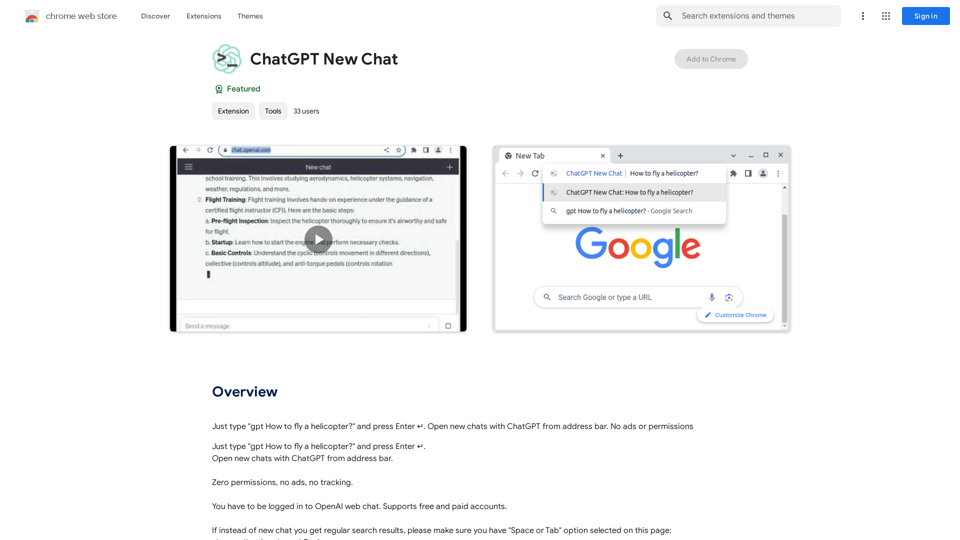
Open ChatGPT in a New Tab

You can open ChatGPT in a new tab by following these steps:

#Method 1: Using the Browser's Context Menu

1. Right-click on the ChatGPT link or button.
2. Select "Open in new tab" or "Open link in new tab" from the context menu.

#Method 2: Using the Keyboard Shortcut

1. Press `Ctrl + Click` (Windows/Linux) or `Cmd + Click` (Mac) on the ChatGPT link or button.

#Method 3: Using the Browser's Toolbar

1. Click on the ChatGPT link or button while holding down the `Ctrl` key (Windows/Linux) or `Cmd` key (Mac).
2. Release the key after the new tab is opened.

By following these methods, you can easily open ChatGPT in a new tab and start chatting without leaving your current page.
View Detail

Open ChatGPT in a New Tab You can open ChatGPT in a new tab by following these steps: #Method 1: Using the Browser's Context Menu 1. Right-click on the ChatGPT link or button. 2. Select "Open in new tab" or "Open link in new tab" from the context menu. #Method 2: Using the Keyboard Shortcut 1. Press `Ctrl + Click` (Windows/Linux) or `Cmd + Click` (Mac) on the ChatGPT link or button. #Method 3: Using the Browser's Toolbar 1. Click on the ChatGPT link or button while holding down the `Ctrl` key (Windows/Linux) or `Cmd` key (Mac). 2. Release the key after the new tab is opened. By following these methods, you can easily open ChatGPT in a new tab and start chatting without leaving your current page.

Open ChatGPT in a New Tab You can open ChatGPT in a new tab by following these steps: #Method 1: Using the Browser's Context Menu 1. Right-click on the ChatGPT link or button. 2. Select "Open in new tab" or "Open link in new tab" from the context menu. #Method 2: Using the Keyboard Shortcut 1. Press `Ctrl + Click` (Windows/Linux) or `Cmd + Click` (Mac) on the ChatGPT link or button. #Method 3: Using the Browser's Toolbar 1. Click on the ChatGPT link or button while holding down the `Ctrl` key (Windows/Linux) or `Cmd` key (Mac). 2. Release the key after the new tab is opened. By following these methods, you can easily open ChatGPT in a new tab and start chatting without leaving your current page.

New Tab with Quick ChatGPT Access

193.90 M
Niro - AI Powered Email Assistant
View Detail

Niro - AI Powered Email Assistant

Niro - AI Powered Email Assistant

Niro: AI Powered Email Assistant - Write emails, messages, and more using AI (privacy-friendly). Works on all sites

193.90 M
WebWise ChatGPT English (USA)
View Detail

WebWise ChatGPT English (USA)

WebWise ChatGPT English (USA)

ChatGPT's power in Chrome: Seamlessly integrated, engage from the toolbar to search results.

193.90 M
popup
View Detail

popup

popup

An assistant powered by ChatGPT

193.90 M
BrainBuddy: AI Assistant with ChatGPT & Bard
View Detail

BrainBuddy: AI Assistant with ChatGPT & Bard

BrainBuddy: AI Assistant with ChatGPT & Bard

BrainBuddy is an All-in-one AI-powered Sidebar Assistant, with ChatGPT, Bard, & more! ⚡

193.90 M
Rolemantic - NSFW Character AI Chat - NSFW Character AI Chat
View Detail

Rolemantic - NSFW Character AI Chat - NSFW Character AI Chat

Rolemantic - NSFW Character AI Chat - NSFW Character AI Chat

Explore the fantasy realm of Rolemantic. Our unrestricted adult AI chatbot enables you to experience AI-powered flirtatious messaging, explicit conversations, and imaginative roleplaying at no cost.

1.03 K
Smart Template - DocumentAI 


This is a placeholder for content about Smart Templates in DocumentAI. 

Please provide me with the content you'd like me to translate.
View Detail

Smart Template - DocumentAI This is a placeholder for content about Smart Templates in DocumentAI. Please provide me with the content you'd like me to translate.

Smart Template - DocumentAI This is a placeholder for content about Smart Templates in DocumentAI. Please provide me with the content you'd like me to translate.

Boost your productivity with the best tool around, making it easy to create and edit documents and saving you precious time.

193.90 M