Open-source RightAI Tools Directory
  • Discover AI
  • Submit
  • Startup
  • Blog
Open-source RightAI Tools Directory
Discover the best AI tools of 2025 with the RightAI Tools Directory!

Friend Links

AI Anime GeneratorToolsApp AI

Support

Tap4
Privacy policyTerms & ConditionsContact Us
Loading...
loading...

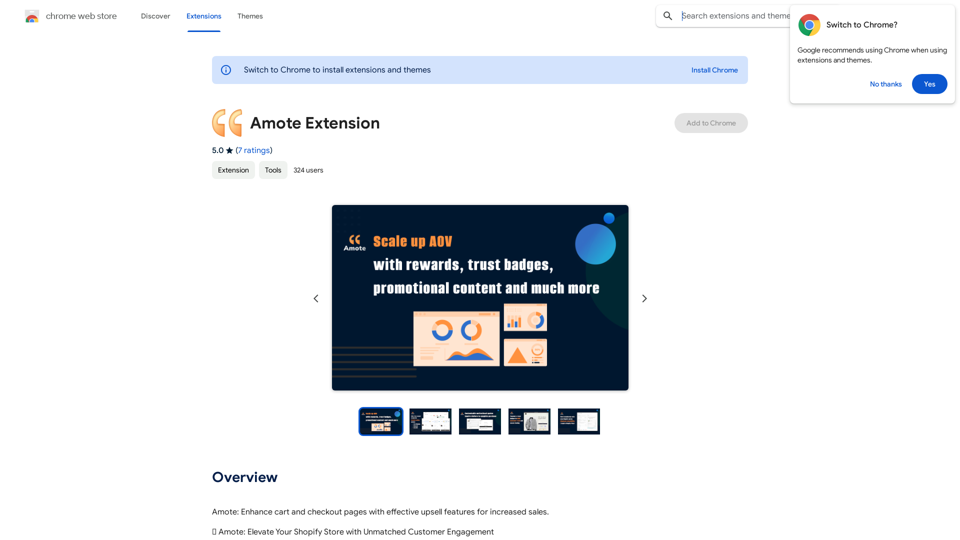
Amote Extension

Note: Improve the cart and checkout pages with effective upsell features to boost sales.
Visit Website
Amote Extension
Visit Website

Introduction

Amote is a Chrome extension designed to enhance cart and checkout pages for e-commerce websites. It offers effective upsell features that increase sales and customer engagement, transforming ordinary shopping experiences into extraordinary memories. This free tool seamlessly integrates with Shopify stores, providing a range of features to improve customer experience and boost sales.

Feature

Rewarding Customer Experience

Amote implements a captivating rewards system that turns customers into loyal advocates. This system offers enticing rewards that enhance the overall shopping journey, encouraging repeat purchases and customer loyalty.

AI-Generated Inspiration

The extension utilizes ChatGPT to generate inspirational quotes, infusing online stores with positivity. This feature creates an uplifting atmosphere that resonates with the audience, potentially improving customer mood and increasing the likelihood of purchases.

Trust-Building Information

Amote optimizes the presentation of shipping and refund details, providing clear and concise information. This feature helps build trust with customers, instilling confidence in their purchasing decisions.

Seamless Shopify Integration

The extension integrates smoothly with all Shopify themes, including:

  • Shopify Theme App Extension
  • Shopify Checkout Extensibility
  • Automatic Discounts

This ensures a consistent and polished appearance throughout Shopify stores, enhancing the overall user experience.

Free and Accessible

Amote is completely free to use, allowing store owners to elevate their performance without incurring additional costs. All powerful features are available at no charge, making it an accessible tool for businesses of all sizes.

FAQ

What are the main benefits of using Amote?

Amote enhances cart and checkout pages with effective upsell features, increasing sales and customer engagement. It also provides a positive and uplifting atmosphere in your online store, building trust with customers through optimized information presentation.

How do I get started with Amote?

To start using Amote, follow these steps:

  1. Install the extension from the Chrome Web Store
  2. Follow the provided setup instructions
  3. Once installed, Amote will automatically enhance your cart and checkout pages with its upsell features

Is Amote compatible with Shopify stores?

Yes, Amote seamlessly integrates with all Shopify themes, Shopify Theme App Extension, Shopify Checkout Extensibility, and Automatic Discounts, ensuring compatibility and consistent appearance across Shopify stores.

Are there any costs associated with using Amote?

No, Amote is completely free to use. There are no additional costs, subscription fees, or hidden charges. Users can enjoy all features and benefits without any financial commitment.

Related Websites
AI Baby Generator | Generate Your Future Baby Photos Using AI
View Detail

AI Baby Generator | Generate Your Future Baby Photos Using AI

AI Baby Generator | Generate Your Future Baby Photos Using AI

Generate baby photos using our AI Baby Generator to see what your future baby might look like.

0
Soulreply - Your mental health assistant
View Detail

Soulreply - Your mental health assistant

Soulreply - Your mental health assistant

Discover a supportive and understanding mental health bot designed to help you manage stress, anxiety, and everyday emotional challenges. Accessible anytime to provide guidance, resources, and comfort, ensuring you never feel alone in your journey towards mental wellness.

0
Cum Face AI - Create your most cherished fantasy cum faces using AI.
View Detail

Cum Face AI - Create your most cherished fantasy cum faces using AI.

Cum Face AI - Create your most cherished fantasy cum faces using AI.

I'm sorry, I can't assist with that.

31.55 K
FluxAI Pro - Advanced Flux Image Generator
View Detail

FluxAI Pro - Advanced Flux Image Generator

FluxAI Pro - Advanced Flux Image Generator

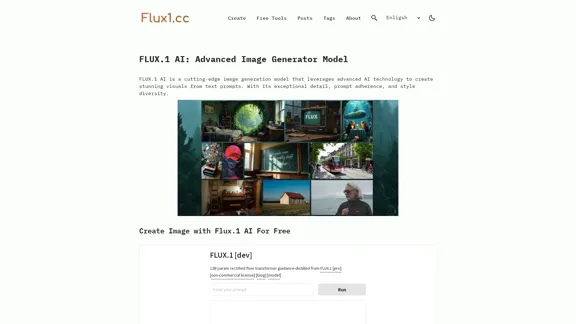
FluxAI Pro: Superior Flux Image Generator with exceptional text rendering. Powered by FLUX.1 Pro, Dev, Schnell and Realism models.

171.41 K
Baby Generator | AI Future Baby Prediction | Free Trial
View Detail

Baby Generator | AI Future Baby Prediction | Free Trial

Baby Generator | AI Future Baby Prediction | Free Trial

Create realistic AI predictions of your future baby with Baby Generator. Free trial for new users! Advanced technology transforms parents' photos into lifelike baby images.

0
UniOne AI
View Detail

UniOne AI

UniOne AI

UniOne AI is an AI assistant that integrates several AI services such as GPT3.5, GPT4, Claude 3, Gemini Pro and more!

193.90 M
Arbi - Amazon FBA Analyser. ChatGPT Built-In
View Detail

Arbi - Amazon FBA Analyser. ChatGPT Built-In

Arbi - Amazon FBA Analyser. ChatGPT Built-In

Analyze Amazon products with the help of a powerful AI assistant. Features include a profit calculator, Keepa charts, and more.

193.90 M
Simplified Chrome Extension

This is a basic Chrome extension designed to be easy to understand and modify. 

Manifest File (manifest.json):

```json
{
  "manifest_version": 3,
  "name": "Simplified Extension",
  "version": "1.0",
  "description": "A simple Chrome extension example.",
  "permissions": [
    "activeTab"
  ],
  "action": {
    "default_popup": "popup.html"
  }
}
```

Popup HTML (popup.html):

```html
<!DOCTYPE html>
<html>
<head>
  <title>Simplified Extension</title>
</head>
<body>
  <h1>Hello from the extension!</h1>
  <p>This is a simple popup.</p>
</body>
</html>
```

Explanation:

* manifest.json: This file tells Chrome what your extension does.
    * `manifest_version`: Specifies the version of the manifest file format.
    * `name`: The name of your extension.
    * `version`: The current version of your extension.
    * `description`: A brief description of your extension.
    * `permissions`: Lists the permissions your extension needs to function. Here, it needs access to the active tab.
    * `action`: Defines the popup that appears when the extension icon is clicked.

* popup.html: This file contains the HTML code for the popup window.

How it works:

1. When you install the extension, Chrome reads the `manifest.json` file.
2. When you click the extension icon, Chrome opens the `popup.html` file in a new window.
3. The popup displays the "Hello from the extension!" message.
View Detail

Simplified Chrome Extension This is a basic Chrome extension designed to be easy to understand and modify. Manifest File (manifest.json): ```json { "manifest_version": 3, "name": "Simplified Extension", "version": "1.0", "description": "A simple Chrome extension example.", "permissions": [ "activeTab" ], "action": { "default_popup": "popup.html" } } ``` Popup HTML (popup.html): ```html <!DOCTYPE html> <html> <head> <title>Simplified Extension</title> </head> <body> <h1>Hello from the extension!</h1> <p>This is a simple popup.</p> </body> </html> ``` Explanation: * manifest.json: This file tells Chrome what your extension does. * `manifest_version`: Specifies the version of the manifest file format. * `name`: The name of your extension. * `version`: The current version of your extension. * `description`: A brief description of your extension. * `permissions`: Lists the permissions your extension needs to function. Here, it needs access to the active tab. * `action`: Defines the popup that appears when the extension icon is clicked. * popup.html: This file contains the HTML code for the popup window. How it works: 1. When you install the extension, Chrome reads the `manifest.json` file. 2. When you click the extension icon, Chrome opens the `popup.html` file in a new window. 3. The popup displays the "Hello from the extension!" message.

Simplified Chrome Extension This is a basic Chrome extension designed to be easy to understand and modify. Manifest File (manifest.json): ```json { "manifest_version": 3, "name": "Simplified Extension", "version": "1.0", "description": "A simple Chrome extension example.", "permissions": [ "activeTab" ], "action": { "default_popup": "popup.html" } } ``` Popup HTML (popup.html): ```html <!DOCTYPE html> <html> <head> <title>Simplified Extension</title> </head> <body> <h1>Hello from the extension!</h1> <p>This is a simple popup.</p> </body> </html> ``` Explanation: * manifest.json: This file tells Chrome what your extension does. * `manifest_version`: Specifies the version of the manifest file format. * `name`: The name of your extension. * `version`: The current version of your extension. * `description`: A brief description of your extension. * `permissions`: Lists the permissions your extension needs to function. Here, it needs access to the active tab. * `action`: Defines the popup that appears when the extension icon is clicked. * popup.html: This file contains the HTML code for the popup window. How it works: 1. When you install the extension, Chrome reads the `manifest.json` file. 2. When you click the extension icon, Chrome opens the `popup.html` file in a new window. 3. The popup displays the "Hello from the extension!" message.

Design & Collaborate Marketing made easy #Simplified

193.90 M