Open-source RightAI Tools Directory
  • Discover AI
  • Submit
  • Startup
  • Blog
Open-source RightAI Tools Directory
Discover the best AI tools of 2025 with the RightAI Tools Directory!

Friend Links

AI Anime GeneratorToolsApp AI

Support

Tap4
Privacy policyTerms & ConditionsContact Us
Loading...
loading...

Assistree

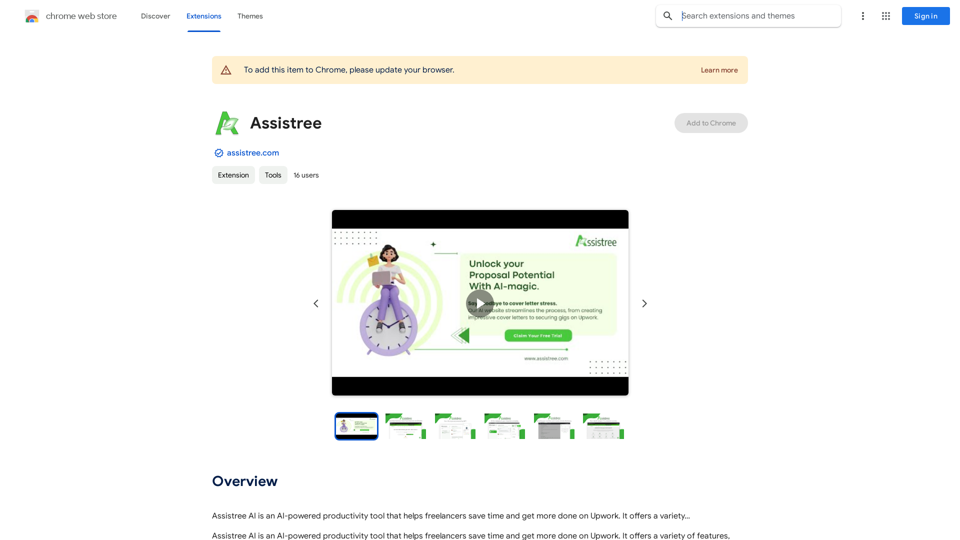
Assistree AI is an AI-powered productivity tool that helps freelancers save time and get more done on Upwork. It offers a variety...
Visit Website
Assistree
Visit Website

Introduction

Assistree AI is a productivity tool designed for freelancers using Upwork. It leverages artificial intelligence to streamline various aspects of freelancing, including proposal writing, client communication, and job matching. The tool aims to help freelancers save time and increase their efficiency on the Upwork platform.

Feature

AI-Powered Messages & Replies

Assistree AI utilizes advanced AI technology to help freelancers craft more effective messages and replies to clients and potential clients. This feature enhances communication and potentially increases the chances of securing projects.

Time-Saving Capabilities

The tool offers various time-saving features across multiple freelancing tasks, including:

  • Proposal writing
  • Messaging
  • Job matching

These features are designed to increase productivity and allow freelancers to focus on their core work.

AI-Powered Proposal Writing

One of Assistree AI's key features is its ability to generate winning proposals quickly. The AI-powered proposal writer can create personalized proposals in seconds, potentially increasing a freelancer's chances of landing projects.

Job Matching

Assistree AI includes a job matching feature that helps freelancers find projects that align with their skills and experience. This targeted approach can save time in job searching and increase the likelihood of successful applications.

Easy Integration

Assistree AI is available as a Chrome extension, making it easily accessible for Upwork users. The installation process is straightforward:

  1. Install the Assistree AI Chrome Extension
  2. Create an account and receive free AI credits
  3. Navigate to desired Upwork jobs
  4. Use the extension to generate proposals and other content

Affordable Pricing

While specific pricing details aren't provided, Assistree AI offers:

  • A free trial period
  • Affordable subscription options after the trial

FAQ

How do I get started with Assistree AI?

To begin using Assistree AI:

  1. Install the Chrome Extension from the Chrome Web Store
  2. Create an account with Assistree AI
  3. Receive free AI credits upon account creation
  4. Start using the tool on Upwork job listings

What are the main benefits of using Assistree AI?

The key benefits include:

  • Time savings on various freelancing tasks
  • Increased productivity on Upwork
  • Quick generation of high-quality proposals
  • Improved job matching based on skills and experience

Is Assistree AI compatible with platforms other than Upwork?

The provided information suggests that Assistree AI is primarily designed for use with Upwork. There's no mention of compatibility with other freelancing platforms.

Latest Traffic Insights

  • Monthly Visits

    193.90 M

  • Bounce Rate

    56.27%

  • Pages Per Visit

    2.71

  • Time on Site(s)

    115.91

  • Global Rank

    -

  • Country Rank

    -

Recent Visits

Traffic Sources

  • Social Media:
    0.48%
  • Paid Referrals:
    0.55%
  • Email:
    0.15%
  • Referrals:
    12.81%
  • Search Engines:
    16.21%
  • Direct:
    69.81%
More Data

Related Websites

ImageTrans
View Detail

ImageTrans

ImageTrans

Translate text within images found on websites.

193.90 M
RevenueEngine
View Detail

RevenueEngine

RevenueEngine

RevenueEngine.ai | Helping Creators Monetize Content Quickly & Easily - Access Thousands of Affiliate Programs In One Place

193.90 M
100% Free AI Image Generator: Text to Image Online | insMind
View Detail

100% Free AI Image Generator: Text to Image Online | insMind

100% Free AI Image Generator: Text to Image Online | insMind

Looking for a free AI image generator from text? Create stunning images with a simple text prompt using the most advanced AI text-to-image generator.

1.77 M
Simplified Chrome Extension

This is a basic Chrome extension designed to be easy to understand and modify. 

Manifest File (manifest.json):

```json
{
  "manifest_version": 3,
  "name": "Simplified Extension",
  "version": "1.0",
  "description": "A simple Chrome extension example.",
  "permissions": [
    "activeTab"
  ],
  "action": {
    "default_popup": "popup.html"
  }
}
```

Popup HTML (popup.html):

```html
<!DOCTYPE html>
<html>
<head>
  <title>Simplified Extension</title>
</head>
<body>
  <h1>Hello from the extension!</h1>
  <p>This is a simple popup.</p>
</body>
</html>
```

Explanation:

* manifest.json: This file tells Chrome what your extension does.
    * `manifest_version`: Specifies the version of the manifest file format.
    * `name`: The name of your extension.
    * `version`: The current version of your extension.
    * `description`: A brief description of your extension.
    * `permissions`: Lists the permissions your extension needs to function. Here, it needs access to the active tab.
    * `action`: Defines the popup that appears when the extension icon is clicked.

* popup.html: This file contains the HTML code for the popup window.

How it works:

1. When you install the extension, Chrome reads the `manifest.json` file.
2. When you click the extension icon, Chrome opens the `popup.html` file in a new window.
3. The popup displays the "Hello from the extension!" message.
View Detail

Simplified Chrome Extension This is a basic Chrome extension designed to be easy to understand and modify. Manifest File (manifest.json): ```json { "manifest_version": 3, "name": "Simplified Extension", "version": "1.0", "description": "A simple Chrome extension example.", "permissions": [ "activeTab" ], "action": { "default_popup": "popup.html" } } ``` Popup HTML (popup.html): ```html <!DOCTYPE html> <html> <head> <title>Simplified Extension</title> </head> <body> <h1>Hello from the extension!</h1> <p>This is a simple popup.</p> </body> </html> ``` Explanation: * manifest.json: This file tells Chrome what your extension does. * `manifest_version`: Specifies the version of the manifest file format. * `name`: The name of your extension. * `version`: The current version of your extension. * `description`: A brief description of your extension. * `permissions`: Lists the permissions your extension needs to function. Here, it needs access to the active tab. * `action`: Defines the popup that appears when the extension icon is clicked. * popup.html: This file contains the HTML code for the popup window. How it works: 1. When you install the extension, Chrome reads the `manifest.json` file. 2. When you click the extension icon, Chrome opens the `popup.html` file in a new window. 3. The popup displays the "Hello from the extension!" message.

Simplified Chrome Extension This is a basic Chrome extension designed to be easy to understand and modify. Manifest File (manifest.json): ```json { "manifest_version": 3, "name": "Simplified Extension", "version": "1.0", "description": "A simple Chrome extension example.", "permissions": [ "activeTab" ], "action": { "default_popup": "popup.html" } } ``` Popup HTML (popup.html): ```html <!DOCTYPE html> <html> <head> <title>Simplified Extension</title> </head> <body> <h1>Hello from the extension!</h1> <p>This is a simple popup.</p> </body> </html> ``` Explanation: * manifest.json: This file tells Chrome what your extension does. * `manifest_version`: Specifies the version of the manifest file format. * `name`: The name of your extension. * `version`: The current version of your extension. * `description`: A brief description of your extension. * `permissions`: Lists the permissions your extension needs to function. Here, it needs access to the active tab. * `action`: Defines the popup that appears when the extension icon is clicked. * popup.html: This file contains the HTML code for the popup window. How it works: 1. When you install the extension, Chrome reads the `manifest.json` file. 2. When you click the extension icon, Chrome opens the `popup.html` file in a new window. 3. The popup displays the "Hello from the extension!" message.

Design & Collaborate Marketing made easy #Simplified

193.90 M
AI Image Generator - Free Text to Image | Freepik

Generate stunning images from text prompts with our AI-powered tool. No design skills needed!
View Detail

AI Image Generator - Free Text to Image | Freepik Generate stunning images from text prompts with our AI-powered tool. No design skills needed!

AI Image Generator - Free Text to Image | Freepik Generate stunning images from text prompts with our AI-powered tool. No design skills needed!

Real-time Text-to-Image AI Tool: Convert Your Ideas into Images and Illustrations Instantly!

98.96 M
Image Search
View Detail

Image Search

Image Search

Find Similar Images in Popular Search Engines You can find similar images in popular search engines like Google, Bing, and Yandex using the following methods: #Google Images * Drag and drop an image into the search bar or click on the camera icon to upload an image. * Click on the "Search by image" button. * Google will display a list of similar images. #Bing Images * Click on the "Images" tab on the Bing homepage. * Click on the "Camera" icon in the search bar. * Upload an image or enter the image URL. * Bing will display a list of similar images. #Yandex Images * Click on the "Images" tab on the Yandex homepage. * Click on the "Lens" icon in the search bar. * Upload an image or enter the image URL. * Yandex will display a list of similar images. These search engines use advanced algorithms to find similar images based on various factors such as color, shape, and texture.

193.90 M
Flux Tools: Comprehensive Guide to AI Image Creation and Editing
View Detail

Flux Tools: Comprehensive Guide to AI Image Creation and Editing

Flux Tools: Comprehensive Guide to AI Image Creation and Editing

Discover how Flux Tools transforms image generation and editing. Expert guide with hands-on experience, use cases, and best practices for creators.

0
Character Headcanon Generator
The Character Headcanon Generator, originating from Perchance, creates unique character headcanons through our headcanon generator.
View Detail

Character Headcanon Generator The Character Headcanon Generator, originating from Perchance, creates unique character headcanons through our headcanon generator.

Character Headcanon Generator The Character Headcanon Generator, originating from Perchance, creates unique character headcanons through our headcanon generator.

Discover the Character Headcanon Generator, an innovative tool that originated from the Perchance platform. This powerful character headcanon generator helps you create detailed and engaging character headcanon with ease, allowing fans to explore new interpretations of their favorite characters. Whether you're a writer, role-player, or fan fiction enthusiast, our headcanon generator provides endless creative possibilities by generating unique backgrounds and traits. Enhance your storytelling and bring your characters to life with the Character Headcanon Generator today!

243