Open-source RightAI Tools Directory
  • Discover AI
  • Submit
  • Startup
  • Blog
Open-source RightAI Tools Directory
Discover the best AI tools of 2025 with the RightAI Tools Directory!

Friend Links

AI Anime GeneratorToolsApp AI

Support

Tap4
Privacy policyTerms & ConditionsContact Us
Loading...
loading...

Adinspiration | Discover your Competitors' Winning Ads from Facebook Ad Library

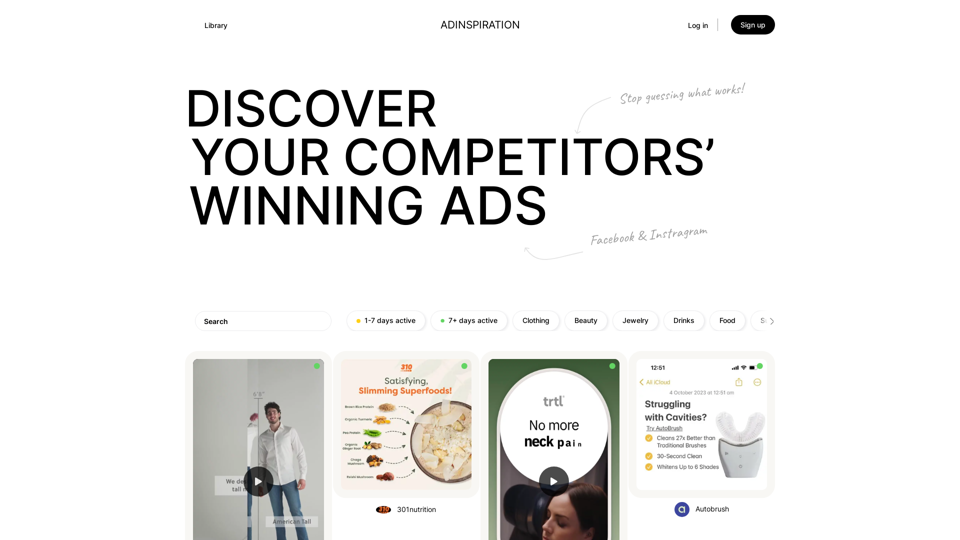
Boost your Return on Ad Spend (ROAS) with proven Ad Inspiration and winning Facebook & Instagram ad creatives from top brands and your Competitors. Meta Ad library with superpowers
Visit Website
Adinspiration | Discover your Competitors' Winning Ads from Facebook Ad Library
Visit Website

Introduction

Adinspiration is a powerful platform that provides access to the Facebook Ad Library, allowing users to discover and analyze their competitors' successful advertising strategies. By offering insights into high-performing ads, Adinspiration helps businesses stop guessing and start making data-driven decisions for their ad campaigns.

Feature

Access to Facebook Ad Library

Adinspiration provides users with access to the extensive Facebook Ad Library, containing a wide range of ads from various industries and niches.

Advanced Filtering and Search

Users can filter and search ads based on specific criteria such as:

  • Industry
  • Niche
  • Ad type
  • Performance metrics

This feature enables users to find the most relevant and high-performing ads for their business needs.

Real-time Performance Insights

Adinspiration offers real-time insights into ad performance, including:

  • Ad spend
  • Reach
  • Engagement metrics

These insights help users make informed decisions about their advertising strategies.

User-friendly Interface

The platform provides an intuitive interface for:

  1. Browsing the Ad Library
  2. Filtering and searching ads
  3. Analyzing ad performance

Subscription-based Service

Adinspiration offers a free trial period, followed by a subscription-based service for continued access to its features.

FAQ

Is Adinspiration free to use?

Adinspiration offers a free trial period. After the trial, it becomes a subscription-based service. For detailed pricing information, users need to contact Adinspiration directly.

How do I get started with Adinspiration?

To get started with Adinspiration:

  1. Sign up for an account using Google or email
  2. Browse the Ad Library to discover high-performing ads
  3. Use the filter and search features to find relevant ads for your business

Can I cancel my subscription to Adinspiration?

Yes, users have the flexibility to cancel their subscription to Adinspiration at any time.

What are some helpful tips for using Adinspiration?

  • Use the platform to gain inspiration for your own ad campaigns
  • Analyze ad performance metrics to identify successful strategies
  • Leverage Adinspiration to stay ahead of your competition in the advertising space

Latest Traffic Insights

  • Monthly Visits

    0

  • Bounce Rate

    0.00%

  • Pages Per Visit

    0.00

  • Time on Site(s)

    0.00

  • Global Rank

    -

  • Country Rank

    -

Recent Visits

Traffic Sources

  • Social Media:
    0.00%
  • Paid Referrals:
    0.00%
  • Email:
    0.00%
  • Referrals:
    0.00%
  • Search Engines:
    0.00%
  • Direct:
    0.00%
More Data

Related Websites

Chart GPT
View Detail

Chart GPT

Chart GPT

AI-Powered Trading Companion

193.90 M
Bing ChatGPT

Bing ChatGPT is a conversational AI powered by Microsoft Bing and OpenAI's ChatGPT technology. It's a chatbot that allows users to have natural conversations, ask questions, and get accurate answers.
View Detail

Bing ChatGPT Bing ChatGPT is a conversational AI powered by Microsoft Bing and OpenAI's ChatGPT technology. It's a chatbot that allows users to have natural conversations, ask questions, and get accurate answers.

Bing ChatGPT Bing ChatGPT is a conversational AI powered by Microsoft Bing and OpenAI's ChatGPT technology. It's a chatbot that allows users to have natural conversations, ask questions, and get accurate answers.

Bing ChatGPT is a free AI app. Use Bing with an AI chatbot simultaneously on your browser's new tab page.

193.90 M
ChatGPT Context Menu

* Copy: Copies the selected text.
* Paste: Pastes the copied text.
* Delete: Deletes the selected text.
* Edit: Opens a text editor to modify the selected text.
* Generate: Uses ChatGPT to generate new text based on the selected context.
* Summarize: Creates a concise summary of the selected text.
* Translate: Translates the selected text into another language.
* Translate to English: Translates the selected text into English.
* Code: Attempts to identify and format the selected text as code.
* Help: Provides information about the context menu options.
View Detail

ChatGPT Context Menu * Copy: Copies the selected text. * Paste: Pastes the copied text. * Delete: Deletes the selected text. * Edit: Opens a text editor to modify the selected text. * Generate: Uses ChatGPT to generate new text based on the selected context. * Summarize: Creates a concise summary of the selected text. * Translate: Translates the selected text into another language. * Translate to English: Translates the selected text into English. * Code: Attempts to identify and format the selected text as code. * Help: Provides information about the context menu options.

ChatGPT Context Menu * Copy: Copies the selected text. * Paste: Pastes the copied text. * Delete: Deletes the selected text. * Edit: Opens a text editor to modify the selected text. * Generate: Uses ChatGPT to generate new text based on the selected context. * Summarize: Creates a concise summary of the selected text. * Translate: Translates the selected text into another language. * Translate to English: Translates the selected text into English. * Code: Attempts to identify and format the selected text as code. * Help: Provides information about the context menu options.

Please provide the text you would like to send to ChatGPT.

193.90 M
Lai画 - Link-Generated AI Video Tool
View Detail

Lai画 - Link-Generated AI Video Tool

Lai画 - Link-Generated AI Video Tool

With just one URL link, you can quickly generate videos in multiple styles using AI. It supports secondary editing and ensures controllable results.

193.90 M
Get ChatGPT for Free with Google

You can now access ChatGPT, a powerful language model, for free with Google. Here's how:

Method 1: Google Colab

* Open Google Colab ([colab.research.google.com](http://colab.research.google.com))
* Create a new notebook
* Install the `transformers` library by running `!pip install transformers`
* Import the `transformers` library and load the ChatGPT model using `from transformers import AutoModelForCausalLM, AutoTokenizer; model = AutoModelForCausalLM.from_pretrained('chatgpt'); tokenizer = AutoTokenizer.from_pretrained('chatgpt')`
* Use the model to generate text using `input_text = "Your input here"; inputs = tokenizer.encode_plus(input_text, return_tensors='pt', max_length=1024, padding='max_length', truncation=True); output = model(inputs['input_ids'], attention_mask=inputs['attention_mask']); print(tokenizer.decode(output.logits[0], skip_special_tokens=True))`

Method 2: Google Apps Script

* Open Google Apps Script ([script.google.com](http://script.google.com))
* Create a new project
* Install the `transformers` library by running `npm install transformers`
* Import the `transformers` library and load the ChatGPT model using `const { AutoModelForCausalLM, AutoTokenizer } = require('transformers'); const model = new AutoModelForCausalLM('chatgpt'); const tokenizer = new AutoTokenizer('chatgpt');`
* Use the model to generate text using `const inputText = "Your input here"; const inputs = tokenizer.encodePlus(inputText, { return_tensors: 'pt', max_length: 1024, padding: 'max_length', truncation: true }); const output = model(inputs.inputIds, inputs.attentionMask); console.log(tokenizer.decode(output.logits[0], { skipSpecialTokens: true }));`

Note: These methods require some technical knowledge and may have limitations compared to the original ChatGPT model.
View Detail

Get ChatGPT for Free with Google You can now access ChatGPT, a powerful language model, for free with Google. Here's how: Method 1: Google Colab * Open Google Colab ([colab.research.google.com](http://colab.research.google.com)) * Create a new notebook * Install the `transformers` library by running `!pip install transformers` * Import the `transformers` library and load the ChatGPT model using `from transformers import AutoModelForCausalLM, AutoTokenizer; model = AutoModelForCausalLM.from_pretrained('chatgpt'); tokenizer = AutoTokenizer.from_pretrained('chatgpt')` * Use the model to generate text using `input_text = "Your input here"; inputs = tokenizer.encode_plus(input_text, return_tensors='pt', max_length=1024, padding='max_length', truncation=True); output = model(inputs['input_ids'], attention_mask=inputs['attention_mask']); print(tokenizer.decode(output.logits[0], skip_special_tokens=True))` Method 2: Google Apps Script * Open Google Apps Script ([script.google.com](http://script.google.com)) * Create a new project * Install the `transformers` library by running `npm install transformers` * Import the `transformers` library and load the ChatGPT model using `const { AutoModelForCausalLM, AutoTokenizer } = require('transformers'); const model = new AutoModelForCausalLM('chatgpt'); const tokenizer = new AutoTokenizer('chatgpt');` * Use the model to generate text using `const inputText = "Your input here"; const inputs = tokenizer.encodePlus(inputText, { return_tensors: 'pt', max_length: 1024, padding: 'max_length', truncation: true }); const output = model(inputs.inputIds, inputs.attentionMask); console.log(tokenizer.decode(output.logits[0], { skipSpecialTokens: true }));` Note: These methods require some technical knowledge and may have limitations compared to the original ChatGPT model.

Get ChatGPT for Free with Google You can now access ChatGPT, a powerful language model, for free with Google. Here's how: Method 1: Google Colab * Open Google Colab ([colab.research.google.com](http://colab.research.google.com)) * Create a new notebook * Install the `transformers` library by running `!pip install transformers` * Import the `transformers` library and load the ChatGPT model using `from transformers import AutoModelForCausalLM, AutoTokenizer; model = AutoModelForCausalLM.from_pretrained('chatgpt'); tokenizer = AutoTokenizer.from_pretrained('chatgpt')` * Use the model to generate text using `input_text = "Your input here"; inputs = tokenizer.encode_plus(input_text, return_tensors='pt', max_length=1024, padding='max_length', truncation=True); output = model(inputs['input_ids'], attention_mask=inputs['attention_mask']); print(tokenizer.decode(output.logits[0], skip_special_tokens=True))` Method 2: Google Apps Script * Open Google Apps Script ([script.google.com](http://script.google.com)) * Create a new project * Install the `transformers` library by running `npm install transformers` * Import the `transformers` library and load the ChatGPT model using `const { AutoModelForCausalLM, AutoTokenizer } = require('transformers'); const model = new AutoModelForCausalLM('chatgpt'); const tokenizer = new AutoTokenizer('chatgpt');` * Use the model to generate text using `const inputText = "Your input here"; const inputs = tokenizer.encodePlus(inputText, { return_tensors: 'pt', max_length: 1024, padding: 'max_length', truncation: true }); const output = model(inputs.inputIds, inputs.attentionMask); console.log(tokenizer.decode(output.logits[0], { skipSpecialTokens: true }));` Note: These methods require some technical knowledge and may have limitations compared to the original ChatGPT model.

How to Add ChatGPT to All Google Searches ===================================================== Step 1: Create a Custom Search Engine -------------------------------------- * Go to the [Google Custom Search Engine](https://cse.google.com/) website and sign in with your Google account. * Click on the "New Search Engine" button. * Fill in the required information, such as the name and description of your search engine. * Click on the "Create" button. Step 2: Add ChatGPT to the Search Engine ----------------------------------------- * In the "Setup" tab, click on the "Add" button next to "Sites to search". * Enter the following URL: `https://chat.openai.com/` * Click on the "Add" button. Step 3: Configure the Search Engine -------------------------------------- * In the "Setup" tab, click on the "Edit" button next to "Search engine keywords". * Add the following keywords: `ChatGPT` * Click on the "Save" button. Step 4: Get the Search Engine Code ------------------------------------- * In the "Setup" tab, click on the "Get code" button. * Copy the HTML code provided. Step 5: Add the Search Engine to Your Browser ------------------------------------------------ * Open your browser and go to the "Settings" or "Options" page. * Look for the "Search engine" or "Default search engine" option. * Click on the "Add" or "Manage search engines" button. * Paste the HTML code you copied earlier. * Click on the "Add" or "Save" button. You're Done! =============== Now, whenever you search on Google, ChatGPT will be included in the search results. You can also use the custom search engine URL provided by Google to search directly.

193.90 M
Awesome GPTs
View Detail

Awesome GPTs

Awesome GPTs

Power Your Workflow with Custom GPTs

193.90 M
Website Optimizer AI
View Detail

Website Optimizer AI

Website Optimizer AI

Improve your website's text with AI. Simply click on any text on a website and receive AI-powered suggestions for making it better.

193.90 M
Flockjay
View Detail

Flockjay

Flockjay

Chrome extension for the Flockjay Sales Elevation Platform

193.90 M