Open-source RightAI Tools Directory
  • Discover AI
  • Submit
  • Startup
  • Blog
Open-source RightAI Tools Directory
Discover the best AI tools of 2025 with the RightAI Tools Directory!

Friend Links

AI Anime GeneratorToolsApp AI

Support

Tap4
Privacy policyTerms & ConditionsContact Us
Loading...
loading...

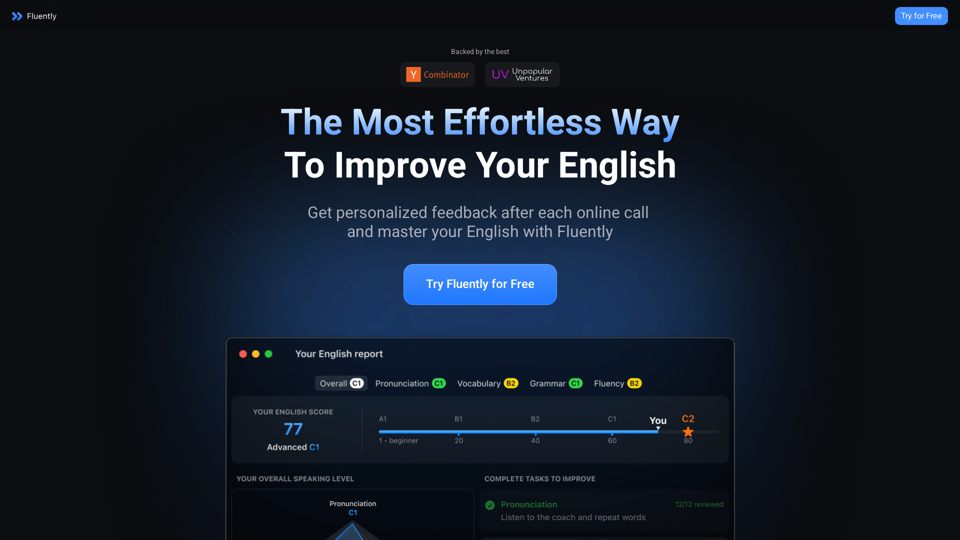
AI-Powered Speaking Coach for Calls Enhance your communication skills and ace your calls with our innovative AI-driven speaking coach. This cutting-edge technology provides personalized feedback and guidance to help you improve your verbal and non-verbal cues, tone, and language.

Fluently is a personal speaking coach that delivers instant feedback on your day-to-day calls to refine your accent, improve grammar, and expand your vocabulary.
Visit Website
AI-Powered Speaking Coach for Calls

Enhance your communication skills and ace your calls with our innovative AI-driven speaking coach. This cutting-edge technology provides personalized feedback and guidance to help you improve your verbal and non-verbal cues, tone, and language.
Visit Website

Introduction

Fluently is an AI-powered speaking coach designed to enhance English language skills through personalized feedback after online calls. It aims to boost users' confidence in speaking English by providing tailored insights and practice opportunities.

Feature

Personalized Feedback

Fluently analyzes speech patterns during real-life calls, offering customized feedback to help users identify and correct common mistakes in spoken English.

Pronunciation Insights

The app provides detailed insights on pronunciation, helping users refine their speaking skills based on their actual conversations.

Progress Tracking

Users can monitor their improvement over time through:

  • Personalized exercises
  • Easy-to-follow growth metrics
  • Continuous assessment of speaking skills

Automatic Setup

Fluently operates seamlessly without requiring complex setup, allowing users to focus solely on improving their English skills.

24/7 Speaking Practice

The app offers round-the-clock opportunities for speaking practice, providing feedback to support continuous improvement.

User-Friendly Interface

Fluently's simple usage process:

  1. Download the app
  2. Launch on your device
  3. Join any call
  4. Receive personalized feedback post-call

Affordable Pricing

OfferDetails
Free TrialAvailable for new users
SubscriptionAffordable plans post-trial

FAQ

How does Fluently work?

Fluently activates automatically during English conversations, analyzing speech patterns and providing personalized feedback after each call to help improve speaking skills.

Is my information used for training purposes?

No, Fluently prioritizes user privacy and does not use personal data for training purposes.

Can I delete my account?

Yes, users can delete their accounts at any time, which also removes all associated data.

How secure is Fluently?

Fluently employs industry-standard security protocols, including transit encryption and local storage & privacy control, ensuring maximum security for users.

Latest Traffic Insights

  • Monthly Visits

    352.33 K

  • Bounce Rate

    37.59%

  • Pages Per Visit

    14.16

  • Time on Site(s)

    125.68

  • Global Rank

    62648

  • Country Rank

    Indonesia 7942

Recent Visits

Traffic Sources

  • Social Media:
    9.12%
  • Paid Referrals:
    0.84%
  • Email:
    0.10%
  • Referrals:
    11.50%
  • Search Engines:
    37.41%
  • Direct:
    41.04%
More Data

Related Websites

ChatGPT Conversations Search
View Detail

ChatGPT Conversations Search

ChatGPT Conversations Search

Save, search, and organize your ChatGPT conversation history.

193.90 M
Ketchup.AI on the App Store
View Detail

Ketchup.AI on the App Store

Ketchup.AI on the App Store

Introducing Ketchup.AI, your ultimate cooking assistant powered by AI, designed to revolutionize your culinary experience, offering comprehensive answers for all your cooking needs.

124.77 M
TaggingBox
View Detail

TaggingBox

TaggingBox

A new way to manage your knowledge! Just like sticking a sticker on an important note, we recommend the best tags for your information.

193.90 M
Online Story Planner - Plot Factory
View Detail

Online Story Planner - Plot Factory

Online Story Planner - Plot Factory

Online story planner, organizer, and writing app that allows you to create fictional universes, develop rich characters, and write amazing stories.

32.05 K
Aksharakuppy TextMagic
View Detail

Aksharakuppy TextMagic

Aksharakuppy TextMagic

Aksharakuppy TextMagic is a versatile tool that enriches text, generates content, and facilitates translations into Malayalam.

193.90 M
Octopuses VAX (Virtual Assistant Experience)
View Detail

Octopuses VAX (Virtual Assistant Experience)

Octopuses VAX (Virtual Assistant Experience)

Octopi.health: Revolutionizing healthcare with computer vision, language processing, and Motion Assessment.

193.90 M
Open ChatGPT in a New Tab

You can open ChatGPT in a new tab by following these steps:

#Method 1: Using the Browser's Context Menu

1. Right-click on the ChatGPT link or button.
2. Select "Open in new tab" or "Open link in new tab" from the context menu.

#Method 2: Using the Keyboard Shortcut

1. Press `Ctrl + Click` (Windows/Linux) or `Cmd + Click` (Mac) on the ChatGPT link or button.

#Method 3: Using the Browser's Toolbar

1. Click on the ChatGPT link or button while holding down the `Ctrl` key (Windows/Linux) or `Cmd` key (Mac).
2. Release the key after the new tab is opened.

By following these methods, you can easily open ChatGPT in a new tab and start chatting without leaving your current page.
View Detail

Open ChatGPT in a New Tab You can open ChatGPT in a new tab by following these steps: #Method 1: Using the Browser's Context Menu 1. Right-click on the ChatGPT link or button. 2. Select "Open in new tab" or "Open link in new tab" from the context menu. #Method 2: Using the Keyboard Shortcut 1. Press `Ctrl + Click` (Windows/Linux) or `Cmd + Click` (Mac) on the ChatGPT link or button. #Method 3: Using the Browser's Toolbar 1. Click on the ChatGPT link or button while holding down the `Ctrl` key (Windows/Linux) or `Cmd` key (Mac). 2. Release the key after the new tab is opened. By following these methods, you can easily open ChatGPT in a new tab and start chatting without leaving your current page.

Open ChatGPT in a New Tab You can open ChatGPT in a new tab by following these steps: #Method 1: Using the Browser's Context Menu 1. Right-click on the ChatGPT link or button. 2. Select "Open in new tab" or "Open link in new tab" from the context menu. #Method 2: Using the Keyboard Shortcut 1. Press `Ctrl + Click` (Windows/Linux) or `Cmd + Click` (Mac) on the ChatGPT link or button. #Method 3: Using the Browser's Toolbar 1. Click on the ChatGPT link or button while holding down the `Ctrl` key (Windows/Linux) or `Cmd` key (Mac). 2. Release the key after the new tab is opened. By following these methods, you can easily open ChatGPT in a new tab and start chatting without leaving your current page.

New Tab with Quick ChatGPT Access

193.90 M
CaptainGPT
View Detail

CaptainGPT

CaptainGPT

Best AI Assistant for Cross-Border E-commerce Operations

193.90 M