Open-source RightAI Tools Directory
  • Discover AI
  • Submit
  • Startup
  • Blog
Open-source RightAI Tools Directory
Discover the best AI tools of 2025 with the RightAI Tools Directory!

Friend Links

AI Anime GeneratorToolsApp AI

Support

Tap4
Privacy policyTerms & ConditionsContact Us
Loading...
loading...

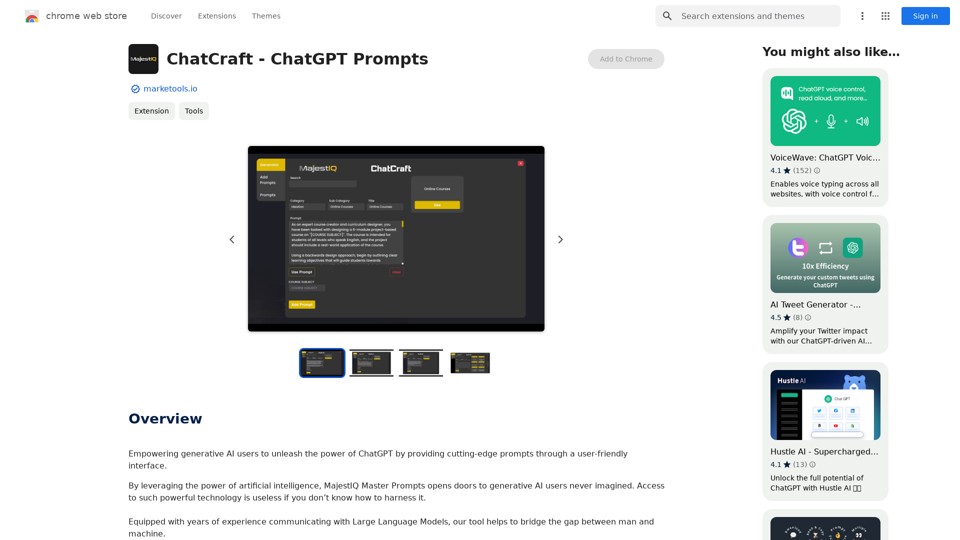
ChatCraft - ChatGPT Prompts What is ChatCraft? ChatCraft is a tool that helps you generate creative and effective prompts for ChatGPT. Why Use ChatCraft? * Unlock ChatGPT's Potential: Get more insightful, engaging, and surprising responses from ChatGPT. * Save Time and Effort: Quickly brainstorm and refine prompts without getting stuck. * Explore New Ideas: Discover unique angles and perspectives for your ChatGPT interactions. How to Use ChatCraft: 1. Choose a Category: Select from a range of categories like storytelling, code generation, dialogue writing, and more. 2. Provide Input: Give ChatCraft some context or keywords related to your desired outcome. 3. Generate Prompts: ChatCraft will generate a variety of tailored prompts for you to use with ChatGPT. 4. Experiment and Refine: Try out different prompts and see what works best for your needs. Let ChatCraft be your guide to unlocking the full potential of ChatGPT!

Helping users of generative AI get the most out of ChatGPT by giving them easy-to-use, advanced prompts.
Visit Website
ChatCraft - ChatGPT Prompts

What is ChatCraft?

ChatCraft is a tool that helps you generate creative and effective prompts for ChatGPT. 

Why Use ChatCraft?

* Unlock ChatGPT's Potential: Get more insightful, engaging, and surprising responses from ChatGPT.
* Save Time and Effort:  Quickly brainstorm and refine prompts without getting stuck.
* Explore New Ideas: Discover unique angles and perspectives for your ChatGPT interactions.

How to Use ChatCraft:

1. Choose a Category: Select from a range of categories like storytelling, code generation, dialogue writing, and more.
2. Provide Input:  Give ChatCraft some context or keywords related to your desired outcome.
3. Generate Prompts: ChatCraft will generate a variety of tailored prompts for you to use with ChatGPT.
4. Experiment and Refine:  Try out different prompts and see what works best for your needs.


Let ChatCraft be your guide to unlocking the full potential of ChatGPT!
Visit Website

Introduction

MajestIQ Master Prompts is a browser extension designed to enhance the capabilities of ChatGPT for generative AI users. It offers a user-friendly interface with advanced prompts across various domains, enabling users to maximize the potential of AI-powered conversations. The extension is free to install and use, making it accessible to a wide range of users looking to improve their productivity and creativity.

Feature

Diverse Prompt Categories

MajestIQ Master Prompts covers a wide range of categories, including:

  • DevOps
  • Ideation
  • Data Analysis
  • SEO
  • Writing
  • Productivity
  • Coding
  • Business Intelligence
  • Generative AI
  • And many more

Easy Installation and Usage

The extension can be quickly installed in your browser, providing seamless integration with OpenAI's ChatGPT page. Users can access powerful prompts with a simple click on the toolbar icon.

User-Friendly Interface

MajestIQ Master Prompts offers a straightforward interface, allowing users to choose the most suitable prompt for their needs and follow simple steps to generate desired outcomes.

Free Access

The extension is free to install and use, making it accessible to all ChatGPT users looking to enhance their AI-powered conversations.

FAQ

What is MajestIQ Master Prompts?

MajestIQ Master Prompts is a browser extension that provides cutting-edge prompts for ChatGPT, empowering users to unleash the full potential of generative AI through a user-friendly interface.

How do I use MajestIQ Master Prompts?

To use MajestIQ Master Prompts:

  1. Install the extension in your browser
  2. Navigate to OpenAI's ChatGPT page
  3. Click on the MajestIQ Master Prompts icon in the toolbar
  4. Choose a suitable prompt
  5. Follow the simple steps provided

Is MajestIQ Master Prompts free?

Yes, MajestIQ Master Prompts is free to install and use, making it accessible to all ChatGPT users looking to enhance their AI-powered conversations.

What types of prompts does MajestIQ Master Prompts offer?

MajestIQ Master Prompts offers a wide range of prompt categories, including DevOps, Ideation, Data Analysis, SEO, Writing, Productivity, Coding, Business Intelligence, Generative AI, and many more.

Latest Traffic Insights

  • Monthly Visits

    193.90 M

  • Bounce Rate

    56.27%

  • Pages Per Visit

    2.71

  • Time on Site(s)

    115.91

  • Global Rank

    -

  • Country Rank

    -

Recent Visits

Traffic Sources

  • Social Media:
    0.48%
  • Paid Referrals:
    0.55%
  • Email:
    0.15%
  • Referrals:
    12.81%
  • Search Engines:
    16.21%
  • Direct:
    69.81%
More Data

Related Websites

Flot AI
View Detail

Flot AI

Flot AI

ChatGPT can now work on any documents, apps, websites, and emails.

193.90 M
ChatGPT Conversations Search
View Detail

ChatGPT Conversations Search

ChatGPT Conversations Search

Save, search, and organize your ChatGPT conversation history.

193.90 M
Breadchaser - Custom networking messages & job applications with AI
View Detail

Breadchaser - Custom networking messages & job applications with AI

Breadchaser - Custom networking messages & job applications with AI

Breadchaser transforms your networking by automating personal messages, sales InMails, and job applications with AI, all while sounding natural and human.

193.90 M
AI Gift For You
View Detail

AI Gift For You

AI Gift For You

Find the perfect gift for any occasion with AI-powered gift suggestions. Get personalized recommendations for easy and stress-free gift giving.

193.90 M
Noam - ChatGPT Translation Assistant & Deep Translation
View Detail

Noam - ChatGPT Translation Assistant & Deep Translation

Noam - ChatGPT Translation Assistant & Deep Translation

Your versatile translation assistant, driven by GPT-4, provides a smoother AI translation and reading experience.

193.90 M
Versabot.Co
View Detail

Versabot.Co

Versabot.Co

Automate outreach, content, customer service, and more with AI!

1.52 K
Midjourney SREF Codes Library for Style Reference

What are SREF Codes?

SREF codes are special text strings used in Midjourney to quickly and easily apply specific artistic styles to your image generations. 

How to Use SREF Codes:

Simply add an SREF code to your Midjourney prompt. For example:

`/imagine a majestic dragon, SREF:cyberpunk`

SREF Code Library:

This library contains a collection of SREF codes categorized by style. 

* Art Styles:
    * `photorealistic`: Creates images with high levels of realism.
    * `impressionistic`:  Captures the essence of a scene with loose brushstrokes and vibrant colors.
    * `cubist`:  Breaks down objects into geometric shapes.
    * `surrealist`:  Creates dreamlike and fantastical images.
    * `abstract`:  Focuses on form, color, and composition rather than representational imagery.

* Visual Effects:
    * `cinematic`:  Gives images a cinematic look and feel.
    * `HDR`:  Creates images with high dynamic range, resulting in greater detail and contrast.
    * `neon`:  Adds vibrant neon lights to the image.
    * `pixel art`:  Generates images in a retro pixel art style.

* Other Styles:
    * `anime`:  Creates images in the style of Japanese animation.
    * `manga`:  Similar to anime, but with a more comic book aesthetic.
    * `sketch`:  Generates images that resemble pencil sketches.
    * `watercolor`:  Creates images with the look and feel of watercolor paintings.

Note: This is just a small sample of the many SREF codes available. 

Explore and Experiment:

The best way to learn about SREF codes is to experiment with them! Try combining different codes to create unique and interesting styles.
View Detail

Midjourney SREF Codes Library for Style Reference What are SREF Codes? SREF codes are special text strings used in Midjourney to quickly and easily apply specific artistic styles to your image generations. How to Use SREF Codes: Simply add an SREF code to your Midjourney prompt. For example: `/imagine a majestic dragon, SREF:cyberpunk` SREF Code Library: This library contains a collection of SREF codes categorized by style. * Art Styles: * `photorealistic`: Creates images with high levels of realism. * `impressionistic`: Captures the essence of a scene with loose brushstrokes and vibrant colors. * `cubist`: Breaks down objects into geometric shapes. * `surrealist`: Creates dreamlike and fantastical images. * `abstract`: Focuses on form, color, and composition rather than representational imagery. * Visual Effects: * `cinematic`: Gives images a cinematic look and feel. * `HDR`: Creates images with high dynamic range, resulting in greater detail and contrast. * `neon`: Adds vibrant neon lights to the image. * `pixel art`: Generates images in a retro pixel art style. * Other Styles: * `anime`: Creates images in the style of Japanese animation. * `manga`: Similar to anime, but with a more comic book aesthetic. * `sketch`: Generates images that resemble pencil sketches. * `watercolor`: Creates images with the look and feel of watercolor paintings. Note: This is just a small sample of the many SREF codes available. Explore and Experiment: The best way to learn about SREF codes is to experiment with them! Try combining different codes to create unique and interesting styles.

Midjourney SREF Codes Library for Style Reference What are SREF Codes? SREF codes are special text strings used in Midjourney to quickly and easily apply specific artistic styles to your image generations. How to Use SREF Codes: Simply add an SREF code to your Midjourney prompt. For example: `/imagine a majestic dragon, SREF:cyberpunk` SREF Code Library: This library contains a collection of SREF codes categorized by style. * Art Styles: * `photorealistic`: Creates images with high levels of realism. * `impressionistic`: Captures the essence of a scene with loose brushstrokes and vibrant colors. * `cubist`: Breaks down objects into geometric shapes. * `surrealist`: Creates dreamlike and fantastical images. * `abstract`: Focuses on form, color, and composition rather than representational imagery. * Visual Effects: * `cinematic`: Gives images a cinematic look and feel. * `HDR`: Creates images with high dynamic range, resulting in greater detail and contrast. * `neon`: Adds vibrant neon lights to the image. * `pixel art`: Generates images in a retro pixel art style. * Other Styles: * `anime`: Creates images in the style of Japanese animation. * `manga`: Similar to anime, but with a more comic book aesthetic. * `sketch`: Generates images that resemble pencil sketches. * `watercolor`: Creates images with the look and feel of watercolor paintings. Note: This is just a small sample of the many SREF codes available. Explore and Experiment: The best way to learn about SREF codes is to experiment with them! Try combining different codes to create unique and interesting styles.

Explore a list of 177 unique Midjourney sref codes and style references to find your perfect Midjourney sref code effect.

149.96 K
PlutoAI - AI Bookmarks and Tabs Manager
View Detail

PlutoAI - AI Bookmarks and Tabs Manager

PlutoAI - AI Bookmarks and Tabs Manager

An AI-powered bookmarking assistant that lets you quickly save, highlight, add notes to, and find web pages.

193.90 M