Open-source RightAI Tools Directory
  • Discover AI
  • Submit
  • Startup
  • Blog
Open-source RightAI Tools Directory
Discover the best AI tools of 2025 with the RightAI Tools Directory!

Friend Links

AI Anime GeneratorToolsApp AI

Support

Tap4
Privacy policyTerms & ConditionsContact Us
Loading...
loading...

Distribution

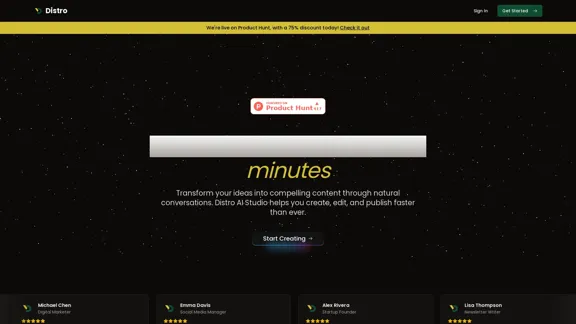
Become a content creator in seconds
Visit Website
Distribution
Visit Website

Introduction

Distro is an innovative AI-powered platform designed to transform ideas into compelling content through natural conversations. It enables users to create, edit, and publish content faster than ever, making it an essential tool for content creators, marketers, and professionals. With features that enhance collaboration and streamline the content creation process, Distro aims to empower users to maintain a consistent content presence effortlessly.

Feature

  1. AI Studio

    Engage with the Distro Agent to capture insights through friendly conversations, making content creation feel natural and intuitive.

  2. Research Competitor Strategies

    Analyze market trends and competitor strategies to stay ahead in your niche.

  3. Content Repurposing

    Effortlessly rewrite and reimagine existing content for different platforms, maximizing its reach and effectiveness.

  4. Idea Agent

    Get creative ideas on the fly, helping you brainstorm series ideas and discover niche opportunities.

  5. Content Calendar

    Organize your content strategy with a built-in content calendar to plan and schedule posts effectively.

  6. Social Media Integration

    Connect your social media profiles and post directly from Distro, simplifying the distribution process.

How to Use?

  1. Sign in to your Distro account or create a new one to get started.
  2. Utilize the AI Studio feature to engage in conversations that will help you generate content ideas.
  3. Take advantage of the Idea Agent to brainstorm and gather inspiration for your content.
  4. Use the content repurposing feature to adapt your existing materials for various platforms.
  5. Regularly analyze competitor strategies to refine your content approach and stay relevant in your field.

FAQ

What is Distro?

Distro is an AI-driven content creation platform that helps users transform their ideas into high-quality content through natural conversations.

How does Distro work?

Distro utilizes advanced AI technology to facilitate conversations that capture user insights, allowing for quick and efficient content generation.

Can I repurpose my existing content with Distro?

Yes, Distro offers features that allow you to rewrite and adapt your existing content for different platforms seamlessly.

Who can benefit from using Distro?

Content creators, digital marketers, social media managers, and anyone looking to streamline their content creation process can benefit from Distro.

What makes Distro different from other content creation tools?

Distro stands out due to its natural conversation flow, context understanding, and ability to generate high-quality content quickly.

Price

PlanMonthly CostFeatures
Free$010 Distro AI posts, 2 studio sessions
Creator$9.99250 Distro AI posts, 30 studio sessions
Standard$19.991,000 Distro AI posts, 80 studio sessions
Expert$49.991,000 Distro AI posts, 600 editor conversations
The price is for reference only, please refer to the latest official data for actual information.

Evaluation

Distro effectively streamlines the content creation process, making it accessible for users of all levels. Its conversation-to-content feature is particularly beneficial for those who may struggle with traditional writing methods. The platform's ability to integrate social media and repurpose content adds significant value.

However, there are areas for improvement. The pricing structure may be a barrier for some users, particularly those just starting out. Additionally, while the AI is capable, it may require further refinement to enhance its contextual understanding and output quality. Overall, Distro is a powerful tool for content creators, but ongoing enhancements could elevate its effectiveness even further.

Related Websites
ChatShelf - Save ChatGPT to Notion

ChatShelf is a tool that lets you save your ChatGPT conversations directly into Notion. 

It's a simple way to keep track of your AI interactions and use them later. 

Just copy the link to your ChatGPT conversation and paste it into ChatShelf. 

It will then extract the conversation and create a Notion page for you.
View Detail

ChatShelf - Save ChatGPT to Notion ChatShelf is a tool that lets you save your ChatGPT conversations directly into Notion. It's a simple way to keep track of your AI interactions and use them later. Just copy the link to your ChatGPT conversation and paste it into ChatShelf. It will then extract the conversation and create a Notion page for you.

ChatShelf - Save ChatGPT to Notion ChatShelf is a tool that lets you save your ChatGPT conversations directly into Notion. It's a simple way to keep track of your AI interactions and use them later. Just copy the link to your ChatGPT conversation and paste it into ChatShelf. It will then extract the conversation and create a Notion page for you.

It's fast, stable, beautiful, and free.

193.90 M
Chrome Web Store
View Detail

Chrome Web Store

Chrome Web Store

Enhance your browser with new features and customize your web browsing.

193.90 M
WhatToTextAi
===============

WhatToTextAi is an AI-powered texting assistant that helps you come up with the perfect response to any situation.
View Detail

WhatToTextAi =============== WhatToTextAi is an AI-powered texting assistant that helps you come up with the perfect response to any situation.

WhatToTextAi =============== WhatToTextAi is an AI-powered texting assistant that helps you come up with the perfect response to any situation.

Overcome texting anxiety with WhatToText AI. Get personalized, human-like replies for any situation in seconds. Improve your English texting skills and build deeper connections. Perfect for non-native speakers and anyone looking to enhance their messaging game.

0
Cici, Your Browser AI Copilot.
View Detail

Cici, Your Browser AI Copilot.

Cici, Your Browser AI Copilot.

Cici is like ChatGPT for browser, but at your fingertips.

193.90 M
MailMentor | Sales Copilot
View Detail

MailMentor | Sales Copilot

MailMentor | Sales Copilot

Find and message potential leads quickly while browsing.

193.90 M
Hints Playbook AI

This playbook provides guidance on how to effectively use hints to improve the performance of AI models.

Understanding Hints

Hints are additional pieces of information provided to an AI model to guide its output. They can take various forms, such as:

* Textual prompts: Direct instructions or suggestions.
* Examples: Demonstrating the desired output format or style.
* Constraints: Specifying limitations or boundaries for the response.

Types of Hints

* Zero-shot: Hints are provided without any examples.
* Few-shot: A small number of examples are given to illustrate the desired output.
* Fine-tuning: Hints are incorporated into the training data to adjust the model's behavior.

Best Practices for Using Hints

* Be specific: Clearly articulate what you want the AI to do.
* Provide context: Give the model enough background information to understand the task.
* Use examples: Demonstrate the desired output format or style.
* Iterate and refine: Experiment with different types and formats of hints to find what works best.
* Evaluate results: Assess the quality of the AI's output and adjust hints accordingly.
View Detail

Hints Playbook AI This playbook provides guidance on how to effectively use hints to improve the performance of AI models. Understanding Hints Hints are additional pieces of information provided to an AI model to guide its output. They can take various forms, such as: * Textual prompts: Direct instructions or suggestions. * Examples: Demonstrating the desired output format or style. * Constraints: Specifying limitations or boundaries for the response. Types of Hints * Zero-shot: Hints are provided without any examples. * Few-shot: A small number of examples are given to illustrate the desired output. * Fine-tuning: Hints are incorporated into the training data to adjust the model's behavior. Best Practices for Using Hints * Be specific: Clearly articulate what you want the AI to do. * Provide context: Give the model enough background information to understand the task. * Use examples: Demonstrate the desired output format or style. * Iterate and refine: Experiment with different types and formats of hints to find what works best. * Evaluate results: Assess the quality of the AI's output and adjust hints accordingly.

Hints Playbook AI This playbook provides guidance on how to effectively use hints to improve the performance of AI models. Understanding Hints Hints are additional pieces of information provided to an AI model to guide its output. They can take various forms, such as: * Textual prompts: Direct instructions or suggestions. * Examples: Demonstrating the desired output format or style. * Constraints: Specifying limitations or boundaries for the response. Types of Hints * Zero-shot: Hints are provided without any examples. * Few-shot: A small number of examples are given to illustrate the desired output. * Fine-tuning: Hints are incorporated into the training data to adjust the model's behavior. Best Practices for Using Hints * Be specific: Clearly articulate what you want the AI to do. * Provide context: Give the model enough background information to understand the task. * Use examples: Demonstrate the desired output format or style. * Iterate and refine: Experiment with different types and formats of hints to find what works best. * Evaluate results: Assess the quality of the AI's output and adjust hints accordingly.

Hints automatically updates CRM fields from video calls. Keep your CRM up-to-date.

193.90 M
Luma AI Video Generator: LunaAI's Dream Machine
View Detail

Luma AI Video Generator: LunaAI's Dream Machine

Luma AI Video Generator: LunaAI's Dream Machine

LunaAI’s Dream Machine is an advanced AI-powered video generator by Luma Labs that creates high-quality, realistic videos quickly.

446.29 K
Best AI Sound Effects Generator | Soundify.
View Detail

Best AI Sound Effects Generator | Soundify.

Best AI Sound Effects Generator | Soundify.

Discover the best AI sound effects generator for free. Generate unique sound effects for your videos and memes effortlessly with our AI tools!

2.37 K