Open-source RightAI Tools Directory
  • Discover AI
  • Submit
  • Startup
  • Blog
Open-source RightAI Tools Directory
Discover the best AI tools of 2025 with the RightAI Tools Directory!

Friend Links

AI Anime GeneratorToolsApp AI

Support

Tap4
Privacy policyTerms & ConditionsContact Us
Loading...
loading...

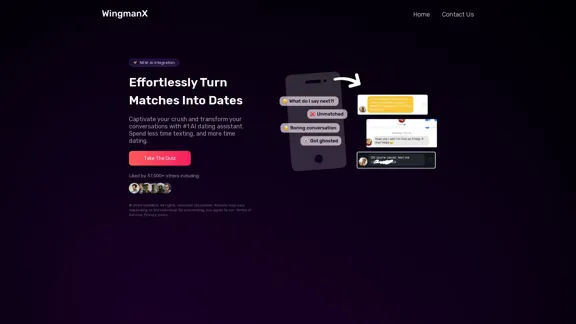
#1 AI Dating Assistant for Rizz Pick Up Lines - WingmanX

Be visible on Tinder, Hinge, Bumble with WingmanX. Attract any woman, get instant replies, and say goodbye to wasted matches. Boost your dating success.
Visit Website
#1 AI Dating Assistant for Rizz Pick Up Lines - WingmanX
Visit Website

Introduction

WingmanX is an AI-powered dating assistant designed to help users improve their online dating experience. It offers AI-generated pick-up lines and conversation starters to enhance users' "rizz" (charisma) and increase their chances of turning matches into actual dates. The tool aims to streamline the texting process, allowing users to focus more on real-life interactions.

Feature

  • AI-generated pick-up lines and conversation starters
  • Personalized assistance through a quiz system
  • Integration with popular dating platforms
  • Time-saving solution for online dating
  • Continuous improvement through AI technology
  • User-friendly interface for easy navigation
  • Compatibility with various devices and platforms

FAQ

What is WingmanX?

WingmanX is an AI dating assistant that helps users create engaging conversations and improve their chances of success in online dating.

How does WingmanX work?

Users take a quiz to personalize their experience, and the AI generates tailored pick-up lines and conversation starters based on their preferences and dating goals.

Is WingmanX compatible with all dating apps?

While specific compatibility information is not provided, WingmanX is designed to work with popular dating platforms to enhance users' online dating experiences.

Can WingmanX guarantee success in dating?

Results may vary depending on the individual, as stated in the disclaimer. WingmanX is a tool to assist and improve chances, but success ultimately depends on various factors.

Evaluation

  1. WingmanX offers a unique solution to a common problem in online dating - initiating and maintaining engaging conversations. The AI-powered assistance can be particularly helpful for users who struggle with crafting witty or interesting messages.

  2. The quiz feature suggests a level of personalization, which is a positive aspect as it tailors the AI's suggestions to individual users' needs and preferences.

  3. The tool's focus on saving time and increasing efficiency in online dating could be appealing to busy professionals or those who find the texting phase of online dating tedious.

  4. However, there are potential drawbacks to consider. Over-reliance on AI-generated content might lead to less authentic interactions or hinder the development of natural conversation skills.

  5. The effectiveness of the tool may vary significantly between users, and there's a risk that conversations initiated through AI assistance might feel artificial or lack genuine connection.

  6. Privacy concerns could arise regarding the handling of personal data and dating preferences, especially given the sensitive nature of dating information.

  7. While WingmanX can be a useful aid, users should be cautious about becoming too dependent on AI for their dating interactions and should strive to develop their own communication skills alongside using the tool.

Related Websites
Image Background Remover API
View Detail

Image Background Remover API

Image Background Remover API

Remove image backgrounds automatically with our powerful API. High-quality cutouts with affordable credit-based pricing. Start with 50 free credits today.

18.26 K
Vidviz GPT: AI for YouTube 

Vidviz GPT is an AI-powered tool designed to help you create amazing YouTube videos.
View Detail

Vidviz GPT: AI for YouTube Vidviz GPT is an AI-powered tool designed to help you create amazing YouTube videos.

Vidviz GPT: AI for YouTube Vidviz GPT is an AI-powered tool designed to help you create amazing YouTube videos.

Vidviz GPT: ChatGPT for YouTube. Chat, Summarize, Question Videos Seamlessly. Extract Visual Information and Empower Your Learning.

193.90 M
Character Headcanon Generator
The Character Headcanon Generator, originating from Perchance, creates unique character headcanons through our headcanon generator.
View Detail

Character Headcanon Generator The Character Headcanon Generator, originating from Perchance, creates unique character headcanons through our headcanon generator.

Character Headcanon Generator The Character Headcanon Generator, originating from Perchance, creates unique character headcanons through our headcanon generator.

Discover the Character Headcanon Generator, an innovative tool that originated from the Perchance platform. This powerful character headcanon generator helps you create detailed and engaging character headcanon with ease, allowing fans to explore new interpretations of their favorite characters. Whether you're a writer, role-player, or fan fiction enthusiast, our headcanon generator provides endless creative possibilities by generating unique backgrounds and traits. Enhance your storytelling and bring your characters to life with the Character Headcanon Generator today!

243
Here is the translation:

Create Perfect Circles in Minecraft with Minecraft Circle Generator | minecraftcirclegenerate.cc
View Detail

Here is the translation: Create Perfect Circles in Minecraft with Minecraft Circle Generator | minecraftcirclegenerate.cc

Here is the translation: Create Perfect Circles in Minecraft with Minecraft Circle Generator | minecraftcirclegenerate.cc

Create perfect circles and ovals in Minecraft with our easy-to-use generator. Customize size and style, then download your designs!

0
BigJpg AI
View Detail

BigJpg AI

BigJpg AI

BigJPG AI: The excellent image upscaler. It enlarges photos beyond limits, delivering crystal-clear results. User-friendly BigJPG creates print-quality enlargements.

62.56 K
4o Image API: Affordable, Stable, and Versatile AI Image Generation
View Detail

4o Image API: Affordable, Stable, and Versatile AI Image Generation

4o Image API: Affordable, Stable, and Versatile AI Image Generation

4oimageapi.io’s 4o Image API provides affordable, stable, and accurate AI image generation, allowing creators to easily produce high-quality visuals. With features such as text-to-image and image-to-image transformations, along with a variety of artistic styles, it offers dependable and effective tools for creative projects.

0
Journey ArtPrompt with Midjourney

This guide will walk you through creating stunning artwork using Midjourney, a powerful AI art generator. 

1. Accessing Midjourney

* You'll need a Discord account to use Midjourney. 
* Join the official Midjourney server: [https://discord.gg/midjourney](https://discord.gg/midjourney)

2. Understanding the Basics

* `/imagine` Command: This is the core command for generating images.
* Prompt:  A text description of the artwork you want to create. Be specific and descriptive!
* Parameters: Options that control aspects like image size, aspect ratio, and style.

3. Crafting Your Journey Prompt

Think about the story you want to tell with your artwork.  

* Setting: Where does your journey take place? (e.g., a mystical forest, a futuristic city, a desolate wasteland)
* Characters: Who is on this journey? (e.g., a lone traveler, a group of adventurers, mythical creatures)
* Mood: What feeling do you want to evoke? (e.g., adventurous, mysterious, hopeful, melancholic)
* Style: What artistic style appeals to you? (e.g., photorealistic, painterly, abstract)

4. Putting it Together

Combine these elements into a clear and concise prompt. 

Example:

`/imagine A lone traveler journeys through a mystical forest at sunset, bathed in golden light. The path ahead is shrouded in mist, hinting at unknown wonders. Style: painterly, ethereal`

5. Experiment and Refine

* Midjourney is all about experimentation! Try different prompts, parameters, and styles.
* Use the "upscale" command to enlarge your favorite images and reveal more detail.
* Don't be afraid to iterate and refine your prompts based on the results.
View Detail

Journey ArtPrompt with Midjourney This guide will walk you through creating stunning artwork using Midjourney, a powerful AI art generator. 1. Accessing Midjourney * You'll need a Discord account to use Midjourney. * Join the official Midjourney server: [https://discord.gg/midjourney](https://discord.gg/midjourney) 2. Understanding the Basics * `/imagine` Command: This is the core command for generating images. * Prompt: A text description of the artwork you want to create. Be specific and descriptive! * Parameters: Options that control aspects like image size, aspect ratio, and style. 3. Crafting Your Journey Prompt Think about the story you want to tell with your artwork. * Setting: Where does your journey take place? (e.g., a mystical forest, a futuristic city, a desolate wasteland) * Characters: Who is on this journey? (e.g., a lone traveler, a group of adventurers, mythical creatures) * Mood: What feeling do you want to evoke? (e.g., adventurous, mysterious, hopeful, melancholic) * Style: What artistic style appeals to you? (e.g., photorealistic, painterly, abstract) 4. Putting it Together Combine these elements into a clear and concise prompt. Example: `/imagine A lone traveler journeys through a mystical forest at sunset, bathed in golden light. The path ahead is shrouded in mist, hinting at unknown wonders. Style: painterly, ethereal` 5. Experiment and Refine * Midjourney is all about experimentation! Try different prompts, parameters, and styles. * Use the "upscale" command to enlarge your favorite images and reveal more detail. * Don't be afraid to iterate and refine your prompts based on the results.

Journey ArtPrompt with Midjourney This guide will walk you through creating stunning artwork using Midjourney, a powerful AI art generator. 1. Accessing Midjourney * You'll need a Discord account to use Midjourney. * Join the official Midjourney server: [https://discord.gg/midjourney](https://discord.gg/midjourney) 2. Understanding the Basics * `/imagine` Command: This is the core command for generating images. * Prompt: A text description of the artwork you want to create. Be specific and descriptive! * Parameters: Options that control aspects like image size, aspect ratio, and style. 3. Crafting Your Journey Prompt Think about the story you want to tell with your artwork. * Setting: Where does your journey take place? (e.g., a mystical forest, a futuristic city, a desolate wasteland) * Characters: Who is on this journey? (e.g., a lone traveler, a group of adventurers, mythical creatures) * Mood: What feeling do you want to evoke? (e.g., adventurous, mysterious, hopeful, melancholic) * Style: What artistic style appeals to you? (e.g., photorealistic, painterly, abstract) 4. Putting it Together Combine these elements into a clear and concise prompt. Example: `/imagine A lone traveler journeys through a mystical forest at sunset, bathed in golden light. The path ahead is shrouded in mist, hinting at unknown wonders. Style: painterly, ethereal` 5. Experiment and Refine * Midjourney is all about experimentation! Try different prompts, parameters, and styles. * Use the "upscale" command to enlarge your favorite images and reveal more detail. * Don't be afraid to iterate and refine your prompts based on the results.

New backgrounds with Midjourney on new tabs

193.90 M
AI Art Generator | AI Image Generator - Jasper Art
View Detail

AI Art Generator | AI Image Generator - Jasper Art

AI Art Generator | AI Image Generator - Jasper Art

Jasper Art is a new AI art generator that transforms your text prompt into stunning art and lifelike AI-generated images within seconds. Your AI artist produces the ideal picture to complement your message.

939.36 K