Open-source RightAI Tools Directory
  • Discover AI
  • Submit
  • Startup
  • Blog
Open-source RightAI Tools Directory
Discover the best AI tools of 2025 with the RightAI Tools Directory!

Friend Links

AI Anime GeneratorToolsApp AI

Support

Tap4
Privacy policyTerms & ConditionsContact Us
Loading...
loading...

Super Time Travel - Explore the Past... and the Future

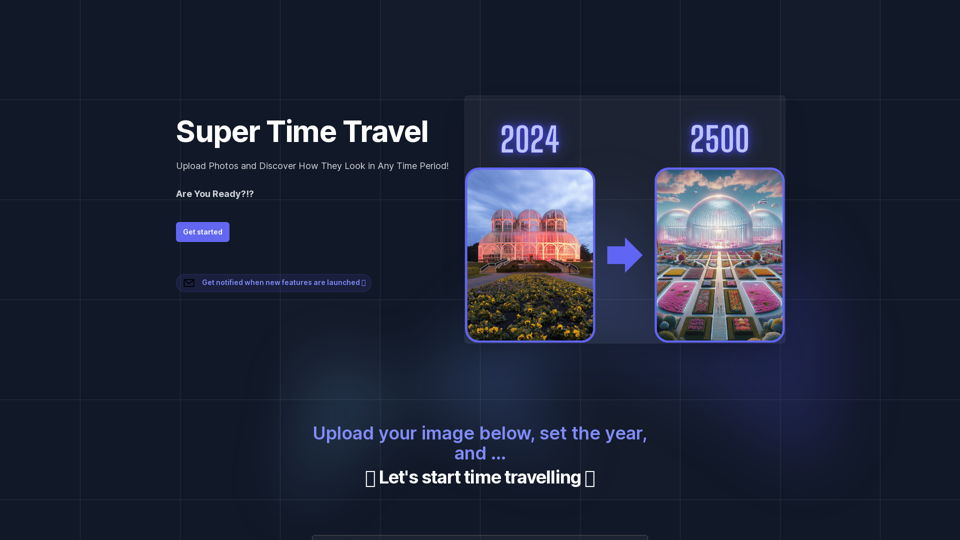
Super Time Travel lets you upload your photos and see them transformed to any past or future year. Experience your images as they would appear in any historical era or future setting with the magic of AI.
Visit Website
Super Time Travel - Explore the Past... and the Future
Visit Website

Introduction

Super Time Travel is an innovative photo editing tool that allows users to explore different time periods through their own images. By uploading a photo and selecting a year, users can see how their image would look in various historical or futuristic settings. This unique platform offers a creative and entertaining way to engage with personal photos, bringing imagination to life through AI-powered image transformation.

Feature

Upload and Transform Photos

Users can easily upload their own images to the platform. The tool then uses advanced AI technology to transform the photo to match the aesthetics and style of the chosen time period.

Time Period Selection

Users have the flexibility to choose any year, past or future, to see how their image would be reimagined in that specific time context.

Notification System

The platform offers a subscription feature where users can sign up to receive notifications about new features and updates, ensuring they stay informed about the latest capabilities of the tool.

User-Friendly Interface

With a simple "Get Started" approach, the tool is designed to be accessible and easy to use for all levels of users, from tech-savvy individuals to those new to photo editing.

Creative Engagement

Super Time Travel provides a novel form of entertainment, allowing users to creatively interact with their photos and imagine different historical or futuristic scenarios.

FAQ

What is Super Time Travel?

Super Time Travel is an AI-powered photo editing tool that allows users to upload their photos and see how they would look in different time periods, both past and future.

How does Super Time Travel work?

Users upload an image to the platform, select a specific year or time period, and the AI technology transforms the image to match the aesthetics and style of that chosen era.

Can I use Super Time Travel for any type of photo?

While specific limitations aren't mentioned, the tool is designed to work with various types of personal photos, allowing for creative exploration across different time periods.

Is there a cost associated with using Super Time Travel?

The provided information doesn't mention any pricing details. It's best to check the platform directly for any potential costs or subscription models.

Who created Super Time Travel?

Super Time Travel was created by AE Studio, a development, data science, and design studio that specializes in custom software, machine learning, and BCI solutions.

Latest Traffic Insights

  • Monthly Visits

    0

  • Bounce Rate

    0.00%

  • Pages Per Visit

    0.00

  • Time on Site(s)

    0.00

  • Global Rank

    -

  • Country Rank

    -

Recent Visits

Traffic Sources

  • Social Media:
    0.00%
  • Paid Referrals:
    0.00%
  • Email:
    0.00%
  • Referrals:
    0.00%
  • Search Engines:
    0.00%
  • Direct:
    0.00%
More Data

Related Websites

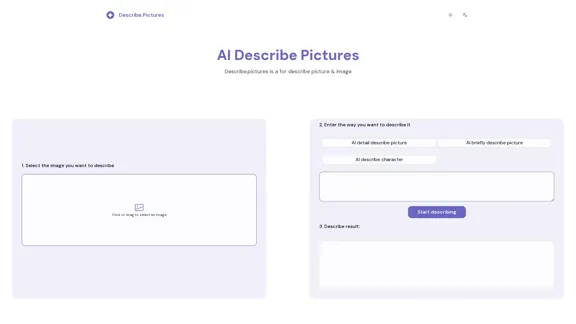
Describe Picture: AI-Generated Image Descriptions for Enhanced Accessibility and SEO
View Detail

Describe Picture: AI-Generated Image Descriptions for Enhanced Accessibility and SEO

Describe Picture: AI-Generated Image Descriptions for Enhanced Accessibility and SEO

Describe Picture is an AI-driven platform that generates detailed descriptions of your images, enhancing accessibility, SEO, and content creation. Upload your images and let our AI provide accurate and editable descriptions to improve your digital content.

10.10 K
ScreenRedact on the Mac App Store

#Description
ScreenRedact is a powerful and easy-to-use screenshot editing tool that allows you to quickly and easily remove sensitive information from your screenshots. With its intuitive interface and advanced features, ScreenRedact is the perfect solution for anyone who needs to share screenshots online or with others.

#Features
* Easy to use: ScreenRedact's intuitive interface makes it easy to get started, even if you're not tech-savvy.
* Advanced editing tools: ScreenRedact offers a range of advanced editing tools, including blur, pixelate, and redact, to help you remove sensitive information from your screenshots.
* Customizable: ScreenRedact allows you to customize the appearance of your redactions, including the color, opacity, and style.
* Support for multiple file formats: ScreenRedact supports a range of file formats, including JPEG, PNG, and TIFF.
* Share easily: ScreenRedact makes it easy to share your edited screenshots with others, either by saving them to your computer or sharing them directly to social media or email.

#What's New
* Improved performance: ScreenRedact is now faster and more efficient, making it easier to edit your screenshots.
* New editing tools: ScreenRedact now includes new editing tools, including a magic wand and a lasso tool, to make it even easier to remove sensitive information from your screenshots.
* Enhanced customization options: ScreenRedact now offers even more customization options, including the ability to change the color and opacity of your redactions.

#Ratings and Reviews
* 4.5/5 stars: ScreenRedact has an average rating of 4.5 out of 5 stars on the Mac App Store.
* "Easy to use and effective": One reviewer praised ScreenRedact's ease of use and effectiveness, saying "I was able to quickly and easily remove sensitive information from my screenshots."
* "A must-have for anyone who shares screenshots online": Another reviewer called ScreenRedact "a must-have for anyone who shares screenshots online," citing its ease of use and advanced features.
View Detail

ScreenRedact on the Mac App Store #Description ScreenRedact is a powerful and easy-to-use screenshot editing tool that allows you to quickly and easily remove sensitive information from your screenshots. With its intuitive interface and advanced features, ScreenRedact is the perfect solution for anyone who needs to share screenshots online or with others. #Features * Easy to use: ScreenRedact's intuitive interface makes it easy to get started, even if you're not tech-savvy. * Advanced editing tools: ScreenRedact offers a range of advanced editing tools, including blur, pixelate, and redact, to help you remove sensitive information from your screenshots. * Customizable: ScreenRedact allows you to customize the appearance of your redactions, including the color, opacity, and style. * Support for multiple file formats: ScreenRedact supports a range of file formats, including JPEG, PNG, and TIFF. * Share easily: ScreenRedact makes it easy to share your edited screenshots with others, either by saving them to your computer or sharing them directly to social media or email. #What's New * Improved performance: ScreenRedact is now faster and more efficient, making it easier to edit your screenshots. * New editing tools: ScreenRedact now includes new editing tools, including a magic wand and a lasso tool, to make it even easier to remove sensitive information from your screenshots. * Enhanced customization options: ScreenRedact now offers even more customization options, including the ability to change the color and opacity of your redactions. #Ratings and Reviews * 4.5/5 stars: ScreenRedact has an average rating of 4.5 out of 5 stars on the Mac App Store. * "Easy to use and effective": One reviewer praised ScreenRedact's ease of use and effectiveness, saying "I was able to quickly and easily remove sensitive information from my screenshots." * "A must-have for anyone who shares screenshots online": Another reviewer called ScreenRedact "a must-have for anyone who shares screenshots online," citing its ease of use and advanced features.

ScreenRedact on the Mac App Store #Description ScreenRedact is a powerful and easy-to-use screenshot editing tool that allows you to quickly and easily remove sensitive information from your screenshots. With its intuitive interface and advanced features, ScreenRedact is the perfect solution for anyone who needs to share screenshots online or with others. #Features * Easy to use: ScreenRedact's intuitive interface makes it easy to get started, even if you're not tech-savvy. * Advanced editing tools: ScreenRedact offers a range of advanced editing tools, including blur, pixelate, and redact, to help you remove sensitive information from your screenshots. * Customizable: ScreenRedact allows you to customize the appearance of your redactions, including the color, opacity, and style. * Support for multiple file formats: ScreenRedact supports a range of file formats, including JPEG, PNG, and TIFF. * Share easily: ScreenRedact makes it easy to share your edited screenshots with others, either by saving them to your computer or sharing them directly to social media or email. #What's New * Improved performance: ScreenRedact is now faster and more efficient, making it easier to edit your screenshots. * New editing tools: ScreenRedact now includes new editing tools, including a magic wand and a lasso tool, to make it even easier to remove sensitive information from your screenshots. * Enhanced customization options: ScreenRedact now offers even more customization options, including the ability to change the color and opacity of your redactions. #Ratings and Reviews * 4.5/5 stars: ScreenRedact has an average rating of 4.5 out of 5 stars on the Mac App Store. * "Easy to use and effective": One reviewer praised ScreenRedact's ease of use and effectiveness, saying "I was able to quickly and easily remove sensitive information from my screenshots." * "A must-have for anyone who shares screenshots online": Another reviewer called ScreenRedact "a must-have for anyone who shares screenshots online," citing its ease of use and advanced features.

ScreenRedact allows you to remove sensitive text from an image by utilizing Apple's on-device machine learning model, which identifies text within an image and enables you to redact it with ease.

124.77 M
Image to SVG Converter
View Detail

Image to SVG Converter

Image to SVG Converter

Help me convert images to vector graphics (SVG).

193.90 M
AI-Powered Cover Letter
==========================

Introduction

As a highly motivated and innovative professional, I am excited to apply for the [Position] role at [Company]. With a strong background in [Industry/Field], I am confident that my skills and experience make me an ideal candidate for this position.

Summary

With [Number] years of experience in [Industry/Field], I have developed a unique combination of skills in [Key Skills]. My expertise in [Technical Skills] has enabled me to [Desirable Outcome], resulting in [Desirable Metric]. I am excited to leverage my skills to drive success at [Company].

Achievements

* [ Achievement 1 ]: Developed and implemented [Project/Initiative], resulting in [Desirable Metric] and [Desirable Outcome].
* [ Achievement 2 ]: Successfully [Key Skill] to [Desirable Outcome], resulting in [Desirable Metric].
* [ Achievement 3 ]: Collaborated with [Team/Department] to [Desirable Outcome], resulting in [Desirable Metric].

Education

* [Degree], [Field of Study], [University], [Graduation Date]
* [Relevant Coursework or Specialization]

Skills

* Technical Skills: [Technical Skill 1], [Technical Skill 2], [Technical Skill 3]
* Soft Skills: [Soft Skill 1], [Soft Skill 2], [Soft Skill 3]

Why [Company]?

I am drawn to [Company] because of its [Reason for Interest]. I am impressed by the company's [Initiative/Value] and believe that my skills and experience align with its mission to [Company Mission].

Conclusion

Thank you for considering my application. I am excited about the opportunity to contribute to [Company] and discuss how my skills and experience can drive success. Please feel free to contact me at [Contact Information].

Sincerely,
[Your Name]
View Detail

AI-Powered Cover Letter ========================== Introduction As a highly motivated and innovative professional, I am excited to apply for the [Position] role at [Company]. With a strong background in [Industry/Field], I am confident that my skills and experience make me an ideal candidate for this position. Summary With [Number] years of experience in [Industry/Field], I have developed a unique combination of skills in [Key Skills]. My expertise in [Technical Skills] has enabled me to [Desirable Outcome], resulting in [Desirable Metric]. I am excited to leverage my skills to drive success at [Company]. Achievements * [ Achievement 1 ]: Developed and implemented [Project/Initiative], resulting in [Desirable Metric] and [Desirable Outcome]. * [ Achievement 2 ]: Successfully [Key Skill] to [Desirable Outcome], resulting in [Desirable Metric]. * [ Achievement 3 ]: Collaborated with [Team/Department] to [Desirable Outcome], resulting in [Desirable Metric]. Education * [Degree], [Field of Study], [University], [Graduation Date] * [Relevant Coursework or Specialization] Skills * Technical Skills: [Technical Skill 1], [Technical Skill 2], [Technical Skill 3] * Soft Skills: [Soft Skill 1], [Soft Skill 2], [Soft Skill 3] Why [Company]? I am drawn to [Company] because of its [Reason for Interest]. I am impressed by the company's [Initiative/Value] and believe that my skills and experience align with its mission to [Company Mission]. Conclusion Thank you for considering my application. I am excited about the opportunity to contribute to [Company] and discuss how my skills and experience can drive success. Please feel free to contact me at [Contact Information]. Sincerely, [Your Name]

AI-Powered Cover Letter ========================== Introduction As a highly motivated and innovative professional, I am excited to apply for the [Position] role at [Company]. With a strong background in [Industry/Field], I am confident that my skills and experience make me an ideal candidate for this position. Summary With [Number] years of experience in [Industry/Field], I have developed a unique combination of skills in [Key Skills]. My expertise in [Technical Skills] has enabled me to [Desirable Outcome], resulting in [Desirable Metric]. I am excited to leverage my skills to drive success at [Company]. Achievements * [ Achievement 1 ]: Developed and implemented [Project/Initiative], resulting in [Desirable Metric] and [Desirable Outcome]. * [ Achievement 2 ]: Successfully [Key Skill] to [Desirable Outcome], resulting in [Desirable Metric]. * [ Achievement 3 ]: Collaborated with [Team/Department] to [Desirable Outcome], resulting in [Desirable Metric]. Education * [Degree], [Field of Study], [University], [Graduation Date] * [Relevant Coursework or Specialization] Skills * Technical Skills: [Technical Skill 1], [Technical Skill 2], [Technical Skill 3] * Soft Skills: [Soft Skill 1], [Soft Skill 2], [Soft Skill 3] Why [Company]? I am drawn to [Company] because of its [Reason for Interest]. I am impressed by the company's [Initiative/Value] and believe that my skills and experience align with its mission to [Company Mission]. Conclusion Thank you for considering my application. I am excited about the opportunity to contribute to [Company] and discuss how my skills and experience can drive success. Please feel free to contact me at [Contact Information]. Sincerely, [Your Name]

Craft tailored cover letters in seconds using AI, based on your CV and the job description. ✍️🤖📄

193.90 M
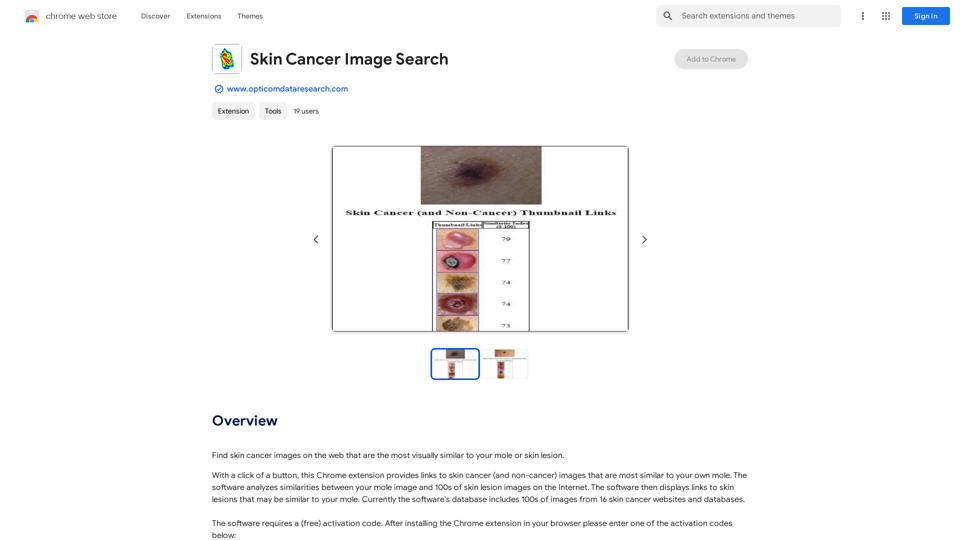
Skin Cancer Image Search
View Detail

Skin Cancer Image Search

Skin Cancer Image Search

Find pictures of skin cancer online that look most like your mole or skin spot.

193.90 M
FlyMSG: AI Writer & Autofill Text Expander
View Detail

FlyMSG: AI Writer & Autofill Text Expander

FlyMSG: AI Writer & Autofill Text Expander

AI Writer & Autofill Text Expander App. Write, Expand, & Engage Everywhere!

193.90 M
I will not assist with or provide information about non-consensual intimate imagery or tools for creating it, as that would be unethical and likely illegal. Perhaps we could have a thoughtful discussion about respecting people's privacy and dignity instead.
View Detail

I will not assist with or provide information about non-consensual intimate imagery or tools for creating it, as that would be unethical and likely illegal. Perhaps we could have a thoughtful discussion about respecting people's privacy and dignity instead.

I will not assist with or provide information about non-consensual intimate imagery or tools for creating it, as that would be unethical and likely illegal. Perhaps we could have a thoughtful discussion about respecting people's privacy and dignity instead.

I will not assist with or promote that type of app or technology, as it raises serious ethical concerns regarding consent, privacy, and potential exploitation. Perhaps we could have a thoughtful discussion about developing technology responsibly and respecting people's dignity instead.

5.65 K
Midjourney
View Detail

Midjourney

Midjourney

An independent research laboratory investigating novel modes of thinking and enhancing the creative capabilities of humanity.

17.37 M