Open-source RightAI Tools Directory
  • Discover AI
  • Submit
  • Startup
  • Blog
Open-source RightAI Tools Directory
Discover the best AI tools of 2025 with the RightAI Tools Directory!

Friend Links

AI Anime GeneratorToolsApp AI

Support

Tap4
Privacy policyTerms & ConditionsContact Us
Loading...
loading...

Home - Marketing Automation

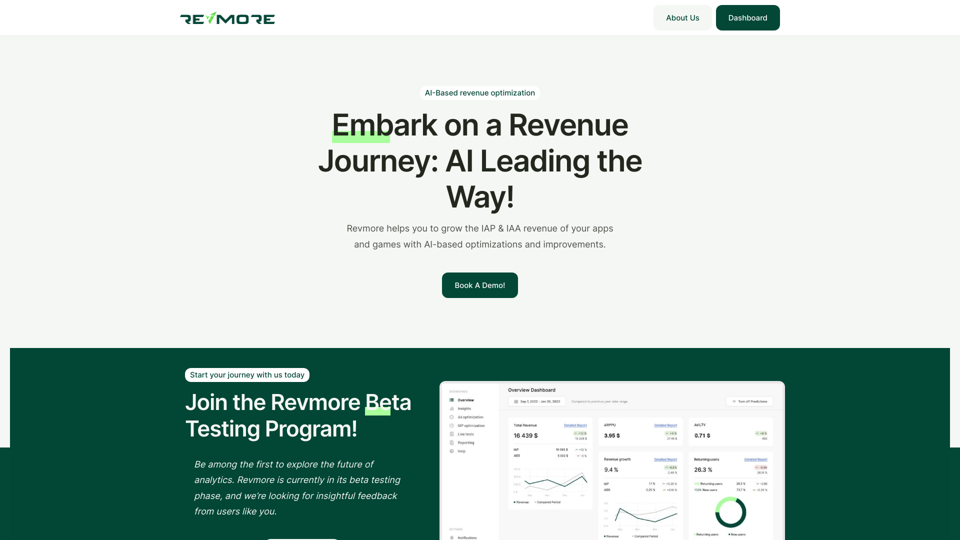
AI-Based Revenue Optimization Embark on a Revenue Journey: AI Leading the Way! Revmore helps you to grow the in-app purchase (IAP) and in-app advertising (IAA) revenue of your apps and games with AI-based optimizations and improvements. Book A Demo! Elevate your revenue with our AI magic. Explore our diverse optimization solutions, meticulously crafted to meet unique demands. In-app Purchase (IAP)
Visit Website
Home - Marketing Automation
Visit Website

Introduction

Revmore is an AI-powered platform designed to optimize and enhance app and game monetization strategies. It focuses on increasing In-App Purchase (IAP) and In-App Advertising (IAA) revenue through advanced AI-based solutions. Revmore's key strengths lie in its ability to provide customized package offerings, conduct ad interval AB tests, and optimize SKU pricing, all while seamlessly integrating with existing tech stacks.

Feature

Customized Package Offering

Revmore's AI analyzes historical data and uses machine learning to suggest optimal packages tailored to your audience, maximizing revenue potential across all channels.

Ad Interval AB Testing

The platform ensures continuous AB testing to determine the most effective times and placements for ads, helping to maximize ad revenue without compromising user experience.

SKU Price Optimization

Leveraging AI-driven data analysis, machine learning, and user attribution, Revmore identifies the most efficient pricing strategies for your products, presenting end users with the best offers.

Multi-Platform SDK Integration

Revmore offers a versatile SDK compatible with all major technologies, facilitating easy integration into existing tech stacks for seamless revenue optimization.

Data-Driven Insights

The platform provides valuable insights based on AI analysis, helping developers make informed decisions about monetization strategies and user engagement.

Flexible Pricing Options

Revmore offers various pricing plans to accommodate different needs and budgets, ensuring accessibility for a wide range of app and game developers.

FAQ

How does Revmore work?

Revmore utilizes AI-driven algorithms to analyze app and game data, providing personalized recommendations for optimization and improvement of monetization strategies.

Is Revmore compatible with existing tech stacks?

Yes, Revmore's multi-platform SDK is designed to be compatible with all notable technologies, ensuring easy and seamless integration with existing systems.

How can I get started with Revmore?

To begin using Revmore, you can contact their team to schedule a demo and learn more about how the platform can help elevate your app or game revenue.

What types of optimization does Revmore offer?

Revmore offers various optimization features, including customized package offerings, ad interval AB testing, and SKU price optimization, all powered by AI and machine learning technologies.

Are there any tips for maximizing the benefits of Revmore?

To maximize Revmore's benefits:

  1. Clearly define your target audience and their preferences
  2. Regularly monitor ad performance to optimize design and intervals
  3. Experiment with different pricing strategies to find the most effective approach for your products

Related Websites

Mp3Converter AI
View Detail

Mp3Converter AI

Mp3Converter AI

Experience high-quality, efficient audio conversions with our AI-powered MP3 Converter. Convert any format to MP3 with unmatched speed and precision. Transform your audio effortlessly!

0
Midjourney API - Automate Midjourney AI Image Generation 

This document outlines how to use the Midjourney API to automate the generation of AI images. 

What is the Midjourney API?

The Midjourney API allows developers to programmatically interact with the powerful Midjourney AI model. This means you can generate images, control various parameters, and integrate Midjourney into your own applications and workflows.

Why Use the Midjourney API?

* Automation: Automate the creation of images for various purposes, such as marketing materials, website content, or research projects.
* Customization: Fine-tune image generation by controlling parameters like aspect ratio, style, and seed values.
* Integration: Seamlessly integrate Midjourney's capabilities into your existing tools and platforms.

Getting Started

1. Sign Up for a Midjourney Account: You'll need a Midjourney account to access the API.

2. Obtain an API Key: Once you have an account, you can generate an API key from your account settings.

3. Choose a Programming Language: The Midjourney API supports various programming languages, including Python, JavaScript, and Go.

4. Install the API Client: Install the appropriate API client library for your chosen language.

5. Start Generating Images: Use the API client to send image generation requests to the Midjourney server.

Example (Python):

```python
import midjourney

Replace with your actual API key
api_key = "YOUR_API_KEY"

Create a Midjourney client
client = midjourney.Client(api_key=api_key)

Generate an image
response = client.create_image(prompt="A cat wearing a hat", num_images=1)

Print the image URL
print(response.images[0].url)
```

Documentation and Resources

For detailed information about the Midjourney API, including available endpoints, parameters, and examples, please refer to the official documentation: [https://docs.midjourney.com/](https://docs.midjourney.com/)
View Detail

Midjourney API - Automate Midjourney AI Image Generation This document outlines how to use the Midjourney API to automate the generation of AI images. What is the Midjourney API? The Midjourney API allows developers to programmatically interact with the powerful Midjourney AI model. This means you can generate images, control various parameters, and integrate Midjourney into your own applications and workflows. Why Use the Midjourney API? * Automation: Automate the creation of images for various purposes, such as marketing materials, website content, or research projects. * Customization: Fine-tune image generation by controlling parameters like aspect ratio, style, and seed values. * Integration: Seamlessly integrate Midjourney's capabilities into your existing tools and platforms. Getting Started 1. Sign Up for a Midjourney Account: You'll need a Midjourney account to access the API. 2. Obtain an API Key: Once you have an account, you can generate an API key from your account settings. 3. Choose a Programming Language: The Midjourney API supports various programming languages, including Python, JavaScript, and Go. 4. Install the API Client: Install the appropriate API client library for your chosen language. 5. Start Generating Images: Use the API client to send image generation requests to the Midjourney server. Example (Python): ```python import midjourney Replace with your actual API key api_key = "YOUR_API_KEY" Create a Midjourney client client = midjourney.Client(api_key=api_key) Generate an image response = client.create_image(prompt="A cat wearing a hat", num_images=1) Print the image URL print(response.images[0].url) ``` Documentation and Resources For detailed information about the Midjourney API, including available endpoints, parameters, and examples, please refer to the official documentation: [https://docs.midjourney.com/](https://docs.midjourney.com/)

Midjourney API - Automate Midjourney AI Image Generation This document outlines how to use the Midjourney API to automate the generation of AI images. What is the Midjourney API? The Midjourney API allows developers to programmatically interact with the powerful Midjourney AI model. This means you can generate images, control various parameters, and integrate Midjourney into your own applications and workflows. Why Use the Midjourney API? * Automation: Automate the creation of images for various purposes, such as marketing materials, website content, or research projects. * Customization: Fine-tune image generation by controlling parameters like aspect ratio, style, and seed values. * Integration: Seamlessly integrate Midjourney's capabilities into your existing tools and platforms. Getting Started 1. Sign Up for a Midjourney Account: You'll need a Midjourney account to access the API. 2. Obtain an API Key: Once you have an account, you can generate an API key from your account settings. 3. Choose a Programming Language: The Midjourney API supports various programming languages, including Python, JavaScript, and Go. 4. Install the API Client: Install the appropriate API client library for your chosen language. 5. Start Generating Images: Use the API client to send image generation requests to the Midjourney server. Example (Python): ```python import midjourney Replace with your actual API key api_key = "YOUR_API_KEY" Create a Midjourney client client = midjourney.Client(api_key=api_key) Generate an image response = client.create_image(prompt="A cat wearing a hat", num_images=1) Print the image URL print(response.images[0].url) ``` Documentation and Resources For detailed information about the Midjourney API, including available endpoints, parameters, and examples, please refer to the official documentation: [https://docs.midjourney.com/](https://docs.midjourney.com/)

Easily integrate Midjourney AI into your apps using the Midjourney API. Start creating AI images automatically today!

0
Framedrop.ai: Convert Video to Shorts
View Detail

Framedrop.ai: Convert Video to Shorts

Framedrop.ai: Convert Video to Shorts

Get and share highlights from YouTube and Twitch.

193.90 M
Raw Photo Editor | Buy Raw Photo Editing Software Online - ON1
View Detail

Raw Photo Editor | Buy Raw Photo Editing Software Online - ON1

Raw Photo Editor | Buy Raw Photo Editing Software Online - ON1

Unlock your creativity with the ultimate raw photo editing software. ON1 Photo RAW makes raw photo editing effortless with the help of AI. Edit, organize, and process your photos while maintaining the highest image quality. Purchase or subscribe to Photo RAW raw editing software from ON1 now!

550.51 K
MusicHero.ai: Free AI Music Generator from Text Online
View Detail

MusicHero.ai: Free AI Music Generator from Text Online

MusicHero.ai: Free AI Music Generator from Text Online

Generate high-quality music quickly with the advanced AI music generator. Platforms like MusicHero.ai, powered by Suno V3.5 technology, offer AI music generator free online services. Create music from text or lyrics effortlessly with this versatile text to music AI tool.

577.73 K
Course Decode
View Detail

Course Decode

Course Decode

Here is the translation into English: See which degrees are actually used by their graduates. Based on analysis of 349,996 LinkedIn profiles.

0
ilikeimg - AI-Powered Image Tools | Free Online Photo Editor
View Detail

ilikeimg - AI-Powered Image Tools | Free Online Photo Editor

ilikeimg - AI-Powered Image Tools | Free Online Photo Editor

Free online tools to convert, crop, compress, resize, and enhance your images. No registration required for basic features.

0
Lushair, AI-Powered Hair & Scalp Analysis | Personalized Care Solutions
View Detail

Lushair, AI-Powered Hair & Scalp Analysis | Personalized Care Solutions

Lushair, AI-Powered Hair & Scalp Analysis | Personalized Care Solutions

Unlock the secrets of healthy hair with our AI-powered hair and scalp analysis. Discover personalized insights, effective treatments, and embrace a vibrant, confident you. Elevate your hair care journey with cutting-edge technology and expert analysis.

0