Open-source RightAI Tools Directory
  • Discover AI
  • Submit
  • Startup
  • Blog
Open-source RightAI Tools Directory
Discover the best AI tools of 2025 with the RightAI Tools Directory!

Friend Links

AI Anime GeneratorToolsApp AI

Support

Tap4
Privacy policyTerms & ConditionsContact Us
Loading...
loading...

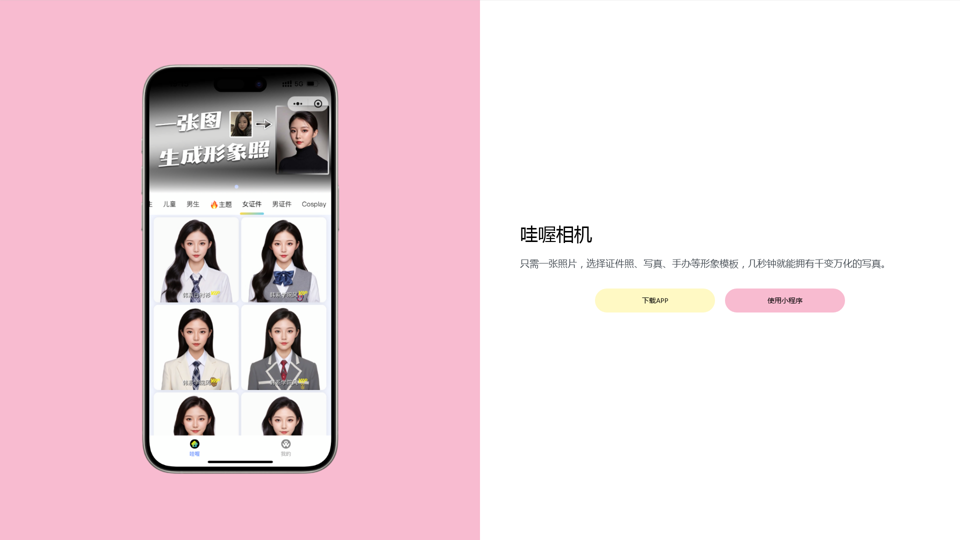
Wow, with just one photo, the camera can generate a portrait!

Wow Camera, Wow Camera, Wao, Portrait Photography, Korean-Style Photography, Chinese-Style Photography, Old Photo Restoration, AI Face Swap, AI Video, Remini, Remini, Clay Filter, Clay Filter, Clay Clay Photo, Standard ID Photo, AI Photography, Photo Editing, Beauty Photo, Wow Photo, Portrait Photo, Butter Camera, Intelligent Photo Editing, Auto Beauty, Deep Learning Photography, Personalized Photo, Artistic Photo, Retro-Style Photo, Modern-Style Photo, Cartoon-Style Photo, Photo Post-Production, AI Photography, Photo Special Effects, Professional-Level Photography, Family Portrait, Personal Photography, Photography Art, Photo Editing, Photo Beautification, Intelligent Filter, Selfie Magic, Photography Enthusiast, Professional Photographer.
Visit Website
Wow, with just one photo, the camera can generate a portrait!
Visit Website

Introduction

Wahou Camera is an AI-powered photography tool that leverages advanced artificial intelligence to automatically recognize facial features, posture, and background. It generates high-quality, personalized photos, offering users a smart and efficient photography experience. The app caters to various photography needs, from standard portraits to certificate photos, with features like automatic beautification and background replacement.

Feature

AI-Driven Photography

Wahou Camera utilizes cutting-edge AI technology to automatically recognize facial features, posture, and background, producing high-quality personalized photos.

Certificate Photography Support

The app supports standard certificate photography, providing smart editing and background adjustment functions to ensure photos meet various certificate requirements.

Smart Editing and Beautification

Wahou Camera offers automatic beautification and smart editing features, enhancing user photos with minimal effort.

Background Replacement

Users can easily change photo backgrounds, adding versatility to their images.

Special Effects and Multiple Styles

The app provides options to add special effects and generate photos in multiple styles, allowing for creative and diverse outputs.

One-Photo Processing

Unlike traditional photography software, Wahou Camera only requires one photo to generate various outputs, offering a more efficient experience.

Accessibility

Users can access Wahou Camera through the official WeChat account, the official website, or major app stores.

FAQ

How does Wahou Camera differ from Xiaohua Camera?

Wahou Camera requires only one photo and uses AI technology to provide a more intelligent and convenient photography experience, operating faster than traditional photography software.

What's the difference between Wahou Camera and Meitu Xiu Xiu?

Wahou Camera focuses on AI technology, automatically generating high-quality photos and artistic images. Meitu Xiu Xiu is a comprehensive beauty and editing software with more functions but requires manual operation.

How do I generate certificate photos with Wahou Camera?

Download the Wahou Camera app or open the mini-program, then locate and use the certificate photo template.

How can I get started with Wahou Camera?

You can start using Wahou Camera by downloading the app or using the mini-program.

How can I contact Wahou Camera support?

For support or inquiries, you can contact Wahou Camera via email at [email protected].

Related Websites
Flux Tools: Comprehensive Guide to AI Image Creation and Editing
View Detail

Flux Tools: Comprehensive Guide to AI Image Creation and Editing

Flux Tools: Comprehensive Guide to AI Image Creation and Editing

Discover how Flux Tools transforms image generation and editing. Expert guide with hands-on experience, use cases, and best practices for creators.

0
meetXcc: AI Meeting Notes for Google Meet
View Detail

meetXcc: AI Meeting Notes for Google Meet

meetXcc: AI Meeting Notes for Google Meet

Automated meeting documentation via transcripts, summaries and intuitive AI-generated mind maps.

193.90 M
Odyssey: Imagine. Create. Automate.
View Detail

Odyssey: Imagine. Create. Automate.

Odyssey: Imagine. Create. Automate.

Odyssey is a native Mac app for creating remarkable art, getting work done, and automating repetitive tasks with the power of AI.

12.13 K
BigJpg AI
View Detail

BigJpg AI

BigJpg AI

BigJPG AI: The excellent image upscaler. It enlarges photos beyond limits, delivering crystal-clear results. User-friendly BigJPG creates print-quality enlargements.

62.56 K
Here is the translation:

Create Perfect Circles in Minecraft with Minecraft Circle Generator | minecraftcirclegenerate.cc
View Detail

Here is the translation: Create Perfect Circles in Minecraft with Minecraft Circle Generator | minecraftcirclegenerate.cc

Here is the translation: Create Perfect Circles in Minecraft with Minecraft Circle Generator | minecraftcirclegenerate.cc

Create perfect circles and ovals in Minecraft with our easy-to-use generator. Customize size and style, then download your designs!

0
Simplified Chrome Extension

This is a basic Chrome extension designed to be easy to understand and modify. 

Manifest File (manifest.json):

```json
{
  "manifest_version": 3,
  "name": "Simplified Extension",
  "version": "1.0",
  "description": "A simple Chrome extension example.",
  "permissions": [
    "activeTab"
  ],
  "action": {
    "default_popup": "popup.html"
  }
}
```

Popup HTML (popup.html):

```html
<!DOCTYPE html>
<html>
<head>
  <title>Simplified Extension</title>
</head>
<body>
  <h1>Hello from the extension!</h1>
  <p>This is a simple popup.</p>
</body>
</html>
```

Explanation:

* manifest.json: This file tells Chrome what your extension does.
    * `manifest_version`: Specifies the version of the manifest file format.
    * `name`: The name of your extension.
    * `version`: The current version of your extension.
    * `description`: A brief description of your extension.
    * `permissions`: Lists the permissions your extension needs to function. Here, it needs access to the active tab.
    * `action`: Defines the popup that appears when the extension icon is clicked.

* popup.html: This file contains the HTML code for the popup window.

How it works:

1. When you install the extension, Chrome reads the `manifest.json` file.
2. When you click the extension icon, Chrome opens the `popup.html` file in a new window.
3. The popup displays the "Hello from the extension!" message.
View Detail

Simplified Chrome Extension This is a basic Chrome extension designed to be easy to understand and modify. Manifest File (manifest.json): ```json { "manifest_version": 3, "name": "Simplified Extension", "version": "1.0", "description": "A simple Chrome extension example.", "permissions": [ "activeTab" ], "action": { "default_popup": "popup.html" } } ``` Popup HTML (popup.html): ```html <!DOCTYPE html> <html> <head> <title>Simplified Extension</title> </head> <body> <h1>Hello from the extension!</h1> <p>This is a simple popup.</p> </body> </html> ``` Explanation: * manifest.json: This file tells Chrome what your extension does. * `manifest_version`: Specifies the version of the manifest file format. * `name`: The name of your extension. * `version`: The current version of your extension. * `description`: A brief description of your extension. * `permissions`: Lists the permissions your extension needs to function. Here, it needs access to the active tab. * `action`: Defines the popup that appears when the extension icon is clicked. * popup.html: This file contains the HTML code for the popup window. How it works: 1. When you install the extension, Chrome reads the `manifest.json` file. 2. When you click the extension icon, Chrome opens the `popup.html` file in a new window. 3. The popup displays the "Hello from the extension!" message.

Simplified Chrome Extension This is a basic Chrome extension designed to be easy to understand and modify. Manifest File (manifest.json): ```json { "manifest_version": 3, "name": "Simplified Extension", "version": "1.0", "description": "A simple Chrome extension example.", "permissions": [ "activeTab" ], "action": { "default_popup": "popup.html" } } ``` Popup HTML (popup.html): ```html <!DOCTYPE html> <html> <head> <title>Simplified Extension</title> </head> <body> <h1>Hello from the extension!</h1> <p>This is a simple popup.</p> </body> </html> ``` Explanation: * manifest.json: This file tells Chrome what your extension does. * `manifest_version`: Specifies the version of the manifest file format. * `name`: The name of your extension. * `version`: The current version of your extension. * `description`: A brief description of your extension. * `permissions`: Lists the permissions your extension needs to function. Here, it needs access to the active tab. * `action`: Defines the popup that appears when the extension icon is clicked. * popup.html: This file contains the HTML code for the popup window. How it works: 1. When you install the extension, Chrome reads the `manifest.json` file. 2. When you click the extension icon, Chrome opens the `popup.html` file in a new window. 3. The popup displays the "Hello from the extension!" message.

Design & Collaborate Marketing made easy #Simplified

193.90 M
Kerqu.Ai
View Detail

Kerqu.Ai

Kerqu.Ai

Essential AI Tools for Cross-Border Business, All-in-One Content Generator

193.90 M
BG Remover - Remove and Change Background
View Detail

BG Remover - Remove and Change Background

BG Remover - Remove and Change Background

With the AI-powered tool, you can easily remove the background from a photo, or further replace the transparent backdrop with colors.

193.90 M