Open-source RightAI Tools Directory
  • Discover AI
  • Submit
  • Startup
  • Blog
Open-source RightAI Tools Directory
Discover the best AI tools of 2025 with the RightAI Tools Directory!

Friend Links

AI Anime GeneratorToolsApp AI

Support

Tap4
Privacy policyTerms & ConditionsContact Us
Loading...
loading...

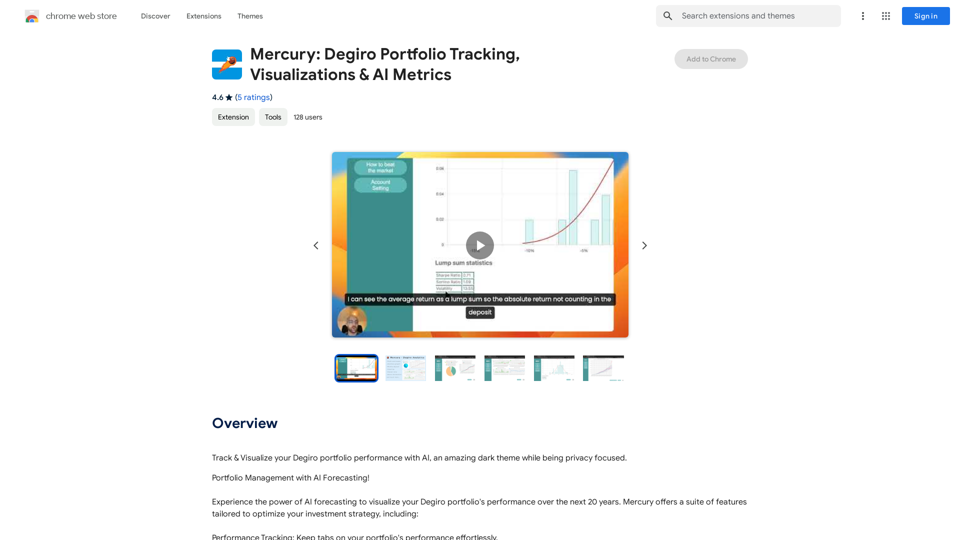
Mercury: Degiro Portfolio Tracking, Visualizations & AI Metrics

Track and visualize your Degiro portfolio performance with AI, featuring an amazing dark theme and a focus on privacy.
Visit Website
Mercury: Degiro Portfolio Tracking, Visualizations & AI Metrics
Visit Website

Introduction

Mercury is a Chrome extension designed for Degiro users, offering portfolio tracking and visualization tools. It leverages AI forecasting to help investors monitor their performance effectively. The extension prioritizes user privacy, sources data directly from Degiro accounts, and provides a customizable experience with features like a dark theme.

Feature

Privacy-Focused Design

Mercury prioritizes user privacy by securely handling personal data and storing it locally in the browser. This ensures that sensitive financial information remains confidential and protected.

Direct Data Integration

The extension sources all necessary data directly from the user's Degiro account, eliminating the need for external operations and enhancing data accuracy and reliability.

AI-Powered Forecasting

Mercury utilizes artificial intelligence to forecast portfolio performance, providing users with valuable insights to make informed investment decisions.

Customizable User Experience

Users can personalize their experience with Mercury, including the option to enable a sleek dark theme for comfortable viewing.

Offline Functionality

Mercury allows users to fetch data while the Degiro page is open, importing it for offline use. This feature enables portfolio analysis even without an active internet connection.

Multi-Currency Support

The extension supports multiple currencies, including EUR, USD, CAD, AUD, CHF, and GBP, catering to a diverse user base.

FAQ

How does Mercury ensure data security?

Mercury prioritizes user privacy by securely handling personal data and storing it locally in the browser. No information is disclosed to third parties, ensuring strict data confidentiality.

Is Mercury suitable for all types of investors?

Mercury is specialized for tracking long-term portfolios and is ideal for users with a buy-and-hold strategy. However, it may not be suitable for frequent traders due to limitations in Degiro's data disclosure for short-term trading activities.

What currencies does Mercury support?

Mercury supports multiple currencies, including EUR, USD, CAD, AUD, CHF, and GBP, making it versatile for users across different regions.

How do users rate Mercury?

Mercury has received positive reviews from users, with an average rating of 4.6 out of 5 stars. Users appreciate its ease of use and the valuable insights it provides into investment performance.

Latest Traffic Insights

  • Monthly Visits

    193.90 M

  • Bounce Rate

    56.27%

  • Pages Per Visit

    2.71

  • Time on Site(s)

    115.91

  • Global Rank

    -

  • Country Rank

    -

Recent Visits

Traffic Sources

  • Social Media:
    0.48%
  • Paid Referrals:
    0.55%
  • Email:
    0.15%
  • Referrals:
    12.81%
  • Search Engines:
    16.21%
  • Direct:
    69.81%
More Data

Related Websites

Stability Matrix CivitAI Integration 

This document outlines the integration of Stability Matrix into Civitai. 

What is Stability Matrix?

Stability Matrix is a powerful tool for evaluating and comparing different AI models. It provides a comprehensive set of metrics to assess model performance across various tasks, including text generation, image generation, and code generation.

Benefits of Integrating Stability Matrix into Civitai:

* Enhanced Model Discovery: Users can easily identify high-performing models based on their desired tasks and preferences.
* Improved Model Selection: The detailed metrics provided by Stability Matrix allow for informed decision-making when choosing a model for a specific project.
* Community-Driven Evaluation: By leveraging the collective wisdom of the Civitai community, Stability Matrix fosters a transparent and collaborative approach to model evaluation.
* Accelerated Model Development: Developers can use Stability Matrix to track the progress of their models and identify areas for improvement.

Implementation Details:

* Stability Matrix scores will be displayed alongside model descriptions on Civitai.
* Users will be able to filter models based on their Stability Matrix scores.
* The integration will initially focus on text generation and image generation models.

Future Enhancements:

* Expand support for additional model types, such as code generation models.
* Implement interactive visualizations of Stability Matrix data.
* Allow users to contribute their own model evaluations to the platform.
View Detail

Stability Matrix CivitAI Integration This document outlines the integration of Stability Matrix into Civitai. What is Stability Matrix? Stability Matrix is a powerful tool for evaluating and comparing different AI models. It provides a comprehensive set of metrics to assess model performance across various tasks, including text generation, image generation, and code generation. Benefits of Integrating Stability Matrix into Civitai: * Enhanced Model Discovery: Users can easily identify high-performing models based on their desired tasks and preferences. * Improved Model Selection: The detailed metrics provided by Stability Matrix allow for informed decision-making when choosing a model for a specific project. * Community-Driven Evaluation: By leveraging the collective wisdom of the Civitai community, Stability Matrix fosters a transparent and collaborative approach to model evaluation. * Accelerated Model Development: Developers can use Stability Matrix to track the progress of their models and identify areas for improvement. Implementation Details: * Stability Matrix scores will be displayed alongside model descriptions on Civitai. * Users will be able to filter models based on their Stability Matrix scores. * The integration will initially focus on text generation and image generation models. Future Enhancements: * Expand support for additional model types, such as code generation models. * Implement interactive visualizations of Stability Matrix data. * Allow users to contribute their own model evaluations to the platform.

Stability Matrix CivitAI Integration This document outlines the integration of Stability Matrix into Civitai. What is Stability Matrix? Stability Matrix is a powerful tool for evaluating and comparing different AI models. It provides a comprehensive set of metrics to assess model performance across various tasks, including text generation, image generation, and code generation. Benefits of Integrating Stability Matrix into Civitai: * Enhanced Model Discovery: Users can easily identify high-performing models based on their desired tasks and preferences. * Improved Model Selection: The detailed metrics provided by Stability Matrix allow for informed decision-making when choosing a model for a specific project. * Community-Driven Evaluation: By leveraging the collective wisdom of the Civitai community, Stability Matrix fosters a transparent and collaborative approach to model evaluation. * Accelerated Model Development: Developers can use Stability Matrix to track the progress of their models and identify areas for improvement. Implementation Details: * Stability Matrix scores will be displayed alongside model descriptions on Civitai. * Users will be able to filter models based on their Stability Matrix scores. * The integration will initially focus on text generation and image generation models. Future Enhancements: * Expand support for additional model types, such as code generation models. * Implement interactive visualizations of Stability Matrix data. * Allow users to contribute their own model evaluations to the platform.

This extension adds a button to the CivitAI interface that allows you to download a given model with Stability Matrix.

193.90 M
Open ChatGPT in a New Tab

You can open ChatGPT in a new tab by following these steps:

#Method 1: Using the Browser's Context Menu

1. Right-click on the ChatGPT link or button.
2. Select "Open in new tab" or "Open link in new tab" from the context menu.

#Method 2: Using the Keyboard Shortcut

1. Press `Ctrl + Click` (Windows/Linux) or `Cmd + Click` (Mac) on the ChatGPT link or button.

#Method 3: Using the Browser's Toolbar

1. Click on the ChatGPT link or button while holding down the `Ctrl` key (Windows/Linux) or `Cmd` key (Mac).
2. Release the key after the new tab is opened.

By following these methods, you can easily open ChatGPT in a new tab and start chatting without leaving your current page.
View Detail

Open ChatGPT in a New Tab You can open ChatGPT in a new tab by following these steps: #Method 1: Using the Browser's Context Menu 1. Right-click on the ChatGPT link or button. 2. Select "Open in new tab" or "Open link in new tab" from the context menu. #Method 2: Using the Keyboard Shortcut 1. Press `Ctrl + Click` (Windows/Linux) or `Cmd + Click` (Mac) on the ChatGPT link or button. #Method 3: Using the Browser's Toolbar 1. Click on the ChatGPT link or button while holding down the `Ctrl` key (Windows/Linux) or `Cmd` key (Mac). 2. Release the key after the new tab is opened. By following these methods, you can easily open ChatGPT in a new tab and start chatting without leaving your current page.

Open ChatGPT in a New Tab You can open ChatGPT in a new tab by following these steps: #Method 1: Using the Browser's Context Menu 1. Right-click on the ChatGPT link or button. 2. Select "Open in new tab" or "Open link in new tab" from the context menu. #Method 2: Using the Keyboard Shortcut 1. Press `Ctrl + Click` (Windows/Linux) or `Cmd + Click` (Mac) on the ChatGPT link or button. #Method 3: Using the Browser's Toolbar 1. Click on the ChatGPT link or button while holding down the `Ctrl` key (Windows/Linux) or `Cmd` key (Mac). 2. Release the key after the new tab is opened. By following these methods, you can easily open ChatGPT in a new tab and start chatting without leaving your current page.

New Tab with Quick ChatGPT Access

193.90 M
Kometa AI – Your personal AI assistant!
View Detail

Kometa AI – Your personal AI assistant!

Kometa AI – Your personal AI assistant!

Don't delay preparing a response to a client. Respond immediately to any email, LinkedIn, HH, or WhatsApp message.

193.90 M
Intelligent Text Generator. Try it for Free
View Detail

Intelligent Text Generator. Try it for Free

Intelligent Text Generator. Try it for Free

The High-Quality AI Text Generator. Writes texts with artificial intelligence for articles, essays, ecommerce, social media, blogs, and much more 🤖

38.49 K
ChatGPT History Search
View Detail

ChatGPT History Search

ChatGPT History Search

ChatGPT conversation history management, including: - Downloading historical data - Searching historical data - Collecting historical data

193.90 M
VidAU - AI Video Generator
View Detail

VidAU - AI Video Generator

VidAU - AI Video Generator

VidAu AI video generator creates high-quality videos for you with features such as avatar spokesperson, face swap, multi-language translation, subtitles, and watermarks removal, as well as video mixing and editing capabilities—get started for free.

684
Discover the Best AI Tools List & AI Tools Directory with tyy.ai
View Detail

Discover the Best AI Tools List & AI Tools Directory with tyy.ai

Discover the Best AI Tools List & AI Tools Directory with tyy.ai

tyy.ai - Leading AI tools directory. Discover the best AI tools, apps & websites to enhance personal & business productivity and tackle any challenge!

1.58 K
Copy.ai
View Detail

Copy.ai

Copy.ai

Use Artificial Intelligence to write better SEO content.

193.90 M