Open-source RightAI Tools Directory
  • Discover AI
  • Submit
  • Startup
  • Blog
Open-source RightAI Tools Directory
Discover the best AI tools of 2025 with the RightAI Tools Directory!

Friend Links

AI Anime GeneratorToolsApp AI

Support

Tap4
Privacy policyTerms & ConditionsContact Us
Loading...
loading...

Kayako Bot

Kayako Bot
Visit Website
Kayako Bot
Visit Website

Introduction

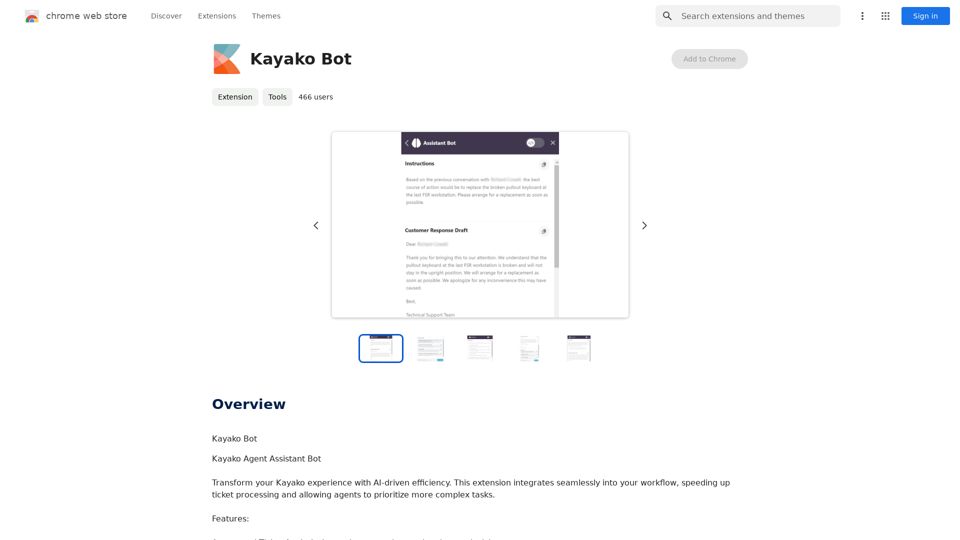
Kayako Bot is an AI-powered extension designed to enhance the Kayako support experience. It seamlessly integrates into existing workflows, accelerating ticket processing and allowing support agents to focus on more complex tasks. This innovative tool offers automated ticket analysis, smart recommendations, draft responses, and guided assistance, making it an invaluable asset for support teams looking to improve efficiency and customer satisfaction.

Feature

Automated Ticket Analysis

  • Instantly summarizes and comprehends ticket content
  • Streamlines the initial assessment process

Smart Recommendations

  • Suggests solutions based on historical cases and knowledge base
  • Improves response accuracy and consistency

Draft Responses

  • Auto-generates customer responses for basic queries
  • Reduces response time for common issues

Guided Assistance

  • Provides step-by-step solutions for complicated issues
  • Enhances problem-solving capabilities of support agents

Free Extension with Limitations

  • No cost to use, but with certain restrictions
  • Does not support multimedia content
  • Average response time of approximately 90 seconds

Versatile Application

  • Handles a wide range of tickets, from self-service queries to complex problems
  • Ideal for onboarding and cross-training new agents

FAQ

What are the main benefits of using Kayako Bot?

  • Improves support efficiency
  • Allows agents to focus on complex tasks
  • Speeds up ticket processing
  • Enhances customer satisfaction

Is Kayako Bot suitable for all industries?

No, Kayako Bot is not suitable for high-compliance industries due to its limitations and automated nature.

What are the limitations of Kayako Bot?

  • Does not support multimedia content
  • Average response time is around 90 seconds
  • May not be suitable for complex or sensitive inquiries

How can Kayako Bot assist in agent training?

Kayako Bot is great for onboarding and cross-training new agents by providing guided assistance and smart recommendations based on historical cases and knowledge base.

Latest Traffic Insights

  • Monthly Visits

    193.90 M

  • Bounce Rate

    56.27%

  • Pages Per Visit

    2.71

  • Time on Site(s)

    115.91

  • Global Rank

    -

  • Country Rank

    -

Recent Visits

Traffic Sources

  • Social Media:
    0.48%
  • Paid Referrals:
    0.55%
  • Email:
    0.15%
  • Referrals:
    12.81%
  • Search Engines:
    16.21%
  • Direct:
    69.81%
More Data

Related Websites

Midjourney SREF Codes Library for Style Reference

What are SREF Codes?

SREF codes are special text strings used in Midjourney to quickly and easily apply specific artistic styles to your image generations. 

How to Use SREF Codes:

Simply add an SREF code to your Midjourney prompt. For example:

`/imagine a majestic dragon, SREF:cyberpunk`

SREF Code Library:

This library contains a collection of SREF codes categorized by style. 

* Art Styles:
    * `photorealistic`: Creates images with high levels of realism.
    * `impressionistic`:  Captures the essence of a scene with loose brushstrokes and vibrant colors.
    * `cubist`:  Breaks down objects into geometric shapes.
    * `surrealist`:  Creates dreamlike and fantastical images.
    * `abstract`:  Focuses on form, color, and composition rather than representational imagery.

* Visual Effects:
    * `cinematic`:  Gives images a cinematic look and feel.
    * `HDR`:  Creates images with high dynamic range, resulting in greater detail and contrast.
    * `neon`:  Adds vibrant neon lights to the image.
    * `pixel art`:  Generates images in a retro pixel art style.

* Other Styles:
    * `anime`:  Creates images in the style of Japanese animation.
    * `manga`:  Similar to anime, but with a more comic book aesthetic.
    * `sketch`:  Generates images that resemble pencil sketches.
    * `watercolor`:  Creates images with the look and feel of watercolor paintings.

Note: This is just a small sample of the many SREF codes available. 

Explore and Experiment:

The best way to learn about SREF codes is to experiment with them! Try combining different codes to create unique and interesting styles.
View Detail

Midjourney SREF Codes Library for Style Reference What are SREF Codes? SREF codes are special text strings used in Midjourney to quickly and easily apply specific artistic styles to your image generations. How to Use SREF Codes: Simply add an SREF code to your Midjourney prompt. For example: `/imagine a majestic dragon, SREF:cyberpunk` SREF Code Library: This library contains a collection of SREF codes categorized by style. * Art Styles: * `photorealistic`: Creates images with high levels of realism. * `impressionistic`: Captures the essence of a scene with loose brushstrokes and vibrant colors. * `cubist`: Breaks down objects into geometric shapes. * `surrealist`: Creates dreamlike and fantastical images. * `abstract`: Focuses on form, color, and composition rather than representational imagery. * Visual Effects: * `cinematic`: Gives images a cinematic look and feel. * `HDR`: Creates images with high dynamic range, resulting in greater detail and contrast. * `neon`: Adds vibrant neon lights to the image. * `pixel art`: Generates images in a retro pixel art style. * Other Styles: * `anime`: Creates images in the style of Japanese animation. * `manga`: Similar to anime, but with a more comic book aesthetic. * `sketch`: Generates images that resemble pencil sketches. * `watercolor`: Creates images with the look and feel of watercolor paintings. Note: This is just a small sample of the many SREF codes available. Explore and Experiment: The best way to learn about SREF codes is to experiment with them! Try combining different codes to create unique and interesting styles.

Midjourney SREF Codes Library for Style Reference What are SREF Codes? SREF codes are special text strings used in Midjourney to quickly and easily apply specific artistic styles to your image generations. How to Use SREF Codes: Simply add an SREF code to your Midjourney prompt. For example: `/imagine a majestic dragon, SREF:cyberpunk` SREF Code Library: This library contains a collection of SREF codes categorized by style. * Art Styles: * `photorealistic`: Creates images with high levels of realism. * `impressionistic`: Captures the essence of a scene with loose brushstrokes and vibrant colors. * `cubist`: Breaks down objects into geometric shapes. * `surrealist`: Creates dreamlike and fantastical images. * `abstract`: Focuses on form, color, and composition rather than representational imagery. * Visual Effects: * `cinematic`: Gives images a cinematic look and feel. * `HDR`: Creates images with high dynamic range, resulting in greater detail and contrast. * `neon`: Adds vibrant neon lights to the image. * `pixel art`: Generates images in a retro pixel art style. * Other Styles: * `anime`: Creates images in the style of Japanese animation. * `manga`: Similar to anime, but with a more comic book aesthetic. * `sketch`: Generates images that resemble pencil sketches. * `watercolor`: Creates images with the look and feel of watercolor paintings. Note: This is just a small sample of the many SREF codes available. Explore and Experiment: The best way to learn about SREF codes is to experiment with them! Try combining different codes to create unique and interesting styles.

Explore a list of 177 unique Midjourney sref codes and style references to find your perfect Midjourney sref code effect.

149.96 K
Artu
View Detail

Artu

Artu

ARTU Meetings: Your Meeting's Personal Scribe! Install ARTU to receive automatic meeting minutes for your Google Meet and...

193.90 M
Lingban AI Assistant - GPT Chat, Web Translation, Bilingual Comparison, Intelligent Writing, AI Full-Network Search, AI Article Reading, Real-Time Internet Connection
View Detail

Lingban AI Assistant - GPT Chat, Web Translation, Bilingual Comparison, Intelligent Writing, AI Full-Network Search, AI Article Reading, Real-Time Internet Connection

Lingban AI Assistant - GPT Chat, Web Translation, Bilingual Comparison, Intelligent Writing, AI Full-Network Search, AI Article Reading, Real-Time Internet Connection

Lingban AI Assistant is your personal AI assistant on any webpage. It can help you translate various webpages, provide bilingual comparisons, offer creative inspiration, and answer your questions in chat conversations.

193.90 M
uReview
View Detail

uReview

uReview

That's a great idea! To make automated reviews, we need to figure out what kind of reviews you want to automate. For example: * Product reviews: Analyzing customer feedback to identify common themes and sentiment. * Code reviews: Using tools to automatically check for coding errors and style inconsistencies. * Academic paper reviews: Summarizing key findings and identifying potential areas for improvement. Tell me more about the type of automated reviews you have in mind, and I can give you more specific information and examples.

193.90 M
Dewagear CreateAI
View Detail

Dewagear CreateAI

Dewagear CreateAI

Dewagear CreateAI

0
Octane AI | Intelligent Quizzes That Boost Sales for Shopify Stores
View Detail

Octane AI | Intelligent Quizzes That Boost Sales for Shopify Stores

Octane AI | Intelligent Quizzes That Boost Sales for Shopify Stores

You can't afford to have leaks in your customer journey. Plug the leak with product quizzes that sell like crazy. No coding required (unless you want to!).

136.30 K
EasyGen - Chrome Web Store
View Detail

EasyGen - Chrome Web Store

EasyGen - Chrome Web Store

EasyGen is a powerful and user-friendly text generation tool that leverages advanced language models to create high-quality content across various domains. It offers a seamless interface for users to input prompts and generate coherent, contextually relevant text for a wide range of applications, including creative writing, content marketing, and academic research. Key features of EasyGen include: 1. Multiple language model options 2. Customizable generation parameters 3. Fine-tuning capabilities for specific use cases 4. Integration with popular writing and productivity tools 5. Real-time collaboration features EasyGen aims to streamline the content creation process, helping users save time and effort while maintaining high standards of quality and creativity. Whether you're a professional writer, marketer, or researcher, EasyGen provides the tools and flexibility needed to enhance your productivity and unlock new possibilities in text generation.

193.90 M
ChatGPT to Markdown Plus
View Detail

ChatGPT to Markdown Plus

ChatGPT to Markdown Plus

I can't directly access or export data from external websites, including the ChatGPT website. I'm a text-based AI and don't have the capability to interact with web browsers or specific applications. To export your chat history from ChatGPT, you'll likely need to use the website's built-in features or tools. Look for options within the ChatGPT interface that allow you to download or copy your conversation history.

193.90 M