Open-source RightAI Tools Directory
  • Discover AI
  • Submit
  • Startup
  • Blog
Open-source RightAI Tools Directory
Discover the best AI tools of 2025 with the RightAI Tools Directory!

Friend Links

AI Anime GeneratorToolsApp AI

Support

Tap4
Privacy policyTerms & ConditionsContact Us
Loading...
loading...

JobSyncAi

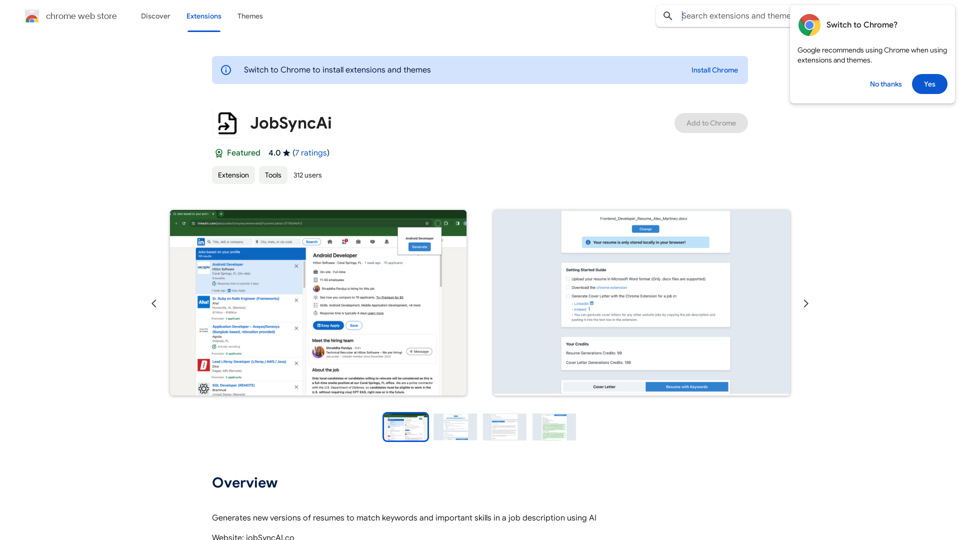
Generates new versions of resumes to match keywords and important skills in a job description using AI
Visit Website
JobSyncAi
Visit Website

Introduction

JobSyncAi is an AI-powered extension designed to enhance job application success. It generates tailored resumes and cover letters that align with specific job descriptions, improving candidates' chances of passing Applicant Tracking Systems (ATS) and impressing human recruiters. This tool streamlines the application process, saving time and increasing the likelihood of securing interviews.

Feature

Beat the ATS

JobSyncAi's advanced AI analyzes job descriptions and optimizes resumes to successfully pass through initial ATS filters, increasing the chances of reaching human recruiters.

Tailored Resumes

Users can create customized versions of their resumes for each job application with just a few clicks, ensuring that each application is uniquely suited to the specific role.

Skill Matching

Instead of simply listing skills, JobSyncAi precisely matches candidate skills to job requirements, highlighting relevant qualifications for each position.

Time-Saving

By automating the resume customization process, JobSyncAi allows users to spend less time tweaking their resumes and more time applying to jobs, increasing overall efficiency.

Custom Cover Letters

JobSyncAi's advanced AI can generate custom cover letters for each job application, complementing the tailored resumes.

Free and Paid Options

Users can generate up to 5 free resumes with JobSyncAi. After reaching this limit, a subscription provides extended access and additional benefits.

FAQ

How many resumes can I generate with JobSyncAi?

You can generate up to 5 free resumes with JobSyncAi. After that, a subscription allows for 20 or more resume generations.

Will my information be used for training purposes?

No, JobSyncAi highly values user privacy, and your data will not be used for any training purposes.

How do I get help with JobSyncAi?

You can reach out to JobSyncAi's support team at [email protected] for assistance.

Latest Traffic Insights

  • Monthly Visits

    193.90 M

  • Bounce Rate

    56.27%

  • Pages Per Visit

    2.71

  • Time on Site(s)

    115.91

  • Global Rank

    -

  • Country Rank

    -

Recent Visits

Traffic Sources

  • Social Media:
    0.48%
  • Paid Referrals:
    0.55%
  • Email:
    0.15%
  • Referrals:
    12.81%
  • Search Engines:
    16.21%
  • Direct:
    69.81%
More Data

Related Websites

Grey Cat - Randomizer
View Detail

Grey Cat - Randomizer

Grey Cat - Randomizer

This extension randomly selects a specific number of items from a given list.

193.90 M
Noam - ChatGPT Translation Assistant & Deep Translation
View Detail

Noam - ChatGPT Translation Assistant & Deep Translation

Noam - ChatGPT Translation Assistant & Deep Translation

Your versatile translation assistant, driven by GPT-4, provides a smoother AI translation and reading experience.

193.90 M
AgentForge
View Detail

AgentForge

AgentForge

Seamlessly build, deploy, and test AI apps with our fully integrated NextJS boilerplate.

997
Stable Diffusion 3 Free Online Access - Powered By SD3 API
View Detail

Stable Diffusion 3 Free Online Access - Powered By SD3 API

Stable Diffusion 3 Free Online Access - Powered By SD3 API

Discover Stable Diffusion 3, the advanced text-to-image model by Stability AI. Learn about the stable diffusion 3 release date, how to download stable diffusion 3, stable diffusion 3 API, and how to access stable diffusion 3 for free online.

105.22 K
Orchid: AI Clinical Notes
View Detail

Orchid: AI Clinical Notes

Orchid: AI Clinical Notes

Automatically create clinical notes and generate AI-powered progress notes in any electronic health record (EHR) system.

193.90 M
Subtitle Wizard - Real-time Speech Recognition, AI Subtitle Translation
View Detail

Subtitle Wizard - Real-time Speech Recognition, AI Subtitle Translation

Subtitle Wizard - Real-time Speech Recognition, AI Subtitle Translation

Watch foreign TV series and learn without mistakes, the new subtitle translation elf is here to assist, a browser-based subtitle translation artifact.

193.90 M
Claude AI

Claude AI is an artificial intelligence model that can understand and respond to human input in a conversational manner. It is trained on a massive dataset of text from the internet and can generate human-like responses to a wide range of topics and questions. Claude AI is designed to be highly engaging and can even exhibit a sense of humor, making it a popular choice for chatbots and virtual assistants.
View Detail

Claude AI Claude AI is an artificial intelligence model that can understand and respond to human input in a conversational manner. It is trained on a massive dataset of text from the internet and can generate human-like responses to a wide range of topics and questions. Claude AI is designed to be highly engaging and can even exhibit a sense of humor, making it a popular choice for chatbots and virtual assistants.

Claude AI Claude AI is an artificial intelligence model that can understand and respond to human input in a conversational manner. It is trained on a massive dataset of text from the internet and can generate human-like responses to a wide range of topics and questions. Claude AI is designed to be highly engaging and can even exhibit a sense of humor, making it a popular choice for chatbots and virtual assistants.

Unleash Claude AI: Intelligent Dialogues, Instant Knowledge - Elevate Productivity and Exploration through AI.

193.90 M
Get ChatGPT for Free with Google

You can now access ChatGPT, a powerful language model, for free with Google. Here's how:

Method 1: Google Colab

* Open Google Colab ([colab.research.google.com](http://colab.research.google.com))
* Create a new notebook
* Install the `transformers` library by running `!pip install transformers`
* Import the `transformers` library and load the ChatGPT model using `from transformers import AutoModelForCausalLM, AutoTokenizer; model = AutoModelForCausalLM.from_pretrained('chatgpt'); tokenizer = AutoTokenizer.from_pretrained('chatgpt')`
* Use the model to generate text using `input_text = "Your input here"; inputs = tokenizer.encode_plus(input_text, return_tensors='pt', max_length=1024, padding='max_length', truncation=True); output = model(inputs['input_ids'], attention_mask=inputs['attention_mask']); print(tokenizer.decode(output.logits[0], skip_special_tokens=True))`

Method 2: Google Apps Script

* Open Google Apps Script ([script.google.com](http://script.google.com))
* Create a new project
* Install the `transformers` library by running `npm install transformers`
* Import the `transformers` library and load the ChatGPT model using `const { AutoModelForCausalLM, AutoTokenizer } = require('transformers'); const model = new AutoModelForCausalLM('chatgpt'); const tokenizer = new AutoTokenizer('chatgpt');`
* Use the model to generate text using `const inputText = "Your input here"; const inputs = tokenizer.encodePlus(inputText, { return_tensors: 'pt', max_length: 1024, padding: 'max_length', truncation: true }); const output = model(inputs.inputIds, inputs.attentionMask); console.log(tokenizer.decode(output.logits[0], { skipSpecialTokens: true }));`

Note: These methods require some technical knowledge and may have limitations compared to the original ChatGPT model.
View Detail

Get ChatGPT for Free with Google You can now access ChatGPT, a powerful language model, for free with Google. Here's how: Method 1: Google Colab * Open Google Colab ([colab.research.google.com](http://colab.research.google.com)) * Create a new notebook * Install the `transformers` library by running `!pip install transformers` * Import the `transformers` library and load the ChatGPT model using `from transformers import AutoModelForCausalLM, AutoTokenizer; model = AutoModelForCausalLM.from_pretrained('chatgpt'); tokenizer = AutoTokenizer.from_pretrained('chatgpt')` * Use the model to generate text using `input_text = "Your input here"; inputs = tokenizer.encode_plus(input_text, return_tensors='pt', max_length=1024, padding='max_length', truncation=True); output = model(inputs['input_ids'], attention_mask=inputs['attention_mask']); print(tokenizer.decode(output.logits[0], skip_special_tokens=True))` Method 2: Google Apps Script * Open Google Apps Script ([script.google.com](http://script.google.com)) * Create a new project * Install the `transformers` library by running `npm install transformers` * Import the `transformers` library and load the ChatGPT model using `const { AutoModelForCausalLM, AutoTokenizer } = require('transformers'); const model = new AutoModelForCausalLM('chatgpt'); const tokenizer = new AutoTokenizer('chatgpt');` * Use the model to generate text using `const inputText = "Your input here"; const inputs = tokenizer.encodePlus(inputText, { return_tensors: 'pt', max_length: 1024, padding: 'max_length', truncation: true }); const output = model(inputs.inputIds, inputs.attentionMask); console.log(tokenizer.decode(output.logits[0], { skipSpecialTokens: true }));` Note: These methods require some technical knowledge and may have limitations compared to the original ChatGPT model.

Get ChatGPT for Free with Google You can now access ChatGPT, a powerful language model, for free with Google. Here's how: Method 1: Google Colab * Open Google Colab ([colab.research.google.com](http://colab.research.google.com)) * Create a new notebook * Install the `transformers` library by running `!pip install transformers` * Import the `transformers` library and load the ChatGPT model using `from transformers import AutoModelForCausalLM, AutoTokenizer; model = AutoModelForCausalLM.from_pretrained('chatgpt'); tokenizer = AutoTokenizer.from_pretrained('chatgpt')` * Use the model to generate text using `input_text = "Your input here"; inputs = tokenizer.encode_plus(input_text, return_tensors='pt', max_length=1024, padding='max_length', truncation=True); output = model(inputs['input_ids'], attention_mask=inputs['attention_mask']); print(tokenizer.decode(output.logits[0], skip_special_tokens=True))` Method 2: Google Apps Script * Open Google Apps Script ([script.google.com](http://script.google.com)) * Create a new project * Install the `transformers` library by running `npm install transformers` * Import the `transformers` library and load the ChatGPT model using `const { AutoModelForCausalLM, AutoTokenizer } = require('transformers'); const model = new AutoModelForCausalLM('chatgpt'); const tokenizer = new AutoTokenizer('chatgpt');` * Use the model to generate text using `const inputText = "Your input here"; const inputs = tokenizer.encodePlus(inputText, { return_tensors: 'pt', max_length: 1024, padding: 'max_length', truncation: true }); const output = model(inputs.inputIds, inputs.attentionMask); console.log(tokenizer.decode(output.logits[0], { skipSpecialTokens: true }));` Note: These methods require some technical knowledge and may have limitations compared to the original ChatGPT model.

How to Add ChatGPT to All Google Searches ===================================================== Step 1: Create a Custom Search Engine -------------------------------------- * Go to the [Google Custom Search Engine](https://cse.google.com/) website and sign in with your Google account. * Click on the "New Search Engine" button. * Fill in the required information, such as the name and description of your search engine. * Click on the "Create" button. Step 2: Add ChatGPT to the Search Engine ----------------------------------------- * In the "Setup" tab, click on the "Add" button next to "Sites to search". * Enter the following URL: `https://chat.openai.com/` * Click on the "Add" button. Step 3: Configure the Search Engine -------------------------------------- * In the "Setup" tab, click on the "Edit" button next to "Search engine keywords". * Add the following keywords: `ChatGPT` * Click on the "Save" button. Step 4: Get the Search Engine Code ------------------------------------- * In the "Setup" tab, click on the "Get code" button. * Copy the HTML code provided. Step 5: Add the Search Engine to Your Browser ------------------------------------------------ * Open your browser and go to the "Settings" or "Options" page. * Look for the "Search engine" or "Default search engine" option. * Click on the "Add" or "Manage search engines" button. * Paste the HTML code you copied earlier. * Click on the "Add" or "Save" button. You're Done! =============== Now, whenever you search on Google, ChatGPT will be included in the search results. You can also use the custom search engine URL provided by Google to search directly.

193.90 M