Open-source RightAI Tools Directory
  • Discover AI
  • Submit
  • Startup
  • Blog
Open-source RightAI Tools Directory
Discover the best AI tools of 2025 with the RightAI Tools Directory!

Friend Links

AI Anime GeneratorToolsApp AI

Support

Tap4
Privacy policyTerms & ConditionsContact Us
Loading...
loading...

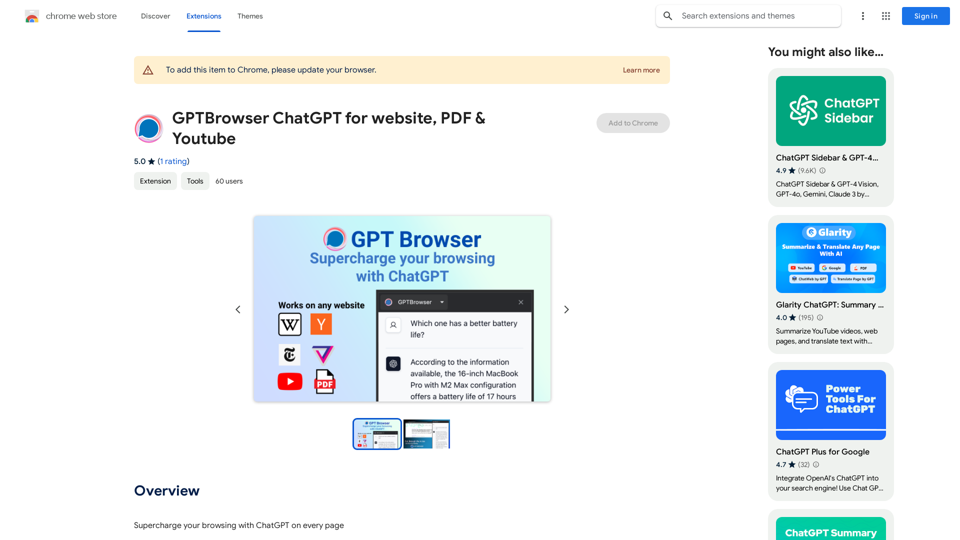
GPTBrowser: ChatGPT for websites, PDFs & YouTube

Boost your web experience with ChatGPT integrated into every website you visit.
Visit Website
GPTBrowser: ChatGPT for websites, PDFs & YouTube
Visit Website

Introduction

GPTBrowser Web Assistant is an AI-powered Chrome extension that integrates ChatGPT's intelligence directly into your web browsing experience. It offers context-aware support, intelligent summaries, and dynamic search capabilities for any website you visit, enhancing efficiency and user experience.

Feature

Context-Aware Conversations

GPTBrowser understands the content of the webpage you're viewing, providing relevant answers and support based on the context.

Intelligent Summaries

Quickly generate coherent summaries of long articles, papers, or webpages with a single command, saving time and improving comprehension.

Dynamic Search

Ask ChatGPT to search through webpage content for specific information, receiving instant, pinpointed results.

Past Conversation Memory

The extension retains the context of previous interactions, ensuring smoother and more efficient conversations without repetition.

Easy Installation and Activation

Install GPTBrowser as a Chrome extension and activate it with a simple click on any webpage where you need assistance.

User-Friendly Design

Intuitive interface makes it accessible for users of all technical backgrounds, from tech-savvy millennials to computer novices.

FAQ

How does GPTBrowser work?

GPTBrowser utilizes AI technology to comprehend and assist with your browsing experience, offering context-aware support and intelligent features.

Is GPTBrowser free?

Yes, GPTBrowser is free to use, with optional paid upgrades available for enhanced features.

Can I use GPTBrowser on multiple devices?

Yes, GPTBrowser is compatible with multiple devices and browsers, allowing for a seamless experience across your digital ecosystem.

Latest Traffic Insights

  • Monthly Visits

    193.90 M

  • Bounce Rate

    56.27%

  • Pages Per Visit

    2.71

  • Time on Site(s)

    115.91

  • Global Rank

    -

  • Country Rank

    -

Recent Visits

Traffic Sources

  • Social Media:
    0.48%
  • Paid Referrals:
    0.55%
  • Email:
    0.15%
  • Referrals:
    12.81%
  • Search Engines:
    16.21%
  • Direct:
    69.81%
More Data

Related Websites

TermsAi
View Detail

TermsAi

TermsAi

TermsAi provides quick summaries of terms and agreements using AI. Understand key points effortlessly with a single click.

193.90 M
Searchable ChatGPT: Search GPT Conversation History

With the rapid development of artificial intelligence technology, ChatGPT has become an essential tool for people to communicate and interact with AI. However, as the conversation history grows, it becomes increasingly difficult to find specific conversations or topics. To address this issue, we propose the concept of Searchable ChatGPT, which enables users to search their GPT conversation history efficiently.

Key Features

1. Keyword Search

Users can input specific keywords or phrases to search for relevant conversations in their chat history. The system will then display a list of conversations that match the search criteria, allowing users to quickly find the information they need.

2. Contextual Search

In addition to keyword search, users can also search for conversations based on context. For example, they can search for conversations related to a specific topic, such as "travel" or "cooking." The system will then display a list of conversations that are relevant to the specified context.

3. Conversation Filtering

To further refine the search results, users can apply filters to narrow down the list of conversations. For instance, they can filter conversations by date, time, or even the emotions expressed during the conversation.

4. Conversation Analytics

Searchable ChatGPT also provides users with conversation analytics, which offer insights into their conversation patterns and preferences. This feature can help users identify areas for improvement and optimize their communication with ChatGPT.

Benefits

1. Improved Productivity

Searchable ChatGPT saves users time and effort by allowing them to quickly find specific conversations or topics in their chat history.

2. Enhanced User Experience

By providing users with a more efficient way to search and analyze their conversations, Searchable ChatGPT enhances the overall user experience and encourages more effective communication with ChatGPT.

3. Better Decision Making

With access to conversation analytics, users can make more informed decisions by identifying patterns and trends in their conversations with ChatGPT.

Conclusion

Searchable ChatGPT is a powerful tool that revolutionizes the way users interact with ChatGPT. By providing a robust search function, contextual search, conversation filtering, and conversation analytics, Searchable ChatGPT improves productivity, enhances the user experience, and enables better decision making.
View Detail

Searchable ChatGPT: Search GPT Conversation History With the rapid development of artificial intelligence technology, ChatGPT has become an essential tool for people to communicate and interact with AI. However, as the conversation history grows, it becomes increasingly difficult to find specific conversations or topics. To address this issue, we propose the concept of Searchable ChatGPT, which enables users to search their GPT conversation history efficiently. Key Features 1. Keyword Search Users can input specific keywords or phrases to search for relevant conversations in their chat history. The system will then display a list of conversations that match the search criteria, allowing users to quickly find the information they need. 2. Contextual Search In addition to keyword search, users can also search for conversations based on context. For example, they can search for conversations related to a specific topic, such as "travel" or "cooking." The system will then display a list of conversations that are relevant to the specified context. 3. Conversation Filtering To further refine the search results, users can apply filters to narrow down the list of conversations. For instance, they can filter conversations by date, time, or even the emotions expressed during the conversation. 4. Conversation Analytics Searchable ChatGPT also provides users with conversation analytics, which offer insights into their conversation patterns and preferences. This feature can help users identify areas for improvement and optimize their communication with ChatGPT. Benefits 1. Improved Productivity Searchable ChatGPT saves users time and effort by allowing them to quickly find specific conversations or topics in their chat history. 2. Enhanced User Experience By providing users with a more efficient way to search and analyze their conversations, Searchable ChatGPT enhances the overall user experience and encourages more effective communication with ChatGPT. 3. Better Decision Making With access to conversation analytics, users can make more informed decisions by identifying patterns and trends in their conversations with ChatGPT. Conclusion Searchable ChatGPT is a powerful tool that revolutionizes the way users interact with ChatGPT. By providing a robust search function, contextual search, conversation filtering, and conversation analytics, Searchable ChatGPT improves productivity, enhances the user experience, and enables better decision making.

Searchable ChatGPT: Search GPT Conversation History With the rapid development of artificial intelligence technology, ChatGPT has become an essential tool for people to communicate and interact with AI. However, as the conversation history grows, it becomes increasingly difficult to find specific conversations or topics. To address this issue, we propose the concept of Searchable ChatGPT, which enables users to search their GPT conversation history efficiently. Key Features 1. Keyword Search Users can input specific keywords or phrases to search for relevant conversations in their chat history. The system will then display a list of conversations that match the search criteria, allowing users to quickly find the information they need. 2. Contextual Search In addition to keyword search, users can also search for conversations based on context. For example, they can search for conversations related to a specific topic, such as "travel" or "cooking." The system will then display a list of conversations that are relevant to the specified context. 3. Conversation Filtering To further refine the search results, users can apply filters to narrow down the list of conversations. For instance, they can filter conversations by date, time, or even the emotions expressed during the conversation. 4. Conversation Analytics Searchable ChatGPT also provides users with conversation analytics, which offer insights into their conversation patterns and preferences. This feature can help users identify areas for improvement and optimize their communication with ChatGPT. Benefits 1. Improved Productivity Searchable ChatGPT saves users time and effort by allowing them to quickly find specific conversations or topics in their chat history. 2. Enhanced User Experience By providing users with a more efficient way to search and analyze their conversations, Searchable ChatGPT enhances the overall user experience and encourages more effective communication with ChatGPT. 3. Better Decision Making With access to conversation analytics, users can make more informed decisions by identifying patterns and trends in their conversations with ChatGPT. Conclusion Searchable ChatGPT is a powerful tool that revolutionizes the way users interact with ChatGPT. By providing a robust search function, contextual search, conversation filtering, and conversation analytics, Searchable ChatGPT improves productivity, enhances the user experience, and enables better decision making.

Search ChatGPT conversation history instantly. Fully local and private. Press sidebar button or hotkey

193.90 M
Ask AI Browser
View Detail

Ask AI Browser

Ask AI Browser

Ask AI Browser Extension ========================== Description The Ask AI browser extension is a cutting-edge tool that revolutionizes the way you interact with the internet. This innovative extension harnesses the power of artificial intelligence to provide you with instant answers, suggestions, and insights as you browse the web. Features * Instant Answers: Get quick answers to your questions without leaving the current webpage. * Smart Suggestions: Receive relevant suggestions based on your browsing history and preferences. * AI-driven Insights: Uncover hidden gems and interesting facts about the topics you're interested in. * Personalized Experience: Enjoy a tailored browsing experience that adapts to your needs and preferences. How it Works 1. Install the Extension: Add the Ask AI browser extension to your favorite browser. 2. Ask Your Question: Type your question in the search bar or highlight a phrase on a webpage. 3. Get Instant Answers: Receive accurate and relevant answers, suggestions, and insights in real-time. Benefits * Save Time: Get instant answers and reduce your search time. * Enhance Productivity: Stay focused on your tasks with relevant suggestions and insights. * Improve Knowledge: Expand your knowledge with interesting facts and hidden gems. Get Started Download the Ask AI browser extension today and experience the future of browsing!

193.90 M
CO-STAR Prompt Template
==========================

Task Description
Describe the task you want the AI to perform. Be specific and concise.

Input Prompt
Provide the input prompt that the AI will receive. This can be a question, a statement, or a scenario.

Desired Response
Describe the desired response from the AI. What type of answer or output are you expecting?

Constraints
List any constraints or rules that the AI should follow when generating a response. This can include tone, style, or specific keywords to include or avoid.

Evaluation Metrics
Describe how you will evaluate the AI's response. What metrics or criteria will you use to determine the quality of the response?

Example Output
Provide an example of what a good response from the AI might look like. This can help clarify the task and provide a target for the AI to aim for.
View Detail

CO-STAR Prompt Template ========================== Task Description Describe the task you want the AI to perform. Be specific and concise. Input Prompt Provide the input prompt that the AI will receive. This can be a question, a statement, or a scenario. Desired Response Describe the desired response from the AI. What type of answer or output are you expecting? Constraints List any constraints or rules that the AI should follow when generating a response. This can include tone, style, or specific keywords to include or avoid. Evaluation Metrics Describe how you will evaluate the AI's response. What metrics or criteria will you use to determine the quality of the response? Example Output Provide an example of what a good response from the AI might look like. This can help clarify the task and provide a target for the AI to aim for.

CO-STAR Prompt Template ========================== Task Description Describe the task you want the AI to perform. Be specific and concise. Input Prompt Provide the input prompt that the AI will receive. This can be a question, a statement, or a scenario. Desired Response Describe the desired response from the AI. What type of answer or output are you expecting? Constraints List any constraints or rules that the AI should follow when generating a response. This can include tone, style, or specific keywords to include or avoid. Evaluation Metrics Describe how you will evaluate the AI's response. What metrics or criteria will you use to determine the quality of the response? Example Output Provide an example of what a good response from the AI might look like. This can help clarify the task and provide a target for the AI to aim for.

Using CO-STAR to Make Your Prompt 10 Times More Effective!

193.90 M
Signify - Compliance Management System for Manufacturing
View Detail

Signify - Compliance Management System for Manufacturing

Signify - Compliance Management System for Manufacturing

Signify automates compliance for manufacturers by analyzing documents to ensure regulatory requirements are met throughout the product lifecycle.

3.17 K
BiRead - A Simple Tool for Instant Bilingual Reading
View Detail

BiRead - A Simple Tool for Instant Bilingual Reading

BiRead - A Simple Tool for Instant Bilingual Reading

Transform any website content into bilingual text with a single click, using AI. Make reading in other languages easy.

10.98 K
Free ChatGPT Sidebar Assistant (GPT-4, AIDraw)
View Detail

Free ChatGPT Sidebar Assistant (GPT-4, AIDraw)

Free ChatGPT Sidebar Assistant (GPT-4, AIDraw)

Free ChatGPT Sidebar Assistant is an AI chatbot developed based on OpenAI's ChatGPT 3.5 and 4 models.

193.90 M
ChatBot AI - ChatGPT & Claude & Bard & BingOverviewChatBot AI
View Detail

ChatBot AI - ChatGPT & Claude & Bard & BingOverviewChatBot AI

ChatBot AI - ChatGPT & Claude & Bard & BingOverviewChatBot AI

ChatBot is a copilot that uses ChatGPT, Bing, Claude, Bard, and more to answer questions like translations, emails, Q&As, and more.

193.90 M