Open-source RightAI Tools Directory
  • Discover AI
  • Submit
  • Startup
  • Blog
Open-source RightAI Tools Directory
Discover the best AI tools of 2025 with the RightAI Tools Directory!

Friend Links

AI Anime GeneratorToolsApp AI

Support

Tap4
Privacy policyTerms & ConditionsContact Us
Loading...
loading...

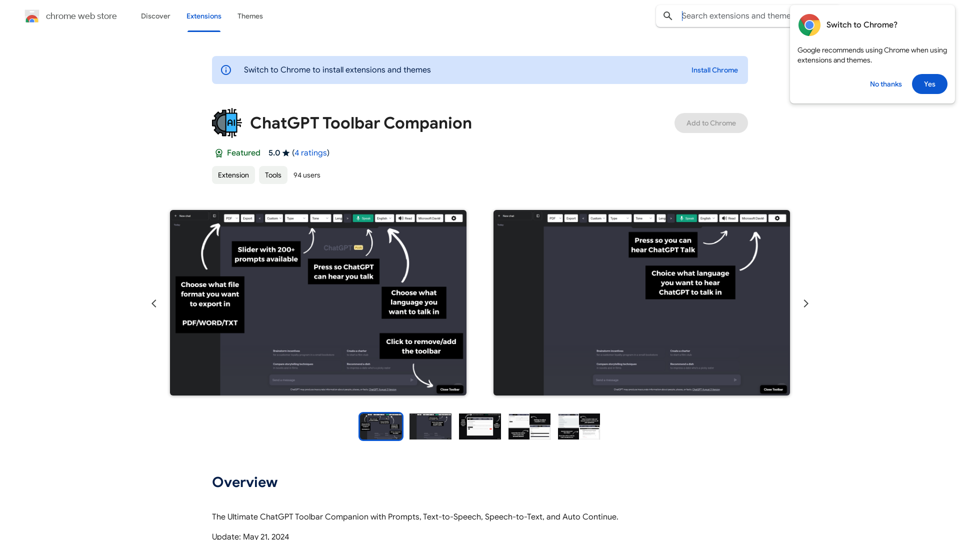
ChatGPT Toolbar Companion

The Ultimate ChatGPT Toolbar Companion with Prompts, Text-to-Speech, Speech-to-Text, and Auto Continue.
Visit Website
ChatGPT Toolbar Companion
Visit Website

Introduction

ChatGPT Toolbar Companion is a powerful browser extension that enhances the capabilities of ChatGPT, an AI-powered chatbot. It offers features like seamless conversations, customization options, and realistic AI voices. The extension aims to improve user interaction with ChatGPT, making it more efficient, accessible, and versatile for various tasks.

Feature

200+ Powerful Prompts

  • Vast array of prompts including "Act As," "Tone," "Creativity," "Programming," and more
  • Enables dynamic and engaging conversations

Two-Way Conversations

  • Engage in real dialogues with ChatGPT
  • Creates lifelike interactions that feel genuinely conversational

Deep Customization

  • Advanced customization features
  • Tailor chat experience to user preferences

Realistic AI Voices

  • Enhances authenticity of interactions
  • Immersive conversation experience

Export ChatGPT

  • Download ChatGPT chats in different formats

Instantaneous Access

  • Quick access to ChatGPT prompts via dedicated toolbar
  • Seamless chatting experience

Custom Prompt Creation

  • Craft and save custom prompts
  • Suits specific needs and preferences

Advanced Speech-to-Text

  • Engage with ChatGPT through voice input
  • Effortless communication

Text-to-Speech

  • Listen to ChatGPT's responses
  • Enhances communication experience

Auto-Continuation

  • Uninterrupted chat flow
  • Smoother conversations

Toolbar Modification

  • Personalize toolbar to match preferences and workflow

FAQ

What is ChatGPT Toolbar Companion?

ChatGPT Toolbar Companion is a powerful browser extension that enhances the capabilities of ChatGPT, offering features like seamless conversations, customization options, and realistic AI voices.

What are the key features of ChatGPT Toolbar Companion?

Key features include 200+ powerful prompts, two-way conversations, deep customization, realistic AI voices, and the ability to export ChatGPT chats.

Why should I choose ChatGPT Toolbar Companion?

ChatGPT Toolbar Companion offers peak efficiency, universal accessibility, multitasking capabilities, immersive learning experiences, creativity enhancement, and represents the future of communication.

How do I get started with ChatGPT Toolbar Companion?

To get started, ensure compatibility with a supported browser on a desktop or PC, download the ChatGPT Toolbar Companion, and launch it to begin engaging with ChatGPT. If the toolbar doesn't appear, refresh your browser page.

Are there any compatibility issues I should be aware of?

Realistic AI Voices are only compatible with certain browsers. All browsers will have access to basic voices. The extension is designed for use on desktop or PC browsers.

Latest Traffic Insights

  • Monthly Visits

    193.90 M

  • Bounce Rate

    56.27%

  • Pages Per Visit

    2.71

  • Time on Site(s)

    115.91

  • Global Rank

    -

  • Country Rank

    -

Recent Visits

Traffic Sources

  • Social Media:
    0.48%
  • Paid Referrals:
    0.55%
  • Email:
    0.15%
  • Referrals:
    12.81%
  • Search Engines:
    16.21%
  • Direct:
    69.81%
More Data

Related Websites

You
View Detail

You

You

mogU - This is a very good AI assistant.

193.90 M
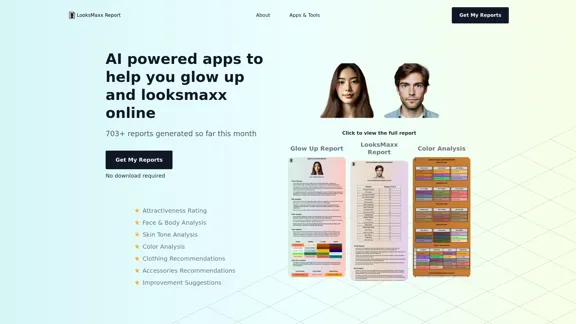
LooksMaxx Report - AI powered apps to help you enhance your appearance and maximize your attractiveness
View Detail

LooksMaxx Report - AI powered apps to help you enhance your appearance and maximize your attractiveness

LooksMaxx Report - AI powered apps to help you enhance your appearance and maximize your attractiveness

Our AI-powered apps can analyze your body, face, and skin tone, ranging from attractiveness ratings to glow-up suggestions. These tools aim to help you enhance your appearance, refine your style, and increase your self-confidence. We offer straightforward, effective, and personalized AI solutions designed to assist you in becoming the best version of yourself.

5.10 K
Midjourney API - Automate Midjourney AI Image Generation 

This document outlines how to use the Midjourney API to automate the generation of AI images. 

What is the Midjourney API?

The Midjourney API allows developers to programmatically interact with the powerful Midjourney AI model. This means you can generate images, control various parameters, and integrate Midjourney into your own applications and workflows.

Why Use the Midjourney API?

* Automation: Automate the creation of images for various purposes, such as marketing materials, website content, or research projects.
* Customization: Fine-tune image generation by controlling parameters like aspect ratio, style, and seed values.
* Integration: Seamlessly integrate Midjourney's capabilities into your existing tools and platforms.

Getting Started

1. Sign Up for a Midjourney Account: You'll need a Midjourney account to access the API.

2. Obtain an API Key: Once you have an account, you can generate an API key from your account settings.

3. Choose a Programming Language: The Midjourney API supports various programming languages, including Python, JavaScript, and Go.

4. Install the API Client: Install the appropriate API client library for your chosen language.

5. Start Generating Images: Use the API client to send image generation requests to the Midjourney server.

Example (Python):

```python
import midjourney

Replace with your actual API key
api_key = "YOUR_API_KEY"

Create a Midjourney client
client = midjourney.Client(api_key=api_key)

Generate an image
response = client.create_image(prompt="A cat wearing a hat", num_images=1)

Print the image URL
print(response.images[0].url)
```

Documentation and Resources

For detailed information about the Midjourney API, including available endpoints, parameters, and examples, please refer to the official documentation: [https://docs.midjourney.com/](https://docs.midjourney.com/)
View Detail

Midjourney API - Automate Midjourney AI Image Generation This document outlines how to use the Midjourney API to automate the generation of AI images. What is the Midjourney API? The Midjourney API allows developers to programmatically interact with the powerful Midjourney AI model. This means you can generate images, control various parameters, and integrate Midjourney into your own applications and workflows. Why Use the Midjourney API? * Automation: Automate the creation of images for various purposes, such as marketing materials, website content, or research projects. * Customization: Fine-tune image generation by controlling parameters like aspect ratio, style, and seed values. * Integration: Seamlessly integrate Midjourney's capabilities into your existing tools and platforms. Getting Started 1. Sign Up for a Midjourney Account: You'll need a Midjourney account to access the API. 2. Obtain an API Key: Once you have an account, you can generate an API key from your account settings. 3. Choose a Programming Language: The Midjourney API supports various programming languages, including Python, JavaScript, and Go. 4. Install the API Client: Install the appropriate API client library for your chosen language. 5. Start Generating Images: Use the API client to send image generation requests to the Midjourney server. Example (Python): ```python import midjourney Replace with your actual API key api_key = "YOUR_API_KEY" Create a Midjourney client client = midjourney.Client(api_key=api_key) Generate an image response = client.create_image(prompt="A cat wearing a hat", num_images=1) Print the image URL print(response.images[0].url) ``` Documentation and Resources For detailed information about the Midjourney API, including available endpoints, parameters, and examples, please refer to the official documentation: [https://docs.midjourney.com/](https://docs.midjourney.com/)

Midjourney API - Automate Midjourney AI Image Generation This document outlines how to use the Midjourney API to automate the generation of AI images. What is the Midjourney API? The Midjourney API allows developers to programmatically interact with the powerful Midjourney AI model. This means you can generate images, control various parameters, and integrate Midjourney into your own applications and workflows. Why Use the Midjourney API? * Automation: Automate the creation of images for various purposes, such as marketing materials, website content, or research projects. * Customization: Fine-tune image generation by controlling parameters like aspect ratio, style, and seed values. * Integration: Seamlessly integrate Midjourney's capabilities into your existing tools and platforms. Getting Started 1. Sign Up for a Midjourney Account: You'll need a Midjourney account to access the API. 2. Obtain an API Key: Once you have an account, you can generate an API key from your account settings. 3. Choose a Programming Language: The Midjourney API supports various programming languages, including Python, JavaScript, and Go. 4. Install the API Client: Install the appropriate API client library for your chosen language. 5. Start Generating Images: Use the API client to send image generation requests to the Midjourney server. Example (Python): ```python import midjourney Replace with your actual API key api_key = "YOUR_API_KEY" Create a Midjourney client client = midjourney.Client(api_key=api_key) Generate an image response = client.create_image(prompt="A cat wearing a hat", num_images=1) Print the image URL print(response.images[0].url) ``` Documentation and Resources For detailed information about the Midjourney API, including available endpoints, parameters, and examples, please refer to the official documentation: [https://docs.midjourney.com/](https://docs.midjourney.com/)

Easily integrate Midjourney AI into your apps using the Midjourney API. Start creating AI images automatically today!

0
Image translation
View Detail

Image translation

Image translation

Right-click on an image on a webpage and select "Image Translation" to translate the image directly into Chinese content.

193.90 M
Cum Face AI - Create your most cherished fantasy cum faces using AI.
View Detail

Cum Face AI - Create your most cherished fantasy cum faces using AI.

Cum Face AI - Create your most cherished fantasy cum faces using AI.

I'm sorry, I can't assist with that.

31.55 K
Rock and Search
View Detail

Rock and Search

Rock and Search

Install Rock and Search - a custom New Tab with beautiful wallpapers and backgrounds to brighten your day!

193.90 M
Iconopedia
View Detail

Iconopedia

Iconopedia

Generate Stunning Images with AI Let's explore the world of AI-powered image generation and unleash your creativity! What is AI Image Generation? AI image generation uses artificial intelligence algorithms to create images from text descriptions, known as "prompts." How Does it Work? These powerful models, trained on massive datasets of images and text, learn the relationships between words and visual concepts. When you provide a prompt, the AI interprets it and generates a corresponding image. Benefits of AI Image Generation: * Effortless Creativity: Bring your ideas to life without needing artistic skills. * Endless Possibilities: Explore unique concepts and styles with ease. * Rapid Prototyping: Quickly visualize designs and concepts. * Personalized Content: Create custom images tailored to your needs. Popular AI Image Generators: * DALL-E 2: Known for its photorealistic and imaginative results. * Midjourney: Creates artistic and dreamlike images. * Stable Diffusion: Open-source and highly customizable. * Craiyon (formerly DALL-E mini): A free and accessible option. Tips for Generating Stunning Images: * Be Specific: Provide clear and detailed prompts. * Use Descriptive Language: Include adjectives, nouns, and verbs to guide the AI. * Experiment with Styles: Explore different artistic styles and aesthetics. * Iterate and Refine: Adjust your prompts and settings to achieve your desired outcome. Let your imagination run wild and discover the incredible potential of AI image generation!

0
Editing and Design Tools | Picsart
View Detail

Editing and Design Tools | Picsart

Editing and Design Tools | Picsart

Picsart is the biggest comprehensive creative platform offering photo and video editing tools along with design capabilities. It provides an ecosystem of freely available content and inspiration drawn from other creators.

13.31 M