Open-source RightAI Tools Directory
  • Discover AI
  • Submit
  • Startup
  • Blog
Open-source RightAI Tools Directory
Discover the best AI tools of 2025 with the RightAI Tools Directory!

Friend Links

AI Anime GeneratorToolsApp AI

Support

Tap4
Privacy policyTerms & ConditionsContact Us
Loading...
loading...

GPT Assistant Mexico This AI-powered assistant is designed to provide helpful and informative responses to your queries, with a focus on Mexico-related topics. Whether you need information on Mexican culture, history, travel, or daily life, this assistant is here to assist you. Features: * Answering questions: Get accurate and reliable information on a wide range of topics, from Mexican history to cultural traditions. * Providing recommendations: Looking for the best places to visit, eat, or stay in Mexico? This assistant has got you covered. * Language translation: Need help translating Spanish to English or vice versa? This assistant is happy to assist. * Conversation: Engage in natural-sounding conversations, just like you would with a local. Benefits: * Convenience: Get instant answers to your questions, 24/7. * Accuracy: Rely on trustworthy information, verified by experts. * Personalization: Receive tailored recommendations based on your preferences. * Language support: Communicate effortlessly, without language barriers. How to use: 1. Ask a question: Type your query, and the assistant will respond with a helpful answer. 2. Provide context: Share more information about your question, and the assistant will give you a more accurate response. 3. Start a conversation: Engage in a natural conversation, and the assistant will respond accordingly. Get started today!

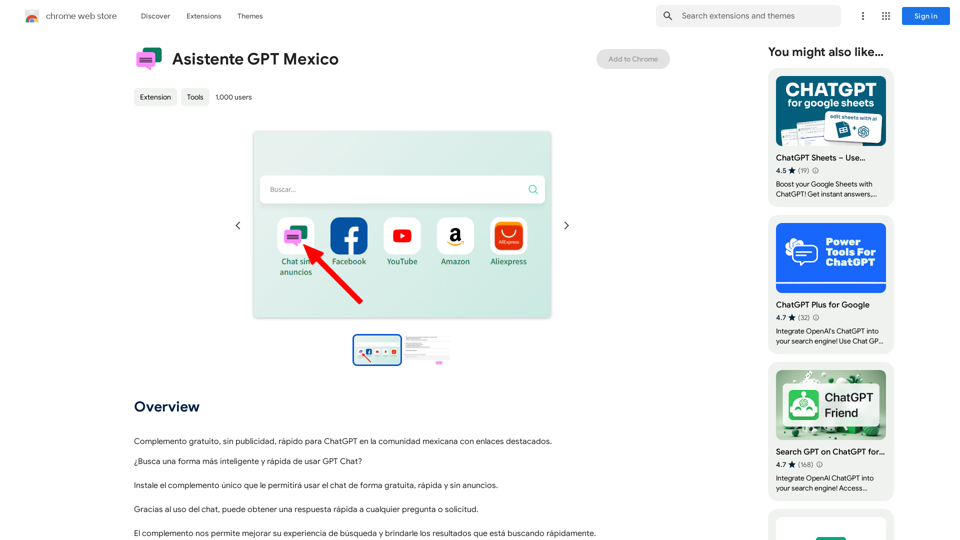
Free add-on, no ads, fast for ChatGPT in the Mexican community with highlighted links.
Visit Website
GPT Assistant Mexico

This AI-powered assistant is designed to provide helpful and informative responses to your queries, with a focus on Mexico-related topics. Whether you need information on Mexican culture, history, travel, or daily life, this assistant is here to assist you.

Features:

* Answering questions: Get accurate and reliable information on a wide range of topics, from Mexican history to cultural traditions.
* Providing recommendations: Looking for the best places to visit, eat, or stay in Mexico? This assistant has got you covered.
* Language translation: Need help translating Spanish to English or vice versa? This assistant is happy to assist.
* Conversation: Engage in natural-sounding conversations, just like you would with a local.

Benefits:

* Convenience: Get instant answers to your questions, 24/7.
* Accuracy: Rely on trustworthy information, verified by experts.
* Personalization: Receive tailored recommendations based on your preferences.
* Language support: Communicate effortlessly, without language barriers.

How to use:

1. Ask a question: Type your query, and the assistant will respond with a helpful answer.
2. Provide context: Share more information about your question, and the assistant will give you a more accurate response.
3. Start a conversation: Engage in a natural conversation, and the assistant will respond accordingly.

Get started today!
Visit Website

Introduction

Asistente GPT Mexico is a free extension designed for the Mexican community to enhance their ChatGPT experience. It offers a fast, ad-free interface with highlighted links, making it easier to navigate and use ChatGPT on Mexican community sites. This unique complement allows users to access chat functionality for free, quickly, and without any advertisements.

Feature

Fast and Ad-Free Experience

Asistente GPT Mexico provides a seamless, rapid, and advertisement-free environment for using ChatGPT within the Mexican community.

Highlighted Links

The extension enhances user experience by highlighting links, facilitating easier navigation on Mexican community sites and other popular websites in Mexico.

Quick Search Results

Users can obtain rapid search results, significantly improving their overall search experience with the help of this extension.

Free of Charge

Asistente GPT Mexico is completely free to use, with no hidden costs or advertisements.

Easy Installation

The extension can be quickly installed, allowing immediate access to free, fast, and ad-free ChatGPT usage.

Advanced Search Capabilities

Leveraging artificial intelligence, the extension offers advanced search features for more efficient information retrieval.

FAQ

How does Asistente GPT Mexico work?

Asistente GPT Mexico functions as an extension that provides a fast and ad-free experience for using ChatGPT specifically tailored for the Mexican community.

Is Asistente GPT Mexico really free?

Yes, the extension is entirely free to use. There are no costs associated with it, and it doesn't display any advertisements.

How can I start using Asistente GPT Mexico?

To begin using Asistente GPT Mexico, simply install the extension. Once installed, you can immediately start using ChatGPT for free, quickly, and without any advertisements.

What are the main benefits of using this extension?

The primary benefits include a faster ChatGPT experience, no advertisements, highlighted links for easier navigation, quick search results, and advanced search features powered by artificial intelligence.

Can I use this extension on any website?

While the extension is designed to work best with Mexican community sites and other popular websites in Mexico, it can enhance your ChatGPT experience across various platforms.

Related Websites
Warm and friendly
View Detail

Warm and friendly

Warm and friendly

Write the free spirit everywhere on the web with Cordial!

193.90 M
Wallow

To roll or move about in a lazy, relaxed way, often in a pleasant or enjoyable manner.
View Detail

Wallow To roll or move about in a lazy, relaxed way, often in a pleasant or enjoyable manner.

Wallow To roll or move about in a lazy, relaxed way, often in a pleasant or enjoyable manner.

Wallow streamlines digital product development with real-time incident tracking, team alignment, and integrated communication tools. Experience seamless collaboration and boost productivity with Wallow.

847
PPT Summary Genius - ChatGPT for PPT

Turn your boring presentations into engaging masterpieces!

* Summarize lengthy PPTs:  ChatGPT can condense your slides into concise summaries, perfect for quick reviews or sharing key points.
* Generate compelling narratives:  Transform your data and bullet points into captivating stories that resonate with your audience.
* Craft impactful introductions and conclusions:  Start strong and leave a lasting impression with ChatGPT's help.
* Overcome writer's block:  Struggling with slide content? ChatGPT can provide creative ideas and help you overcome creative hurdles.
* Tailor your message:  Adjust the tone and style of your presentation to match your audience and purpose.

Boost your productivity and create presentations that truly shine!
View Detail

PPT Summary Genius - ChatGPT for PPT Turn your boring presentations into engaging masterpieces! * Summarize lengthy PPTs: ChatGPT can condense your slides into concise summaries, perfect for quick reviews or sharing key points. * Generate compelling narratives: Transform your data and bullet points into captivating stories that resonate with your audience. * Craft impactful introductions and conclusions: Start strong and leave a lasting impression with ChatGPT's help. * Overcome writer's block: Struggling with slide content? ChatGPT can provide creative ideas and help you overcome creative hurdles. * Tailor your message: Adjust the tone and style of your presentation to match your audience and purpose. Boost your productivity and create presentations that truly shine!

PPT Summary Genius - ChatGPT for PPT Turn your boring presentations into engaging masterpieces! * Summarize lengthy PPTs: ChatGPT can condense your slides into concise summaries, perfect for quick reviews or sharing key points. * Generate compelling narratives: Transform your data and bullet points into captivating stories that resonate with your audience. * Craft impactful introductions and conclusions: Start strong and leave a lasting impression with ChatGPT's help. * Overcome writer's block: Struggling with slide content? ChatGPT can provide creative ideas and help you overcome creative hurdles. * Tailor your message: Adjust the tone and style of your presentation to match your audience and purpose. Boost your productivity and create presentations that truly shine!

Using ChatGPT, you can chat, ask questions, get instant summaries and answers, and generate outlines for presentations in PPT and PowerPoint format.

193.90 M
Omost | Try Omost for Free Online - AI-Powered Image Generation from Code
View Detail

Omost | Try Omost for Free Online - AI-Powered Image Generation from Code

Omost | Try Omost for Free Online - AI-Powered Image Generation from Code

Omost offers large language model (LLM) models that can generate code to create visual images using Omost's virtual Canvas agent.

0
AI Voice Over for YouTube 

This is a guide to using AI voice over for your YouTube videos. 

Why Use AI Voice Over?

* Cost-Effective: AI voice over is much cheaper than hiring a professional voice actor.
* Time-Saving: You can generate voice over quickly and easily, without needing to schedule recording sessions.
* Variety of Voices: Choose from a wide range of AI voices, including male, female, and even robotic voices.
* Accessibility: Make your videos accessible to viewers who are deaf or hard of hearing by adding captions generated by AI.

How to Use AI Voice Over

1. Choose a Platform: There are many different platforms that offer AI voice over services, such as:
    * Google Cloud Text-to-Speech
    * Amazon Polly
    * Microsoft Azure Text to Speech
    * Murf.ai
    * NaturalReader
2. Write Your Script:  Write a clear and concise script for your video.
3. Upload Your Script:  Upload your script to the chosen platform.
4. Select a Voice: Choose the voice that best suits your video.
5. Adjust Settings:  Adjust settings such as speed, pitch, and volume.
6. Generate Voice Over:  Click the "Generate" button to create your voice over.
7. Download and Edit: Download the generated voice over file and edit it as needed.
8. Add to Your Video:  Add the voice over to your YouTube video.

Tips for Using AI Voice Over

* Use Natural Language:  Write your script as if you were speaking naturally.
* Vary Your Tone:  Use different tones of voice to keep your viewers engaged.
* Add Pauses:  Include pauses in your script to allow viewers to process information.
* Proofread Carefully:  Always proofread your script before generating the voice over.
* Experiment:  Try different voices, settings, and styles to find what works best for you.
View Detail

AI Voice Over for YouTube This is a guide to using AI voice over for your YouTube videos. Why Use AI Voice Over? * Cost-Effective: AI voice over is much cheaper than hiring a professional voice actor. * Time-Saving: You can generate voice over quickly and easily, without needing to schedule recording sessions. * Variety of Voices: Choose from a wide range of AI voices, including male, female, and even robotic voices. * Accessibility: Make your videos accessible to viewers who are deaf or hard of hearing by adding captions generated by AI. How to Use AI Voice Over 1. Choose a Platform: There are many different platforms that offer AI voice over services, such as: * Google Cloud Text-to-Speech * Amazon Polly * Microsoft Azure Text to Speech * Murf.ai * NaturalReader 2. Write Your Script: Write a clear and concise script for your video. 3. Upload Your Script: Upload your script to the chosen platform. 4. Select a Voice: Choose the voice that best suits your video. 5. Adjust Settings: Adjust settings such as speed, pitch, and volume. 6. Generate Voice Over: Click the "Generate" button to create your voice over. 7. Download and Edit: Download the generated voice over file and edit it as needed. 8. Add to Your Video: Add the voice over to your YouTube video. Tips for Using AI Voice Over * Use Natural Language: Write your script as if you were speaking naturally. * Vary Your Tone: Use different tones of voice to keep your viewers engaged. * Add Pauses: Include pauses in your script to allow viewers to process information. * Proofread Carefully: Always proofread your script before generating the voice over. * Experiment: Try different voices, settings, and styles to find what works best for you.

AI Voice Over for YouTube This is a guide to using AI voice over for your YouTube videos. Why Use AI Voice Over? * Cost-Effective: AI voice over is much cheaper than hiring a professional voice actor. * Time-Saving: You can generate voice over quickly and easily, without needing to schedule recording sessions. * Variety of Voices: Choose from a wide range of AI voices, including male, female, and even robotic voices. * Accessibility: Make your videos accessible to viewers who are deaf or hard of hearing by adding captions generated by AI. How to Use AI Voice Over 1. Choose a Platform: There are many different platforms that offer AI voice over services, such as: * Google Cloud Text-to-Speech * Amazon Polly * Microsoft Azure Text to Speech * Murf.ai * NaturalReader 2. Write Your Script: Write a clear and concise script for your video. 3. Upload Your Script: Upload your script to the chosen platform. 4. Select a Voice: Choose the voice that best suits your video. 5. Adjust Settings: Adjust settings such as speed, pitch, and volume. 6. Generate Voice Over: Click the "Generate" button to create your voice over. 7. Download and Edit: Download the generated voice over file and edit it as needed. 8. Add to Your Video: Add the voice over to your YouTube video. Tips for Using AI Voice Over * Use Natural Language: Write your script as if you were speaking naturally. * Vary Your Tone: Use different tones of voice to keep your viewers engaged. * Add Pauses: Include pauses in your script to allow viewers to process information. * Proofread Carefully: Always proofread your script before generating the voice over. * Experiment: Try different voices, settings, and styles to find what works best for you.

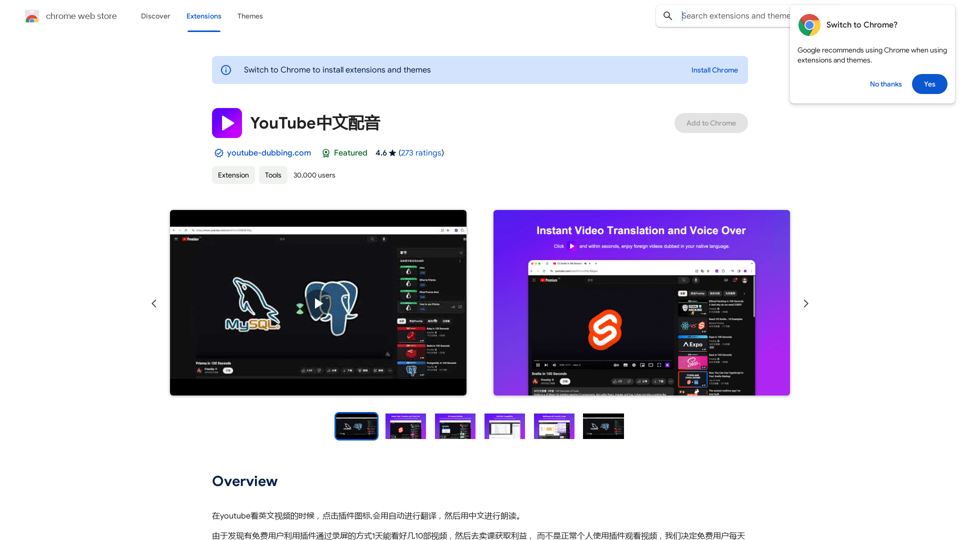
Watch foreign language YouTube videos in your own language.

193.90 M
Podly - AI Toolset for Merch By Amazon
View Detail

Podly - AI Toolset for Merch By Amazon

Podly - AI Toolset for Merch By Amazon

Introducing AI Listing Creator by Podly, a revolutionary tool that uses artificial intelligence technology to help Merch by Amazon sellers create high-quality product listings quickly and efficiently.

193.90 M
GPT Stats 

* Parameters: 175 Billion
* Trainers: 
    * Dataset:  Massive dataset of text and code
    * Method: Supervised fine-tuning 
* Capabilities:
    * Text Generation
    * Text Summarization
    * Language Translation
    * Code Generation
    * Question Answering
    * Dialogue Generation
* Limitations:
    * Can sometimes generate incorrect or biased information
    * Lacks real-world knowledge and common sense
    * Can be fooled by adversarial examples
View Detail

GPT Stats * Parameters: 175 Billion * Trainers: * Dataset: Massive dataset of text and code * Method: Supervised fine-tuning * Capabilities: * Text Generation * Text Summarization * Language Translation * Code Generation * Question Answering * Dialogue Generation * Limitations: * Can sometimes generate incorrect or biased information * Lacks real-world knowledge and common sense * Can be fooled by adversarial examples

GPT Stats * Parameters: 175 Billion * Trainers: * Dataset: Massive dataset of text and code * Method: Supervised fine-tuning * Capabilities: * Text Generation * Text Summarization * Language Translation * Code Generation * Question Answering * Dialogue Generation * Limitations: * Can sometimes generate incorrect or biased information * Lacks real-world knowledge and common sense * Can be fooled by adversarial examples

Search for conversations with GPT and other content.

193.90 M
AI Deer: AI Korean Sentence Correction Solution
View Detail

AI Deer: AI Korean Sentence Correction Solution

AI Deer: AI Korean Sentence Correction Solution

AI Deer will help you turn your great inspiration into a wonderful piece of writing!

193.90 M