Open-source RightAI Tools Directory
  • Discover AI
  • Submit
  • Startup
  • Blog
Open-source RightAI Tools Directory
Discover the best AI tools of 2025 with the RightAI Tools Directory!

Friend Links

AI Anime GeneratorToolsApp AI

Support

Tap4
Privacy policyTerms & ConditionsContact Us
Loading...
loading...

AI Detector for Text and Images - Winston AI

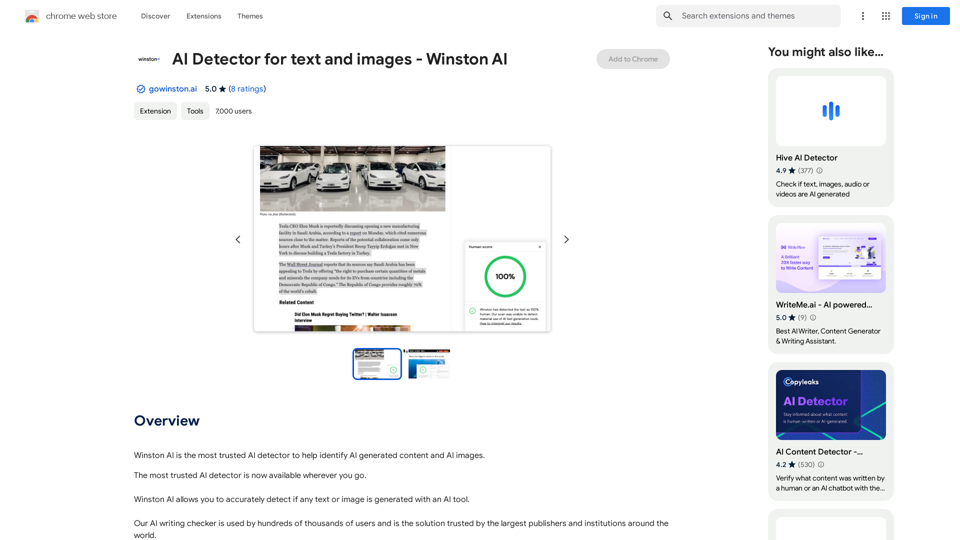
Winston AI is the most trusted AI detector to help identify AI-generated content and AI images.
Visit Website
AI Detector for Text and Images - Winston AI
Visit Website

Introduction

Winston AI is a powerful AI detection tool designed to identify AI-generated content and images with exceptional accuracy. This innovative solution offers a Chrome extension that seamlessly integrates into users' browsing experience, allowing them to scan and analyze text and images directly on web pages. With multilingual support and a user-friendly interface, Winston AI caters to a diverse range of users seeking to distinguish between human-created and AI-generated content.

Feature

Industry-Leading Accuracy

Winston AI boasts an impressive 99.98% accuracy rate in detecting AI-generated content, making it the most trusted AI detector available in the market.

Comprehensive AI Detection

The tool is capable of identifying AI-generated content from all known AI writing tools, including popular platforms like ChatGPT and Midjourney.

In-Browser Scanning

Users can conveniently scan content directly on web pages without leaving their current browsing session, enhancing efficiency and user experience.

Multilingual Support

Winston AI supports multiple languages, including English, French, Spanish, German, Portuguese, and Dutch, catering to a global user base.

Free Account Option

Users can start with a free account without requiring a credit card, allowing them to explore the tool's capabilities before committing to a paid plan.

Chrome Extension Integration

The tool is available as a Chrome extension, enabling easy installation and quick access to AI detection features while browsing.

Credit-Based System

Winston AI utilizes a credit system for scanning content, with one credit required per word for text analysis and 300 credits for image scans.

Detailed Analysis

The tool provides comprehensive forensics analysis for images, including metadata when applicable, offering users in-depth insights into the content's origin.

FAQ

What is the accuracy rate of Winston AI?

Winston AI boasts an industry-leading accuracy rate of 99.98% in detecting AI-generated content and images.

Which AI writing tools can Winston AI detect?

Winston AI can detect AI writing from all known AI writing tools, including popular platforms like ChatGPT and Midjourney.

How do I use Winston AI?

To use Winston AI:

  1. Add the Chrome extension to your browser
  2. Pin the extension
  3. Create a free account
  4. Click the Winston AI logo to view credits
  5. Highlight content or images on any website
  6. Right-click and select "scan for AI content" or "Scan image for AI"
  7. View your score and assessment in the bottom right corner of your browser

Is there a cost associated with using Winston AI?

Winston AI offers a free account option to start with, and users can upgrade to paid plans for additional features and credits. The extension provides in-app purchases for those who require more advanced capabilities.

Related Websites
WhatToTextAi
===============

WhatToTextAi is an AI-powered texting assistant that helps you come up with the perfect response to any situation.
View Detail

WhatToTextAi =============== WhatToTextAi is an AI-powered texting assistant that helps you come up with the perfect response to any situation.

WhatToTextAi =============== WhatToTextAi is an AI-powered texting assistant that helps you come up with the perfect response to any situation.

Overcome texting anxiety with WhatToText AI. Get personalized, human-like replies for any situation in seconds. Improve your English texting skills and build deeper connections. Perfect for non-native speakers and anyone looking to enhance their messaging game.

0
What are we eating today?
View Detail

What are we eating today?

What are we eating today?

An extension that suggests recipes using the ingredients you have in your pantry.

193.90 M
Chrome Web Store
View Detail

Chrome Web Store

Chrome Web Store

Add new features to your browser and personalize your browsing experience.

193.90 M
AI Writing Tool - YanbiAI | yanbiai.com | Generate Quality Copy with One Click
View Detail

AI Writing Tool - YanbiAI | yanbiai.com | Generate Quality Copy with One Click

AI Writing Tool - YanbiAI | yanbiai.com | Generate Quality Copy with One Click

YanBi AI (yanbiai.com) is a leading AI writing tool that provides intelligent article creation, continuation, rewriting, and polishing services. Use our AI writing software to quickly generate high-quality content, including papers, presentations, official documents, and more, unleashing your creative potential.

13.43 K
Please provide me with the text you would like me to rewrite in English.
View Detail

Please provide me with the text you would like me to rewrite in English.

Please provide me with the text you would like me to rewrite in English.

An AI-powered rephraser that can help you express your ideas more clearly and powerfully.

193.90 M
AI Letter Generator: Free AI Letter Writer, Cover Letter
View Detail

AI Letter Generator: Free AI Letter Writer, Cover Letter

AI Letter Generator: Free AI Letter Writer, Cover Letter

AI Letter Generator helps you create professional letters easily with AI. Try our free letter writer, cover letter generator, and more!

0
Get ChatGPT for Free with Google

You can now access ChatGPT, a powerful language model, for free with Google. Here's how:

Method 1: Google Colab

* Open Google Colab ([colab.research.google.com](http://colab.research.google.com))
* Create a new notebook
* Install the `transformers` library by running `!pip install transformers`
* Import the `transformers` library and load the ChatGPT model using `from transformers import AutoModelForCausalLM, AutoTokenizer; model = AutoModelForCausalLM.from_pretrained('chatgpt'); tokenizer = AutoTokenizer.from_pretrained('chatgpt')`
* Use the model to generate text using `input_text = "Your input here"; inputs = tokenizer.encode_plus(input_text, return_tensors='pt', max_length=1024, padding='max_length', truncation=True); output = model(inputs['input_ids'], attention_mask=inputs['attention_mask']); print(tokenizer.decode(output.logits[0], skip_special_tokens=True))`

Method 2: Google Apps Script

* Open Google Apps Script ([script.google.com](http://script.google.com))
* Create a new project
* Install the `transformers` library by running `npm install transformers`
* Import the `transformers` library and load the ChatGPT model using `const { AutoModelForCausalLM, AutoTokenizer } = require('transformers'); const model = new AutoModelForCausalLM('chatgpt'); const tokenizer = new AutoTokenizer('chatgpt');`
* Use the model to generate text using `const inputText = "Your input here"; const inputs = tokenizer.encodePlus(inputText, { return_tensors: 'pt', max_length: 1024, padding: 'max_length', truncation: true }); const output = model(inputs.inputIds, inputs.attentionMask); console.log(tokenizer.decode(output.logits[0], { skipSpecialTokens: true }));`

Note: These methods require some technical knowledge and may have limitations compared to the original ChatGPT model.
View Detail

Get ChatGPT for Free with Google You can now access ChatGPT, a powerful language model, for free with Google. Here's how: Method 1: Google Colab * Open Google Colab ([colab.research.google.com](http://colab.research.google.com)) * Create a new notebook * Install the `transformers` library by running `!pip install transformers` * Import the `transformers` library and load the ChatGPT model using `from transformers import AutoModelForCausalLM, AutoTokenizer; model = AutoModelForCausalLM.from_pretrained('chatgpt'); tokenizer = AutoTokenizer.from_pretrained('chatgpt')` * Use the model to generate text using `input_text = "Your input here"; inputs = tokenizer.encode_plus(input_text, return_tensors='pt', max_length=1024, padding='max_length', truncation=True); output = model(inputs['input_ids'], attention_mask=inputs['attention_mask']); print(tokenizer.decode(output.logits[0], skip_special_tokens=True))` Method 2: Google Apps Script * Open Google Apps Script ([script.google.com](http://script.google.com)) * Create a new project * Install the `transformers` library by running `npm install transformers` * Import the `transformers` library and load the ChatGPT model using `const { AutoModelForCausalLM, AutoTokenizer } = require('transformers'); const model = new AutoModelForCausalLM('chatgpt'); const tokenizer = new AutoTokenizer('chatgpt');` * Use the model to generate text using `const inputText = "Your input here"; const inputs = tokenizer.encodePlus(inputText, { return_tensors: 'pt', max_length: 1024, padding: 'max_length', truncation: true }); const output = model(inputs.inputIds, inputs.attentionMask); console.log(tokenizer.decode(output.logits[0], { skipSpecialTokens: true }));` Note: These methods require some technical knowledge and may have limitations compared to the original ChatGPT model.

Get ChatGPT for Free with Google You can now access ChatGPT, a powerful language model, for free with Google. Here's how: Method 1: Google Colab * Open Google Colab ([colab.research.google.com](http://colab.research.google.com)) * Create a new notebook * Install the `transformers` library by running `!pip install transformers` * Import the `transformers` library and load the ChatGPT model using `from transformers import AutoModelForCausalLM, AutoTokenizer; model = AutoModelForCausalLM.from_pretrained('chatgpt'); tokenizer = AutoTokenizer.from_pretrained('chatgpt')` * Use the model to generate text using `input_text = "Your input here"; inputs = tokenizer.encode_plus(input_text, return_tensors='pt', max_length=1024, padding='max_length', truncation=True); output = model(inputs['input_ids'], attention_mask=inputs['attention_mask']); print(tokenizer.decode(output.logits[0], skip_special_tokens=True))` Method 2: Google Apps Script * Open Google Apps Script ([script.google.com](http://script.google.com)) * Create a new project * Install the `transformers` library by running `npm install transformers` * Import the `transformers` library and load the ChatGPT model using `const { AutoModelForCausalLM, AutoTokenizer } = require('transformers'); const model = new AutoModelForCausalLM('chatgpt'); const tokenizer = new AutoTokenizer('chatgpt');` * Use the model to generate text using `const inputText = "Your input here"; const inputs = tokenizer.encodePlus(inputText, { return_tensors: 'pt', max_length: 1024, padding: 'max_length', truncation: true }); const output = model(inputs.inputIds, inputs.attentionMask); console.log(tokenizer.decode(output.logits[0], { skipSpecialTokens: true }));` Note: These methods require some technical knowledge and may have limitations compared to the original ChatGPT model.

How to Add ChatGPT to All Google Searches ===================================================== Step 1: Create a Custom Search Engine -------------------------------------- * Go to the [Google Custom Search Engine](https://cse.google.com/) website and sign in with your Google account. * Click on the "New Search Engine" button. * Fill in the required information, such as the name and description of your search engine. * Click on the "Create" button. Step 2: Add ChatGPT to the Search Engine ----------------------------------------- * In the "Setup" tab, click on the "Add" button next to "Sites to search". * Enter the following URL: `https://chat.openai.com/` * Click on the "Add" button. Step 3: Configure the Search Engine -------------------------------------- * In the "Setup" tab, click on the "Edit" button next to "Search engine keywords". * Add the following keywords: `ChatGPT` * Click on the "Save" button. Step 4: Get the Search Engine Code ------------------------------------- * In the "Setup" tab, click on the "Get code" button. * Copy the HTML code provided. Step 5: Add the Search Engine to Your Browser ------------------------------------------------ * Open your browser and go to the "Settings" or "Options" page. * Look for the "Search engine" or "Default search engine" option. * Click on the "Add" or "Manage search engines" button. * Paste the HTML code you copied earlier. * Click on the "Add" or "Save" button. You're Done! =============== Now, whenever you search on Google, ChatGPT will be included in the search results. You can also use the custom search engine URL provided by Google to search directly.

193.90 M
Sentence Rewriter
View Detail

Sentence Rewriter

Sentence Rewriter

AI sentence and paragraph rewriter. Supports 50+ languages including English, Spanish, French, German, Hindi, Chinese, and more.

193.90 M