Open-source RightAI Tools Directory
  • Discover AI
  • Submit
  • Startup
  • Blog
Open-source RightAI Tools Directory
Discover the best AI tools of 2025 with the RightAI Tools Directory!

Friend Links

AI Anime GeneratorToolsApp AI

Support

Tap4
Privacy policyTerms & ConditionsContact Us
Loading...
loading...

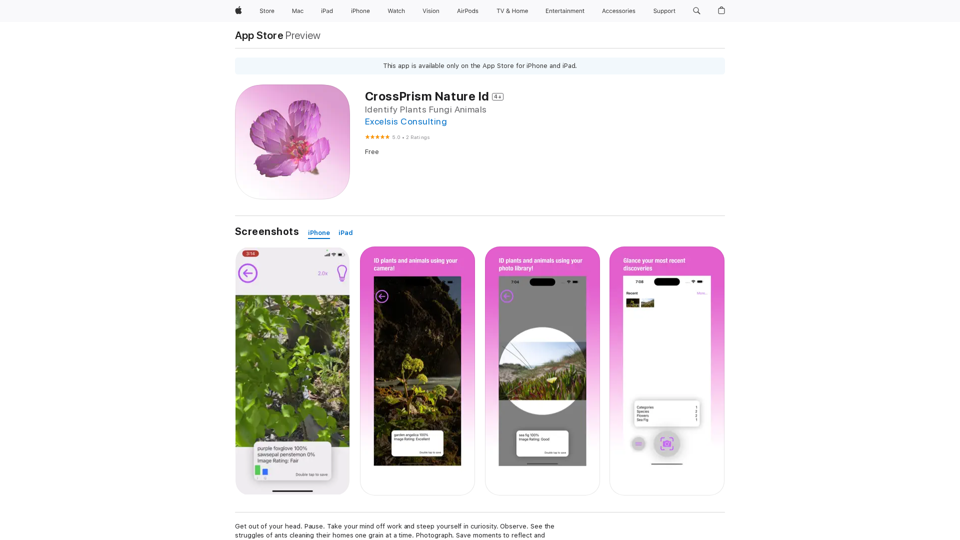
CrossPrism Nature Id on the App Store

Get out of your head. Pause. Take your mind off work and steep yourself in curiosity. Observe. See the struggles of ants cleaning their homes one grain at a time, and the way birds build their nests with twigs and threads.
Visit Website
CrossPrism Nature Id on the App Store
Visit Website

Introduction

CrossPrism Nature Id is an AI-powered platform for identifying various species in nature. It uses advanced AI technology to recognize plants, fungi, animals, and underwater species in real-time. The app offers offline capabilities, customization options, and an image evaluator feature, making it a versatile tool for nature enthusiasts, researchers, and casual users alike.

Feature

Comprehensive Species Identification

CrossPrism Nature Id can identify a wide range of species including:

  • Birds
  • Flowers
  • Leaves
  • Insects
  • Fungi
  • Underwater species
  • Mammals
  • Reptiles
  • Amphibians

Image Quality Evaluator

The app includes a built-in image evaluator that guides users in taking high-quality photos for better identification results.

Offline Functionality

Unlike many other identification apps, CrossPrism Nature Id works without an internet connection, allowing users to explore and identify species in remote areas.

AI Engine Customization

Users can train and customize the CrossPrism AI engine to suit their specific needs, enhancing the app's versatility for various applications.

Free to Use

CrossPrism Nature Id is available for free download and use on iPhone and iPad devices.

Extensive Species Database

The app can identify over 6,000 bird species, 17,000 flower species, and numerous other plant and animal species.

FAQ

How do I use CrossPrism Nature Id?

  1. Download and install the app from the App Store on your iPhone or iPad.
  2. Take a photo of the species you want to identify.
  3. Use the app to process the image and receive identification results.
  4. Explore additional information about the identified species.

Can I use CrossPrism Nature Id without an internet connection?

Yes, the app is designed to work offline, allowing you to identify species in remote areas without internet access.

Is it possible to customize the app for specific identification needs?

Yes, CrossPrism Nature Id allows users to train and customize the AI engine to meet their specific requirements.

Latest Traffic Insights

  • Monthly Visits

    124.77 M

  • Bounce Rate

    74.15%

  • Pages Per Visit

    1.56

  • Time on Site(s)

    46.64

  • Global Rank

    -

  • Country Rank

    -

Recent Visits

Traffic Sources

  • Social Media:
    2.88%
  • Paid Referrals:
    2.50%
  • Email:
    0.18%
  • Referrals:
    19.65%
  • Search Engines:
    29.02%
  • Direct:
    45.78%
More Data

Related Websites

AI Book Writer for Non-Fiction and Poetry
View Detail

AI Book Writer for Non-Fiction and Poetry

AI Book Writer for Non-Fiction and Poetry

BookScribi is a platform for creating non-fiction and poetry books. Powered by AI. No writing needed.

445
GPT Store: Find Your Perfect GPT
View Detail

GPT Store: Find Your Perfect GPT

GPT Store: Find Your Perfect GPT

A One-Stop Shop to Explore the Newest, Trending, and Most Effective OpenAI GPTs!

193.90 M
Suki Assistant
View Detail

Suki Assistant

Suki Assistant

Suki: An AI-powered clinical documentation app for your Chrome browser.

193.90 M
GoodReply | AI-responder for customer reviews
View Detail

GoodReply | AI-responder for customer reviews

GoodReply | AI-responder for customer reviews

Respond to customer reviews 10x faster with GoodReply!

193.90 M
SHADE: Stylishly Sustainable
View Detail

SHADE: Stylishly Sustainable

SHADE: Stylishly Sustainable

Upgrade Your Style, Thoughtfully.

193.90 M
Genji - AI Browser Assistant
View Detail

Genji - AI Browser Assistant

Genji - AI Browser Assistant

Automate the Browser Using a Visual AI Assistant

193.90 M
ChatGPT Keyboard Shortcuts

#Navigation

* Ctrl + β†’: Move to the next message
* Ctrl + ←: Move to the previous message
* Home: Move to the beginning of the conversation
* End: Move to the end of the conversation

#Editing

* Ctrl + A: Select all text
* Ctrl + C: Copy selected text
* Ctrl + X: Cut selected text
* Ctrl + V: Paste copied or cut text
* Ctrl + Z: Undo
* Ctrl + Y: Redo
* Ctrl + Shift + F: Format text as code

#Actions

* Enter: Send the message
* Shift + Enter: Insert a new line
* Ctrl + Shift + Enter: Send the message and insert a new line
* Esc: Cancel editing and close the message input field
* Ctrl + Shift + Space: Open the emoji picker
* Ctrl + Shift + /: Open the help menu

#Accessibility

* Ctrl + +: Increase font size
* Ctrl + -: Decrease font size
* Ctrl + 0: Reset font size to default
View Detail

ChatGPT Keyboard Shortcuts #Navigation * Ctrl + β†’: Move to the next message * Ctrl + ←: Move to the previous message * Home: Move to the beginning of the conversation * End: Move to the end of the conversation #Editing * Ctrl + A: Select all text * Ctrl + C: Copy selected text * Ctrl + X: Cut selected text * Ctrl + V: Paste copied or cut text * Ctrl + Z: Undo * Ctrl + Y: Redo * Ctrl + Shift + F: Format text as code #Actions * Enter: Send the message * Shift + Enter: Insert a new line * Ctrl + Shift + Enter: Send the message and insert a new line * Esc: Cancel editing and close the message input field * Ctrl + Shift + Space: Open the emoji picker * Ctrl + Shift + /: Open the help menu #Accessibility * Ctrl + +: Increase font size * Ctrl + -: Decrease font size * Ctrl + 0: Reset font size to default

ChatGPT Keyboard Shortcuts #Navigation * Ctrl + β†’: Move to the next message * Ctrl + ←: Move to the previous message * Home: Move to the beginning of the conversation * End: Move to the end of the conversation #Editing * Ctrl + A: Select all text * Ctrl + C: Copy selected text * Ctrl + X: Cut selected text * Ctrl + V: Paste copied or cut text * Ctrl + Z: Undo * Ctrl + Y: Redo * Ctrl + Shift + F: Format text as code #Actions * Enter: Send the message * Shift + Enter: Insert a new line * Ctrl + Shift + Enter: Send the message and insert a new line * Esc: Cancel editing and close the message input field * Ctrl + Shift + Space: Open the emoji picker * Ctrl + Shift + /: Open the help menu #Accessibility * Ctrl + +: Increase font size * Ctrl + -: Decrease font size * Ctrl + 0: Reset font size to default

Enhance your ChatGPT experience with easy-to-use keyboard shortcuts.

193.90 M
Thrive as a Freelancer
View Detail

Thrive as a Freelancer

Thrive as a Freelancer

Your all-in-one solution for maximizing efficiency and income

0