Open-source RightAI Tools Directory
  • Discover AI
  • Submit
  • Startup
  • Blog
Open-source RightAI Tools Directory
Discover the best AI tools of 2025 with the RightAI Tools Directory!

Friend Links

AI Anime GeneratorToolsApp AI

Support

Tap4
Privacy policyTerms & ConditionsContact Us
Loading...
loading...

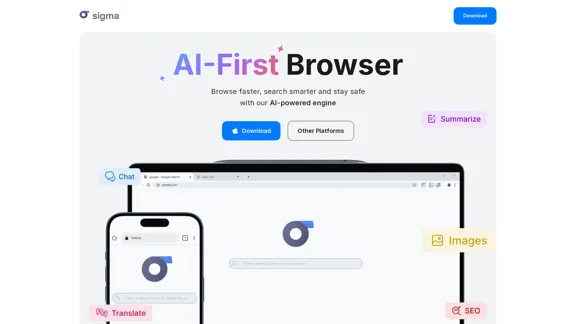
Sigma AI Browser

Visit Website
Sigma AI Browser
Visit Website

Introduction

Sigma AI Browser is an innovative web browser that combines speed, security, and artificial intelligence to enhance the browsing experience. It allows users to browse faster, search smarter, and maintain privacy while online. With features like AI-powered content creation, translation, and summarization, Sigma AI Browser caters to both casual users and professionals looking for efficiency and productivity.

Feature

  1. AI-Powered Content Creation

    Users can easily create articles, emails, and essays by simply describing their needs. The AI generates content tailored to the user's specifications.

  2. Smart Summarization Tool

    Quickly condense long texts into brief summaries, making it easier to digest information without losing key points.

  3. AI Chat Assistant

    Engage with an AI assistant that responds naturally to queries, helping users find information or generate content seamlessly.

  4. Image Generation

    Describe desired images, and the AI will create them for you, enhancing creativity and visual content production.

  5. Privacy and Security Features

    Sigma AI Browser includes a private browsing mode, advanced data protection, and tracker blocking to ensure user anonymity and security.

  6. Cross-Device Synchronization

    Keep bookmarks, settings, and browsing history consistent across all devices, providing a seamless user experience.

  7. Fast Browsing Experience

    Optimized for speed, Sigma AI Browser allows users to navigate the internet quickly while conserving battery life.

How to Use?

  1. Download Sigma AI Browser from the official website for your operating system (Windows, macOS, Linux, Android, or iOS).
  2. Activate the AI Chat feature to start asking questions or generating content.
  3. Use the summarization tool to condense lengthy articles or documents for quicker understanding.
  4. Explore the built-in SigmaGPT extension for enhanced AI interactions right after installation.
  5. Utilize the image generation feature by providing a clear description of the desired image.

FAQ

How to use AI chat for free?

Sigma AI Browser includes a built-in AI Chat that is free to use. Simply activate it and start asking questions or creating content.

Is Sigma AI Browser safe?

Yes, it offers a high level of security, including incognito mode and tracker protection to safeguard your identity.

What pre-installed extensions does Sigma AI Browser have?

The SigmaGPT extension is pre-installed, allowing immediate access to AI chat functionalities.

Are there any free AI tools in Sigma Browser?

Yes, Sigma AI Browser provides free AI tools like SigmaGPT for content creation, summarization, and multimedia generation.

Why is Sigma AI Browser better than Chrome?

It integrates advanced AI features, enhanced privacy tools, and a more modern interface, making it a superior choice for users seeking efficiency.

Price

  • Free Plan: $0/month
  • Basic Plan: $9.99/month
  • Standard Plan: $19.99/month
  • Professional Plan: $49.99/month
The price is for reference only, please refer to the latest official data for actual information.

Evaluation

  1. Sigma AI Browser excels in integrating AI features that enhance productivity and creativity, making it a valuable tool for users.
  2. The user-friendly interface and fast browsing capabilities are significant advantages over traditional browsers.
  3. However, some users may find the reliance on AI for content creation can lead to generic outputs if not guided properly.
  4. Continuous updates and improvements are necessary to keep pace with evolving user needs and competitive browsers.
  5. Overall, Sigma AI Browser is a promising tool for those looking to enhance their browsing experience, but it may require users to adapt to its AI-driven functionalities.

Latest Traffic Insights

  • Monthly Visits

    60.85 K

  • Bounce Rate

    41.10%

  • Pages Per Visit

    1.74

  • Time on Site(s)

    24.28

  • Global Rank

    568324

  • Country Rank

    United States 1105510

Recent Visits

Traffic Sources

  • Social Media:
    6.01%
  • Paid Referrals:
    1.07%
  • Email:
    0.17%
  • Referrals:
    15.77%
  • Search Engines:
    45.60%
  • Direct:
    31.26%
More Data

Related Websites

Machine Translation - Amazon Translate - AWS

Amazon Translate is a neural machine translation service that delivers fast, high-quality, and affordable language translation. Amazon Translate allows you to localize content - such as websites and applications - for international users, and to easily translate large volumes of text efficiently.

How it works

1. Input text
2. Amazon Translate
3. Output text

Use cases

• Multilingual user experience
• Cross-lingual communication
• Content analysis in multiple languages

Benefits

• High-quality translations
• Easy to use
• Cost-effective
• Scalable
• Secure and compliant

Features

• Neural machine translation
• Custom terminology
• Batch translation
• Real-time translation
• Language detection
• Profanity filtering
View Detail

Machine Translation - Amazon Translate - AWS Amazon Translate is a neural machine translation service that delivers fast, high-quality, and affordable language translation. Amazon Translate allows you to localize content - such as websites and applications - for international users, and to easily translate large volumes of text efficiently. How it works 1. Input text 2. Amazon Translate 3. Output text Use cases • Multilingual user experience • Cross-lingual communication • Content analysis in multiple languages Benefits • High-quality translations • Easy to use • Cost-effective • Scalable • Secure and compliant Features • Neural machine translation • Custom terminology • Batch translation • Real-time translation • Language detection • Profanity filtering

Machine Translation - Amazon Translate - AWS Amazon Translate is a neural machine translation service that delivers fast, high-quality, and affordable language translation. Amazon Translate allows you to localize content - such as websites and applications - for international users, and to easily translate large volumes of text efficiently. How it works 1. Input text 2. Amazon Translate 3. Output text Use cases • Multilingual user experience • Cross-lingual communication • Content analysis in multiple languages Benefits • High-quality translations • Easy to use • Cost-effective • Scalable • Secure and compliant Features • Neural machine translation • Custom terminology • Batch translation • Real-time translation • Language detection • Profanity filtering

Amazon Translate, a neural machine translation service, uses deep learning to deliver more accurate and natural translation than traditional algorithms.

60.83 M
Good AI Tools
View Detail

Good AI Tools

Good AI Tools

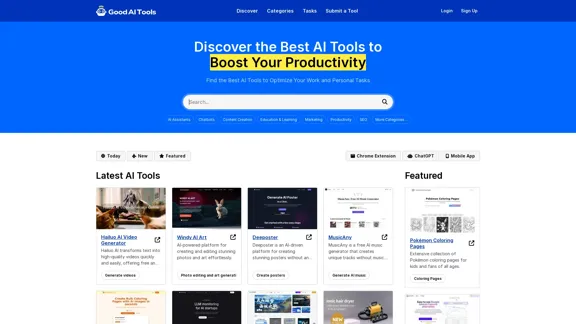
Good AI Tools is your ultimate resource for discovering the best AI tools to enhance your productivity. Explore our extensive AI directory and find leading software and applications that match what you're looking for.

0

Translation tool for professionals | SYSTRAN
View Detail

Translation tool for professionals | SYSTRAN

Translation tool for professionals | SYSTRAN

Translate texts, documents and much more in over 55 languages with SYSTRAN's fully secure professional translation solutions. API & CAT Tool integration

314.63 K
Retainr - All-in-One Agency Management Software
View Detail

Retainr - All-in-One Agency Management Software

Retainr - All-in-One Agency Management Software

Elevate your brand, streamline operations, and foster stronger client relationships. The future of creative agency management starts here! From your own branded app to streamlined client management, Retainr.io empowers you at every step.

39.23 K
Online Spreadsheet Software | Create Spreadsheets for Free - Zoho Sheet
View Detail

Online Spreadsheet Software | Create Spreadsheets for Free - Zoho Sheet

Online Spreadsheet Software | Create Spreadsheets for Free - Zoho Sheet

Create and collaborate on spreadsheets online with your team in real-time, from anywhere. Available on mobile devices too! Import your Excel spreadsheet files and get started now.

67.14 M
Artificial intelligence-powered software platform for aneurysms, pulmonary embolisms, and strokes
View Detail

Artificial intelligence-powered software platform for aneurysms, pulmonary embolisms, and strokes

Artificial intelligence-powered software platform for aneurysms, pulmonary embolisms, and strokes

RapidAI empowers neurovascular and vascular clinical teams to push the limits of care, decreasing treatment time and enhancing patient outcomes.

20.57 K
Copilot for Microsoft 365 – Microsoft Adoption

Copilot for Microsoft 365 is a powerful AI assistant that helps you work smarter and faster across Microsoft 365 apps and services. It combines the power of large language models (LLMs) with your organization's data in the Microsoft Graph and Microsoft 365 apps to turn your words into the most powerful productivity tool on the planet.

Copilot is designed to help you:

• Unleash creativity
• Unlock productivity
• Uplevel skills

Copilot is built on Microsoft's comprehensive approach to security, compliance, and privacy. Copilot in Microsoft 365 apps and services:

• Does not use your data to train the underlying LLM
• Does not replace human ingenuity and judgment
• Is designed to keep humans in the loop

Copilot is currently available in Word, Excel, PowerPoint, Outlook, Teams, and more.

Getting Started with Copilot

To get started with Copilot, follow these steps:

1. Check availability: Ensure your organization has access to Copilot.
2. Learn the basics: Familiarize yourself with Copilot's capabilities and how to use it effectively.
3. Explore use cases: Discover how Copilot can help you in your specific role and tasks.
4. Practice and refine: Use Copilot regularly and refine your prompts for better results.
5. Share and collaborate: Collaborate with colleagues using Copilot and share best practices.

Best Practices for Using Copilot

1. Be specific in your prompts
2. Provide context for better results
3. Review and edit Copilot's output
4. Use Copilot as a starting point, not a final product
5. Experiment with different approaches
6. Stay informed about new features and updates

Copilot in Different Microsoft 365 Apps

• Word: Draft, edit, summarize, and rewrite content
• Excel: Analyze data, create formulas, and generate insights
• PowerPoint: Create presentations, design slides, and generate content
• Outlook: Compose emails, summarize threads, and manage your inbox
• Teams: Summarize meetings, generate action items, and create meeting notes

Responsible AI and Copilot

Microsoft is committed to developing AI systems responsibly. When using Copilot, keep in mind:

• AI-generated content may contain biases or inaccuracies
• Always review and verify Copilot's output
• Use your judgment and expertise alongside Copilot's suggestions
• Be aware of your organization's policies regarding AI use

Conclusion

Copilot for Microsoft 365 is a powerful tool that can significantly enhance your productivity and creativity. By understanding its capabilities, following best practices, and using it responsibly, you can make the most of this AI assistant in your daily work.
View Detail

Copilot for Microsoft 365 – Microsoft Adoption Copilot for Microsoft 365 is a powerful AI assistant that helps you work smarter and faster across Microsoft 365 apps and services. It combines the power of large language models (LLMs) with your organization's data in the Microsoft Graph and Microsoft 365 apps to turn your words into the most powerful productivity tool on the planet. Copilot is designed to help you: • Unleash creativity • Unlock productivity • Uplevel skills Copilot is built on Microsoft's comprehensive approach to security, compliance, and privacy. Copilot in Microsoft 365 apps and services: • Does not use your data to train the underlying LLM • Does not replace human ingenuity and judgment • Is designed to keep humans in the loop Copilot is currently available in Word, Excel, PowerPoint, Outlook, Teams, and more. Getting Started with Copilot To get started with Copilot, follow these steps: 1. Check availability: Ensure your organization has access to Copilot. 2. Learn the basics: Familiarize yourself with Copilot's capabilities and how to use it effectively. 3. Explore use cases: Discover how Copilot can help you in your specific role and tasks. 4. Practice and refine: Use Copilot regularly and refine your prompts for better results. 5. Share and collaborate: Collaborate with colleagues using Copilot and share best practices. Best Practices for Using Copilot 1. Be specific in your prompts 2. Provide context for better results 3. Review and edit Copilot's output 4. Use Copilot as a starting point, not a final product 5. Experiment with different approaches 6. Stay informed about new features and updates Copilot in Different Microsoft 365 Apps • Word: Draft, edit, summarize, and rewrite content • Excel: Analyze data, create formulas, and generate insights • PowerPoint: Create presentations, design slides, and generate content • Outlook: Compose emails, summarize threads, and manage your inbox • Teams: Summarize meetings, generate action items, and create meeting notes Responsible AI and Copilot Microsoft is committed to developing AI systems responsibly. When using Copilot, keep in mind: • AI-generated content may contain biases or inaccuracies • Always review and verify Copilot's output • Use your judgment and expertise alongside Copilot's suggestions • Be aware of your organization's policies regarding AI use Conclusion Copilot for Microsoft 365 is a powerful tool that can significantly enhance your productivity and creativity. By understanding its capabilities, following best practices, and using it responsibly, you can make the most of this AI assistant in your daily work.

Copilot for Microsoft 365 – Microsoft Adoption Copilot for Microsoft 365 is a powerful AI assistant that helps you work smarter and faster across Microsoft 365 apps and services. It combines the power of large language models (LLMs) with your organization's data in the Microsoft Graph and Microsoft 365 apps to turn your words into the most powerful productivity tool on the planet. Copilot is designed to help you: • Unleash creativity • Unlock productivity • Uplevel skills Copilot is built on Microsoft's comprehensive approach to security, compliance, and privacy. Copilot in Microsoft 365 apps and services: • Does not use your data to train the underlying LLM • Does not replace human ingenuity and judgment • Is designed to keep humans in the loop Copilot is currently available in Word, Excel, PowerPoint, Outlook, Teams, and more. Getting Started with Copilot To get started with Copilot, follow these steps: 1. Check availability: Ensure your organization has access to Copilot. 2. Learn the basics: Familiarize yourself with Copilot's capabilities and how to use it effectively. 3. Explore use cases: Discover how Copilot can help you in your specific role and tasks. 4. Practice and refine: Use Copilot regularly and refine your prompts for better results. 5. Share and collaborate: Collaborate with colleagues using Copilot and share best practices. Best Practices for Using Copilot 1. Be specific in your prompts 2. Provide context for better results 3. Review and edit Copilot's output 4. Use Copilot as a starting point, not a final product 5. Experiment with different approaches 6. Stay informed about new features and updates Copilot in Different Microsoft 365 Apps • Word: Draft, edit, summarize, and rewrite content • Excel: Analyze data, create formulas, and generate insights • PowerPoint: Create presentations, design slides, and generate content • Outlook: Compose emails, summarize threads, and manage your inbox • Teams: Summarize meetings, generate action items, and create meeting notes Responsible AI and Copilot Microsoft is committed to developing AI systems responsibly. When using Copilot, keep in mind: • AI-generated content may contain biases or inaccuracies • Always review and verify Copilot's output • Use your judgment and expertise alongside Copilot's suggestions • Be aware of your organization's policies regarding AI use Conclusion Copilot for Microsoft 365 is a powerful tool that can significantly enhance your productivity and creativity. By understanding its capabilities, following best practices, and using it responsibly, you can make the most of this AI assistant in your daily work.

Microsoft Copilot combines the power of large language models (LLMs) with your organization's data to turn your words into one of the most powerful productivity tools on the planet.

608.60 K
BidPacer - AI Bidder for Freelance Projects.
View Detail

BidPacer - AI Bidder for Freelance Projects.

BidPacer - AI Bidder for Freelance Projects.

0