Open-source RightAI Tools Directory
  • Discover AI
  • Submit
  • Startup
  • Blog
Open-source RightAI Tools Directory
Discover the best AI tools of 2025 with the RightAI Tools Directory!

Friend Links

AI Anime GeneratorToolsApp AI

Support

Tap4
Privacy policyTerms & ConditionsContact Us
Loading...
loading...

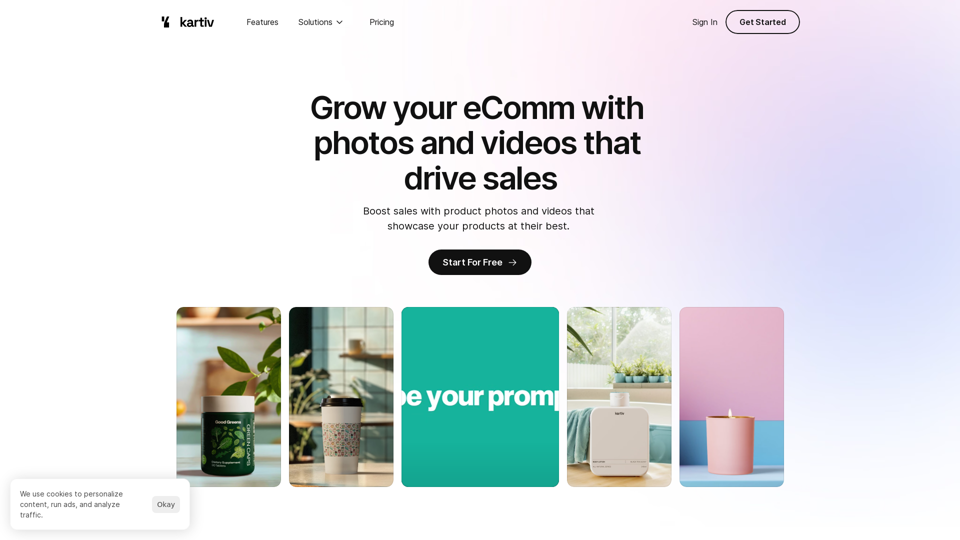
Kartiv: Automated Visual Content for eCommerce & Marketing Agencies

Elevate your brand with Kartiv's AI-powered design solutions. Perfect for eCommerce businesses and marketing agencies.
Visit Website
Kartiv: Automated Visual Content for eCommerce & Marketing Agencies
Visit Website

Introduction

Kartiv is an automated visual content platform tailored for eCommerce and marketing agencies. It offers tools to create high-quality product photos and videos that boost sales. The platform combines AI technology with human creativity to generate diverse creative variations for each product, making it easy for users to produce engaging visuals that showcase their products effectively.

Feature

Easy-to-Use Interface

Kartiv provides a user-friendly platform that simplifies the process of uploading products and generating visual content. This feature makes it accessible for users of all skill levels to create professional-quality product visuals.

AI-Powered Optimization

The platform utilizes artificial intelligence to generate multiple creative variations for each product automatically. This AI-driven approach ensures a wide range of options for users to choose from, optimizing the visual content creation process.

Diverse Visual Content Options

Kartiv offers various types of visual content, including:

  • 360° videos
  • White background images
  • Sales boosters

These options allow users to showcase their products from different angles and in various formats, enhancing the overall presentation.

Vetted Creative Team

Kartiv employs a team of vetted creatives who ensure that all visual content meets high-quality standards and aligns with the needs of eCommerce and marketing agencies.

Flexible Pricing Plans

Kartiv offers a range of pricing options to accommodate different business needs:

PlanDescription
FreeBasic features for small businesses or individuals
Paid PlansAdvanced features for growing businesses and agencies

This flexible pricing structure makes Kartiv accessible to businesses of all sizes.

3D Modeling Capability

Users can either upload their own product images or have Kartiv create a 3D model of their product. This feature adds versatility to the platform's offerings and allows for more dynamic visual content creation.

FAQ

How does Kartiv's platform work?

Kartiv's AI-powered platform combines artificial intelligence with human creativity to generate multiple creative variations tailored for each product. Users can upload their product image or request a 3D model, then review and select the best images and videos to download.

What types of visual content can I create using Kartiv?

Kartiv offers a variety of visual content options, including:

  • 360° videos
  • White background images
  • Sales boosters These diverse options allow users to create engaging and effective product presentations.

Is there a free option available for Kartiv?

Yes, Kartiv offers a free plan along with various paid plans to cater to different needs of eCommerce and marketing agencies. This allows businesses to choose the most suitable option based on their requirements and budget.

Related Websites
WebWise ChatGPT English (USA)
View Detail

WebWise ChatGPT English (USA)

WebWise ChatGPT English (USA)

ChatGPT's power in Chrome: Seamlessly integrated, engage from the toolbar to search results.

193.90 M
Wallow

To roll or move about in a lazy, relaxed way, often in a pleasant or enjoyable manner.
View Detail

Wallow To roll or move about in a lazy, relaxed way, often in a pleasant or enjoyable manner.

Wallow To roll or move about in a lazy, relaxed way, often in a pleasant or enjoyable manner.

Wallow streamlines digital product development with real-time incident tracking, team alignment, and integrated communication tools. Experience seamless collaboration and boost productivity with Wallow.

847
Ask Your Bookmarks
View Detail

Ask Your Bookmarks

Ask Your Bookmarks

Simple and Smart Bookmark Manager. Great AI-powered search capability, find the bookmark you want with fuzzy descriptions.

193.90 M
Google for Jobs Structured Data by Tarta.ai
View Detail

Google for Jobs Structured Data by Tarta.ai

Google for Jobs Structured Data by Tarta.ai

SEO Job Postings Structured Data by Tarta.ai is an AI-driven platform that enhances job postings with structured data for improved search engine optimization.

193.90 M
Get MailMaestro
View Detail

Get MailMaestro

Get MailMaestro

Enhance your email productivity with MailMaestro. Enjoy AI-assisted email summaries, unique style personalization, and top-quality drafts. Check our features today!

222.20 K
Ask AI
View Detail

Ask AI

Ask AI

Ask AI is an AI-powered Search Assistant, with Bing, ChatGPT, Bard, & more! ⚡

193.90 M
Insync Browser Co-Pilot (Beta)
View Detail

Insync Browser Co-Pilot (Beta)

Insync Browser Co-Pilot (Beta)

Navigate the web smarter with Insyncai Co-Pilot: Your AI-powered assistant for quick summaries and finding information on any webpage!

193.90 M
AI Voice Over for YouTube 

This is a guide to using AI voice over for your YouTube videos. 

Why Use AI Voice Over?

* Cost-Effective: AI voice over is much cheaper than hiring a professional voice actor.
* Time-Saving: You can generate voice over quickly and easily, without needing to schedule recording sessions.
* Variety of Voices: Choose from a wide range of AI voices, including male, female, and even robotic voices.
* Accessibility: Make your videos accessible to viewers who are deaf or hard of hearing by adding captions generated by AI.

How to Use AI Voice Over

1. Choose a Platform: There are many different platforms that offer AI voice over services, such as:
    * Google Cloud Text-to-Speech
    * Amazon Polly
    * Microsoft Azure Text to Speech
    * Murf.ai
    * NaturalReader
2. Write Your Script:  Write a clear and concise script for your video.
3. Upload Your Script:  Upload your script to the chosen platform.
4. Select a Voice: Choose the voice that best suits your video.
5. Adjust Settings:  Adjust settings such as speed, pitch, and volume.
6. Generate Voice Over:  Click the "Generate" button to create your voice over.
7. Download and Edit: Download the generated voice over file and edit it as needed.
8. Add to Your Video:  Add the voice over to your YouTube video.

Tips for Using AI Voice Over

* Use Natural Language:  Write your script as if you were speaking naturally.
* Vary Your Tone:  Use different tones of voice to keep your viewers engaged.
* Add Pauses:  Include pauses in your script to allow viewers to process information.
* Proofread Carefully:  Always proofread your script before generating the voice over.
* Experiment:  Try different voices, settings, and styles to find what works best for you.
View Detail

AI Voice Over for YouTube This is a guide to using AI voice over for your YouTube videos. Why Use AI Voice Over? * Cost-Effective: AI voice over is much cheaper than hiring a professional voice actor. * Time-Saving: You can generate voice over quickly and easily, without needing to schedule recording sessions. * Variety of Voices: Choose from a wide range of AI voices, including male, female, and even robotic voices. * Accessibility: Make your videos accessible to viewers who are deaf or hard of hearing by adding captions generated by AI. How to Use AI Voice Over 1. Choose a Platform: There are many different platforms that offer AI voice over services, such as: * Google Cloud Text-to-Speech * Amazon Polly * Microsoft Azure Text to Speech * Murf.ai * NaturalReader 2. Write Your Script: Write a clear and concise script for your video. 3. Upload Your Script: Upload your script to the chosen platform. 4. Select a Voice: Choose the voice that best suits your video. 5. Adjust Settings: Adjust settings such as speed, pitch, and volume. 6. Generate Voice Over: Click the "Generate" button to create your voice over. 7. Download and Edit: Download the generated voice over file and edit it as needed. 8. Add to Your Video: Add the voice over to your YouTube video. Tips for Using AI Voice Over * Use Natural Language: Write your script as if you were speaking naturally. * Vary Your Tone: Use different tones of voice to keep your viewers engaged. * Add Pauses: Include pauses in your script to allow viewers to process information. * Proofread Carefully: Always proofread your script before generating the voice over. * Experiment: Try different voices, settings, and styles to find what works best for you.

AI Voice Over for YouTube This is a guide to using AI voice over for your YouTube videos. Why Use AI Voice Over? * Cost-Effective: AI voice over is much cheaper than hiring a professional voice actor. * Time-Saving: You can generate voice over quickly and easily, without needing to schedule recording sessions. * Variety of Voices: Choose from a wide range of AI voices, including male, female, and even robotic voices. * Accessibility: Make your videos accessible to viewers who are deaf or hard of hearing by adding captions generated by AI. How to Use AI Voice Over 1. Choose a Platform: There are many different platforms that offer AI voice over services, such as: * Google Cloud Text-to-Speech * Amazon Polly * Microsoft Azure Text to Speech * Murf.ai * NaturalReader 2. Write Your Script: Write a clear and concise script for your video. 3. Upload Your Script: Upload your script to the chosen platform. 4. Select a Voice: Choose the voice that best suits your video. 5. Adjust Settings: Adjust settings such as speed, pitch, and volume. 6. Generate Voice Over: Click the "Generate" button to create your voice over. 7. Download and Edit: Download the generated voice over file and edit it as needed. 8. Add to Your Video: Add the voice over to your YouTube video. Tips for Using AI Voice Over * Use Natural Language: Write your script as if you were speaking naturally. * Vary Your Tone: Use different tones of voice to keep your viewers engaged. * Add Pauses: Include pauses in your script to allow viewers to process information. * Proofread Carefully: Always proofread your script before generating the voice over. * Experiment: Try different voices, settings, and styles to find what works best for you.

Watch foreign language YouTube videos in your own language.

193.90 M