Open-source RightAI Tools Directory
  • Discover AI
  • Submit
  • Startup
  • Blog
Open-source RightAI Tools Directory
Discover the best AI tools of 2025 with the RightAI Tools Directory!

Friend Links

AI Anime GeneratorToolsApp AI

Support

Tap4
Privacy policyTerms & ConditionsContact Us
Loading...
loading...

Justdone: AI Writing & Copywriting Assistant

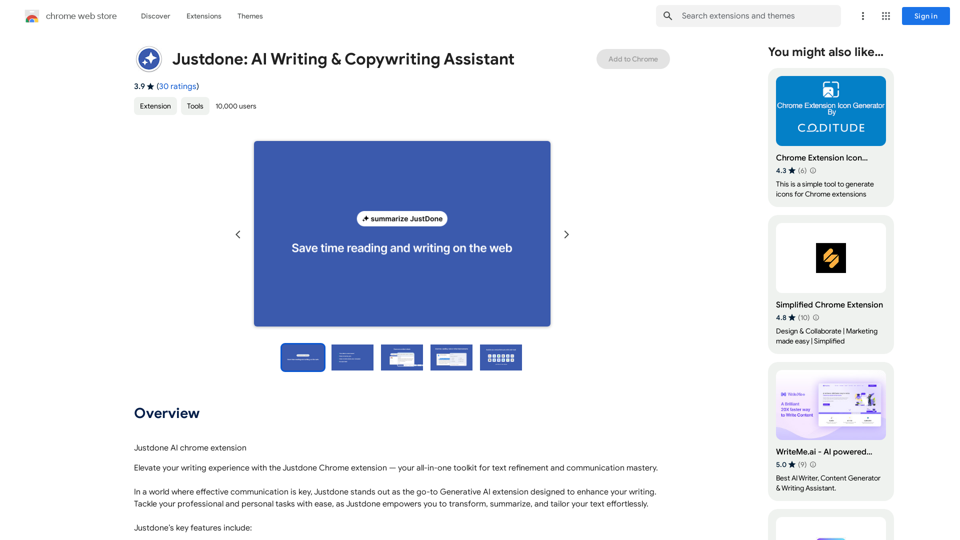
Justdone AI Chrome Extension
Visit Website
Justdone: AI Writing & Copywriting Assistant
Visit Website

Introduction

Justdone is a powerful Generative AI Chrome extension designed to enhance your writing experience. This all-in-one toolkit offers a range of features for text refinement and communication mastery, allowing users to effortlessly transform, summarize, and tailor their text. With Justdone, you can improve your writing, paraphrase content, summarize lengthy texts, simplify complex information, and adjust the tone of your messages to suit various contexts.

Feature

Text Improvement

Justdone's innovative text improvement tool refines your writing with precision, ensuring your message resonates at its best. This feature works on various text lengths, from individual words to entire documents.

Paraphrasing Capability

Embrace diversity in expression by effortlessly rephrasing sentences and paragraphs. This tool adds versatility to your communication style while maintaining clarity.

Text Summarization

Streamline your reading experience by condensing lengthy content. Justdone's summarization feature allows you to grasp the essence of information in half the time.

Text Simplification

Cut through complexity with Justdone's text simplification feature. This tool ensures your message is clear and easily understandable, whether you're drafting emails, documents, or messages.

Tone Adjustment

Informal Tone

Infuse a touch of informality into your communication effortlessly. This feature lets you strike the right balance between professionalism and approachability.

Formal Tone

Tailor your tone to suit formal contexts seamlessly. The formal tone tool refines your writing, making it suitable for professional correspondence and formal documents.

Free Chrome Extension

Justdone is available as a free Chrome extension, allowing users to experience its features on all preferred websites and web applications without any subscription fees or limitations.

FAQ

Is Justdone a paid extension?

No, Justdone is a free extension with no subscription fees. You can use all its features without any limitations.

Can I use Justdone on multiple devices?

Yes, as a Chrome extension, Justdone can be used on any device where you have Chrome installed and signed in to your account.

How do I get started with Justdone?

To get started, simply install the Justdone Chrome extension from the Chrome Web Store. Once installed, you're ready to use its features to elevate your writing experience.

What types of text can I improve with Justdone?

Justdone can improve various types of text, from individual words to entire documents. It's suitable for emails, documents, messages, and any other form of written communication.

Can Justdone help with academic writing?

While not specifically designed for academic writing, Justdone's features like text improvement, summarization, and formal tone adjustment can be beneficial for academic purposes. However, always ensure to follow your institution's guidelines on the use of AI tools.

Related Websites
AutoMOT - Quick Access to MOT History
View Detail

AutoMOT - Quick Access to MOT History

AutoMOT - Quick Access to MOT History

This extension saves you time by automatically loading information about a vehicle's MOT history on autotrader.co.uk.

193.90 M
What is a Prompster?

A Prompster is a person who assists a speaker, actor, or presenter by providing them with lines or cues, usually in a subtle and discreet manner, during a performance, presentation, or speech.
View Detail

What is a Prompster? A Prompster is a person who assists a speaker, actor, or presenter by providing them with lines or cues, usually in a subtle and discreet manner, during a performance, presentation, or speech.

What is a Prompster? A Prompster is a person who assists a speaker, actor, or presenter by providing them with lines or cues, usually in a subtle and discreet manner, during a performance, presentation, or speech.

Slash Commands for ChatGPT and Bard ===================================== Introduction Slash commands are a convenient way to interact with ChatGPT and Bard, allowing you to perform various tasks and actions within the chat interface. This guide provides an overview of the available slash commands for both ChatGPT and Bard. ChatGPT Slash Commands #General Commands * `/help`: Displays a list of available slash commands and their descriptions. * `/reset`: Resets the conversation, clearing all previous messages and context. #Conversation Management * `/start`: Starts a new conversation, allowing you to begin a fresh topic or task. * `/stop`: Ends the current conversation, stopping any ongoing tasks or topics. #Language and Tone * `/lang <language_code>`: Sets the language for the conversation (e.g., `/lang en` for English). * `/tone <tone>`: Adjusts the tone of the responses (e.g., `/tone formal` for formal tone). #Task Management * `/task <task_name>`: Creates a new task or topic for the conversation (e.g., `/task math problem`). * `/done`: Marks the current task as completed. #Information and Resources * `/define <word>`: Provides the definition of a word or phrase. * `/wiki <topic>`: Displays information about a topic from Wikipedia. Bard Slash Commands #General Commands * `/help`: Displays a list of available slash commands and their descriptions. * `/reset`: Resets the conversation, clearing all previous messages and context. #Conversation Management * `/start`: Starts a new conversation, allowing you to begin a fresh topic or task. * `/stop`: Ends the current conversation, stopping any ongoing tasks or topics. #Language and Tone * `/lang <language_code>`: Sets the language for the conversation (e.g., `/lang en` for English). * `/tone <tone>`: Adjusts the tone of the responses (e.g., `/tone formal` for formal tone). #Task Management * `/task <task_name>`: Creates a new task or topic for the conversation (e.g., `/task math problem`). * `/done`: Marks the current task as completed. #Information and Resources * `/define <word>`: Provides the definition of a word or phrase. * `/wiki <topic>`: Displays information about a topic from Wikipedia. * `/news <topic>`: Displays news articles related to a specific topic. Conclusion Slash commands provide a convenient way to interact with ChatGPT and Bard, allowing you to manage conversations, adjust language and tone, and access various resources. By mastering these commands, you can optimize your experience and get the most out of your interactions with these AI models.

193.90 M
NovaTexter - Chat GPT Chrome Extension
View Detail

NovaTexter - Chat GPT Chrome Extension

NovaTexter - Chat GPT Chrome Extension

Your AI assistant powered by the latest ChatGPT models, right inside any text box! For Twitter, LinkedIn, Gmail, WordPress, and many other platforms.

193.90 M
ChatGPT Hero
View Detail

ChatGPT Hero

ChatGPT Hero

The ChatGPT Hero extension gives you a collection of ChatGPT prompt templates to make it simple to write great prompts.

193.90 M
YouTube Copilot
View Detail

YouTube Copilot

YouTube Copilot

Improve your YouTube viewing by automatically skipping ads, summarizing videos, and searching within them.

193.90 M
doSmartQA Personal Edition
View Detail

doSmartQA Personal Edition

doSmartQA Personal Edition

Smart Probing Assistant

193.90 M
ChatGPT Smart Search
View Detail

ChatGPT Smart Search

ChatGPT Smart Search

The ChatGPT Smart Search extension uses ChatGPT's API to make a simple but powerful search tool.

193.90 M
SOAI Extensions
View Detail

SOAI Extensions

SOAI Extensions

soai Extension

193.90 M