Open-source RightAI Tools Directory
  • Discover AI
  • Submit
  • Startup
  • Blog
Open-source RightAI Tools Directory
Discover the best AI tools of 2025 with the RightAI Tools Directory!

Friend Links

AI Anime GeneratorToolsApp AI

Support

Tap4
Privacy policyTerms & ConditionsContact Us
Loading...
loading...

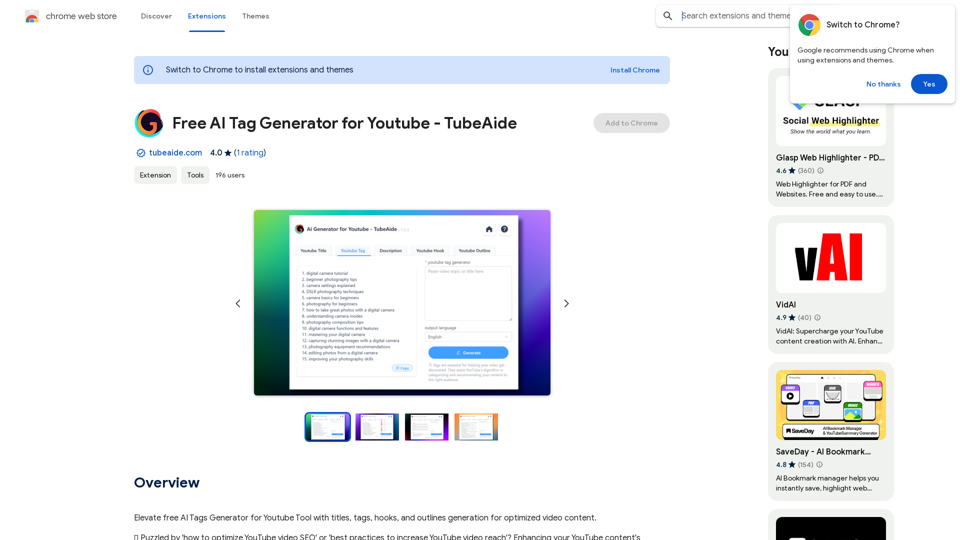
Free AI Tag Generator for YouTube - TubeAide

Improve the free AI Tags Generator for YouTube tool by adding features to generate titles, tags, hooks, and outlines for optimized video content.
Visit Website
Free AI Tag Generator for YouTube - TubeAide
Visit Website

Introduction

TubeAide is a free AI-powered Chrome extension designed to help content creators optimize their YouTube video content. It generates optimized titles, tags, hooks, and outlines to enhance video visibility. This tool supports 25 languages, making it accessible to a global audience. TubeAide offers a user-friendly interface, making it easy for both beginners and experienced marketers to improve their YouTube SEO.

Feature

AI-driven SEO Optimization

TubeAide utilizes advanced AI technology to generate optimized video elements, ensuring maximum SEO impact for your YouTube content.

Multilingual Support

The extension supports 25 languages, allowing content creators to cater to a global audience and optimize their channels regardless of the language.

User-friendly Interface

TubeAide's plugin is designed for simplicity, making it easy to generate and apply SEO elements to your videos, even for those new to SEO.

Comprehensive SEO Enhancement

Get all your video SEO elements aligned with your content strategy, including optimized titles, tags, hooks, and outlines.

Easy Installation and Usage

  1. Install the extension from the Chrome Web Store
  2. Input your video topic or title
  3. Let AI craft your optimized video elements
  4. Apply to your YouTube content and track the improvement

Data-driven Insights

Utilize AI to tap into the potential of your content with data-driven suggestions for tags and titles, helping you make informed decisions about your video optimization.

FAQ

Can TubeAide improve my YouTube video rankings?

Absolutely! Our AI-driven suggestions are designed to boost your video's SEO, potentially increasing its rankings on YouTube.

Is TubeAide easy to use for those new to SEO?

Yes, our tool is user-friendly, making it accessible for beginners while powerful enough for seasoned marketers.

Does TubeAide support non-English YouTube channels?

Yes, it supports 25 languages, enabling you to optimize your channel no matter the language.

Is TubeAide secure?

We prioritize your privacy and security. The extension operates in compliance with Chrome Web Store's privacy policies, ensuring your data's safety.

Is there a cost associated with TubeAide?

The core functionality is free, allowing you to generate tags, titles, and more without any charge. Additional features may be available with a subscription.

How often does TubeAide receive updates?

Our team is dedicated to the tool's continuous improvement, regularly releasing updates to enhance its features and ensure it remains ahead of SEO trends.

What sets TubeAide apart from other YouTube optimization plugins?

Our AI Tags Generator stands out for its advanced AI capabilities, multilingual support, and a focus on delivering an intuitive user experience tailored for content creators.

Latest Traffic Insights

  • Monthly Visits

    193.90 M

  • Bounce Rate

    56.27%

  • Pages Per Visit

    2.71

  • Time on Site(s)

    115.91

  • Global Rank

    -

  • Country Rank

    -

Recent Visits

Traffic Sources

  • Social Media:
    0.48%
  • Paid Referrals:
    0.55%
  • Email:
    0.15%
  • Referrals:
    12.81%
  • Search Engines:
    16.21%
  • Direct:
    69.81%
More Data

Related Websites

Songmeaning - Uncovering the Hidden Story Behind Your Favorite Song Lyrics
View Detail

Songmeaning - Uncovering the Hidden Story Behind Your Favorite Song Lyrics

Songmeaning - Uncovering the Hidden Story Behind Your Favorite Song Lyrics

Let's unlock the hidden depths of your favorite song with the power of AI. With Songmeaning, let's uncover the true meaning behind your favorite lyrics.

84.13 K
Personal Vocabulary (Highlight/Read Aloud/Translate/Grammar)
View Detail

Personal Vocabulary (Highlight/Read Aloud/Translate/Grammar)

Personal Vocabulary (Highlight/Read Aloud/Translate/Grammar)

Highlight new words, read aloud | Translate, lexical dependency | Syntax analysis

193.90 M
TeamCreate AI: Build Your AI Dream Team in Minutes!
View Detail

TeamCreate AI: Build Your AI Dream Team in Minutes!

TeamCreate AI: Build Your AI Dream Team in Minutes!

What if you could grow your team and boost productivity without the usual financial or hiring constraints? Teamcreate enables companies of all sizes to create AI workers for hundreds of roles in Sales, Finance, Product and more.

422
InFold
View Detail

InFold

InFold

We're here to help you understand things better, explore topics in more detail, and learn new things.

193.90 M
Rewrite AI - Correct Grammar or Alter Writing Style with AI
View Detail

Rewrite AI - Correct Grammar or Alter Writing Style with AI

Rewrite AI - Correct Grammar or Alter Writing Style with AI

Rewrite AI assists you in refining your writing with immediate grammar corrections and style changes. Improve your content using our AI-driven writing assistant.

6.84 K
Open AI Chat GPT For Email
View Detail

Open AI Chat GPT For Email

Open AI Chat GPT For Email

Email Completion Suggestions ============================= Powered by OpenAI, this feature provides intelligent suggestions to complete your emails, saving you time and effort. How it Works --------------- 1. Start Writing: Begin composing your email as you normally would. 2. AI Takes Over: Our AI engine, powered by OpenAI, kicks in and analyzes the context of your email. 3. Suggestions Appear: Relevant and contextual suggestions will appear, helping you complete your email quickly and efficiently. Benefits ------------ * Save Time: Get suggestions in real-time, reducing the time spent on writing emails. * Improve Quality: Enhance the clarity and coherence of your emails with AI-driven suggestions. * Boost Productivity: Focus on more important tasks while our AI handles the email completion. Get Started -------------- Try our email completion suggestions today and experience the power of AI-driven productivity!

193.90 M
GPTsLab: Smartly Filter and Discover Top GPTs
View Detail

GPTsLab: Smartly Filter and Discover Top GPTs

GPTsLab: Smartly Filter and Discover Top GPTs

Collect over 90,000+ GPTs, search for them quickly. Save GPTs to your personal space and manage them. In GPT-4, it will automatically suggest relevant GPTs.

193.90 M
Get ChatGPT for Free with Google

You can now access ChatGPT, a powerful language model, for free with Google. Here's how:

Method 1: Google Colab

* Open Google Colab ([colab.research.google.com](http://colab.research.google.com))
* Create a new notebook
* Install the `transformers` library by running `!pip install transformers`
* Import the `transformers` library and load the ChatGPT model using `from transformers import AutoModelForCausalLM, AutoTokenizer; model = AutoModelForCausalLM.from_pretrained('chatgpt'); tokenizer = AutoTokenizer.from_pretrained('chatgpt')`
* Use the model to generate text using `input_text = "Your input here"; inputs = tokenizer.encode_plus(input_text, return_tensors='pt', max_length=1024, padding='max_length', truncation=True); output = model(inputs['input_ids'], attention_mask=inputs['attention_mask']); print(tokenizer.decode(output.logits[0], skip_special_tokens=True))`

Method 2: Google Apps Script

* Open Google Apps Script ([script.google.com](http://script.google.com))
* Create a new project
* Install the `transformers` library by running `npm install transformers`
* Import the `transformers` library and load the ChatGPT model using `const { AutoModelForCausalLM, AutoTokenizer } = require('transformers'); const model = new AutoModelForCausalLM('chatgpt'); const tokenizer = new AutoTokenizer('chatgpt');`
* Use the model to generate text using `const inputText = "Your input here"; const inputs = tokenizer.encodePlus(inputText, { return_tensors: 'pt', max_length: 1024, padding: 'max_length', truncation: true }); const output = model(inputs.inputIds, inputs.attentionMask); console.log(tokenizer.decode(output.logits[0], { skipSpecialTokens: true }));`

Note: These methods require some technical knowledge and may have limitations compared to the original ChatGPT model.
View Detail

Get ChatGPT for Free with Google You can now access ChatGPT, a powerful language model, for free with Google. Here's how: Method 1: Google Colab * Open Google Colab ([colab.research.google.com](http://colab.research.google.com)) * Create a new notebook * Install the `transformers` library by running `!pip install transformers` * Import the `transformers` library and load the ChatGPT model using `from transformers import AutoModelForCausalLM, AutoTokenizer; model = AutoModelForCausalLM.from_pretrained('chatgpt'); tokenizer = AutoTokenizer.from_pretrained('chatgpt')` * Use the model to generate text using `input_text = "Your input here"; inputs = tokenizer.encode_plus(input_text, return_tensors='pt', max_length=1024, padding='max_length', truncation=True); output = model(inputs['input_ids'], attention_mask=inputs['attention_mask']); print(tokenizer.decode(output.logits[0], skip_special_tokens=True))` Method 2: Google Apps Script * Open Google Apps Script ([script.google.com](http://script.google.com)) * Create a new project * Install the `transformers` library by running `npm install transformers` * Import the `transformers` library and load the ChatGPT model using `const { AutoModelForCausalLM, AutoTokenizer } = require('transformers'); const model = new AutoModelForCausalLM('chatgpt'); const tokenizer = new AutoTokenizer('chatgpt');` * Use the model to generate text using `const inputText = "Your input here"; const inputs = tokenizer.encodePlus(inputText, { return_tensors: 'pt', max_length: 1024, padding: 'max_length', truncation: true }); const output = model(inputs.inputIds, inputs.attentionMask); console.log(tokenizer.decode(output.logits[0], { skipSpecialTokens: true }));` Note: These methods require some technical knowledge and may have limitations compared to the original ChatGPT model.

Get ChatGPT for Free with Google You can now access ChatGPT, a powerful language model, for free with Google. Here's how: Method 1: Google Colab * Open Google Colab ([colab.research.google.com](http://colab.research.google.com)) * Create a new notebook * Install the `transformers` library by running `!pip install transformers` * Import the `transformers` library and load the ChatGPT model using `from transformers import AutoModelForCausalLM, AutoTokenizer; model = AutoModelForCausalLM.from_pretrained('chatgpt'); tokenizer = AutoTokenizer.from_pretrained('chatgpt')` * Use the model to generate text using `input_text = "Your input here"; inputs = tokenizer.encode_plus(input_text, return_tensors='pt', max_length=1024, padding='max_length', truncation=True); output = model(inputs['input_ids'], attention_mask=inputs['attention_mask']); print(tokenizer.decode(output.logits[0], skip_special_tokens=True))` Method 2: Google Apps Script * Open Google Apps Script ([script.google.com](http://script.google.com)) * Create a new project * Install the `transformers` library by running `npm install transformers` * Import the `transformers` library and load the ChatGPT model using `const { AutoModelForCausalLM, AutoTokenizer } = require('transformers'); const model = new AutoModelForCausalLM('chatgpt'); const tokenizer = new AutoTokenizer('chatgpt');` * Use the model to generate text using `const inputText = "Your input here"; const inputs = tokenizer.encodePlus(inputText, { return_tensors: 'pt', max_length: 1024, padding: 'max_length', truncation: true }); const output = model(inputs.inputIds, inputs.attentionMask); console.log(tokenizer.decode(output.logits[0], { skipSpecialTokens: true }));` Note: These methods require some technical knowledge and may have limitations compared to the original ChatGPT model.

How to Add ChatGPT to All Google Searches ===================================================== Step 1: Create a Custom Search Engine -------------------------------------- * Go to the [Google Custom Search Engine](https://cse.google.com/) website and sign in with your Google account. * Click on the "New Search Engine" button. * Fill in the required information, such as the name and description of your search engine. * Click on the "Create" button. Step 2: Add ChatGPT to the Search Engine ----------------------------------------- * In the "Setup" tab, click on the "Add" button next to "Sites to search". * Enter the following URL: `https://chat.openai.com/` * Click on the "Add" button. Step 3: Configure the Search Engine -------------------------------------- * In the "Setup" tab, click on the "Edit" button next to "Search engine keywords". * Add the following keywords: `ChatGPT` * Click on the "Save" button. Step 4: Get the Search Engine Code ------------------------------------- * In the "Setup" tab, click on the "Get code" button. * Copy the HTML code provided. Step 5: Add the Search Engine to Your Browser ------------------------------------------------ * Open your browser and go to the "Settings" or "Options" page. * Look for the "Search engine" or "Default search engine" option. * Click on the "Add" or "Manage search engines" button. * Paste the HTML code you copied earlier. * Click on the "Add" or "Save" button. You're Done! =============== Now, whenever you search on Google, ChatGPT will be included in the search results. You can also use the custom search engine URL provided by Google to search directly.

193.90 M