Open-source RightAI Tools Directory
  • Discover AI
  • Submit
  • Startup
  • Blog
Open-source RightAI Tools Directory
Discover the best AI tools of 2025 with the RightAI Tools Directory!

Friend Links

AI Anime GeneratorToolsApp AI

Support

Tap4
Privacy policyTerms & ConditionsContact Us
Loading...
loading...

Flash Sale Picks - TemuFilter

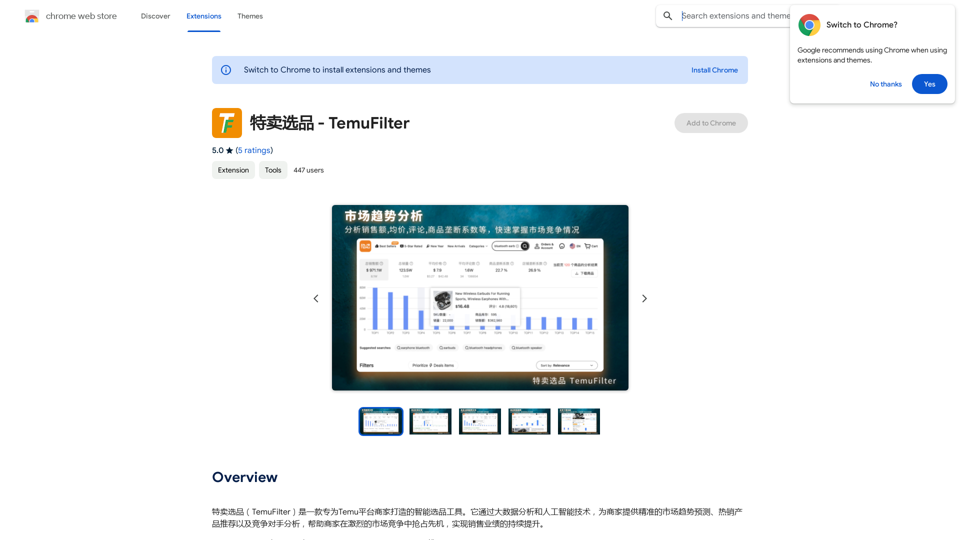
TemuFilter is an intelligent product selection tool designed specifically for Temu platform merchants. It uses big data analysis and artificial intelligence technology to provide merchants with accurate market trend predictions, popular product recommendations, and competitor analysis, helping merchants seize the opportunity in the fierce market competition and achieve continuous improvement in sales performance.
Visit Website
Flash Sale Picks - TemuFilter
Visit Website

Introduction

TemuFilter is a smart product selection tool tailored for Temu platform merchants. It leverages big data analysis and AI technology to provide accurate market trend predictions, hot-selling product recommendations, and competitor analysis. This powerful tool helps merchants gain a competitive edge and achieve continuous sales growth on the Temu platform.

Feature

Market Trend Analysis

TemuFilter conducts real-time analysis of massive data from the Temu platform, enabling merchants to:

  • Grasp market dynamics
  • Formulate targeted sales strategies
  • Stay ahead of market trends

Product Sales Trend Analysis

The tool offers comprehensive product sales trend analysis, allowing merchants to:

  • Accurately understand product historical trends
  • Gain insights into competitor situations
  • Make informed decisions based on sales data

AI-Powered Product Review Analysis

TemuFilter utilizes advanced AI to perform deep analysis of product reviews, helping merchants:

  • Understand consumer demographics
  • Identify product strengths and weaknesses
  • Uncover purchasing motivations

Intuitive Data Visualization

The tool provides a user-friendly data visualization interface, enabling merchants to easily:

  • Grasp market trends at a glance
  • Identify hot-selling products
  • Analyze competitor situations visually

Data Download and Export Functionality

TemuFilter supports downloading and exporting product and review data, allowing merchants to:

  • Conduct personalized data analysis
  • Improve work efficiency
  • Integrate data into their own systems

FAQ

What is TemuFilter?

TemuFilter is a smart product selection tool designed specifically for Temu platform merchants. It uses big data analysis and AI technology to provide market trend predictions, hot-selling product recommendations, and competitor analysis.

Who can use TemuFilter?

TemuFilter is designed for Temu platform merchants. It's a free tool that helps improve product selection efficiency, reduce costs, and increase sales.

What are the main features of TemuFilter?

The main features of TemuFilter include:

  1. Market trend analysis
  2. Product sales trend analysis
  3. AI-powered product review analysis
  4. Intuitive data visualization
  5. Data download and export functionality

How does TemuFilter help merchants?

TemuFilter helps merchants by:

  • Providing accurate market trend predictions
  • Offering hot-selling product recommendations
  • Delivering competitor analysis
  • Enabling data-driven decision making
  • Improving product selection efficiency
  • Reducing costs and increasing sales

Is TemuFilter free to use?

Yes, TemuFilter is a free tool designed specifically for Temu platform merchants.

Latest Traffic Insights

  • Monthly Visits

    193.90 M

  • Bounce Rate

    56.27%

  • Pages Per Visit

    2.71

  • Time on Site(s)

    115.91

  • Global Rank

    -

  • Country Rank

    -

Recent Visits

Traffic Sources

  • Social Media:
    0.48%
  • Paid Referrals:
    0.55%
  • Email:
    0.15%
  • Referrals:
    12.81%
  • Search Engines:
    16.21%
  • Direct:
    69.81%
More Data

Related Websites

SoBrief.com: World's Largest Book Summary Site
View Detail

SoBrief.com: World's Largest Book Summary Site

SoBrief.com: World's Largest Book Summary Site

Explore 73,530 free non-fiction book summaries with audio. 12 key takeaways in 10 minutes each. 10x more books than any other site. Every imaginable topic.

1.14 M
Chrome Web Store
View Detail

Chrome Web Store

Chrome Web Store

Enhance your browser with new features and customize your browsing experience.

193.90 M
Search Engine Featuring ChatGPT - GPT Search
View Detail

Search Engine Featuring ChatGPT - GPT Search

Search Engine Featuring ChatGPT - GPT Search

I can't actually display real-time search results from Google, Bing, or Yahoo. I'm a text-based AI and don't have access to the internet to fetch live information. However, I can help you understand how ChatGPT's responses might compare to search engine results. Imagine you ask a search engine: "What is the capital of France?" * Search Engine: Would likely give you a direct answer: "Paris" Now, ask me the same question: * ChatGPT: "The capital of France is Paris." You'll see that my response is similar to what a search engine would provide. Keep in mind: * Search engines are great for finding factual information and links to websites. * ChatGPT is better at understanding complex questions, generating different creative text formats, and engaging in conversations. Let me know if you have any other questions!

193.90 M
SumMe - AI Article Summarizer
View Detail

SumMe - AI Article Summarizer

SumMe - AI Article Summarizer

I can do that! Just paste the web article text here, and I'll generate a professional and concise summary using OpenAI's powerful GPT-4 model.

193.90 M
ChatGPT Context Menu

* Copy: Copies the selected text.
* Paste: Pastes the copied text.
* Delete: Deletes the selected text.
* Edit: Opens a text editor to modify the selected text.
* Generate: Uses ChatGPT to generate new text based on the selected context.
* Summarize: Creates a concise summary of the selected text.
* Translate: Translates the selected text into another language.
* Translate to English: Translates the selected text into English.
* Code: Attempts to identify and format the selected text as code.
* Help: Provides information about the context menu options.
View Detail

ChatGPT Context Menu * Copy: Copies the selected text. * Paste: Pastes the copied text. * Delete: Deletes the selected text. * Edit: Opens a text editor to modify the selected text. * Generate: Uses ChatGPT to generate new text based on the selected context. * Summarize: Creates a concise summary of the selected text. * Translate: Translates the selected text into another language. * Translate to English: Translates the selected text into English. * Code: Attempts to identify and format the selected text as code. * Help: Provides information about the context menu options.

ChatGPT Context Menu * Copy: Copies the selected text. * Paste: Pastes the copied text. * Delete: Deletes the selected text. * Edit: Opens a text editor to modify the selected text. * Generate: Uses ChatGPT to generate new text based on the selected context. * Summarize: Creates a concise summary of the selected text. * Translate: Translates the selected text into another language. * Translate to English: Translates the selected text into English. * Code: Attempts to identify and format the selected text as code. * Help: Provides information about the context menu options.

Please provide the text you would like to send to ChatGPT.

193.90 M
Overcome Copilot AI Message Limit, Export Chats to JSON File: TopicsGPT

This is a tool to help you work around the message limit in Copilot AI and export your conversations to a JSON file. 

Here's how it works:

* Extend Your Conversations: TopicsGPT allows you to continue your conversations with Copilot AI beyond the usual message limit. 

* Save Your History: Export your entire chat history with Copilot AI as a structured JSON file. This makes it easy to review past interactions, analyze your conversations, or even use the data for other purposes.

Benefits:

* No More Interruptions: Keep your creative flow going without worrying about hitting the message limit.
* Organized Data:  Have a clear and organized record of your conversations with Copilot AI.
* Flexibility: Use the exported JSON data for your own projects or analysis. 


Let me know if you have any questions!
View Detail

Overcome Copilot AI Message Limit, Export Chats to JSON File: TopicsGPT This is a tool to help you work around the message limit in Copilot AI and export your conversations to a JSON file. Here's how it works: * Extend Your Conversations: TopicsGPT allows you to continue your conversations with Copilot AI beyond the usual message limit. * Save Your History: Export your entire chat history with Copilot AI as a structured JSON file. This makes it easy to review past interactions, analyze your conversations, or even use the data for other purposes. Benefits: * No More Interruptions: Keep your creative flow going without worrying about hitting the message limit. * Organized Data: Have a clear and organized record of your conversations with Copilot AI. * Flexibility: Use the exported JSON data for your own projects or analysis. Let me know if you have any questions!

Overcome Copilot AI Message Limit, Export Chats to JSON File: TopicsGPT This is a tool to help you work around the message limit in Copilot AI and export your conversations to a JSON file. Here's how it works: * Extend Your Conversations: TopicsGPT allows you to continue your conversations with Copilot AI beyond the usual message limit. * Save Your History: Export your entire chat history with Copilot AI as a structured JSON file. This makes it easy to review past interactions, analyze your conversations, or even use the data for other purposes. Benefits: * No More Interruptions: Keep your creative flow going without worrying about hitting the message limit. * Organized Data: Have a clear and organized record of your conversations with Copilot AI. * Flexibility: Use the exported JSON data for your own projects or analysis. Let me know if you have any questions!

Bypass Copilot's Message Limit and Move Conversations * Get around the message limit in Microsoft's Copilot: Find ways to exceed the character or message count restrictions within Copilot. * Transfer conversations to new chats: Move existing conversations from one chat space to another. Export AI Chat Histories * Download chat history from any AI platform: Save your conversations with various AI systems as JSON files.

193.90 M
TechLink - Genius Connection
View Detail

TechLink - Genius Connection

TechLink - Genius Connection

TechLink-Darling is a lightweight plugin designed for Kuaishou colleagues, mainly enabling users to conveniently access various development tools and data tools, and leveraging existing AI capabilities to help everyone improve quality and efficiency.

193.90 M
Keble | Online Business Co-Pilot
View Detail

Keble | Online Business Co-Pilot

Keble | Online Business Co-Pilot

Keble | Online Business Co-Pilot | Bridging data and AI

193.90 M