Open-source RightAI Tools Directory
  • Discover AI
  • Submit
  • Startup
  • Blog
Open-source RightAI Tools Directory
Discover the best AI tools of 2025 with the RightAI Tools Directory!

Friend Links

AI Anime GeneratorToolsApp AI

Support

Tap4
Privacy policyTerms & ConditionsContact Us
Loading...
loading...

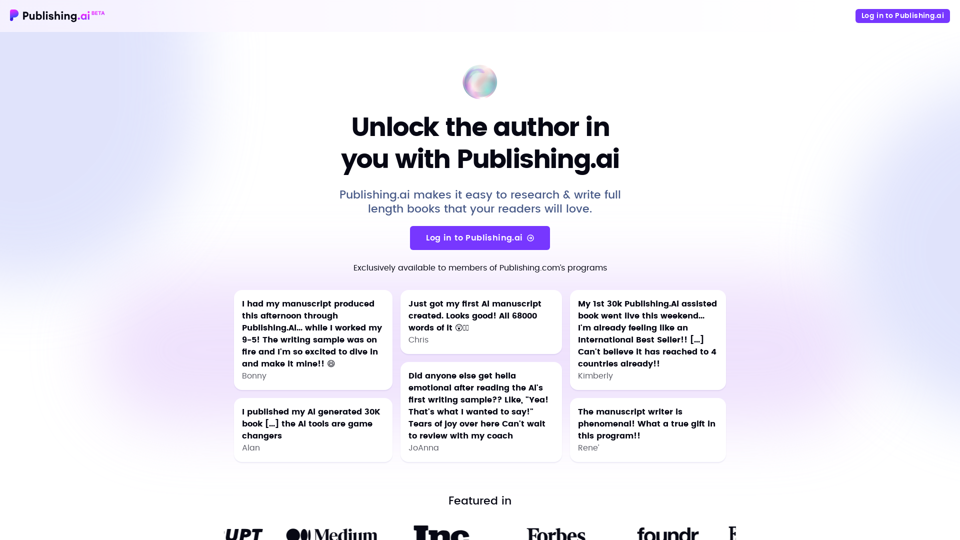
Publishing.ai

Create high-quality books faster and more cost-effectively than ever, with the world’s first AI designed exclusively for digital publishers.
Visit Website
Publishing.ai
Visit Website

Introduction

Publishing.ai is an AI-powered platform designed to assist authors in researching and writing full-length books. It offers a comprehensive suite of tools to streamline the book creation process, from generating topic ideas to producing complete manuscripts. The platform aims to make high-quality book writing accessible, efficient, and cost-effective for both novice and experienced authors.

Feature

Endless Book Topic Ideas

Publishing.ai provides instant access to high-demand topic ideas from Amazon's best-seller categories, helping authors find the perfect theme for their book.

Customer Research Reports

The platform generates one-click research reports incorporating customer reviews, preferences, and buying motives, offering valuable insights for crafting compelling books.

Custom Book Outlines

Publishing.ai's AI engine creates custom book outlines based on research and user input, helping authors structure their books effectively.

Manuscript Generation

The platform can produce a full manuscript for as low as $332, saving authors time and money in the writing process.

Writing Samples and Revisions

Authors can receive instant writing samples, adjust the writing tone on-the-fly, and get complete drafts within a day. The platform also supports proofreading, editing, and personalization of manuscripts.

Unique Book Descriptions

Publishing.ai generates compelling book descriptions specifically designed to maximize sales potential and help authors stand out in the market.

FAQ

Is Publishing.ai a ghostwriter?

No, Publishing.ai is not a ghostwriter. It is an AI-driven platform that assists authors in writing their books, rather than replacing them.

Can I use Publishing.ai for free?

Yes, you can use Publishing.ai for free, but with limited features and tools. The platform offers a range of pricing options, including a one-time fee for manuscript generation and a subscription-based model for unlimited access to features and tools.

How do I get started with Publishing.ai?

To get started with Publishing.ai, simply log in to the platform. Once logged in, you'll have access to a range of features and tools to help you write your book, including topic ideas, research reports, and manuscript generation capabilities.

Latest Traffic Insights

  • Monthly Visits

    5.18 K

  • Bounce Rate

    42.38%

  • Pages Per Visit

    1.61

  • Time on Site(s)

    111.09

  • Global Rank

    3586933

  • Country Rank

    United States 1098849

Recent Visits

Traffic Sources

  • Social Media:
    5.67%
  • Paid Referrals:
    0.98%
  • Email:
    0.08%
  • Referrals:
    9.26%
  • Search Engines:
    25.70%
  • Direct:
    58.30%
More Data

Related Websites

Knowz AI Search Engine: A New Era of Online Searching Experience
View Detail

Knowz AI Search Engine: A New Era of Online Searching Experience

Knowz AI Search Engine: A New Era of Online Searching Experience

Discover the power of Knowz, a free AI search designed to deliver fast, accurate, and clutter-free answers, revolutionizing your online searches.

270
TLDR.AI
View Detail

TLDR.AI

TLDR.AI

Say goodbye to information overload

193.90 M
Hebbia
View Detail

Hebbia

Hebbia

AI Agents for serious work.

18.57 K
GPT Netherlands Assistant
View Detail

GPT Netherlands Assistant

GPT Netherlands Assistant

A free, ad-free, fast add-on for ChatGPT on the German community page with links to top websites.

193.90 M
Grow Your OnlyFans Agency - Supercreator Tools for OnlyFans
View Detail

Grow Your OnlyFans Agency - Supercreator Tools for OnlyFans

Grow Your OnlyFans Agency - Supercreator Tools for OnlyFans

CRM tools and automation bots for OnlyFans management agencies. Improve your chat interactions and promotions, and upsell more pay-per-view (PPV) content with the OnlyFans extension.

248.97 K
Affordable Midjourney API Integration - Best Deals & Packages | ttapi.io
View Detail

Affordable Midjourney API Integration - Best Deals & Packages | ttapi.io

Affordable Midjourney API Integration - Best Deals & Packages | ttapi.io

Discover affordable Midjourney API integration, best buy packages, and cheap plans. Get reliable Midjourney API services and solutions at ttapi.io today!

9.78 K
GPTsLab: Smartly Filter and Discover Top GPTs
View Detail

GPTsLab: Smartly Filter and Discover Top GPTs

GPTsLab: Smartly Filter and Discover Top GPTs

Collect over 90,000+ GPTs, search for them quickly. Save GPTs to your personal space and manage them. In GPT-4, it will automatically suggest relevant GPTs.

193.90 M
Get ChatGPT for Free with Google

You can now access ChatGPT, a powerful language model, for free with Google. Here's how:

Method 1: Google Colab

* Open Google Colab ([colab.research.google.com](http://colab.research.google.com))
* Create a new notebook
* Install the `transformers` library by running `!pip install transformers`
* Import the `transformers` library and load the ChatGPT model using `from transformers import AutoModelForCausalLM, AutoTokenizer; model = AutoModelForCausalLM.from_pretrained('chatgpt'); tokenizer = AutoTokenizer.from_pretrained('chatgpt')`
* Use the model to generate text using `input_text = "Your input here"; inputs = tokenizer.encode_plus(input_text, return_tensors='pt', max_length=1024, padding='max_length', truncation=True); output = model(inputs['input_ids'], attention_mask=inputs['attention_mask']); print(tokenizer.decode(output.logits[0], skip_special_tokens=True))`

Method 2: Google Apps Script

* Open Google Apps Script ([script.google.com](http://script.google.com))
* Create a new project
* Install the `transformers` library by running `npm install transformers`
* Import the `transformers` library and load the ChatGPT model using `const { AutoModelForCausalLM, AutoTokenizer } = require('transformers'); const model = new AutoModelForCausalLM('chatgpt'); const tokenizer = new AutoTokenizer('chatgpt');`
* Use the model to generate text using `const inputText = "Your input here"; const inputs = tokenizer.encodePlus(inputText, { return_tensors: 'pt', max_length: 1024, padding: 'max_length', truncation: true }); const output = model(inputs.inputIds, inputs.attentionMask); console.log(tokenizer.decode(output.logits[0], { skipSpecialTokens: true }));`

Note: These methods require some technical knowledge and may have limitations compared to the original ChatGPT model.
View Detail

Get ChatGPT for Free with Google You can now access ChatGPT, a powerful language model, for free with Google. Here's how: Method 1: Google Colab * Open Google Colab ([colab.research.google.com](http://colab.research.google.com)) * Create a new notebook * Install the `transformers` library by running `!pip install transformers` * Import the `transformers` library and load the ChatGPT model using `from transformers import AutoModelForCausalLM, AutoTokenizer; model = AutoModelForCausalLM.from_pretrained('chatgpt'); tokenizer = AutoTokenizer.from_pretrained('chatgpt')` * Use the model to generate text using `input_text = "Your input here"; inputs = tokenizer.encode_plus(input_text, return_tensors='pt', max_length=1024, padding='max_length', truncation=True); output = model(inputs['input_ids'], attention_mask=inputs['attention_mask']); print(tokenizer.decode(output.logits[0], skip_special_tokens=True))` Method 2: Google Apps Script * Open Google Apps Script ([script.google.com](http://script.google.com)) * Create a new project * Install the `transformers` library by running `npm install transformers` * Import the `transformers` library and load the ChatGPT model using `const { AutoModelForCausalLM, AutoTokenizer } = require('transformers'); const model = new AutoModelForCausalLM('chatgpt'); const tokenizer = new AutoTokenizer('chatgpt');` * Use the model to generate text using `const inputText = "Your input here"; const inputs = tokenizer.encodePlus(inputText, { return_tensors: 'pt', max_length: 1024, padding: 'max_length', truncation: true }); const output = model(inputs.inputIds, inputs.attentionMask); console.log(tokenizer.decode(output.logits[0], { skipSpecialTokens: true }));` Note: These methods require some technical knowledge and may have limitations compared to the original ChatGPT model.

Get ChatGPT for Free with Google You can now access ChatGPT, a powerful language model, for free with Google. Here's how: Method 1: Google Colab * Open Google Colab ([colab.research.google.com](http://colab.research.google.com)) * Create a new notebook * Install the `transformers` library by running `!pip install transformers` * Import the `transformers` library and load the ChatGPT model using `from transformers import AutoModelForCausalLM, AutoTokenizer; model = AutoModelForCausalLM.from_pretrained('chatgpt'); tokenizer = AutoTokenizer.from_pretrained('chatgpt')` * Use the model to generate text using `input_text = "Your input here"; inputs = tokenizer.encode_plus(input_text, return_tensors='pt', max_length=1024, padding='max_length', truncation=True); output = model(inputs['input_ids'], attention_mask=inputs['attention_mask']); print(tokenizer.decode(output.logits[0], skip_special_tokens=True))` Method 2: Google Apps Script * Open Google Apps Script ([script.google.com](http://script.google.com)) * Create a new project * Install the `transformers` library by running `npm install transformers` * Import the `transformers` library and load the ChatGPT model using `const { AutoModelForCausalLM, AutoTokenizer } = require('transformers'); const model = new AutoModelForCausalLM('chatgpt'); const tokenizer = new AutoTokenizer('chatgpt');` * Use the model to generate text using `const inputText = "Your input here"; const inputs = tokenizer.encodePlus(inputText, { return_tensors: 'pt', max_length: 1024, padding: 'max_length', truncation: true }); const output = model(inputs.inputIds, inputs.attentionMask); console.log(tokenizer.decode(output.logits[0], { skipSpecialTokens: true }));` Note: These methods require some technical knowledge and may have limitations compared to the original ChatGPT model.

How to Add ChatGPT to All Google Searches ===================================================== Step 1: Create a Custom Search Engine -------------------------------------- * Go to the [Google Custom Search Engine](https://cse.google.com/) website and sign in with your Google account. * Click on the "New Search Engine" button. * Fill in the required information, such as the name and description of your search engine. * Click on the "Create" button. Step 2: Add ChatGPT to the Search Engine ----------------------------------------- * In the "Setup" tab, click on the "Add" button next to "Sites to search". * Enter the following URL: `https://chat.openai.com/` * Click on the "Add" button. Step 3: Configure the Search Engine -------------------------------------- * In the "Setup" tab, click on the "Edit" button next to "Search engine keywords". * Add the following keywords: `ChatGPT` * Click on the "Save" button. Step 4: Get the Search Engine Code ------------------------------------- * In the "Setup" tab, click on the "Get code" button. * Copy the HTML code provided. Step 5: Add the Search Engine to Your Browser ------------------------------------------------ * Open your browser and go to the "Settings" or "Options" page. * Look for the "Search engine" or "Default search engine" option. * Click on the "Add" or "Manage search engines" button. * Paste the HTML code you copied earlier. * Click on the "Add" or "Save" button. You're Done! =============== Now, whenever you search on Google, ChatGPT will be included in the search results. You can also use the custom search engine URL provided by Google to search directly.

193.90 M