Open-source RightAI Tools Directory
  • Discover AI
  • Submit
  • Startup
  • Blog
Open-source RightAI Tools Directory
Discover the best AI tools of 2025 with the RightAI Tools Directory!

Friend Links

AI Anime GeneratorToolsApp AI

Support

Tap4
Privacy policyTerms & ConditionsContact Us
Loading...
loading...

YouTube Copilot

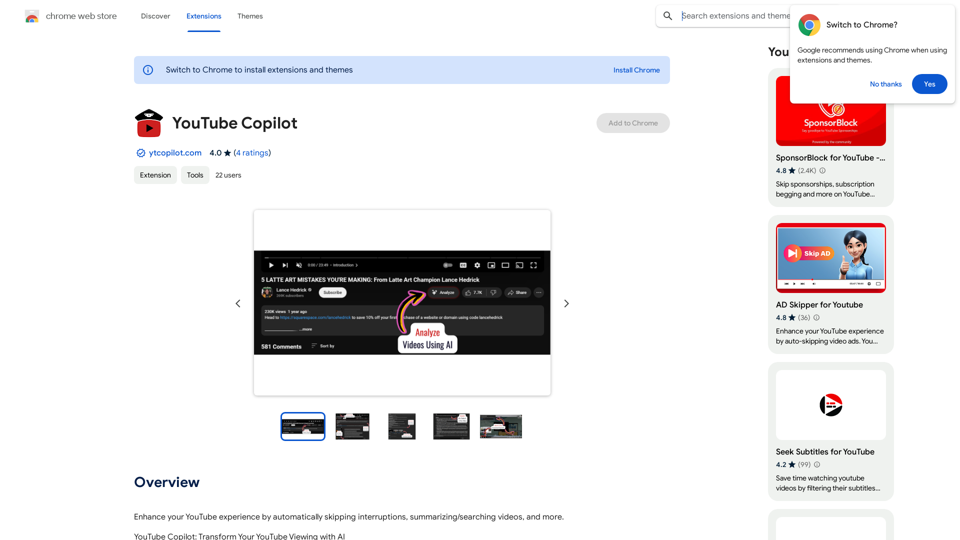
Improve your YouTube viewing by automatically skipping ads, summarizing videos, and searching within them.
Visit Website
YouTube Copilot
Visit Website

Introduction

YouTube Copilot is a Chrome extension that enhances the YouTube viewing experience. It uses advanced OpenAI technology to automatically skip promotional content, intros, and outros in videos. The extension also provides video summaries and allows users to search within video content, making information access more efficient and saving time for viewers.

Feature

Intelligent Content Skipping

YouTube Copilot automatically identifies and skips sponsored segments, intros, and outros in videos, providing an uninterrupted viewing experience.

Video Summarization

The extension generates concise summaries of videos, allowing users to quickly grasp the main points without watching the entire content.

In-Video Search

Users can search for specific content within videos, making it easier to find relevant information quickly.

Privacy-Focused Design

YouTube Copilot operates without collecting or sharing personal data, ensuring user privacy.

Free with Optional Upgrades

The extension is available for free, with the option to purchase additional features through in-app purchases.

Easy Installation

Users can quickly install YouTube Copilot by clicking the "Add to Chrome" button and following the installation instructions.

FAQ

How does YouTube Copilot work?

YouTube Copilot uses advanced OpenAI technology to identify and skip promotional content, intros, and outros in videos. It also provides video summaries and allows in-video content searching.

Is YouTube Copilot free to use?

Yes, YouTube Copilot is a free Chrome extension. However, there are optional in-app purchases for additional features.

Does YouTube Copilot collect personal data?

No, YouTube Copilot operates without collecting or sharing users' personal data, prioritizing privacy.

How can I get the most out of YouTube Copilot?

To maximize your experience with YouTube Copilot:

  1. Use the search feature to find specific content within videos
  2. Utilize the summary feature for quick video overviews
  3. Provide feedback to help improve the AI's performance over time

Related Websites
Musemind
View Detail

Musemind

Musemind

Improve your social media posts on platforms like Twitter, Facebook, LinkedIn, and Gmail with customized replies.

193.90 M
Enterprise Bot: AI Chatbot For Website | EntBot.ai
View Detail

Enterprise Bot: AI Chatbot For Website | EntBot.ai

Enterprise Bot: AI Chatbot For Website | EntBot.ai

EntBot.ai can build an AI chatbot for your website in just 5 minutes, no technical skills required. You can easily embed it on your website, resulting in a 100% increase in customer response speed.

0
Ikigai Ads Companion
View Detail

Ikigai Ads Companion

Ikigai Ads Companion

Track the success of your TikTok ads as they run and get helpful tips to improve them.

193.90 M
Job Tracker
View Detail

Job Tracker

Job Tracker

Save, track, and manage all your job applications in one place. Build your professional network and get hired.

193.90 M
Ponyrun
View Detail

Ponyrun

Ponyrun

Give our bots instructions, and they will explore and engage with websites to collect and arrange useful information for you.

193.90 M
Addlly AI: 1st Complete AI Playground for Content Creation
View Detail

Addlly AI: 1st Complete AI Playground for Content Creation

Addlly AI: 1st Complete AI Playground for Content Creation

The best all-in-one, no-prompt Gen AI Playground for enterprises. Generate SEO blogs, social media posts, ad copy, press releases, newsletters & more.

46.81 K
The Free Alternative to ChatGPT Powered by 4o | AIChatOnline.org
View Detail

The Free Alternative to ChatGPT Powered by 4o | AIChatOnline.org

The Free Alternative to ChatGPT Powered by 4o | AIChatOnline.org

Discover AIChatOnline.org, your ultimate platform for free online access to ChatGPT. Enjoy ChatGPT 3.5 online for free and ChatGPT 4 online for free, with no registration required. Take advantage of OpenAI's free online ChatGPT for advanced AI capabilities, including ChatGPT memory and ChatGPT API integration.

70.11 K
NoteGPT: ChatGPT Summary for Vimeo
===============

What is NoteGPT?

NoteGPT is an AI-powered note-taking tool that utilizes the capabilities of ChatGPT to assist users in summarizing and organizing their video content on Vimeo.

Key Features

* Automatic Summarization: NoteGPT can automatically generate a concise summary of Vimeo videos, saving users time and effort.
* Customizable Notes: Users can add their own notes and tags to the generated summary, making it easy to review and reference later.
* Organization: NoteGPT allows users to organize their video content by categorizing and tagging their notes, making it simple to find specific information.

Benefits

* Time-Saving: NoteGPT's automatic summarization feature saves users time and effort, allowing them to focus on more important tasks.
* Improved Productivity: With NoteGPT, users can quickly review and reference their video content, improving their overall productivity.
* Enhanced Learning: NoteGPT's customizable notes and organization features enable users to engage more effectively with their video content, leading to enhanced learning and retention.

Use Cases

* Education: NoteGPT is ideal for students and educators who need to review and summarize video lectures and online courses.
* Business: NoteGPT can be used by professionals to summarize and organize video content for meetings, training sessions, and presentations.
* Personal Development: Individuals can use NoteGPT to summarize and review video content for personal development, such as language learning or skill-building.
View Detail

NoteGPT: ChatGPT Summary for Vimeo =============== What is NoteGPT? NoteGPT is an AI-powered note-taking tool that utilizes the capabilities of ChatGPT to assist users in summarizing and organizing their video content on Vimeo. Key Features * Automatic Summarization: NoteGPT can automatically generate a concise summary of Vimeo videos, saving users time and effort. * Customizable Notes: Users can add their own notes and tags to the generated summary, making it easy to review and reference later. * Organization: NoteGPT allows users to organize their video content by categorizing and tagging their notes, making it simple to find specific information. Benefits * Time-Saving: NoteGPT's automatic summarization feature saves users time and effort, allowing them to focus on more important tasks. * Improved Productivity: With NoteGPT, users can quickly review and reference their video content, improving their overall productivity. * Enhanced Learning: NoteGPT's customizable notes and organization features enable users to engage more effectively with their video content, leading to enhanced learning and retention. Use Cases * Education: NoteGPT is ideal for students and educators who need to review and summarize video lectures and online courses. * Business: NoteGPT can be used by professionals to summarize and organize video content for meetings, training sessions, and presentations. * Personal Development: Individuals can use NoteGPT to summarize and review video content for personal development, such as language learning or skill-building.

NoteGPT: ChatGPT Summary for Vimeo =============== What is NoteGPT? NoteGPT is an AI-powered note-taking tool that utilizes the capabilities of ChatGPT to assist users in summarizing and organizing their video content on Vimeo. Key Features * Automatic Summarization: NoteGPT can automatically generate a concise summary of Vimeo videos, saving users time and effort. * Customizable Notes: Users can add their own notes and tags to the generated summary, making it easy to review and reference later. * Organization: NoteGPT allows users to organize their video content by categorizing and tagging their notes, making it simple to find specific information. Benefits * Time-Saving: NoteGPT's automatic summarization feature saves users time and effort, allowing them to focus on more important tasks. * Improved Productivity: With NoteGPT, users can quickly review and reference their video content, improving their overall productivity. * Enhanced Learning: NoteGPT's customizable notes and organization features enable users to engage more effectively with their video content, leading to enhanced learning and retention. Use Cases * Education: NoteGPT is ideal for students and educators who need to review and summarize video lectures and online courses. * Business: NoteGPT can be used by professionals to summarize and organize video content for meetings, training sessions, and presentations. * Personal Development: Individuals can use NoteGPT to summarize and review video content for personal development, such as language learning or skill-building.

Vimeo Summary with ChatGPT for Better Learning ===================================================== What is Vimeo? --------------- Vimeo is a video-hosting platform that allows users to upload, share, and view videos. It is popular among creative professionals, businesses, and individuals who want to showcase their videos in a high-quality format. How Can ChatGPT Help with Vimeo Courses? ----------------------------------------- ChatGPT is an AI-powered language model that can assist with summarizing Vimeo courses by: * Identifying key points: ChatGPT can analyze the video content and extract the most important information, making it easier to understand and retain. * Generating summaries: ChatGPT can create concise summaries of the video courses, saving time and effort. * Improving learning: By providing a clear and concise summary, ChatGPT can help learners focus on the essential concepts and improve their understanding of the material. Benefits of Using ChatGPT for Vimeo Courses --------------------------------------------- * Time-saving: ChatGPT can quickly summarize long video courses, saving learners time and effort. * Improved comprehension: ChatGPT's summaries can help learners understand complex concepts more easily. * Enhanced retention: By providing a concise summary, ChatGPT can help learners retain information better. How to Use ChatGPT for Vimeo Courses ----------------------------------------- 1. Upload the video course: Upload the Vimeo course to ChatGPT. 2. Analyze the content: ChatGPT will analyze the video content and extract key points. 3. Generate a summary: ChatGPT will create a concise summary of the video course. 4. Review and learn: Review the summary and use it to learn and retain the information. Conclusion ---------- ChatGPT can be a valuable tool for summarizing Vimeo courses, making it easier to learn and retain information. By using ChatGPT, learners can save time, improve comprehension, and enhance retention.

193.90 M